
Introduction
This manual provides essential instructions for the safe and effective use of your DCH 2600mAh Li-ion battery replacement. This battery is specifically designed for compatibility with SILVERCREST SSWR A1 and SSR 3000 A1 robot vacuum cleaners.
Before proceeding with installation or use, please ensure that the battery model number CS-FEX750VX and the battery part number match your device's requirements. If you are uncertain about compatibility, please consult your device's specific instruction manual or contact the manufacturer for verification.
The battery specifications are as follows:
- Capacity: 2600mAh
- Energy: 37.44Wh
- Type: Li-ion
- Voltage: 14.4V
Safety Information
Read all safety instructions carefully before using the battery. Failure to follow these instructions may result in fire, electric shock, or injury.
- Do not disassemble, open, or shred the battery pack.
- Do not expose the battery to heat or fire. Avoid storage in direct sunlight.
- Do not short-circuit the battery. Do not store battery packs haphazardly in a box or drawer where they may short-circuit each other or be short-circuited by conductive materials.
- Do not expose the battery to mechanical shock.
- In the event of a battery leaking, do not allow the liquid to come into contact with the skin or eyes. If contact has been made, wash the affected area with copious amounts of water and seek medical advice.
- Do not use any charger other than that specifically provided for use with the equipment.
- Keep the battery clean and dry.
- Do not leave a battery on prolonged charge when not in use.
- Observe the plus (+) and minus (-) marks on the battery and equipment and ensure correct use.
- Keep batteries out of the reach of children.
Setup and Installation
Follow these general steps to replace the battery in your compatible SILVERCREST robot vacuum. Always refer to your device's specific instruction manual for detailed battery replacement procedures.
- Power Off Device: Ensure your robot vacuum is completely powered off and disconnected from its charging base or power adapter.
- Locate Battery Compartment: Turn the robot vacuum upside down. The battery compartment is typically located on the underside and secured by screws or a latch.
- Remove Old Battery: Unscrew any retaining screws and open the battery compartment cover. Carefully disconnect the old battery's connector from the device's port. Remove the old battery.
- Insert New Battery: Connect the new DCH battery to the device's port, ensuring the connector is properly aligned and securely fastened. Observe the polarity if applicable.
- Secure Battery: Place the new battery into the compartment. Ensure it fits snugly without forcing. Close the battery compartment cover and secure it with the screws.
- Initial Charge: Place the robot vacuum back on its charging base or connect it to the power adapter for an initial full charge before first use.

Image 1: Top view of the DCH 2600mAh Li-ion battery, showing its blue casing and white securing strap.
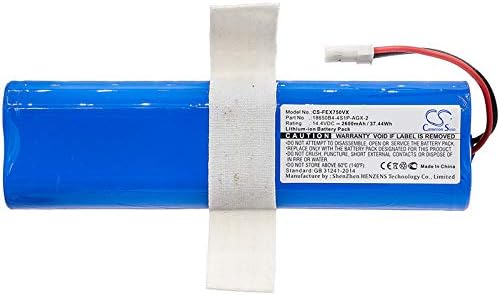
Image 2: Side view of the DCH 2600mAh Li-ion battery, displaying the product label with model number CS-FEX750VX and specifications.

Image 3: Close-up view of the battery's two-pin connector with red and black wires, essential for proper connection to the device.
Operating Instructions
Once the battery is installed and fully charged, your robot vacuum should operate as normal. Refer to your robot vacuum's user manual for specific operating instructions, cleaning modes, and scheduling.
- First Use: For optimal performance, fully charge the battery before its first use.
- Regular Charging: Always return the robot vacuum to its charging base when not in use to ensure the battery remains charged and ready for operation.
- Battery Life: Battery life varies depending on usage patterns and environmental factors.
Maintenance
Proper maintenance can extend the life of your battery.
- Storage: If the battery will not be used for an extended period, store it in a cool, dry place. It is recommended to charge the battery to about 50% capacity before long-term storage and recharge it every 3-6 months to prevent deep discharge.
- Cleaning: Keep the battery contacts clean. Use a dry cloth to wipe any dust or debris from the battery and its connectors.
- Disposal: Do not dispose of batteries in household waste. Li-ion batteries should be recycled or disposed of according to local regulations. Contact your local waste management authority for information on battery recycling options.
Troubleshooting
If you encounter issues with your new battery, consider the following common troubleshooting steps:
- Battery Not Charging:
- Ensure the battery is correctly installed and the connector is secure.
- Verify that the charging base or power adapter is functioning correctly and connected to a live power outlet.
- Clean the charging contacts on both the robot vacuum and the charging base.
- Short Operating Time:
- Ensure the battery has been fully charged.
- Operating time can be affected by the cleaning mode, floor type, and obstacles.
- If the issue persists after several full charge/discharge cycles, the battery may be nearing the end of its lifespan.
- Device Not Powering On:
- Check if the battery is properly installed and charged.
- Confirm the device's power switch is in the "ON" position.
If these steps do not resolve the issue, please contact customer support.
Specifications
| Feature | Detail |
|---|---|
| Battery Type | Li-ion |
| Capacity | 2600mAh |
| Energy (Wh) | 37.44Wh |
| Voltage | 14.4V |
| Model Number | CS-FEX750VX |
| Compatible Models | SILVERCREST SSWR A1, SILVERCREST SSR 3000 A1 |
| Dimensions (mm) | 132.0 x 37.4 x 20.45mm |
| Dimensions (inches) | 5.2 x 1.47 x 0.81 inches |
| Weight (g) | 339.0g |
| Weight (ounces) | 12 ounces |
| Manufacturer | DCH |
Warranty Information
This DCH battery is covered by a manufacturer's warranty against defects in materials and workmanship. The specific terms and duration of the warranty may vary. Please retain your proof of purchase for warranty claims.
For detailed warranty information, please refer to the documentation provided with your purchase or contact DCH customer support.
Customer Support
If you have any questions, require assistance with installation, or encounter issues not covered in this manual, please do not hesitate to contact our customer service team. We are committed to providing professional pre-sales and after-sales support.
Please refer to your purchase documentation or the seller's contact information for the most direct way to reach support.


