
1. Introduction
This manual provides instructions for the safe and proper use of your Carrera RC Nintendo Mario Kart Quad Yoshi 1:40 Scale Remote Control Vehicle. This mini RC quad operates at a speed of up to 3.1 mph and features 2.4 GHz radio control technology, allowing up to 16 vehicles to be driven simultaneously. It comes ready to run with all necessary batteries and a USB charging cable.
2. Safety Information
WARNING: CHOKING HAZARD - Small Parts. Not for children under 3 years.
- Always operate the vehicle in a safe environment, away from people, pets, and obstacles.
- Do not operate near water or in wet conditions to prevent damage to electronic components.
- Ensure adult supervision for children operating the vehicle.
- Use only the specified batteries and charging methods.
- Do not attempt to modify or disassemble the vehicle or remote control.
3. Package Contents
Verify that all items listed below are included in your package:
- 1x Carrera RC Nintendo Mario Kart Quad Yoshi (1:40 Scale)
- 1x Remote Controller
- 1x USB Charging Cable
- 1x Rechargeable LiPo-Akku Battery (for vehicle)
- 2x AAA Batteries (for remote controller)
4. Product Overview
The Carrera RC Mario Kart Quad Yoshi is a miniature remote control vehicle featuring the popular Yoshi character. The remote control provides full-function steering for an engaging play experience.

Figure 1: Carrera RC Mario Kart Quad Yoshi vehicle and remote control.
4.1 Vehicle Components
- Yoshi Figure: Permanently attached to the quad.
- Quad Body: Green and grey design with pneumatic tires.
- Battery Compartment: Located on the underside/rear of the vehicle.

Figure 2: Front view of the Carrera RC Mario Kart Quad Yoshi vehicle.
4.2 Remote Control Components
- Control Sticks: Two red control sticks for movement and steering.
- Power Switch: On/Off switch.
- LED Indicator: Shows power status and pairing.
- Battery Compartment: Located on the underside.
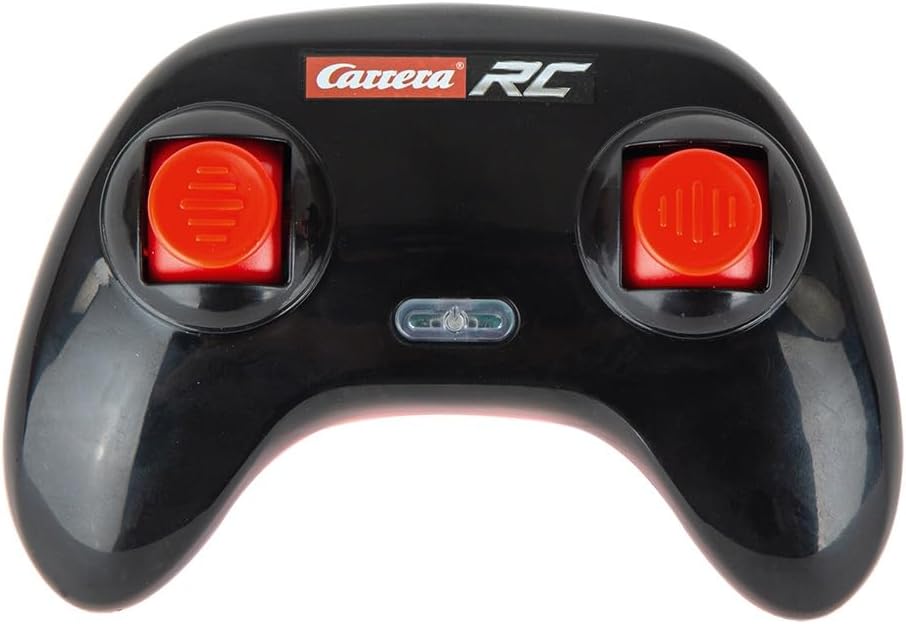
Figure 3: Carrera RC Remote Control.
5. Setup
5.1 Installing Remote Control Batteries
- Locate the battery compartment on the underside of the remote control.
- Open the battery compartment cover.
- Insert 2 AAA batteries, ensuring correct polarity (+/-).
- Close the battery compartment cover securely.
5.2 Charging the Vehicle Battery
The vehicle uses a rechargeable 3.7V LiPo-Akku battery. Before first use, fully charge the battery.
- Locate the battery connection port on the vehicle (often under a small cover or near the rear).
- Connect the vehicle's battery to the provided USB charging cable.
- Plug the USB charging cable into a standard USB power source (e.g., computer USB port, USB wall adapter).
- The charging indicator on the USB cable will typically show red during charging and turn off or green when fully charged.
- A full charge takes approximately 25 minutes. Do not overcharge.
- Once charged, disconnect the cable and secure the battery connection in the vehicle.
5.3 Pairing the Vehicle and Remote Control
The 2.4 GHz technology allows for automatic pairing. Follow these steps:
- Ensure the vehicle battery is charged and connected.
- Turn on the vehicle's power switch (if applicable).
- Turn on the remote control's power switch.
- The LED indicator on the remote control will flash and then become solid once paired.
- If pairing fails, turn both devices off and repeat the steps.
6. Operation
Once paired, you can begin operating your Carrera RC Mario Kart Quad Yoshi.
- Forward/Backward: Use the left control stick to move the vehicle forward or backward.
- Steering (Left/Right): Use the right control stick to steer the vehicle left or right.
- 2.4 GHz Technology: This technology allows for interference-free operation and enables up to 16 RC cars to be driven simultaneously.
- Playtime: The vehicle can operate for up to 8 minutes on a single full charge.
For optimal performance, operate the vehicle on smooth, flat surfaces. Avoid rough terrain, sand, or water.
7. Charging
The vehicle's LiPo-Akku battery provides approximately 8 minutes of play on a 25-minute charge. Always allow the battery to cool down before recharging. Do not leave charging batteries unattended.
- Battery Type: 3.7V rechargeable LiPo-Akku (vehicle), 2x AAA (remote control).
- Charging Time: Approximately 25 minutes for the vehicle battery.
- Run Time: Up to 8 minutes per charge.
8. Maintenance
- Cleaning: Use a soft, dry cloth to clean the vehicle and remote control. Do not use water or chemical cleaners.
- Storage: When not in use, store the vehicle and remote control in a cool, dry place, away from direct sunlight. Remove batteries from the remote control if storing for extended periods.
- Battery Care: Do not expose batteries to extreme temperatures. Dispose of used batteries responsibly according to local regulations.
9. Troubleshooting
| Problem | Possible Cause | Solution |
|---|---|---|
| Vehicle does not respond to remote control. |
|
|
| Short operating time. |
|
|
| Vehicle moves erratically or slowly. |
|
|
10. Specifications
- Model: 370400021
- Scale: 1:40
- Frequency: 2.4 GHz
- Max Speed: Up to 3.1 mph
- Vehicle Dimensions: 3.1 x 3.1 x 3.1 inches
- Vehicle Weight: 9.6 ounces
- Vehicle Battery: 3.7V Rechargeable LiPo-Akku (included)
- Remote Control Batteries: 2x AAA (included)
- Charging Time: Approx. 25 minutes
- Run Time: Up to 8 minutes
- Recommended Age: 6 years and up
- Manufacturer: Carrera
11. Warranty & Support
For warranty information or technical support, please refer to the contact details provided on the product packaging or visit the official Carrera website. Keep your purchase receipt as proof of purchase.
Note: Product specifications and appearance are subject to change without prior notice.


