
Introduction
The Line 6 POD Express Guitar is a compact and portable amplifier and effects processor designed for guitarists. It offers a range of tones derived from the acclaimed HX family of processors, ensuring high sound quality and authentic feel. This unit includes seven amplifier models, seven cabinet models, and 17 effects such as distortion, modulation, reverb, delay, and a looper. It can be powered by three AA batteries (included) or an optional 9-volt power supply. Advanced tone editing, preset management, and global settings are accessible via the POD Express Edit app for computer or mobile devices. Key features include stereo outputs, tap tempo, a built-in tuner, a noise gate, a headphone output, and a USB-C audio interface with re-amping capabilities. Optional accessories like an expression pedal or up to two footswitches can expand its functionality for volume control, preset selection, or effect toggling.
What's in the Box
- One Line 6 POD Express Guitar unit
- Three AA Batteries
Controls and Connections
Familiarize yourself with the various controls and connection points on your POD Express Guitar unit.

Figure 1: Front Panel Controls. This image displays the top surface of the POD Express Guitar, highlighting the DIST, MOD, DELAY, REVERB, and AMP control knobs, along with the ON and TAP footswitches and the ALT button.
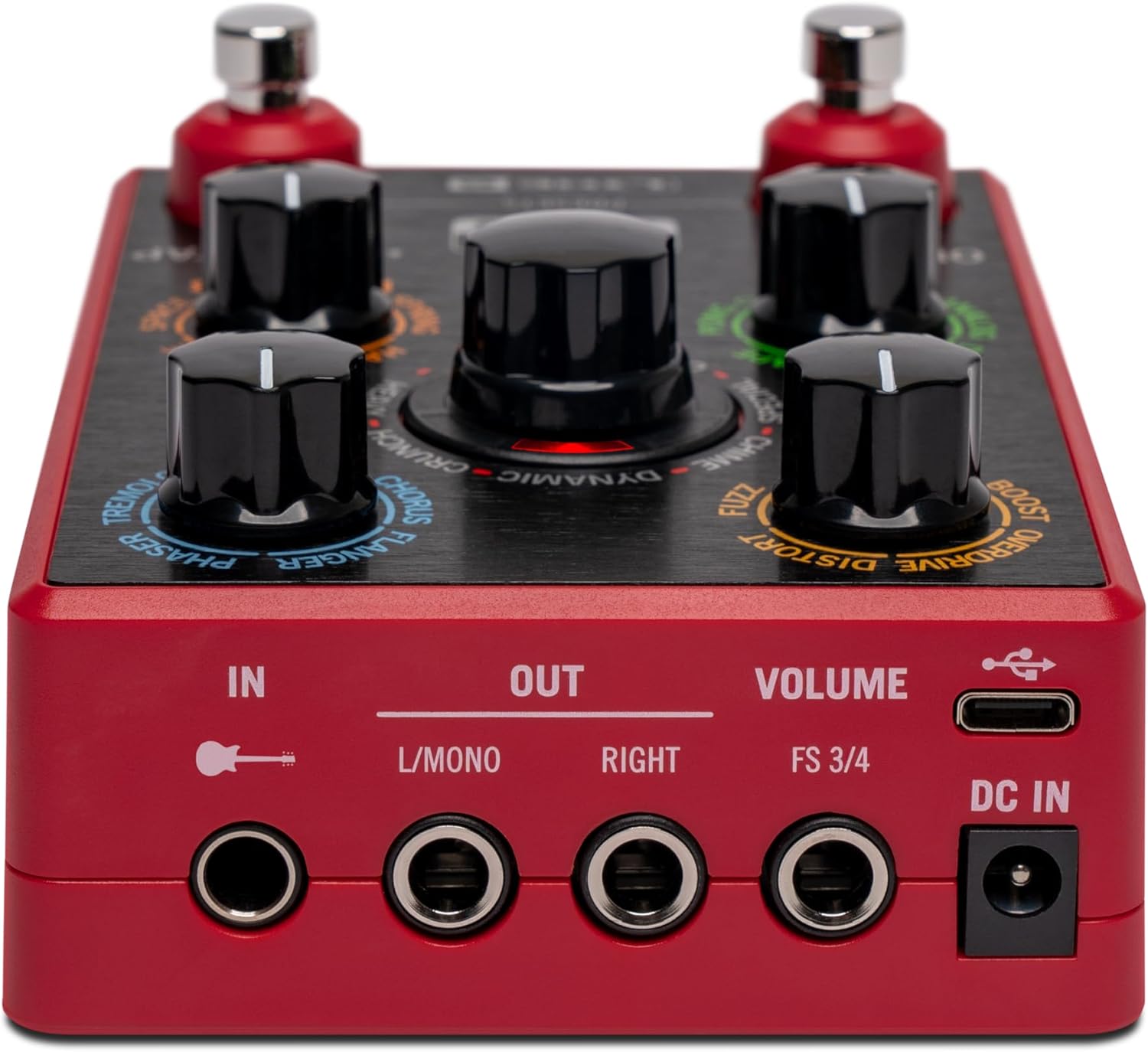
Figure 2: Rear Panel Connections. This image shows the back of the unit, detailing the IN (guitar input), L/MONO OUT, RIGHT OUT, FS 3/4 (footswitch input), USB-C, and DC IN ports.

Figure 3: Side Panel. This image illustrates the side of the POD Express Guitar, featuring the headphone output jack and its dedicated volume slider.
Control Knobs:
- DIST: Adjusts distortion type and gain.
- MOD: Selects modulation effects and adjusts their parameters.
- DELAY: Controls delay types and settings.
- REVERB: Manages reverb types and characteristics.
- AMP: Selects amplifier models and adjusts channel volume.
Footswitches & Buttons:
- ON Footswitch: Activates/deactivates the unit or selected effect.
- TAP Footswitch: Sets tap tempo for time-based effects and activates the tuner.
- ALT Button: Accesses secondary functions for the control knobs.
Connection Ports:
- IN (1/4" Jack): Guitar input.
- L/MONO OUT (1/4" Jack): Main audio output (mono or left channel for stereo).
- RIGHT OUT (1/4" Jack): Right channel audio output for stereo setups.
- FS 3/4 (1/4" Jack): Input for optional external footswitches.
- DC IN: Power input for optional 9-volt power supply.
- USB-C: Connects to computer for POD Express Edit app and USB audio interface functionality.
- Headphone Out (1/8" Jack): For private monitoring.
- Headphone Volume Slider: Adjusts headphone output level.
Setup
- Powering the Unit:
Insert three AA batteries into the battery compartment on the underside of the unit. Alternatively, connect an optional 9-volt DC power supply (not included) to the DC IN port. - Connecting Your Guitar:
Plug your guitar into the IN (1/4" jack) on the rear panel. The unit will power on automatically when a cable is inserted into this input. - Audio Output:
Connect the L/MONO OUT (1/4" jack) to your amplifier, mixer, or audio interface. For stereo output, connect both the L/MONO OUT and RIGHT OUT to a stereo input device. - Headphone Connection (Optional):
For private practice, plug your headphones into the Headphone Out (1/8" jack) on the side of the unit. Adjust the headphone volume using the dedicated slider. - USB-C Connection (Optional):
Connect the USB-C port to your computer using a USB-C cable. This enables use with the POD Express Edit app for deeper editing and allows the unit to function as a USB audio interface for recording.

Figure 4: Output Connections. This image shows cables connected to the L/MONO and RIGHT output jacks, demonstrating a stereo setup.
Operating Instructions
- Power On/Off:
The POD Express Guitar automatically powers on when a guitar cable is inserted into the IN jack. To power off, simply remove the guitar cable. - Basic Tone Adjustment:
Use the DIST, MOD, DELAY, and REVERB knobs to dial in your desired effects. The AMP knob allows you to select different amplifier models and adjust their channel volume. - Accessing Alternate Functions:
Press the ALT button to access secondary functions for the control knobs. For example, with ALT active, the DIST knob may control Gain, MOD may control Mid, DELAY may control Bass, and REVERB may control Treble. Refer to the unit's markings for specific alternate functions. - Using Presets:
The ON and TAP footswitches can be used to navigate and select presets. Consult the full Line 6 manual for detailed instructions on preset management. - Tuner Function:
Press and hold the TAP footswitch to activate the built-in tuner. Strum a string, and the LEDs will indicate if the note is flat, sharp, or in tune. - Tap Tempo:
Tap the TAP footswitch two or more times in rhythm to set the tempo for time-based effects like delay. - Looper:
The unit includes a looper function. Specific controls for recording, playback, and overdubbing are typically accessed via combinations of footswitch presses. Refer to the detailed manual for looper operation. - POD Express Edit App:
For comprehensive tone editing, preset management, and global settings, download and install the POD Express Edit app on your computer or mobile device. Connect the POD Express Guitar via USB-C to access these advanced features.

Figure 5: Adjusting Controls. This image demonstrates a user adjusting one of the main control knobs on the POD Express Guitar.

Figure 6: USB-C Connection. This image shows the POD Express Guitar connected to a laptop, indicating its capability for software editing and audio interface functions.

Figure 7: POD Express Edit App. A visual representation of the software interface for advanced tone customization and management.
Maintenance
- Cleaning: Wipe the unit with a soft, dry cloth. Avoid using liquid cleaners, solvents, or abrasive materials, as these can damage the finish and internal components.
- Battery Replacement: When the unit's performance degrades or the power indicator shows low battery, replace the three AA batteries with new alkaline batteries. Ensure correct polarity.
- Storage: Store the POD Express Guitar in a dry, cool environment away from direct sunlight, extreme temperatures, and high humidity.
- Firmware Updates: Periodically check the official Line 6 website or the POD Express Edit app for available firmware updates. Keeping your unit updated ensures optimal performance and access to new features.
Troubleshooting
- No Sound Output:
- Ensure the guitar cable is fully inserted into the IN jack to power on the unit.
- Check all audio cables (guitar to unit, unit to amp/mixer) for secure connections.
- Verify that the volume levels on the POD Express Guitar, your amplifier, and any connected devices are turned up.
- If using batteries, check if they are depleted and replace them if necessary.
- Distorted or Unwanted Noise:
- Adjust the DIST knob and other gain-related settings to reduce excessive distortion.
- Ensure proper impedance matching between your guitar, the POD Express, and your amplifier/interface.
- Check for faulty cables or power supply issues that might introduce noise.
- Utilize the built-in noise gate feature to minimize hum or hiss.
- Effects Not Activating or Responding:
- Ensure the specific effect is enabled and its parameters are adjusted correctly using the corresponding knob.
- If using alternate functions, ensure the ALT button is pressed or released as required.
- Check if the unit is in tuner mode (indicated by specific LED behavior); exit tuner mode to resume normal operation.
- USB-C Connection Issues with POD Express Edit App:
- Ensure you are using a high-quality USB-C cable.
- Verify that the POD Express Edit app is installed and updated on your computer or mobile device.
- Check your device's USB settings and drivers to ensure the POD Express is recognized.
Specifications
| Model Number | 99-060-3000 |
| Item Weight | 12.3 ounces (0.35 Kilograms) |
| Product Dimensions | 5.12 x 3.66 x 2.28 inches |
| Compatible Devices | Guitar |
| Connector Type | 6.35mm Jack (Input/Output), USB Type C |
| Signal Format | Analog |
| Material Type | Plastic |
| Battery Type | AA Alkaline (3 included) |
| Power Source | Battery Powered or optional 9-volt power supply |
| Voltage | 9 Volts |
Warranty and Support
For detailed warranty information, please refer to the documentation provided with your purchase or contact your retailer. For product support, frequently asked questions, and software downloads (including the POD Express Edit app), please visit the official Line 6 website.


