
Introduction
Thank you for purchasing the DUDAO R2PRO+ Bluetooth 5.3 FM Transmitter Car Adapter. This device allows you to stream audio wirelessly from your Bluetooth-enabled devices to your car's FM radio, make hands-free calls, and charge your mobile devices quickly. This manual provides detailed instructions for setup, operation, maintenance, and troubleshooting to ensure optimal performance and safety.
Safety Information
- Always operate the device safely and avoid distractions while driving.
- Do not expose the device to extreme temperatures, direct sunlight, or moisture.
- Keep the device away from children.
- Do not disassemble or attempt to repair the device yourself. This will void the warranty.
- Ensure the device is securely plugged into the car's cigarette lighter socket.
Setup Instructions
Follow these steps to set up your DUDAO R2PRO+ FM Transmitter:
- Power On: Plug the DUDAO R2PRO+ into your car's 12V/24V cigarette lighter socket. The device will power on automatically, and the LED display will light up.
- Tune Car Radio: Tune your car's FM radio to an unused frequency. Choose a frequency that has no strong radio station signal to minimize interference.
- Match FM Frequency: Adjust the FM frequency on the DUDAO R2PRO+ to match the frequency set on your car's radio. Use the main knob or frequency adjustment buttons on the device to change the frequency.
- Pair Bluetooth: On your mobile device, enable Bluetooth and search for available devices. Select "R2Pro+" from the list to pair. Once connected, you will hear a confirmation tone.
Operating Instructions
Music Playback
- Bluetooth Streaming: Once paired, audio from your phone will stream through your car's speakers via the selected FM frequency.
- USB Drive/TF Card Playback: Insert a USB flash drive (up to 128GB) or a TF card (up to 128GB) into the designated port. The device will automatically detect and play WMA, MP3, WAV, APE, and FLAC audio files.
- Controls: Use the 'Previous Track' and 'Next Track' buttons on the device to navigate your music. The main knob can adjust the volume.
- Deep Bass: Press the 'BASS' button (if available) to enhance the bass output for a richer audio experience.

Hands-Free Calling
The built-in microphone and Noise Suppression (CVC) technology allow for clear hands-free calls.
- Answer Call: Short press the function key (usually the main knob or a dedicated call button) to answer an incoming call.
- End Call: Short press the function key again to end an active call.
- Reject Call: Double-click the function key to reject an incoming call.
- Redial: Double-click the function key to redial the last outgoing number.

Charging Devices
The R2PRO+ features multiple charging ports for your convenience:
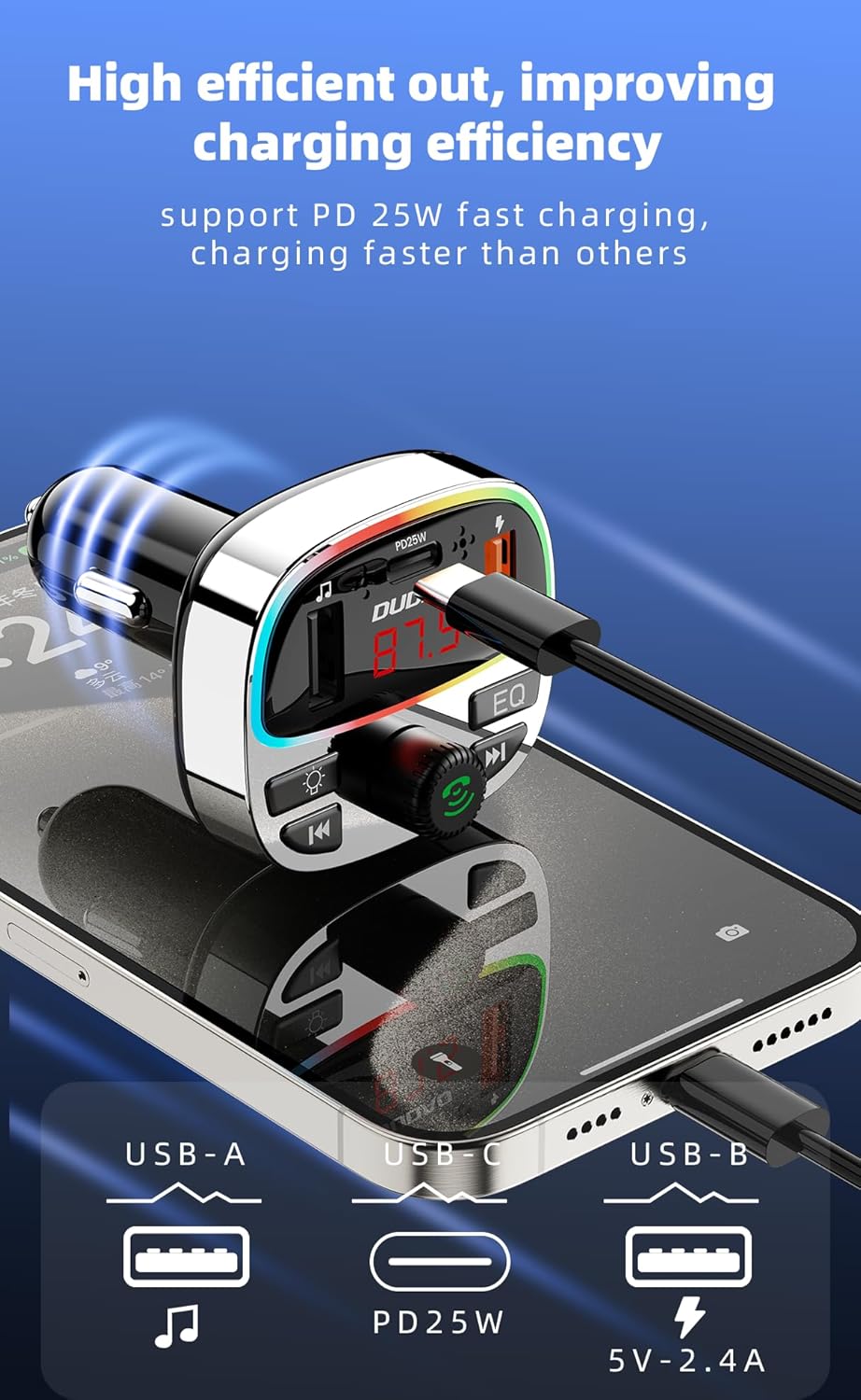
- Type-C PD 25W Port: For fast charging compatible devices like Samsung, iPhone, and iPad.
- QC3.0 USB 18W Port: For fast charging compatible devices.
- Additional USB Port: For standard charging (5V-2.4A) or USB drive playback.
Note:
- When both PD ports are used simultaneously, the maximum combined output is 36W.
- When a single PD port is used, the maximum output is 36W.

Maintenance
- Clean the device regularly with a soft, dry cloth.
- Do not use harsh chemicals or abrasive cleaners.
- Ensure the cigarette lighter socket and USB ports are free from dust and debris.
- Store the device in a cool, dry place when not in use for extended periods.
Troubleshooting
| Problem | Possible Cause | Solution |
|---|---|---|
| No power to the device. | Loose connection; Car cigarette lighter socket issue; Blown fuse in car. | Ensure the device is firmly plugged in. Check if the car's cigarette lighter socket is working with another device. Consult a mechanic if the car's fuse is suspected. |
| Poor audio quality/Static. | FM frequency interference; Volume too low/high; Bluetooth connection issue. | Find a clearer, unused FM frequency on both the device and car radio. Adjust volume levels on both the device and car stereo. Re-pair the Bluetooth connection. |
| Bluetooth disconnects frequently. | Interference; Device too far from phone; Low phone battery. | Ensure your phone is within close proximity to the transmitter. Avoid placing other wireless devices near the transmitter. Restart both the phone and the transmitter. |
| Hands-free calls not working or no audio. | Bluetooth not properly connected for calls; Microphone blocked; Car stereo input issue. | Check phone's Bluetooth settings to ensure 'Call Audio' is enabled for 'R2Pro+'. Ensure the device's microphone is not obstructed. Verify car stereo is on the correct input (FM). |
| Fast charging not working. | Cable not compatible; Device not supporting fast charging; Multiple devices charging. | Use a high-quality, fast-charging compatible cable. Ensure your device supports PD or QC fast charging. Note that charging multiple devices simultaneously may reduce individual port output. |
Specifications
- Brand: DUDAO
- Model: R2PRO+
- Bluetooth Version: 5.3
- Input Voltage: 12V-24V
- USB-C Output (PD): 25W (Max 36W when used alone)
- USB-A Output (QC3.0): 18W (Max 36W when used alone)
- Additional USB Output: 5V-2.4A
- Total USB Ports: 2 (plus 1 Type-C)
- Compatible Media: USB Drive (up to 128GB), TF Card (up to 128GB)
- Supported Audio Formats: WMA, MP3, WAV, APE, FLAC
- Special Features: Automatic On/Off, Built-In Microphone, Fast Charging, Hands-Free Calls, 7-color LED lighting, Deep Bass function
- Material: Polycarbonate (PC)
- Product Dimensions: 10 x 10 x 5 cm
- Item Weight: 90 g
- Operating System Compatibility: Android, iOS

Warranty Information
The DUDAO R2PRO+ Bluetooth 5.3 FM Transmitter Car Adapter comes with a standard manufacturer's warranty. Please refer to the warranty policy provided at the time of purchase for specific terms and conditions. Keep your purchase receipt as proof of purchase for any warranty claims.
Customer Support
For technical assistance, warranty inquiries, or any other support needs, please contact DUDAO customer service:
- Contact Number: +919310681651
- Address: DUDAO INDIA, 101 Mall Road, Kingsway Camp, GTB Nagar Metro Station Gate No 1, NEW DELHI, DELHI 110009