
1. Introduction
Thank you for choosing the Jesebang Wireless Earbuds BD86. These earbuds are designed to provide a superior audio experience with advanced features and comfortable wear. This manual will guide you through the setup, operation, and maintenance of your new earbuds.
Key Features:
- Cutting-Edge Bluetooth 5.3: Offers 3X faster transfer speeds and a highly stable connection with almost no delay.
- Immersive Sound Experience: Equipped with 14.2mm dynamic drivers and ultra-sensitive polymer diaphragms for rich, balanced audio.
- Unparalleled Call Clarity: Advanced microphone design and ENC noise reduction technology suppress up to 95% of background noise.
- Continuous Entertainment: Over 6 hours of playback on a single charge, with a total of 30 hours using the charging case.
- Real-Time Dual LED Display: Intelligent LED digital display shows battery levels for both earphones and the charging case.
- Comfortable to Wear: Ultra-light (3.3 grams each) and ergonomic design for prolonged wear without discomfort.
- Rain-Proof Music Companion: IP7 waterproof rating provides effective protection against sweat and rain.
- Smart Touch Control: High-sensitivity touch technology for easy control of music, calls, and voice assistant.
What's in the Box:
- 1 x Fast Charging Case
- 2 x Wireless Headsets (Left and Right Earbuds)
- 1 x Type-C Charging Cable
- 1 x Instruction Manual
2. Product Overview
Familiarize yourself with the components of your Jesebang Wireless Earbuds BD86.

Figure 2.1: Jesebang Wireless Earbuds BD86 in Pink Charging Case
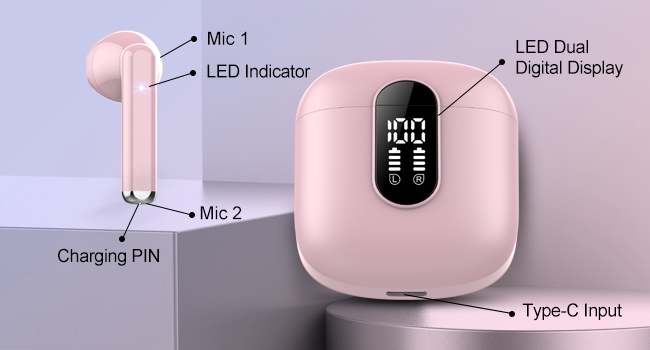
Figure 2.2: Earbud and Charging Case Component Diagram
Components:
- Earbuds (Left & Right): Each earbud features a microphone (Mic 1), LED indicator, and charging pins.
- Charging Case: Houses the earbuds, features a dual LED digital display for battery levels, and a Type-C input for charging.
- Type-C Charging Cable: Used to charge the charging case.
3. Setup
3.1 Initial Pairing
Follow these steps to pair your Jesebang Wireless Earbuds BD86 with your device for the first time:
- Ensure the earbuds are fully charged.
- Open the charging case and take out both earbuds. They will automatically enter pairing mode.
- On your device (smartphone, tablet, laptop), turn on Bluetooth.
- Search for available devices and select "BD86" from the list.
- Confirm the pairing request on your device if prompted.
Video 3.1: How to Connect Jesebang BD86 Earbuds via Bluetooth. This video demonstrates the steps for initial Bluetooth pairing, including taking out the earbuds, enabling Bluetooth on your device, and selecting "BD86" to connect.
3.2 Automatic Connection
After the first successful pairing, the earbuds will automatically connect to the last paired device when you open the charging case and take them out, provided Bluetooth is enabled on your device.

Figure 3.1: Bluetooth Pairing Interface
3.3 Charging the Earbuds and Case
To charge the earbuds, place them back into the charging case. The LED display on the case will show the charging status. To charge the charging case, connect the provided Type-C charging cable to the case's Type-C input and a power source.
- Earbud Charging Time: Approximately 1 hour for a full charge.
- Case Charging Time: Approximately 1 hour for a full charge.
- Earbud Playback Time: Over 6 hours on a single charge.
- Total Playback Time (with case): Up to 30 hours.

Figure 3.2: Battery Life and Charging Information

Figure 3.3: Real-Time Dual LED Display
4. Operating Instructions
4.1 Smart Touch Controls
The Jesebang BD86 earbuds feature intuitive touch controls on each earbud. Refer to the table below for common functions:
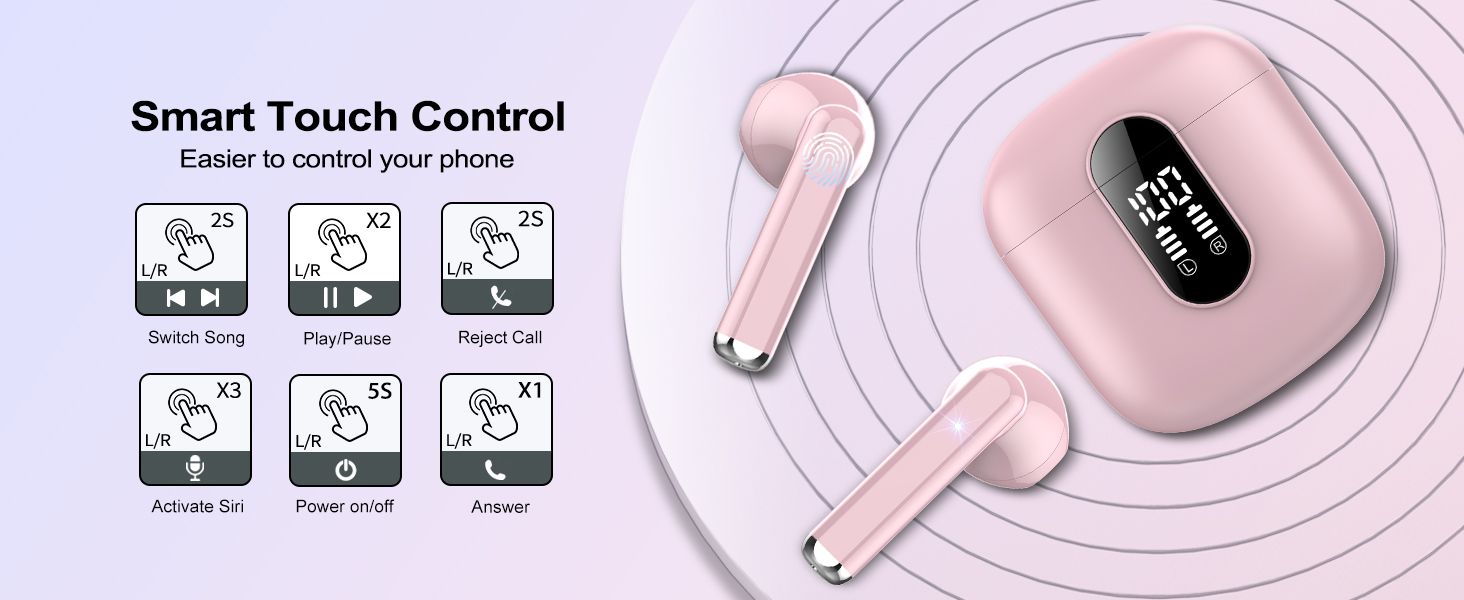
Figure 4.1: Smart Touch Control Guide
| Action | Function |
|---|---|
| Tap L/R x1 | Volume Down (L) / Volume Up (R) |
| Tap L/R x2 | Play / Pause Music |
| Tap L/R x3 | Activate Voice Assistant (Siri, Google Assistant) |
| Press L/R for 2 seconds | Previous Song (L) / Next Song (R) |
| Press L/R for 2 seconds (Incoming Call) | Reject Call |
| Tap L/R x1 (Incoming Call) | Answer Call |
| Press L/R for 2 seconds (During Call) | End Call |
| Press L/R for 5 seconds | Power On / Off |
4.2 Wearing the Earbuds
The earbuds are designed for an ultra-light and ergonomic fit. Insert each earbud gently into your ear canal and adjust for a secure and comfortable position. This ensures optimal sound quality and prevents discomfort during prolonged use.
5. Maintenance
Proper care will extend the lifespan of your earbuds.
5.1 Water Resistance
The Jesebang BD86 earbuds have an IP7 waterproof rating, providing effective protection against sweat and rain. This makes them suitable for workouts and travel. However, they are not designed for submersion in water. Avoid prolonged exposure to water or extreme humidity.

Figure 5.1: IP7 Water Resistance
5.2 General Care
- Clean the earbuds and charging case regularly with a soft, dry cloth.
- Avoid using abrasive cleaners or solvents.
- Store the earbuds in their charging case when not in use to protect them and keep them charged.
- Keep away from extreme temperatures and direct sunlight.
6. Troubleshooting
If you encounter any issues with your earbuds, refer to the following common solutions:
| Problem | Solution |
|---|---|
| Earbuds not pairing | Ensure earbuds are charged. Turn off and on Bluetooth on your device. Forget "BD86" from your device's Bluetooth list and re-pair. |
| Only one earbud working | Place both earbuds back in the case, close the lid, wait a few seconds, then take them out again. Ensure both are charged. |
| Low volume or poor sound quality | Adjust volume on both earbuds and your device. Ensure earbuds are clean and free of debris. Check for proper fit in your ears. |
| Earbuds not charging | Ensure charging cable is securely connected. Check if the charging case has power. Clean charging contacts on earbuds and case. |
| Connection drops frequently | Ensure no obstacles between earbuds and device. Keep device within Bluetooth range (up to 15 meters). Avoid strong electromagnetic interference. |
If the issue persists, please contact customer support.
7. Specifications
Detailed technical specifications for the Jesebang Wireless Earbuds BD86:
| Feature | Detail |
|---|---|
| Model Name | BD86 |
| Connectivity Technology | Wireless (Bluetooth) |
| Bluetooth Version | 5.3 |
| Bluetooth Range | 15 Meters |
| Audio Driver Type | Dynamic Driver |
| Audio Driver Size | 14.2 Millimeters |
| Frequency Range | 20 Hz - 20,000 Hz |
| Battery Life (Earbuds) | 6+ Hours (single charge) |
| Battery Life (with Case) | 30 Hours |
| Charging Time (Earbuds/Case) | 1 Hour |
| Water Resistance Level | IP7 Waterproof |
| Control Type | Touch Control |
| Material | Silicone, Plastic, Rubber, Thermoplastic Elastomer (TPE) |
| Item Weight | 3.2 ounces |
| Product Dimensions | 2.17 x 1.77 x 0.71 inches |
8. Warranty and Support
Jesebang is committed to providing high-quality products and excellent customer service.
8.1 Warranty Information
Your Jesebang Wireless Earbuds BD86 come with a 2-year warranty from the date of purchase. This warranty covers manufacturing defects and ensures your product functions as intended under normal use. Please retain your proof of purchase for warranty claims.

Figure 8.1: Warranty and Customer Service Details
8.2 Customer Support
For any questions, technical assistance, or warranty claims, please contact Jesebang customer service. We offer 24-hour customer service response to ensure your satisfaction.
You can also visit the official Jesebang Store for more information and product updates: Jesebang Store on Amazon
