
Introduction
Welcome to the Btootos A90 Pro Wireless Earbuds user manual. These earbuds are designed to provide a superior audio experience with advanced features such as Bluetooth 5.4 connectivity, Environmental Noise Cancellation (ENC) for clear calls, an LED power display, and IP7 waterproofing. This manual will guide you through the setup, operation, and maintenance of your new earbuds to ensure optimal performance and longevity.
What's in the Box
- A90 Pro Wireless Earbuds (L/R)
- Portable Charging Box
- Silicone Earplugs (S / M / L sizes)
- USB-C Charging Cable
- User Manual

Image: The contents of the Btootos A90 Pro True Wireless Earbuds box, showing the earbuds, charging case, various sized ear tips, a USB-C charging cable, and the user manual.
Setup
1. Charging the Earbuds and Case
Before first use, fully charge your Btootos A90 Pro earbuds and charging case. The charging case features an LED display that shows the battery percentage of the case and individual earbuds.
- Connect the provided USB-C charging cable to the charging port on the case and a power source.
- The LED display will illuminate, showing the charging status.
- Place the earbuds into the charging case. Ensure they are properly seated to begin charging.
- A full charge for the earbuds takes approximately 1.5 hours, and the charging case provides up to 30 hours of additional usage.
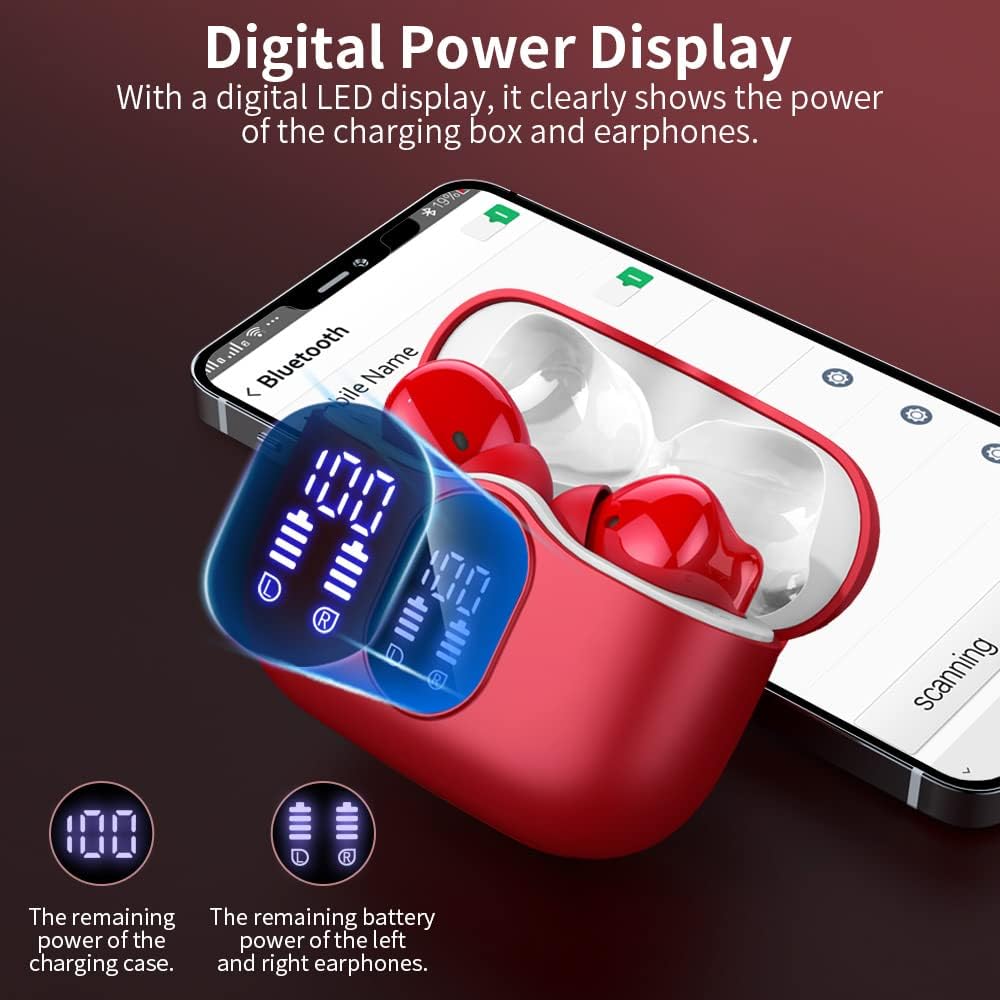
Image: The Btootos A90 Pro charging case in red, connected to a USB-C cable, with the LED display showing '100' for the case battery and charging indicators for both earbuds, illustrating the fast charging capability and long playtime.
2. Pairing with Your Device
The earbuds utilize Bluetooth 5.4 technology for a fast and stable connection.
- Open the charging case. The earbuds will automatically power on and enter pairing mode.
- On your device (smartphone, tablet, laptop), go to Bluetooth settings and turn on Bluetooth.
- Look for "A90 Pro" in the list of available devices and select it to connect.
- Once connected, you will hear an audio prompt, and the earbuds will be ready for use.

Image: A smartphone displaying its Bluetooth settings, showing "A90 Pro" as a discoverable device, next to the open red charging case with earbuds, illustrating the one-step pairing process.
Tip: The earbuds support automatic re-connection to the last paired device when taken out of the case.
Operating Instructions
Touch Controls
The Btootos A90 Pro earbuds feature intuitive touch controls on each earbud for easy management of music and calls.
| Function | Action |
|---|---|
| Play/Pause | Single tap on either earbud |
| Next Track | Double tap on the right earbud |
| Previous Track | Double tap on the left earbud |
| Volume Up | Triple tap on the right earbud |
| Volume Down | Triple tap on the left earbud |
| Answer/End Call | Single tap on either earbud |
| Reject Call | Press and hold for 2 seconds on either earbud |
| Activate Voice Assistant | Press and hold for 2 seconds on either earbud (when not on a call) |

Image: A diagram illustrating the touch control functions on the Btootos A90 Pro earbuds, showing how to control music playback, calls, and voice assistant with taps and presses.
Environmental Noise Cancellation (ENC)
The A90 Pro earbuds feature ENC call noise cancellation technology, which uses multiple microphones to filter out ambient noise during calls, ensuring your voice is heard clearly by the other party.

Image: A diagram showing the internal components of a Btootos A90 Pro earbud, highlighting the ENC Noise Reduction Chip and noise-cancelling microphones, with a visual representation of noise being reduced by 40dB.
Single and Dual Earbud Mode
You can use either earbud independently (single mode) or both together (dual mode) for a stereo audio experience. The earbuds automatically switch between modes when one is placed back in the charging case or taken out.

Image: A diagram illustrating the flexibility of the Btootos A90 Pro earbuds, showing options for using a single earbud, both earbuds in dual mode, and the seamless switching between these modes.
Maintenance
Water Resistance
The Btootos A90 Pro earbuds are IP7 waterproof, making them resistant to sweat and rain. This makes them suitable for workouts and outdoor activities. However, they are not designed for swimming or prolonged submersion in water.

Image: Btootos A90 Pro earbuds being splashed with water, with text indicating "IP7 Waterproofing Resists Sweat and Rain," highlighting their durability for active use.
Cleaning and Care
- Regularly clean the earbuds and charging case with a soft, dry, lint-free cloth.
- Remove the silicone earplugs and clean them with mild soap and water, then dry thoroughly before reattaching.
- Avoid using abrasive materials or harsh chemicals for cleaning.
- Store the earbuds in their charging case when not in use to protect them and keep them charged.
Troubleshooting
| Problem | Solution |
|---|---|
| Earbuds not pairing | Ensure earbuds are charged. Turn off and on your device's Bluetooth. Place earbuds back in case, close, then reopen to re-enter pairing mode. |
| No sound or low volume | Check device volume and earbud volume. Ensure earbuds are properly seated in your ears. Re-pair the earbuds with your device. |
| Intermittent connection | Ensure your device is within the 15-meter Bluetooth range. Avoid obstacles between your device and earbuds. Disconnect and re-pair. |
| Charging case not charging | Check USB-C cable and power adapter. Ensure connections are secure. Try a different cable or power source. |
| Earbuds not charging in case | Ensure earbuds are correctly placed in the charging slots. Clean the charging contacts on both earbuds and inside the case with a dry cotton swab. |
Specifications
| Feature | Detail |
|---|---|
| Model Name | A90 PRO |
| Bluetooth Version | 5.4 |
| Bluetooth Range | Up to 15 meters (without obstruction) |
| Battery Life (Earbuds) | 6-8 hours on a single charge |
| Total Playtime (with Case) | Up to 36 hours |
| Charging Time (Earbuds) | 1.5 hours |
| Charging Port | USB-C |
| Noise Control | Environmental Noise Cancellation (ENC), Passive Noise Cancellation, Sound Isolation |
| Water Resistance Level | IP7 Waterproof |
| Audio Driver Size | 14.2 Millimeters |
| Control Method | Touch |
| Compatible Devices | Most Bluetooth-enabled devices (smartphones, tablets, laptops) |
Warranty and Support
Btootos products are designed for quality and reliability. For specific warranty information, please refer to the warranty card included in your product packaging or visit the official Btootos website. If you encounter any issues or require technical assistance, please contact Btootos customer support through the contact information provided in your user manual or on the official website.


