
1. Introduction
Thank you for choosing the YIERBLUE YBN-20000W Rechargeable LED Spotlight Floodlight. This device combines a powerful spotlight and a wide-angle COB floodlight, offering versatile illumination for various applications. It features a durable, waterproof design and can also function as a portable power bank. Please read this manual thoroughly before use to ensure proper operation and maintenance.
2. Safety Instructions
- Do not look directly into the LED light when it is on, as it can cause eye damage.
- Keep the device away from extreme temperatures and open flames.
- Ensure the charging port cover is securely closed when not charging to maintain IP67 water resistance.
- Do not attempt to disassemble or modify the device. This will void the warranty and may cause damage or injury.
- Use only compatible USB-C charging cables.
- Keep out of reach of children.
3. Product Overview
The YIERBLUE YBN-20000W features a robust design with multiple lighting modes and functions.
Key Features:
- Dual Light Source: High-lumen LED spotlight and wide-angle COB floodlight.
- High Brightness: Up to 1,000,000 lumens.
- Durable Construction: IP67 waterproof, submersible up to 0.9m, floats, shock-resistant ABS casing with silicone protection, withstands drops up to 3m.
- Long Battery Life: Built-in 10,000 mAh batteries provide up to 9 hours on lower settings, 3 hours on higher settings.
- Fast Charging: USB-C charging, fully recharges in approximately 4 hours.
- Power Bank Function: Integrated USB output port for charging external devices.
- Adjustable Stand: For hands-free operation.
- Removable Red Lens: For specialized lighting needs like hunting.

Figure 1: The YIERBLUE YBN-20000W in action, demonstrating its combined spotlight and floodlight capabilities in an outdoor setting. The image shows the powerful beam illuminating a garden area.

Figure 2: Visual comparison of the YIERBLUE's superior flood and spot beam combination versus a standard light. This image highlights the wide view and super distance provided by the YIERBLUE unit.

Figure 3: Detailed view of the high-lumen spotlight and COB floodlight components within the YIERBLUE device. This illustrates the dual light source technology.
4. Setup
Initial Charge:
- Before first use, fully charge the device.
- Locate the USB-C charging port, typically protected by a rubber cover. Open the cover.
- Connect a USB-C cable (not included) to the device and the other end to a compatible USB power adapter (e.g., wall charger, car charger, computer USB port).
- The charging indicator lights will illuminate, showing the charging status. A full charge takes approximately 4 hours.
- Once fully charged, disconnect the cable and securely close the rubber cover to maintain water resistance.
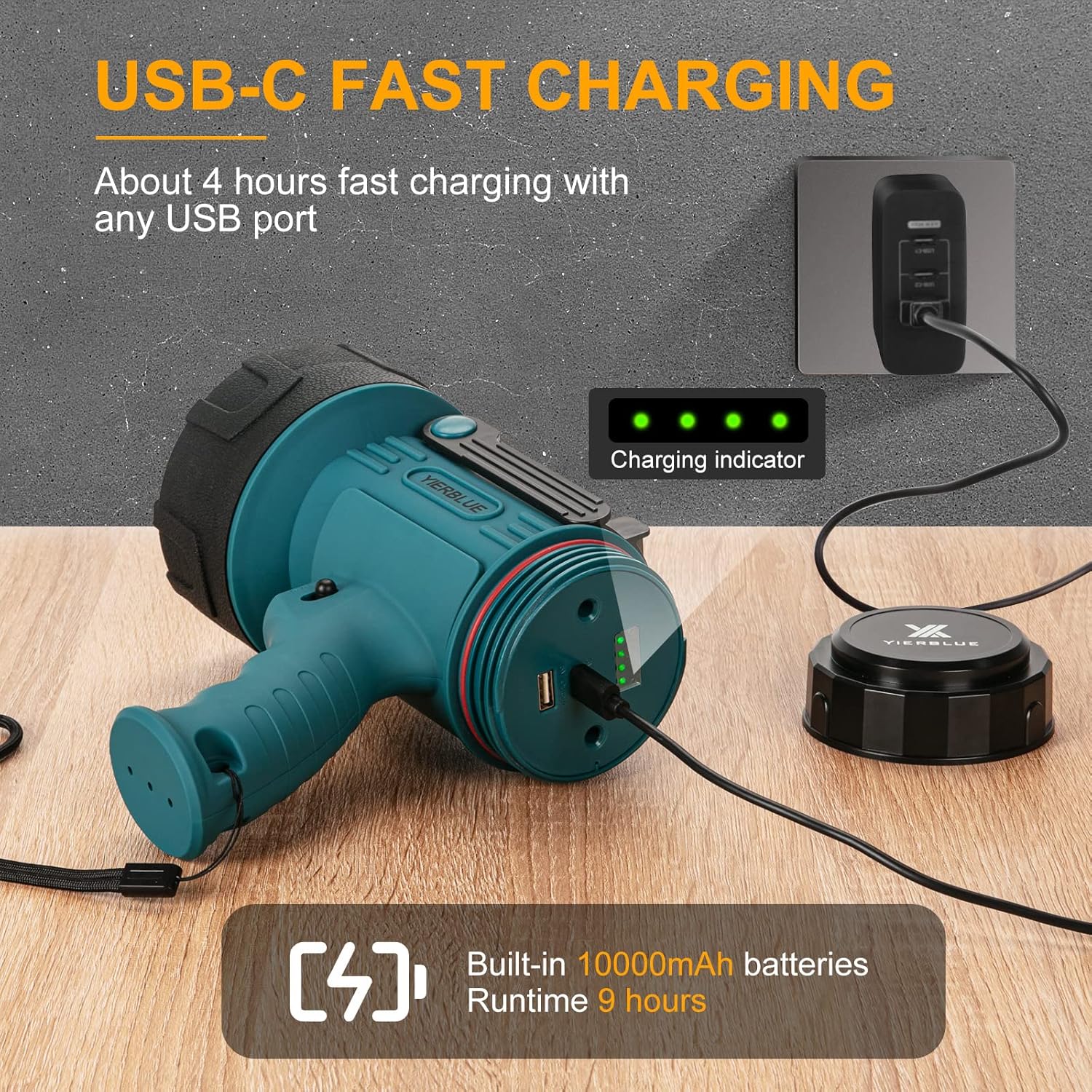
Figure 4: The YIERBLUE spotlight connected for USB-C fast charging. The image shows the charging indicator lights and the USB-C port.
5. Operating Instructions
Power Button and Mode Selection:
The device features a single power button to cycle through different lighting modes.
- Press once: Activates Spotlight + Floodlight Combo mode.
- Press twice: Activates High Spotlight mode.
- Press three times: Activates Low Spotlight mode.
- Press four times: Activates High Floodlight mode.
- Press five times: Activates Low Floodlight mode.
- Long press (3 seconds) from any mode: Activates SOS (Strobe) mode.
- Press again after SOS or after cycling through all modes: Turns the device off.
Using the Adjustable Stand:
The integrated adjustable stand allows for hands-free operation. Simply unfold the stand from the bottom of the device and position it to direct the light as needed. This is ideal for work, camping, or other activities requiring stable illumination.
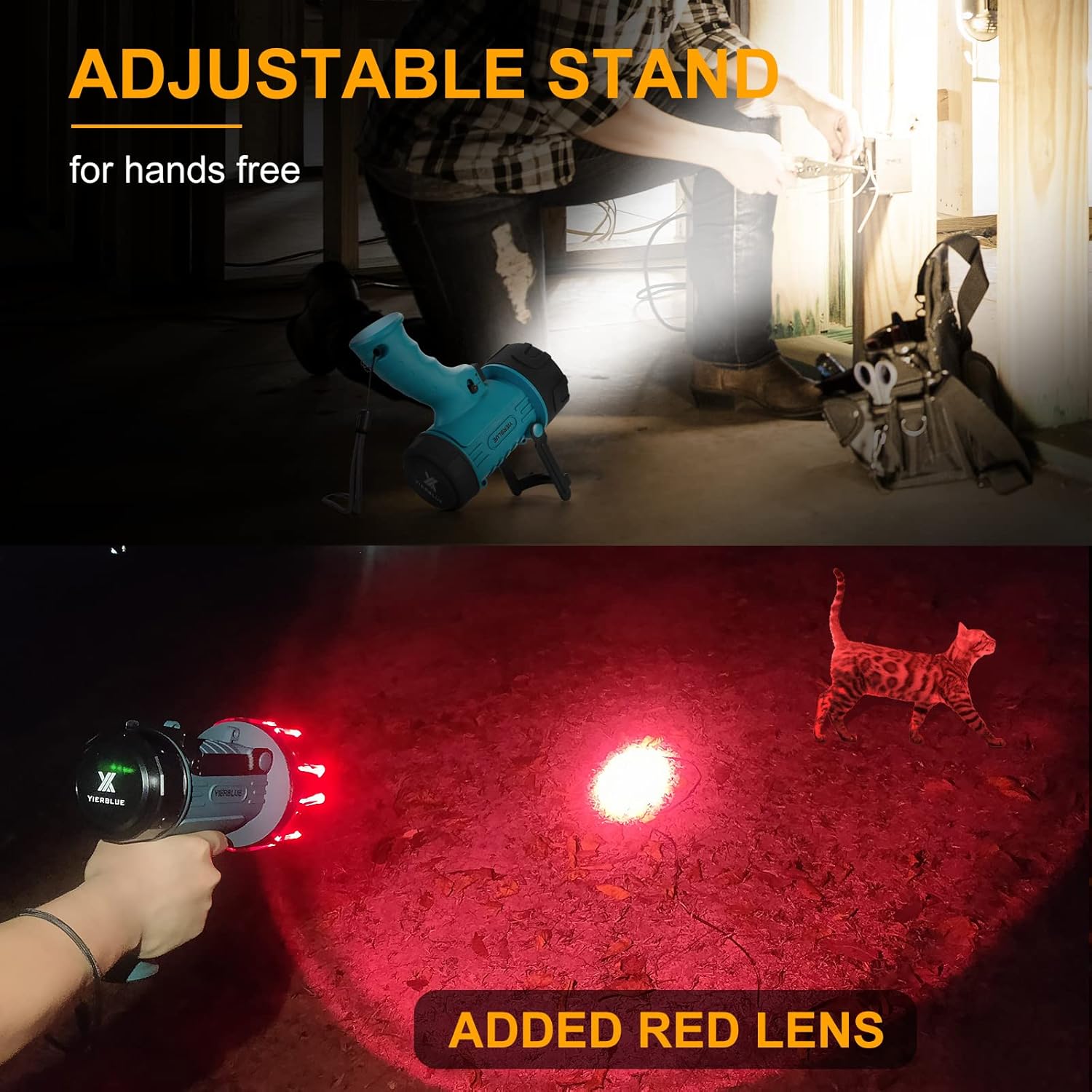
Figure 5: The YIERBLUE spotlight positioned with its adjustable stand for hands-free use, and an example of the removable red lens in action for specialized lighting.
Using the Removable Red Lens:
The red lens can be attached to the front of the floodlight for specific applications, such as hunting, where red light is preferred to preserve night vision or avoid startling animals.
6. Charging and Power Bank Function
Charging the Device:
Refer to the "Initial Charge" section under Setup for detailed charging instructions. The device uses a USB-C port for fast charging.
Using as a Portable Power Bank:
The YIERBLUE YBN-20000W can serve as an emergency power bank for your mobile devices.
- Locate the USB-A output port (usually next to the USB-C input port).
- Connect your device's charging cable to the USB-A output port on the YIERBLUE spotlight.
- Connect the other end of the cable to your smartphone, tablet, or other USB-powered device.
- The YIERBLUE spotlight will begin charging your device.

Figure 6: The YIERBLUE spotlight functioning as a portable power bank, charging a smartphone in an outdoor setting. This highlights its utility for emergency device charging.
7. Maintenance
- Cleaning: Wipe the device with a soft, damp cloth. Do not use abrasive cleaners or solvents.
- Storage: Store the device in a cool, dry place away from direct sunlight when not in use. For prolonged storage, charge the battery every 3-6 months to maintain battery health.
- Water Resistance: Always ensure the charging port cover is fully sealed to maintain IP67 water resistance.
8. Troubleshooting
| Problem | Possible Cause | Solution |
|---|---|---|
| Light does not turn on. | Battery is depleted. | Charge the device fully using a USB-C cable. |
| Light modes are not cycling correctly. | Incorrect button press sequence. | Refer to Section 5: Operating Instructions for correct button press sequences. |
| Device not charging. | Faulty cable or power adapter; charging port obstruction. | Try a different USB-C cable and power adapter. Ensure the charging port is clean and free of debris. |
| Power bank function not working. | Battery too low; incompatible cable; device not recognized. | Ensure the spotlight has sufficient charge. Try a different USB-A cable. Check if the external device is compatible. |
9. Specifications
| Brand | YIERBLUE |
| Model Number | YBN-20000W |
| Dimensions (L x W x H) | 10.92 x 19.81 x 20.07 cm (4.3 x 7.8 x 7.9 inches) |
| Weight | 862 grams (1.9 lbs) |
| Material | ABS |
| Light Source Type | LED (Spotlight) + COB (Floodlight) |
| Luminosity | Up to 1,000,000 Lumens |
| Battery Type | 2 x Lithium-Polymer (included) |
| Battery Capacity | 10,000 mAh |
| Runtime | Up to 9 hours (low setting), 3 hours (high setting) |
| Charging Time | Approx. 4 hours (USB-C) |
| Water Resistance | IP67 (submersible up to 0.9m, floats) |
| Shock Resistance | Withstands drops up to 3m |
| Special Features | Rechargeable, Portable Power Bank, Adjustable Stand, Removable Red Lens |
10. Warranty and Support
YIERBLUE offers a lifetime warranty for this product. If you receive a defective unit, please contact YIERBLUE customer support directly. They will arrange for a replacement unit to be sent to you free of charge, without the need for a return.
For any questions, issues, or support needs, YIERBLUE provides 24-hour online after-sales service. Please refer to the contact information provided with your purchase or visit the official YIERBLUE website for assistance.