
OLIGHT BATONTURBO
OLIGHT BatonTurbo EDC Flashlight User Manual
Model: BATONTURBO
Introduction
Thank you for choosing the OLIGHT BatonTurbo EDC Flashlight. This compact and powerful LED flashlight is designed for everyday carry, offering 1000 lumens of brightness and a 510-meter beam distance. It features multiple lighting modes, magnetic charging, and a durable, waterproof design, making it suitable for various outdoor and emergency situations. This manual provides detailed instructions for proper setup, operation, and maintenance to ensure optimal performance and longevity of your device.

Image: The OLIGHT BatonTurbo EDC Flashlight, a compact black flashlight with a blue bezel and side switch, featuring a textured body for grip and a two-way pocket clip.
What's in the Box
Upon opening your OLIGHT BatonTurbo package, please verify that all the following components are included:
- BatonTurbo Flashlight
- Customized Lithium-Ion Battery (pre-installed or separate)
- Magnetic Charging Cable (MCC)
- Belt Clip (pre-installed)
- Lanyard
- User Manual (this document)

Image: All components of the OLIGHT BatonTurbo package laid out, including the flashlight, battery, charging cable, belt clip, lanyard, and user manual.
Specifications
| Feature | Detail |
|---|---|
| Max Output | 1000 Lumens |
| Max Throw | 510 Meters |
| Max Runtime | 50 Days (Moonlight mode) |
| Light Source Type | LED |
| Power Source | Customized Lithium-Ion Battery (Rechargeable) |
| Material | Aluminum Alloy |
| Water Resistance | IPX8 (Waterproof) |
| Drop Test Rating | 1.5 meters |
| Dimensions | 1.98"D x 1.45"W x 5.82"H (approx. 50.3mm D x 36.8mm W x 147.8mm H) |
| Item Weight | 3.2 ounces (approx. 90.7 grams) |
| Special Features | Adjustable Light Modes, Lightweight, Magnetic Base, Portable, Rechargeable |
Note: All data above are test results according to ANSI/NEMA FL 1-2019 standards.
Setup
1. Battery Installation
The OLIGHT BatonTurbo comes with a customized Lithium-Ion battery. Ensure the battery is properly inserted before first use. If replacing the battery or using an optional single-use battery, unscrew the tail cap, insert the battery with the positive (+) end facing the head of the flashlight, and then securely screw the tail cap back on.
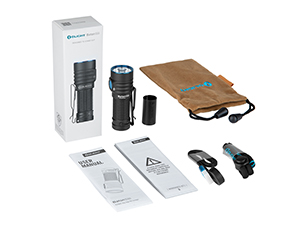
Image: The customized rechargeable battery and an optional sleeve for a single-use battery, demonstrating flexible power sources.
2. Charging
The BatonTurbo features magnetic charging for convenience. Use the included Magnetic Charging Cable (MCC) to charge the flashlight.
- Connect the USB end of the MCC to a power source (e.g., USB wall adapter, computer USB port, power bank).
- Attach the magnetic end of the MCC to the tail cap of the flashlight. The indicator light on the MCC will turn red to indicate charging is in progress.
- Once fully charged, the indicator light on the MCC will turn green. A full charge takes approximately 1.5 hours.

Image: The OLIGHT BatonTurbo flashlight connected to a magnetic charging cable, illustrating the charging process.
Operating Instructions
The BatonTurbo is operated via a single side switch. The flashlight features a battery level indicator around the switch.
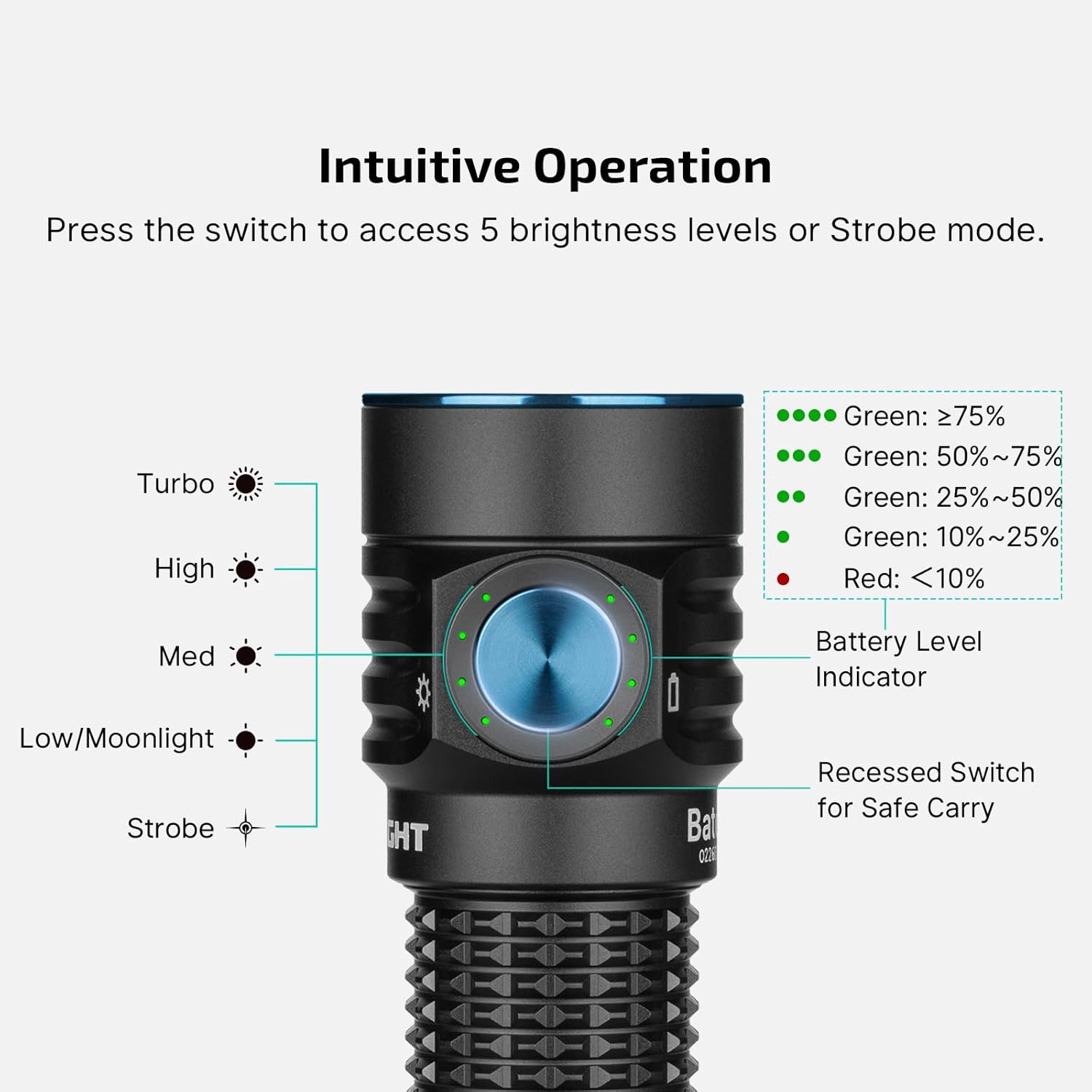
Image: Diagram illustrating the intuitive operation of the OLIGHT BatonTurbo, showing the side switch, various brightness modes (Moonlight, Low, Med, High, Turbo, Strobe), and the battery level indicator.
1. Power On/Off
- To Turn On: Single click the side switch. The flashlight will turn on in the previously used mode (except Turbo and Strobe).
- To Turn Off: Single click the side switch again.
2. Mode Selection
- Change Brightness: When the flashlight is on, press and hold the side switch to cycle through Low, Medium, and High modes. Release the switch to select the desired mode.
- Moonlight Mode: When the flashlight is off, press and hold the side switch for approximately one second to activate Moonlight mode.
- Turbo Mode: Double click the side switch quickly to activate Turbo mode. Double click again to return to the previous mode.
3. Strobe Mode
- Activate Strobe: Triple click the side switch quickly to activate Strobe mode. Single click to turn off.
4. Lockout/Unlock
- Lockout: When the flashlight is off, press and hold the side switch for approximately two seconds until the Moonlight mode briefly turns on and then off. The flashlight is now in lockout mode to prevent accidental activation.
- Unlock: Press and hold the side switch for approximately one second. The flashlight will unlock and activate in Moonlight mode.
Maintenance
Proper maintenance ensures the longevity and reliable performance of your OLIGHT BatonTurbo flashlight.
- Cleaning: Regularly clean the threads and O-rings with a clean cloth. Apply a thin layer of silicone grease to the O-rings periodically to maintain water resistance.
- Battery Care: Store the flashlight with a partially charged battery if not used for extended periods. Avoid fully discharging the battery frequently.
- Contact Points: Keep the magnetic charging port and battery contact points clean to ensure efficient charging and operation.
- Storage: Store the flashlight in a cool, dry place away from direct sunlight and extreme temperatures.
Troubleshooting
If you encounter issues with your BatonTurbo flashlight, please refer to the following common troubleshooting steps:
- Flashlight Not Turning On:
- Ensure the battery is fully charged.
- Check if the tail cap is screwed on tightly. A loose tail cap can prevent electrical contact.
- Verify the flashlight is not in lockout mode. Unlock it by pressing and holding the side switch for one second.
- Inspect battery contact points for dirt or corrosion. Clean if necessary.
- Dim Light or Short Runtime:
- The battery may be low. Recharge the flashlight.
- Ensure you are using the customized OLIGHT rechargeable battery for optimal performance. Optional single-use batteries may offer limited brightness.
- Charging Issues:
- Ensure the Magnetic Charging Cable (MCC) is securely connected to both the power source and the flashlight's tail cap.
- Check if the MCC indicator light turns red during charging. If not, try a different USB power source or inspect the cable for damage.
- Clean the magnetic charging port on the tail cap.
If these steps do not resolve the issue, please contact OLIGHT customer support for further assistance.
Warranty & Support
OLIGHT provides a Lifetime Warranty for the BatonTurbo EDC Flashlight, reflecting our commitment to quality and durability. For detailed warranty terms and conditions, please refer to the official OLIGHT website or contact customer service.
For product support, technical assistance, or warranty claims, please visit the official OLIGHT store or contact their customer service department:
- OLIGHT Official Store: Visit OLIGHT Store on Amazon
- Manufacturer: OLIGHT
Related documentsBATONTURBO


Ask a question about this manual
Ask about setup, troubleshooting, compatibility, parts, safety, or missing instructions. Manuals+ will review the question and use this page’s manual context to help answer it.