
Kitchen Mama CO5600-R
Kitchen Mama Orbit One Rechargeable Electric Can Opener
Model: CO5600-R
Introduction
The Kitchen Mama Orbit One Rechargeable Electric Can Opener is designed to simplify meal preparation with its hands-free operation and smooth-edge cutting. This manual provides essential information for safe and efficient use of your new appliance.
What's in the Box
Your Kitchen Mama Orbit One Rechargeable Electric Can Opener package includes:
- Kitchen Mama Orbit One Rechargeable Electric Can Opener (with Triangular Blade pre-installed)
- Storage Box
- USB-C Charging Cable
- Blade Screwdriver
- Cylinder Blade (for thick-walled and jumbo cans)

Image: The Kitchen Mama Orbit One can opener, its storage box, USB-C charging cable, and two types of blades (triangular and cylinder) are displayed.
Setup
Initial Charging
Before first use, fully charge the can opener using the provided USB-C cable. The charging port is located on the device. A red light will blink during charging and turn off when fully charged. The opener will not operate while charging.
Video: Demonstrates how to charge the Kitchen Mama Orbit One can opener and indicates the charging light status.
Blade Installation/Replacement
The can opener comes with a triangular blade installed, suitable for most standard cans. For thick-walled or jumbo cans, you may need to switch to the cylinder blade.
- Unscrew the currently installed blade using the provided blade screwdriver.
- Carefully remove the blade.
- Place the desired blade (triangular or cylinder) onto the screw post, ensuring the recessed part of the blade faces the can opener.
- Tighten the blade securely with the screwdriver.

Image: Illustration detailing the process of unscrewing and replacing the can opener blade.
Operating Instructions
Follow these steps to open a can with your Kitchen Mama Orbit One:
- Place the Can Opener: Position the can opener on top of the can, ensuring the cutting wheel is aligned with the can's edge.
- Start Operation: Press the button once. The can opener will automatically grip the can and begin cutting along the rim.
- Automatic Stop: The device will stop automatically once it has completed a full rotation around the can.
- Lift the Lid: Gently lift the can opener from the can. The lid will be attached to the opener via a magnet.
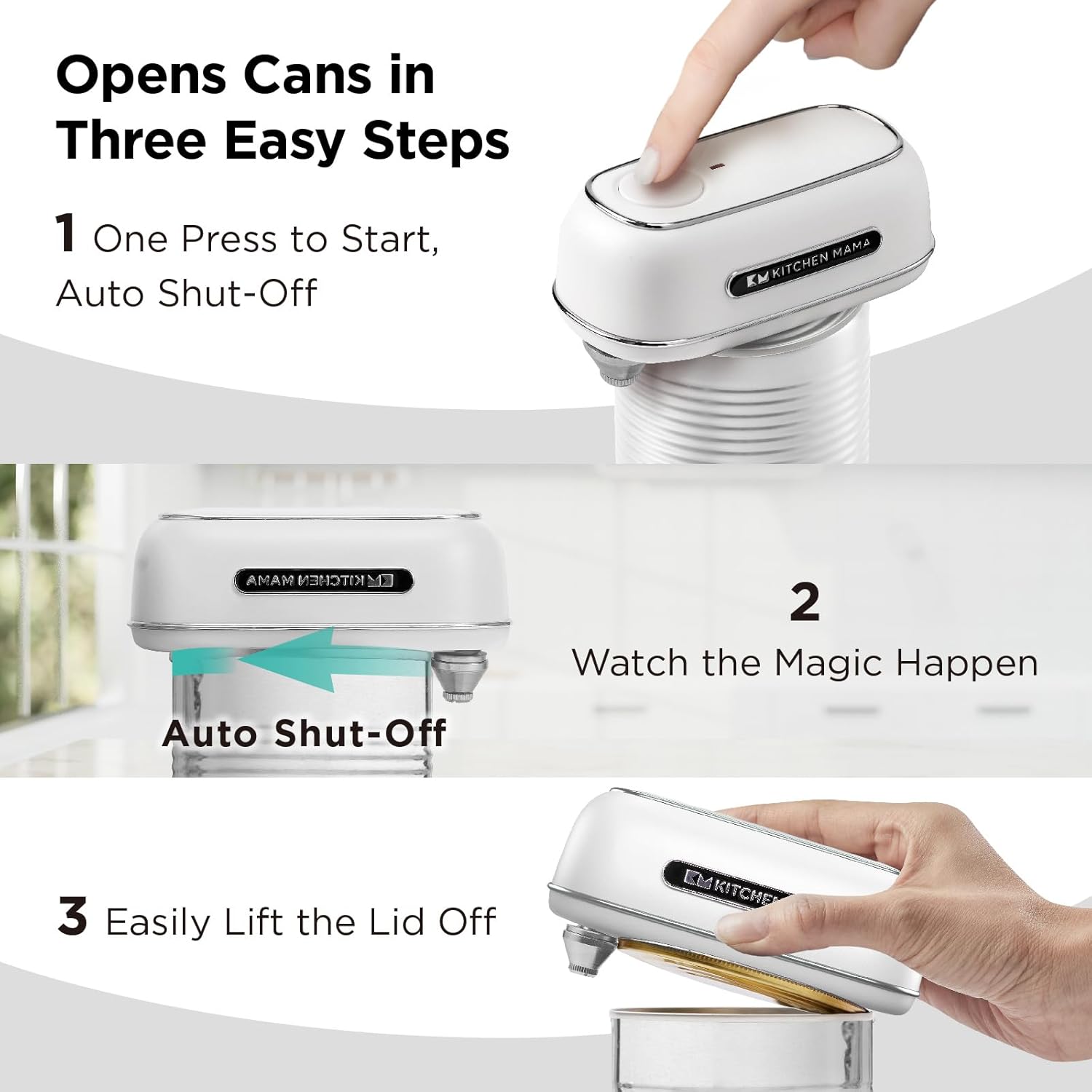
Image: Visual guide demonstrating the three-step process of using the electric can opener.
Note: The cutting action creates a smooth, safe edge on the can, eliminating sharp edges.
Blade Types and Suitable Cans
Your Kitchen Mama Orbit One comes with two interchangeable blades to handle various can types:
Triangular Blade
- Ideal for small cans (e.g., pet food), everyday staples, and family-size cans.
- Opens cans of any shape: round, oval, or rectangular.
Cylinder Blade
- Best for thick-walled cans and jumbo cans (96-109 oz).
- Use this blade if the red light blinks on smaller cans, indicating thicker metal.

Image: Illustrates the two blade types and their recommended use for different can sizes and thicknesses.
Maintenance
Cleaning
To clean your can opener, wipe the exterior with a damp cloth. Do not immerse the device in water. The cutting wheel can be cleaned with a small brush if food particles accumulate.
Storage
Store the can opener and its accessories in the provided storage box to keep your kitchen organized and protect the device.

Image: The can opener and its components neatly organized within the storage case.
Troubleshooting
Scenario 1: 5 Slow Blinking Red Lights (Low Battery)
If the red light blinks slowly five times, the battery is low. Press the button to release the blade and recharge the device.
Scenario 2: Steady Red Light (2 seconds) (Overload)
A steady red light for 2 seconds indicates an overload, often due to a thick-walled can. Press the button to release the blade. Switch to the Cylinder Blade and restart the cutting process at the same spot.
Scenario 3: Lid Cut but Stuck
This can occur with aluminum (non-magnetic) cans, vacuum-sealed cans, cans with thick contents, or extra-sticky adhesive. Gently lift the lid with your hand or a spoon. Please handle with care to avoid injury.
Scenario 4: Lid Not Fully Cut
If the lid is not fully cut, ensure the blade is tightened securely. Tighten the blade and restart the can opener at the same spot.
Video: Demonstrates common troubleshooting scenarios including low battery, overload, and issues with lid removal or incomplete cuts.
Specifications
- Brand: Kitchen Mama
- Model Number: CO5600-R
- Color: White
- Material: Stainless Steel
- Product Dimensions: 2.6"W x 4.8"H
- Item Weight: 8.8 ounces (0.25 Kilograms)
- Operation Mode: Automatic
- Wattage: 9.6
- Batteries: 1 Lithium Ion battery required (included)
Safety Information
- Keep out of reach of children.
- Do not attempt to open damaged or bulging cans.
- Ensure the can opener is clean and dry before use.
- Always handle the can lid with care after opening, even though the edges are smooth.
- Do not immerse the can opener in water.
- Use only the provided USB-C cable for charging.
Warranty and Support
For warranty information or product support, please visit the official Kitchen Mama website or contact their customer service. Keep your purchase receipt for warranty claims.
Related documentsCO5600-R


Ask a question about this manual
Ask about setup, troubleshooting, compatibility, parts, safety, or missing instructions. Manuals+ will review the question and use this page’s manual context to help answer it.