
1. Product Overview
The NOVOO Portable Power Station is a versatile and high-capacity power solution designed for various applications, including emergencies, camping, garden use, and other outdoor activities. With a robust 666Wh (180000mAh) capacity and 700W AC output, it provides reliable power for multiple devices.
Key Features:
- High Capacity: 666Wh / 180000mAh for extended power supply.
- Multiple Outputs: Includes 2 AC 220V outlets, 1 DC 12V/10A, 1 DC 11-50V/6A, 1 DC 12V cigarette lighter socket, 2 USB-A (22.5W max), and 1 USB-C PD 100W.
- Automatic Power Backup: Activates within 1 second during power failure to ensure continuous operation of devices.
- Portable Design: Equipped with a handle for easy transport.
- Informative LCD Display: Shows working status, power output, and remaining time.
- Integrated LED Light: Features three modes: constant, flashing, and SOS.
- Advanced Safety: Pure sine wave inverter and Battery Management System (BMS) protect against overcharge, over-discharge, short circuits, and overheating.
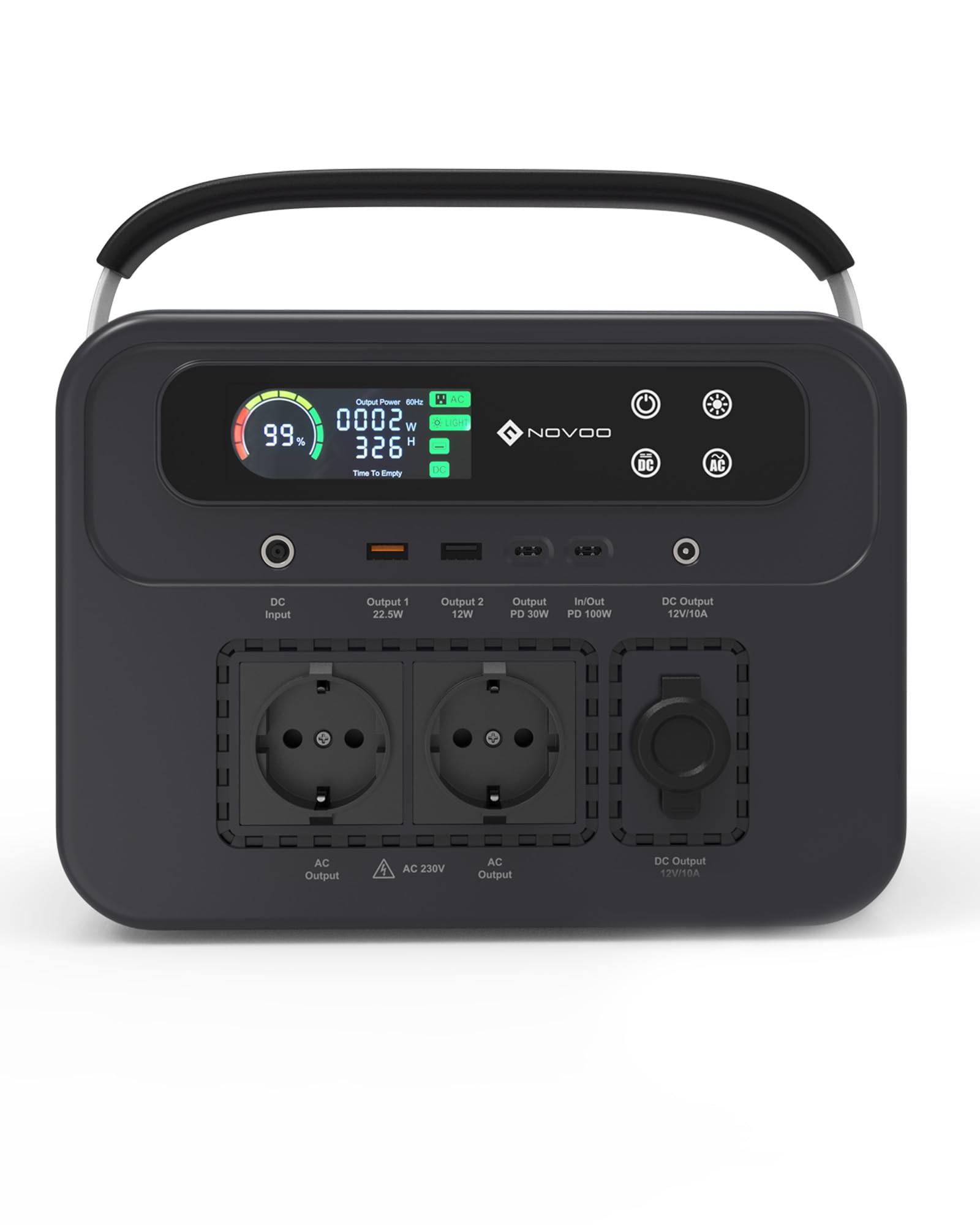
Figure 1: NOVOO Portable Power Station EU-700W, a compact and robust power solution.
2. Safety Instructions
Please read and understand all safety instructions before operating the power station. Failure to follow these instructions may result in electric shock, fire, or serious injury.
- Do not disassemble, repair, or modify the unit.
- Do not expose the unit to fire or extreme temperatures (above 40°C/104°F).
- Do not use or store the unit in direct sunlight or in hot environments.
- Keep the unit away from water, moisture, and corrosive substances.
- Ensure proper ventilation during use to prevent overheating.
- Do not insert foreign objects into the ports or vents.
- Keep out of reach of children and pets.
- Use only approved accessories and charging cables.
- If the unit emits smoke, unusual odors, or makes strange noises, discontinue use immediately and contact customer support.

Figure 2: The power station features a Battery Management System (BMS) for protection against overload, overcharge, overvoltage, over-discharge, short circuit, and overcurrent.
3. Product Components and Interface
Familiarize yourself with the various ports, buttons, and indicators on your NOVOO Portable Power Station.

Figure 3: Front and rear view of the power station with labeled input/output ports and controls.
- LED Display Screen: Shows battery level, output power, remaining time, and error indicators.
- Power Button: Turns the unit ON/OFF.
- AC Button: Activates/deactivates the AC output ports.
- DC Button: Activates/deactivates the DC output ports.
- Flashlight Button: Controls the integrated LED light (constant, flashing, SOS modes).
- DC/PV Input (11-50V/6A): For charging via solar panel (MPPT mode supported) or DC adapter.
- AC Output (230V/50Hz/700W): Two standard AC outlets for household appliances.
- USB-A Output (22.5W Max): Two USB-A ports for charging smartphones, tablets, etc.
- USB-C PD 100W (In/Out): Power Delivery port for fast charging compatible devices or recharging the power station.
- DC Output (12V/10A): For DC-powered devices.
- DC Output (Car Cigarette Port 12V/10A): For car appliances.
- LED Light: Integrated light for illumination.

Figure 4: Close-up of the colorful LED display screen, showing battery percentage, output wattage, and remaining hours.
4. Setup and Charging
Before first use, it is recommended to fully charge the power station. The unit supports charging and discharging simultaneously.
4.1 Initial Charge
Connect the power station to a wall outlet using the provided AC adapter until the battery indicator shows 100%.
4.2 Charging Methods
The NOVOO Portable Power Station offers four methods for recharging:
- AC Wall Outlet Charging:
Connect the provided AC adapter to a standard wall outlet. The power station can be fully charged in approximately 3.9 hours.

Figure 5: Recharging the power station using the included AC adapter from a wall socket.
- Solar Panel Charging (100W, not included):
Connect a compatible 100W solar panel (sold separately) to the DC/PV input port. The power station can be fully charged in approximately 7.4 hours under optimal sunlight conditions. Ensure the solar panel supports DC input 18-30V output or PD charging protocol.

Figure 6: The power station connected to a solar panel for eco-friendly charging.
- Car Charger Charging:
Connect the power station to your car's cigarette lighter socket using a car charger (not included). A full charge takes approximately 10.3 hours.

Figure 7: Recharging the power station on the go using a car charging port.
- USB-C PD 100W Charging:
Use a 100W Type-C PD charger (not included) to charge the power station. This method can fully charge the unit in approximately 7.4 hours.
5. Operating Instructions
5.1 Turning On/Off
Press and hold the Power Button for 3 seconds to turn the power station ON or OFF. The LCD display will illuminate.
5.2 Using AC Outputs
Press the AC Button to activate the AC outlets. The AC indicator on the LCD display will light up. Plug your devices into the 230V AC outlets. Press the AC Button again to turn off AC output when not in use.
5.3 Using DC Outputs (USB-A, USB-C, DC 12V, Car Port)
Press the DC Button to activate the DC output ports. The DC indicator on the LCD display will light up. Connect your USB, USB-C, or 12V DC devices. Press the DC Button again to turn off DC output when not in use.
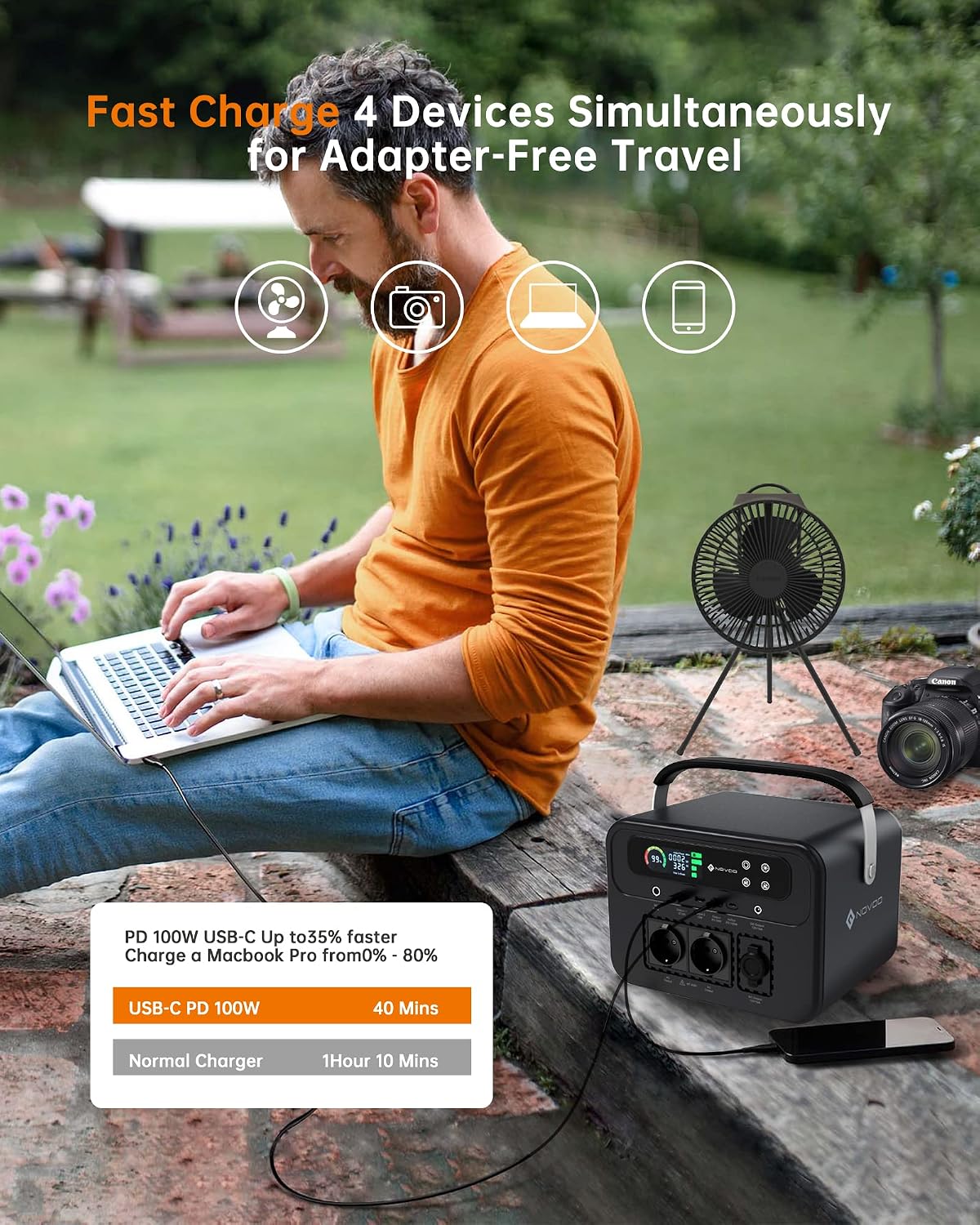
Figure 8: The power station can charge multiple devices simultaneously, including laptops, cameras, and fans.
5.4 Using the LED Flashlight
Press the Flashlight Button once for constant light. Press again for flashing mode. Press a third time for SOS mode. Press a fourth time to turn off the flashlight.

Figure 9: The integrated LED light offers Reading, Bright, and SOS modes for various situations.
6. Maintenance
6.1 General Care
- Clean the unit with a dry, soft cloth. Do not use abrasive cleaners or solvents.
- Keep the ventilation openings clear of dust and debris to ensure proper cooling.
- Avoid dropping or subjecting the unit to strong impacts.

Figure 10: The power station features a smart cooling system to maintain optimal operating temperature.
6.2 Storage
- Store the power station in a cool, dry place, away from direct sunlight and extreme temperatures.
- For long-term storage, charge the unit to 50-80% every 3-6 months to prolong battery life.
- Do not store the unit completely discharged.
7. Troubleshooting
If you encounter issues with your power station, refer to the following common problems and solutions:
| Problem | Possible Cause | Solution |
|---|---|---|
| Unit does not turn on | Battery is completely discharged; Power button not pressed correctly. | Charge the unit using an AC adapter. Press and hold the Power button for 3 seconds. |
| AC output not working | AC output not activated; Device draws too much power; Overload protection triggered. | Press the AC button to activate. Check device wattage (max 700W). Disconnect device, restart AC output. |
| DC/USB output not working | DC output not activated; Cable faulty; Device incompatible. | Press the DC button to activate. Try a different cable or device. |
| Unit not charging | Charger not connected properly; Charger faulty; Input port damaged. | Ensure all connections are secure. Try a different charging method or adapter. Contact support if issue persists. |
| USB-C PD port not working (as reported in reviews) | Internal fault; Software issue. | Try restarting the unit. Ensure the cable and device are compatible with PD 100W. If the issue persists, contact customer support for assistance. |
If the problem persists after trying these solutions, please contact NOVOO customer support.
8. Specifications
| Brand | NOVOO |
| Model Number | EU-700W |
| Capacity | 666 Wh / 180000 mAh |
| AC Output | 2 x 230V, 50Hz, 700W (Pure Sine Wave) |
| DC Input | 11-50V / 6A (Supports MPPT for solar) |
| USB-A Output | 2 x 22.5W Max (5V/3A, 9V/2A, 12V/1.5A) |
| USB-C PD Output | 1 x 100W Max (5V/3A, 9V/3A, 12V/3A, 15V/3A, 20V/5A) |
| DC Output | 1 x 12V/10A |
| Car Cigarette Port Output | 1 x 12V/10A |
| Dimensions (L x W x H) | 28.1 x 25.2 x 22.7 cm |
| Material | Aluminum, Steel, Durable Plastics |
| Color | Black |
| Components Included | Portable Power Station, AC Adapter & Cable, User Manual |
9. Warranty and Support
The NOVOO Portable Power Station comes with a 24-month warranty from the date of purchase. This warranty covers manufacturing defects and issues arising from normal use.
For technical support, warranty claims, or any questions regarding your product, please contact NOVOO customer service. Our friendly customer service team is available to assist you.
Please retain your proof of purchase for warranty validation.

Figure 11: What's included in the package: the power station, AC adapter, and user manual.


