
Introduction
This user manual provides comprehensive instructions for the setup, operation, and maintenance of your VTech ES2050 Digital Cordless Phone. Please read this manual thoroughly before using your new phone to ensure proper functionality and to take full advantage of its features.

Image: The VTech ES2050 digital cordless phone handset docked in its base unit. The phone is black with a clear display and a standard numeric keypad. The base unit is also black and features a circular message counter display.
Package Contents
Ensure all items are present in your package:
- VTech ES2050 Cordless Handset
- VTech ES2050 Base Unit
- Power Adapter for Base Unit
- Telephone Line Cord
- 2 x AAA NiMH Rechargeable Batteries
- User Manual (this document)
Setup
1. Battery Installation
- Open the battery compartment cover on the back of the handset.
- Insert the two AAA NiMH rechargeable batteries, observing the correct polarity (+ and -).
- Close the battery compartment cover securely.
2. Base Unit Connection
- Plug the small end of the power adapter into the power jack on the back of the base unit.
- Plug the large end of the power adapter into a standard electrical outlet.
- Plug one end of the telephone line cord into the telephone jack on the back of the base unit.
- Plug the other end of the telephone line cord into a telephone wall jack.
3. Initial Charging
Place the handset on the base unit. The charge indicator on the handset display will show that it is charging. For optimal battery performance, charge the handset for at least 16 hours before initial use.

Image: The VTech ES2050 phone and its base unit placed on a table in a modern living room, illustrating its compact design and how it fits into a home environment.
Operating Instructions
Making and Receiving Calls
- To Make a Call: Press TALK or SPEAKER, then dial the number.
- To Receive a Call: Press TALK or SPEAKER when the phone rings.
- To End a Call: Press END or place the handset back on the base unit.
Digital Answering Machine
The VTech ES2050 features a digital answering machine with up to 30 minutes of recording time.
- Playing Messages: Press the PLAY/STOP button on the base unit.
- Deleting Messages: Press the DELETE button on the base unit during message playback.
- Recording Outgoing Message: Refer to the detailed instructions in the full manual for custom outgoing message recording.

Image: A woman interacting with the VTech ES2050 phone, highlighting the digital answering system. The base unit shows a message counter, and a speech bubble indicates a recorded message, emphasizing the 30-minute recording capacity.
Nuisance Call Blocker
Block unwanted calls by adding numbers to the blacklist. The phone can block up to 100 numbers.
- To Block a Number: During a call, press the CALL BLOCK button (if available) or access the call block menu option.
- Managing Blocked Numbers: Access the Call Block menu through the handset settings to add, review, or remove blocked numbers.
Volume Booster
Amplify incoming audio for improved clarity and volume, especially useful for users with hearing difficulties.
- Activating Volume Boost: During a call, press the VOLUME BOOST button (often marked with a speaker icon and a plus sign) on the side of the handset.
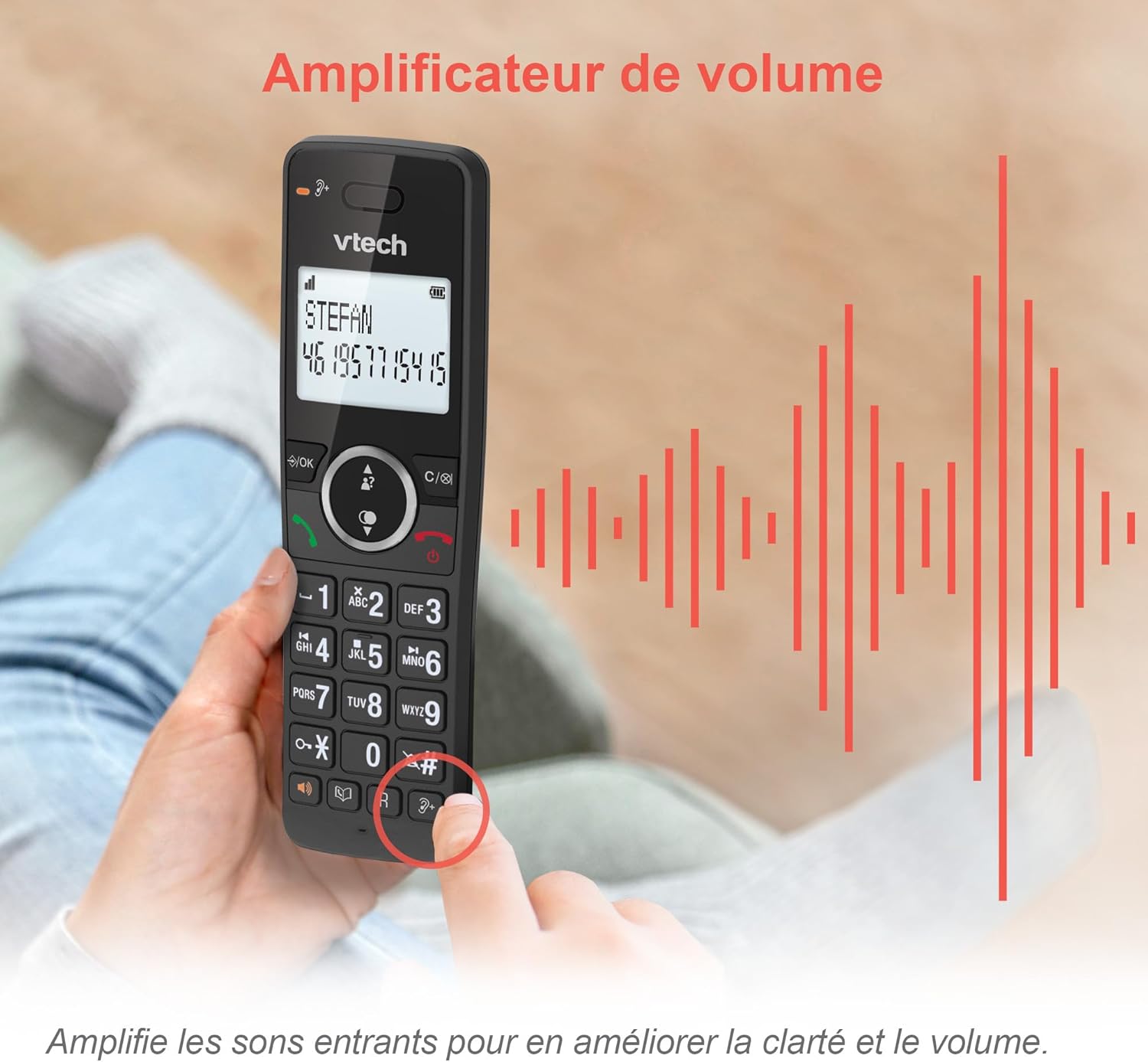
Image: A hand pressing the volume amplifier button on the VTech ES2050 handset, with sound waves emanating from the phone to visually represent the amplified audio feature.
Other Features
- Caller ID/Call Waiting: Displays caller information for incoming calls (requires subscription from your telephone service provider). Stores up to 20 caller ID records.
- Backlit Screen and Keypad: The LCD screen and keypad illuminate for easy viewing in low-light conditions.
- Alarm Function: Set an alarm to remind you of important events.
- Mute Function: Mute your microphone during a call so the other party cannot hear you.
- Redial: Quickly redial the last 10 numbers called.
- Phonebook: Store up to 100 names and numbers for quick dialing.
- Hands-free Speakerphone: Use the built-in speakerphone for hands-free conversations.
- ECO Mode: Reduces power consumption and transmission power when the handset is close to the base unit.

Image: A collage of four images demonstrating key features: the 100-entry phonebook, caller ID display with 20 call list entries, redialing the last 10 numbers, and the impressive 18-hour talk time / 250-hour standby battery life.
Maintenance
Cleaning Your Phone
Wipe the phone and base unit with a soft, damp cloth. Do not use cleaning sprays or harsh chemicals as they may damage the finish or electrical components.
Battery Care
- Use only the supplied rechargeable NiMH batteries.
- Do not dispose of batteries in a fire. They may explode.
- Do not open or mutilate the batteries. Released electrolyte is corrosive and may cause burns or injury to the eyes or skin.
- Dispose of batteries according to local regulations.
Troubleshooting
| Problem | Solution |
|---|---|
| No dial tone. |
|
| Handset does not charge. |
|
| Poor sound quality or static. |
|
| Answering machine not recording messages. |
|
Specifications
| Feature | Detail |
|---|---|
| Model Number | ES2050 |
| Color | Black |
| Screen Size | 2 Inches |
| Battery Type | 2 x AAA NiMH Rechargeable Batteries (included) |
| Talk Time | Up to 18 hours |
| Standby Time | Up to 250 hours |
| Answering Machine Recording Capacity | Up to 30 minutes |
| Phonebook Capacity | 100 names and numbers |
| Call Block Capacity | Up to 100 numbers |
| Caller ID Log Capacity | 20 records |
| Dimensions (L x W x H) | 18.3 x 12 x 10.2 cm (approximate for base and handset) |
| Country of Origin | China |
Warranty and Support
VTech products are designed for reliability and performance. For warranty information, please refer to the warranty card included with your purchase or visit the official VTech website. If you encounter any issues not covered in the troubleshooting section, please contact VTech customer support for assistance.
Please note that specific warranty terms and support availability may vary by region.


