
ECOXGEAR GDI-EXBULT510
ECOXGEAR EcoBoulder Ultra Bluetooth Speaker Instruction Manual
Model: GDI-EXBULT510
Product Overview
The ECOXGEAR EcoBoulder Ultra is a rugged, high-performance portable Bluetooth speaker designed for outdoor adventures. It delivers powerful 121dB sound with crisp highs, clear vocals, and deep bass. Built to withstand the elements, it is 100% waterproof and dirtproof (IP67 rated), and even floats. The speaker features customizable RGB LED lighting, long-lasting battery life, and the ability to wirelessly connect with up to 100 other ECOCAST and SoundExtreme speakers for an expansive audio experience.

Front view of the ECOXGEAR EcoBoulder Ultra speaker, showcasing its robust design and vibrant red and blue LED party lights.
Key Features:
- 100% Waterproof & Dirtproof (IP67): Designed to float and withstand submersion, rain, snow, and dust.
- Optimized for Massive Sound: 100-watt amplifier, 8-inch full-range speaker, 8-inch passive woofer, and 3-inch tweeter for up to 121 decibels of audio.
- Built-in Equalizer: Customize audio output with 5 proprietary digital DSP equalizer modes or adjust bass and treble.
- ECOCAST Built-in: Wirelessly connect up to 100 compatible ECOCAST and SoundExtreme speakers for true stereo sound.
- Addressable RGB LED Lighting: Customize colors, speed, brightness, and music sync via a mobile app. LEDCAST compatible.
- Extended Battery Life: Up to 50+ hours at average listening levels, 10+ hours at full volume. Recharges in 7-8 hours.
- Large LED Display & Back-Lit Buttons: Ensures visibility in various lighting conditions.
- Convenient Features: Rugged wheels, extra-long pull-out handle, 2.1A USB-C charging port, built-in bottle opener, 2 large cup holders.
Setup
Initial Charging:
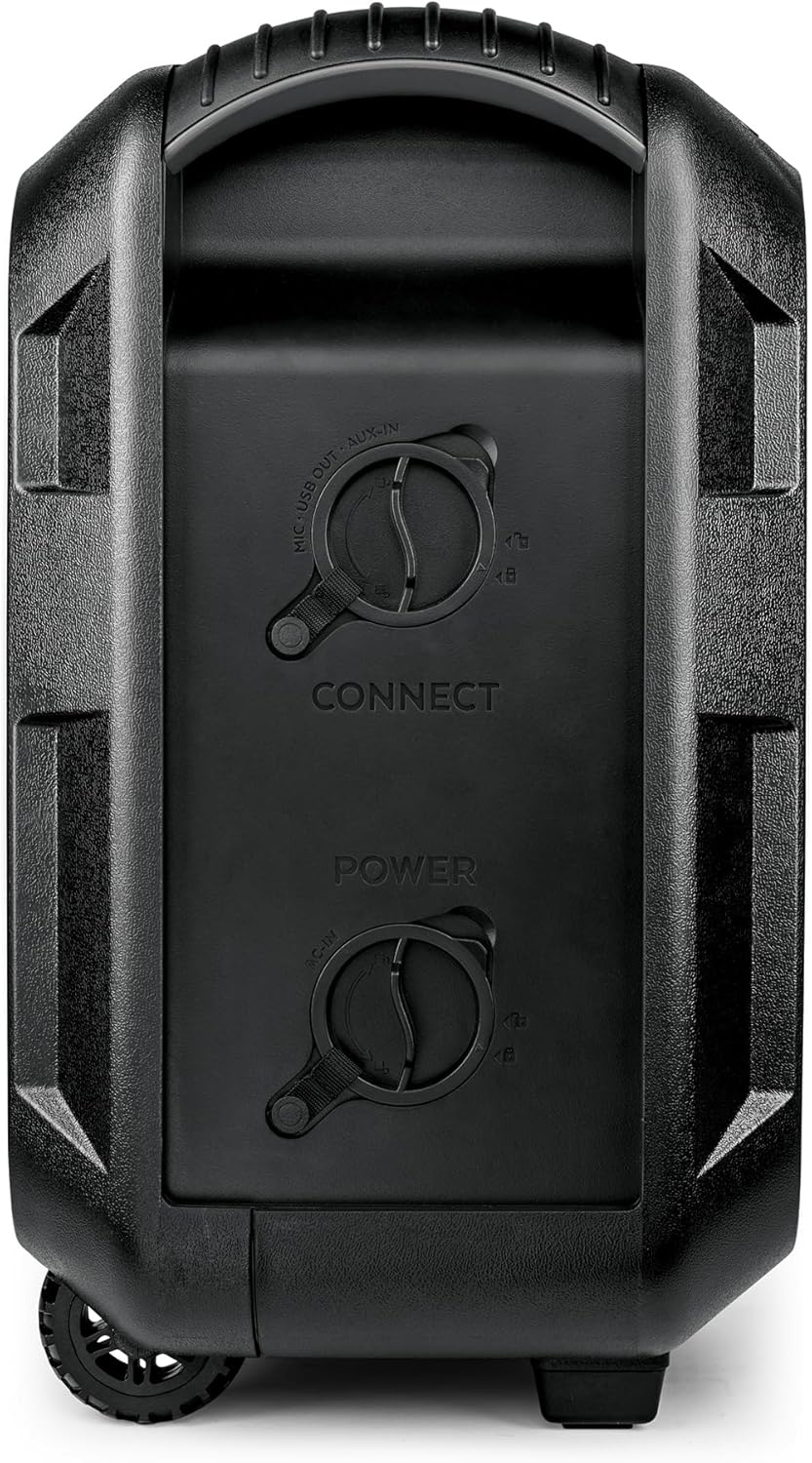
Before first use, fully charge the EcoBoulder Ultra speaker. Connect the included AC power cord to the speaker's power input port, located on the side panel, and then to a standard wall outlet. A full charge typically takes 7-8 hours. The battery indicator on the LED display will show charging progress.

Side view of the speaker, highlighting the sealed power and auxiliary input ports. Ensure these caps are securely closed when near water.
Powering On/Off:
To power on the speaker, press and hold the POWER button on the control panel. The LED display will illuminate. To power off, press and hold the POWER button again.
Close-up of the speaker's top control panel, showing the power button, master volume, and other controls.
Bluetooth Pairing:
- Ensure the speaker is powered on and in Bluetooth mode (indicated by 'BT' on the display). If not, press the SOURCE button until 'BT' is displayed.
- On your mobile device, enable Bluetooth and search for available devices.
- Select "ECOXGEAR EcoBoulder Ultra" from the list. Once paired, the speaker will confirm with an audible tone.
ECOCAST Linking (Multiple Speakers):
The EcoBoulder Ultra supports ECOCAST, allowing you to wirelessly connect up to 100 compatible ECOCAST and SoundExtreme speakers for a synchronized audio experience. This creates a true left and right stereo system.
- Power on all speakers you wish to link.
- On the primary speaker (the one connected to your Bluetooth device), press and hold the ECOCAST button until it enters pairing mode.
- On the secondary speakers, press the ECOCAST button briefly to connect. They will automatically link to the primary speaker.
- Ensure all speakers are within range for optimal performance.
Operating Instructions
Control Panel Functions:
- POWER: Press and hold to turn on/off.
- SOURCE: Cycle through audio sources (Bluetooth, AM/FM Radio, AUX-IN).
- MASTER VOLUME: Adjust overall speaker volume.
- MIC VOL: Adjust microphone input volume (if a microphone is connected).
- PLAY/PAUSE: Control media playback.
- SKIP TRACK: Navigate between tracks.
- EQ: Cycle through 5 preset equalizer modes.
- LIGHTS: Control LED party lights modes and colors.
Audio Sources:
The EcoBoulder Ultra supports audio playback from Bluetooth-enabled devices, AM/FM radio, and wired AUX-IN connections. Use the SOURCE button to switch between these options.
Customizing Audio with Equalizer:
Press the EQ button to select from five pre-programmed digital signal processing (DSP) equalizer modes. For personalized sound, you can also adjust bass and treble settings directly on the unit.
LED Party Lights:
The speaker features addressable RGB LED lighting. Use the LIGHTS button on the control panel to cycle through various light modes. For advanced customization of colors, speed, brightness, and music sync, download the free mobile app.
Charging External Devices:
The EcoBoulder Ultra includes a 2.1A USB-C charging port. This allows you to charge your portable devices, such as smartphones or tablets, directly from the speaker's internal battery.
Official lifestyle video demonstrating the ECOXGEAR EcoBoulder Ultra speaker's features in outdoor settings, including its portability, charging capabilities, and waterproof design.
Maintenance
Waterproof and Dirtproof Design:
The EcoBoulder Ultra is IP67 rated, meaning it is fully submersible in water up to 1 meter for 30 minutes and protected from dust ingress. It is designed to float, preventing loss in water bodies. Always ensure all port caps are securely closed before exposing the speaker to water or dirt.

The EcoBoulder Ultra speaker being lowered into water, demonstrating its waterproof capability and buoyant design.
Cleaning:
To clean the speaker, use a soft, damp cloth. Avoid using harsh chemicals or abrasive cleaners, as these can damage the finish or seals. For dirt or sand, rinse with fresh water and allow to air dry completely before storing or using again.
Battery Care:
To maximize battery lifespan, avoid fully discharging the speaker frequently. Recharge the battery when the low battery indicator appears. For long-term storage, charge the battery to approximately 50% and store in a cool, dry place. The speaker features drain ports on the bottom to allow water to exit after submersion, aiding in drying and preventing internal moisture buildup.

The underside of the EcoBoulder Ultra speaker, revealing the integrated bottle opener and drain ports designed to expel water.
Troubleshooting
| Problem | Possible Cause | Solution |
|---|---|---|
| Speaker does not power on. | Low battery; Power button not held long enough; Blown fuse. | Charge the speaker fully. Press and hold the POWER button for 3-5 seconds. Check and replace the internal fuse if necessary (refer to the user guide for fuse location and type). |
| Cannot pair via Bluetooth. | Speaker not in pairing mode; Device too far; Interference; Previously paired device connected. | Ensure speaker is in Bluetooth pairing mode. Move device closer to speaker. Turn off other Bluetooth devices. Disconnect from previously paired devices. |
| No sound or low volume. | Volume too low; Incorrect source selected; Audio cable not fully inserted. | Increase master volume on speaker and device. Press SOURCE button to select correct input. Ensure AUX cable is fully inserted. |
| ECOCAST linking fails. | Speakers out of range; Incorrect linking procedure. | Ensure speakers are within close proximity. Follow ECOCAST linking steps precisely (primary speaker holds button, secondary speakers press briefly). |
Specifications
- Model Name: ECOBOULDER ULTRA
- Model Number: GDI-EXBULT510
- Brand: ECOXGEAR
- Material: Plastic
- Speaker Type: Single Speaker
- Power Output: 100 Watts
- Signal-to-Noise Ratio: 121 dB
- Woofer Diameter: 8 Inches
- Tweeter Diameter: 3 Inches
- Connectivity Technology: Wireless (Bluetooth), Auxiliary, USB
- Wireless Communication Technology: Bluetooth 5.1
- Bluetooth Range: 100 Feet
- Water Resistance Level: Waterproof (IP67)
- Battery Life: Up to 50 Hours (average listening levels)
- Charging Time: 7.5 Hours
- Product Dimensions: 11.3"D x 15.5"W x 19.8"H
- Item Weight: 27 Pounds
- Included Components: 1x Boulder Ultra Speaker, 1x AC Power Cord, User Guide

Diagram showing the dimensions of the EcoBoulder Ultra speaker: 19.8 inches high, 15.5 inches wide, and 11.3 inches deep.
Warranty and Support
The ECOXGEAR EcoBoulder Ultra speaker comes with a limited warranty. For specific warranty terms and conditions, please refer to the detailed user guide included in the product packaging.
In case of any issues or for technical support, please contact Grace Digital, the manufacturer of ECOXGEAR products. They can assist with troubleshooting, replacement parts (such as batteries), and general inquiries.
For the most up-to-date support information, visit the official ECOXGEAR website or refer to the contact details provided in your product's user guide.
Ask a question about this manual
Ask about setup, troubleshooting, compatibility, parts, safety, or missing instructions. Manuals+ will review the question and use this page’s manual context to help answer it.