
Introduction
This manual provides essential information for the safe and efficient use of your Panasonic EU 7-in-1 Convertible 1 Ton 3 Star Inverter Split AC. Please read these instructions carefully before operating the unit and retain them for future reference. This air conditioner is designed to provide comfortable cooling for residential spaces.
Key features include 7-in-1 Convertible modes, Inverter Cooling Technology, a durable Copper Condenser Coil, Stabilizer Free Operation, and advanced PM0.1 and Ag Clean Plus filters for improved air quality.
Setup and Installation
Professional installation is highly recommended for split air conditioning units to ensure proper functioning and safety. Incorrect installation can lead to water leakage, electric shock, or fire.
Package Contents
Upon unpacking, verify that all components are present:
- 1 x Indoor Unit
- 1 x Outdoor Unit
- 1 x Remote Control
- 1 x User Manual (this document)
Placement Considerations
- Ensure the indoor unit is placed in a location that allows for optimal air circulation and easy access for maintenance.
- The outdoor unit requires adequate ventilation and should be installed on a stable surface, away from direct sunlight or heavy rain.
- The product dimensions are approximately 88D x 26W x 83.5H Centimeters for the indoor unit.
Electrical Requirements
The unit operates on 230 Volts (AC) and has a wattage of 1100 Watts. Ensure the electrical supply meets these requirements and that a dedicated circuit is used if necessary. This model features Stabilizer Free Operation, adapting to voltage fluctuations within a specified range.
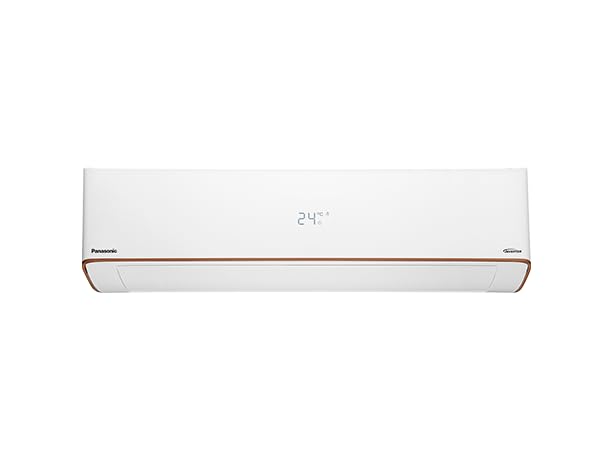
Image 1: Indoor unit of the Panasonic EU 7-in-1 Convertible 1 Ton 3 Star Inverter Split AC. This image illustrates the compact design of the indoor unit.
Operating Instructions
Your Panasonic AC is controlled via the included remote control. Familiarize yourself with the remote's functions for optimal use.
Basic Operation
- Power On/Off: Press the power button on the remote control to turn the unit on or off.
- Temperature Adjustment: Use the temperature up/down buttons to set your desired room temperature.
- Fan Speed: Adjust the fan speed to your preference (Auto, Low, Medium, High).
- Swing Function: Activate the 2-Way Swing function for even air distribution throughout the room.
Operating Modes
The AC offers various modes to suit different comfort needs:
- Auto Mode: The unit automatically selects the appropriate operating mode (Cool, Fan, Dry) based on the room temperature.
- Cool Mode: Provides powerful cooling. Set your desired temperature for optimal comfort.
- Fan Mode: Circulates air without cooling, useful for ventilation.
- Dry Mode: Reduces humidity in the room, ideal for humid conditions.
- Sleep Mode: Adjusts temperature gradually for comfortable sleep and energy saving.
- Eco Mode: Optimizes operation for energy efficiency while maintaining comfort.
7-in-1 Convertible Feature
This feature allows you to adjust the cooling capacity of the AC to match your specific needs and room size, offering flexibility and energy savings. Refer to your remote control's specific buttons or the on-screen display for selecting the desired convertible level.
Advanced Features
- Air Flow Volume: Experience a powerful 494 CFM air flow with a Shower Effect for rapid and widespread cooling.
- Humidity Control: Integrated sensors monitor and manage room humidity levels for enhanced comfort.
- Temperature Sensors: Precise temperature sensors ensure accurate and consistent cooling.
- Ambient Temperature Cooling: Designed to provide effective cooling even in extreme ambient temperatures up to 52 degrees Celsius.
Maintenance
Regular maintenance ensures the longevity and efficient performance of your air conditioner. Always turn off the power supply before performing any maintenance.
Air Filter Cleaning
Your AC is equipped with PM0.1 and Ag Clean Plus filters. These filters should be cleaned regularly (e.g., every two weeks or as needed) to maintain air quality and cooling efficiency.
- Open the front panel of the indoor unit.
- Carefully remove the air filters.
- Clean the filters using a vacuum cleaner or wash them gently with lukewarm water and mild detergent.
- Allow the filters to dry completely in a shaded area before re-installing them.
- Close the front panel securely.
Indoor Unit Cleaning
- Wipe the surface of the indoor unit with a soft, dry cloth. For stubborn dirt, use a damp cloth with a neutral detergent, then wipe dry.
- Do not use harsh chemicals, abrasive cleaners, or hot water, as this may damage the surface.
- The unit also features an auto-cleaning function to help maintain internal cleanliness.
Outdoor Unit Maintenance
The outdoor unit is protected by SuperDyma and Shield Blu Plus coatings for enhanced durability. Periodically check the outdoor unit for any obstructions (leaves, debris) around the condenser coils and clear them. Ensure proper airflow around the unit.
Troubleshooting
Before contacting customer support, please refer to the following common issues and solutions:
- No Power:
- Check if the power cord is securely plugged in.
- Verify if the circuit breaker has tripped.
- Ensure the remote control batteries are not depleted.
- Insufficient Cooling:
- Clean the air filters as described in the Maintenance section.
- Ensure no obstructions are blocking the indoor or outdoor unit's airflow.
- Check if windows and doors are closed to prevent cool air from escaping.
- Verify the temperature setting on the remote control.
- Ensure the unit is not operating in Fan or Dry mode.
- Unusual Noise:
- A slight gurgling sound is normal due to refrigerant flow.
- If the noise is loud or unusual, check for loose parts or contact service.
- Water Leakage from Indoor Unit:
- Ensure the unit is installed correctly and is level.
- Check if the drain hose is clogged or kinked.
- Contact a qualified technician for inspection.
If the problem persists after attempting these solutions, please contact Panasonic customer support.
Specifications
| Brand | Panasonic |
| Model Name | CS/CU-EU12AKY3 |
| Capacity | 1 Ton |
| BEE Star Rating | 3 Star |
| Cooling Power | 3450 Kilowatts |
| Annual Energy Consumption | 685.08 Kilowatt Hours |
| Noise Level | 53 Decibels |
| Refrigerant | R32 |
| Filter Type | PM0.1, Ag Clean Plus Filter |
| Core Material | Copper Condenser Coil |
| Voltage | 230 Volts (AC) |
| Wattage | 1100 Watts |
| Product Dimensions (D x W x H) | 88D x 26W x 83.5H Centimeters |
| Installation Type | Split System |
| Special Features | 7-in-1 Convertible, Air Flow Volume 494 CFM with Shower Effect, Copper Condenser Coil, Inverter Cooling Technology, Rotary Compressor, Various Modes, Stabilizer Free Operation, Humidity Control, Temperature Sensors, Ambient Temperature Cooling at 52°C, SuperDyma and Shield Blu Plus coatings. |
Warranty Information
Your Panasonic EU 7-in-1 Convertible Inverter Split AC comes with the following warranty:
- 1 Year Comprehensive Warranty on the entire unit.
- 9 Years Warranty on the Compressor.
Please retain your purchase receipt as proof of purchase for warranty claims. The warranty covers manufacturing defects under normal use conditions. For detailed terms and conditions, please refer to the warranty card included with your product or contact Panasonic customer support.
Customer Support
For any inquiries, technical assistance, or service requests, please contact Panasonic Life Solutions India Private Limited customer support:
- Customer Support Number: 18005727662
- Manufacturer: Panasonic Life Solutions India Private Limited
- Address: 12th Floor, Ambience Tower, Ambience Island, NH-8, Gurgaon - 122002, Haryana, India.
You can also visit the official Panasonic website for more information and support resources.


