
1. Introduction
Thank you for choosing the ALORAIR GF600A 600 CFM Air Mover Blower Fan. This manual provides essential information for the safe and efficient operation, maintenance, and troubleshooting of your new air mover. Please read all instructions carefully before use and retain this manual for future reference.
Safety Warnings
- Always ensure the unit is unplugged before performing any maintenance or cleaning.
- Do not operate the unit with a damaged cord or plug.
- Keep children and pets away from the operating unit.
- Ensure proper ventilation when operating in enclosed spaces.
- This appliance is not intended for use by persons (including children) with reduced physical, sensory or mental capabilities, or lack of experience and knowledge, unless they have been given supervision or instruction concerning use of the appliance by a person responsible for their safety.
2. Product Features
- Powerful Airflow: Features advanced centrifugal blower fan technology with 3-speed control (350-600 CFM) for industrial-grade airflow.
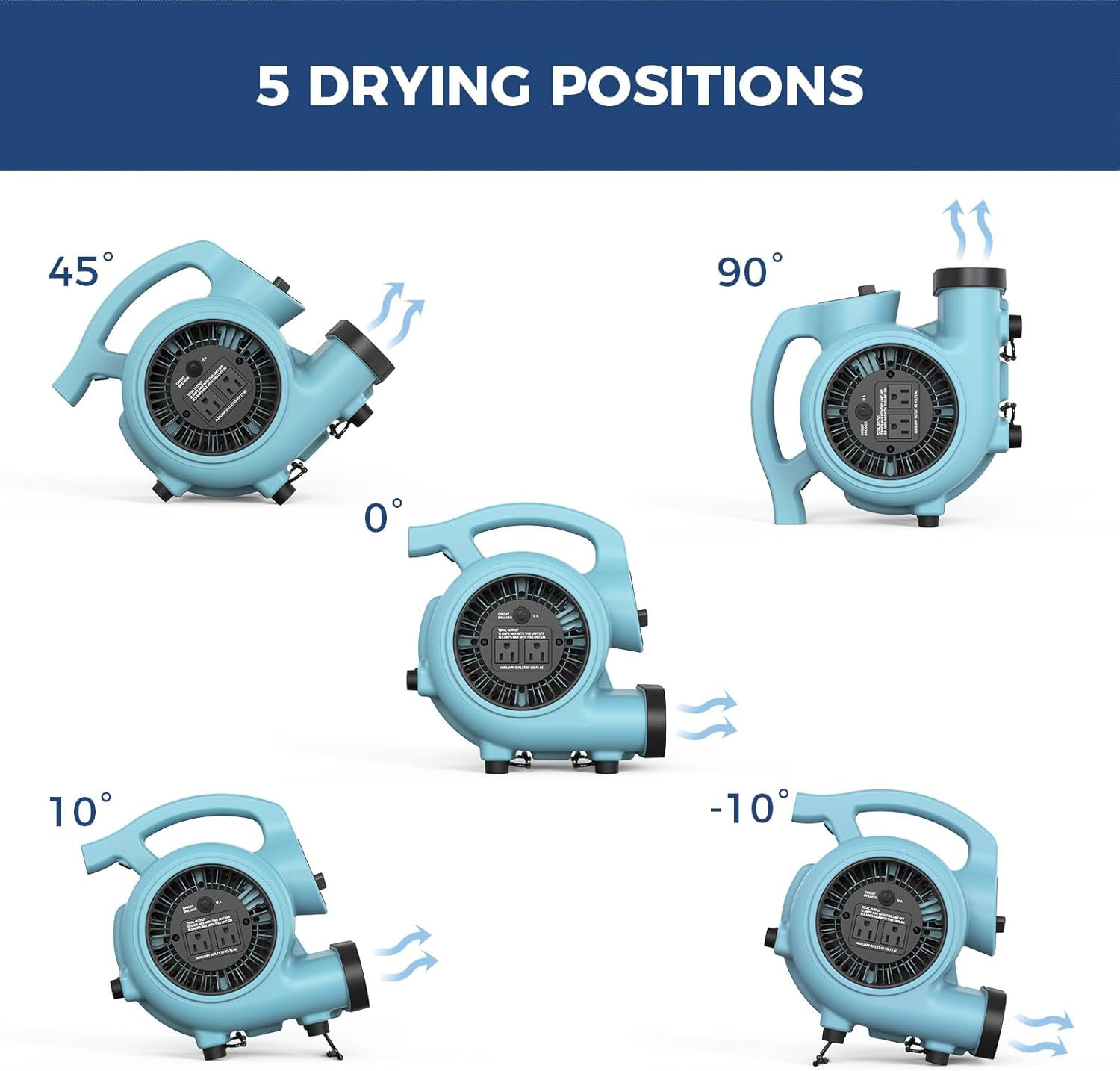
- Multi-Angle Airflow: Five adjustable angles (0°-90° + tilt) to target airflow precisely for various drying needs.
- Professional & Reliable: Integrated GFCI/thermal safeguards and commercial-grade 12A motor for continuous 24/7 use.
- Daisy Chain Capability: Allows connecting multiple units via a 25ft cord for whole-house drying systems (ensure cumulative maximum current does not exceed 12A).
- Lightweight & Portable: Weighs 7.94 lbs with an ergonomic handle for easy transport and stackable design for space-saving storage.
- Quiet Operation: Operates at whisper-quiet 60dB (lower noise levels at low speeds).
3. Setup
Unpacking
Carefully remove the ALORAIR GF600A Air Mover from its packaging. Inspect the unit for any signs of damage during transit. Retain packaging materials for future storage or shipping.
Positioning
Place the air mover on a stable, flat surface. Utilize the adjustable angles to direct airflow as needed. The unit can be positioned at 0°, 10°, -10°, 45°, and 90° angles to optimize drying or ventilation.
Power Connection
Plug the power cord into a standard 115V AC electrical outlet. Ensure the outlet is properly grounded.
Daisy Chain Setup (Optional)
For larger areas requiring more airflow, multiple GF600A units can be daisy-chained. Connect the power cord of a secondary unit into the auxiliary outlet on the primary unit. Ensure the total current draw of all connected units does not exceed 12 Amps to prevent circuit overload.
4. Operating Instructions
Power On/Off
Turn the control knob to the 'ON' position to activate the unit. Turn the knob to 'OFF' to power down.
Speed Control
The unit features 3-speed settings: Low (1), Medium (2), and High (3). Rotate the control knob to select the desired airflow speed.
- Low (350 CFM): Gentle ventilation, ideal for maintaining airflow in smaller areas.
- Medium (470 CFM): Balanced airflow for effective drying in average-sized spaces.
- High (600 CFM): Maximum airflow for rapid drying in larger or heavily saturated areas.
Adjustable Angles
The air mover can be adjusted to 5 different angles to optimize airflow direction:
- 0° Angle: Direct airflow in a straight line for focused drying.
- 10° Angle: Slightly elevated angle for customized drying.
- -10° Angle: Slightly lowered angle for alternative pushing positions.
- 45° Angle: Angled airflow for targeted drying in a diagonal direction.
- 90° Angle: Creates a right-angle airflow for versatile drying options.
Daisy Chain Operation
When using multiple units in a daisy chain, ensure the total current draw does not exceed 12 Amps. The integrated circuit breaker will trip if the load is too high, protecting the units from damage. Reset the circuit breaker if it trips.
5. Maintenance
Cleaning
Regularly clean the exterior of the unit with a soft, damp cloth. Ensure the air intake and exhaust grilles are free from dust and debris to maintain optimal airflow. Do not use harsh chemicals or abrasive cleaners.
Storage
The ALORAIR GF600A features a stackable design, allowing multiple units to be stored vertically to save space. Wrap the power cord neatly around the integrated cord management system before storing.
6. Troubleshooting
- Unit does not power on: Check if the power cord is securely plugged into a working outlet. Verify the circuit breaker on the unit has not tripped.
- Reduced airflow: Ensure air intake and exhaust grilles are not obstructed. Clean any accumulated dust or debris.
- Unusual noise or vibration: Check for any foreign objects inside the fan housing. Ensure the unit is placed on a stable surface.
- Circuit breaker trips repeatedly: Reduce the number of daisy-chained units or connect units to separate circuits to avoid exceeding the 12A limit.
7. Specifications
| Feature | Specification |
|---|---|
| Brand | ALORAIR |
| Model Name | GF600A |
| Color | GF600A Air Mover in Blue |
| Electric Fan Design | Blower |
| Power Source | AC |
| Style | 600 CFM |
| Product Dimensions | 11.81"D x 9.41"W x 12.52"H |
| Room Type | Industrial Spaces, Commercial Areas, Construction Sites, Home Use |
| Special Feature | Stackable, Daisy Chain, 5-Angle Design |
| Recommended Uses | Air Mover for Water Damage Restoration, Janitorial, Plumbing, Carpet Drying |
| Noise Level | 65 Decibels |
| Wattage | 115 watts |
| Number of Blades | 5 |
| Air Flow Capacity | 600 Cubic Feet Per Minute |
| Speed | 3 Speeds |
| Voltage | 115 Volts |
| Item Weight | 7.9 Pounds |
| Included Components | Cord |
| Indoor/Outdoor Usage | Indoor |
| Control Method | Touch |
| Efficiency | High Efficiency |
| Is Cordless? | No |
| Number of Power Levels | 3 |
| Motor Type | Brushed |
| Installation Type | Plug-and-Play |
| UPC | 702367600748 |
| Form Factor | Handheld |
| Mounting Type | Free Standing |
8. Warranty and Support
The ALORAIR GF600A Air Mover includes a 3-year warranty against manufacturing defects. For any inquiries or support, please contact our 24/7 U.S.-based support team. Your product is also Verified by Transparency, ensuring authenticity and quality.
9. Product Visuals



Official Product Video
ALORAIR 600 CFM Air Mover Blower Fan Overview: This video provides a detailed overview of the ALORAIR 600 CFM Air Mover Blower Fan, demonstrating its 3 speeds, 5 adjustable angles, and daisy chain capabilities. It highlights the product's features and applications for various drying and ventilation needs.


