
1. Introduction
This manual provides instructions for the safe and effective use of your TORRAS COOLIFY Cyber Alpha Thermochromic Limited Edition Neck Air Conditioner. This device is designed to provide personal cooling and heating through advanced thermoelectric cooling (TEC) modules and airflow systems. Please read this manual thoroughly before operating the device and retain it for future reference.
2. Safety Information
- Do not immerse the device in water or other liquids.
- Keep the device away from extreme temperatures, direct sunlight, and high humidity.
- Do not attempt to disassemble, repair, or modify the device. Contact authorized service personnel for assistance.
- Use only the provided charging cable and a compatible power adapter (20W fast charging recommended).
- Keep out of reach of children and pets.
- Avoid prolonged direct contact with the cooling/heating plates on bare skin to prevent discomfort or skin irritation, especially for individuals with sensitive skin or circulatory issues.
- Ensure hair is clear of the air vents to prevent tangling.
3. Package Contents
Verify that all items are present in your package:
- TORRAS COOLIFY Cyber Alpha Neck Air Conditioner
- USB-C Charging Cable
- User Manual
4. Product Overview
The COOLIFY Cyber Alpha features a wearable design with integrated cooling and heating elements, along with multiple air vents for comprehensive temperature control. The device includes a thermochromic semiconductor that changes color based on temperature.

Image: Front and back view of the TORRAS COOLIFY Cyber Alpha Neck Air Conditioner, showcasing its ergonomic design and vent placement.

Image: Side profile of the COOLIFY Cyber Alpha, highlighting the stainless steel painted finish and integrated components.
Key Components:
- Thermoelectric Cooling (TEC) Modules: Three modules covering a 14,975mm² cooling area, with 366 cooling particles, providing cooling and heating.
- Air Vents: Six upper and two lower air vents create a 3D convection system for enhanced airflow.
- Control Buttons: Located on the device for power, mode selection, and fan speed adjustment.
- Display Screen: Shows current mode, temperature, and battery status.
- USB-C Charging Port: For recharging the internal battery.
- Thermochromic Semiconductor: Changes color (Blue below 87°F, Orange above 87°F) to indicate temperature.
5. Setup
5.1 Charging the Device
- Connect the provided USB-C charging cable to the charging port on the device.
- Connect the other end of the cable to a 20W fast charging power adapter (not included) or a compatible USB power source.
- The display will indicate charging status. A full charge ensures optimal performance. The 6000mAh battery can charge to 80% in approximately 1.2 hours.
- The device can be used while charging.
5.2 Initial Fit and Adjustment
The COOLIFY Cyber Alpha features an ErgoFit design with an adjustable angle (approximately 75°) to accommodate various neck sizes. Gently adjust the device to ensure a comfortable and secure fit around your neck.

Image: Two individuals wearing the COOLIFY Cyber Alpha, demonstrating its ergonomic fit and how the airflow is directed around the neck.
5.3 App Connection (Optional)
For advanced control and personalized settings, download the official TORRAS COOLIFY app from your device's app store. Follow the in-app instructions to pair your COOLIFY Cyber Alpha via Bluetooth.
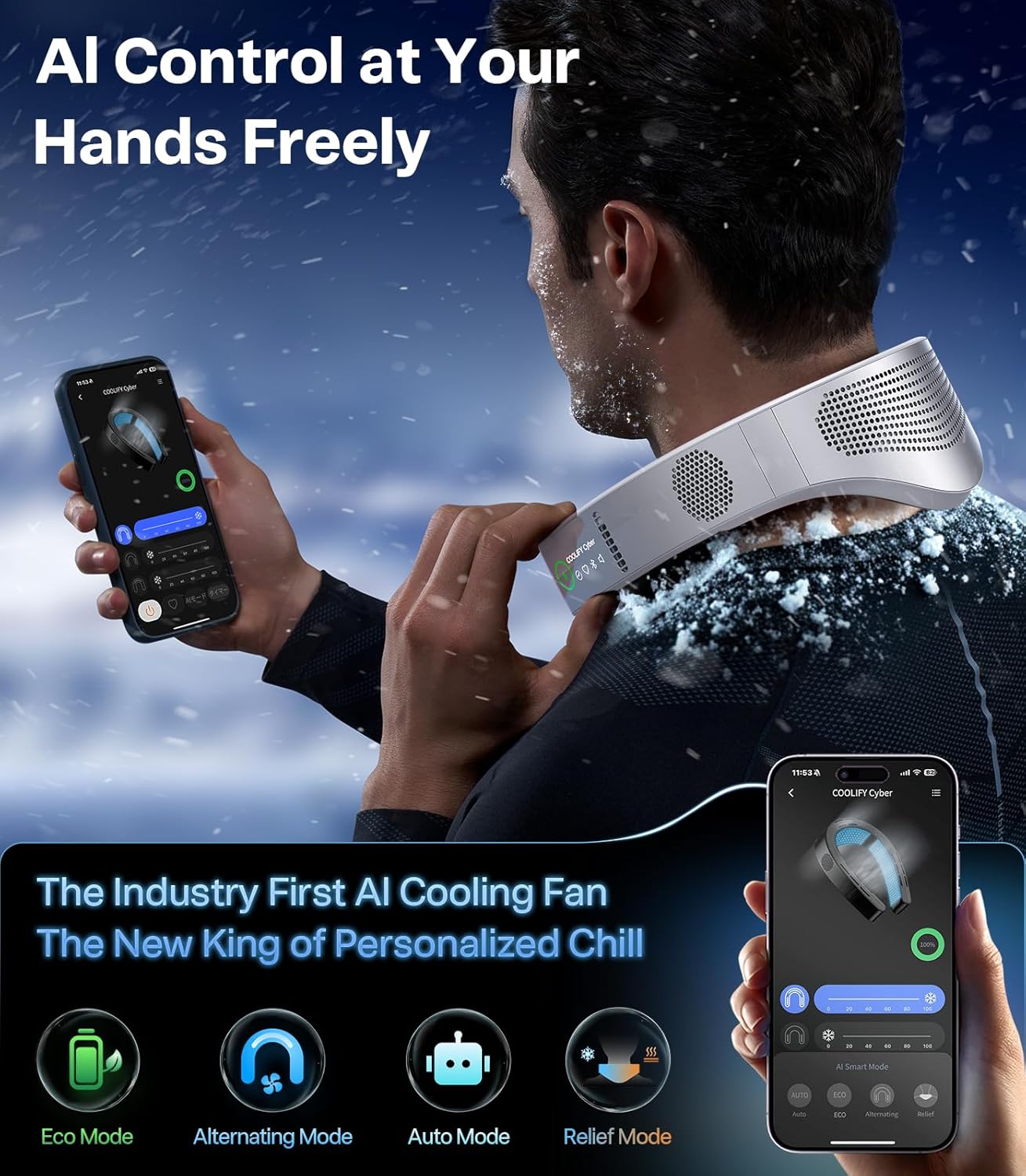
Image: A smartphone screen showing the TORRAS COOLIFY app interface, illustrating the AI control options for the neck air conditioner.
6. Operating Instructions
6.1 Power On/Off
Press and hold the power button (usually located on the side of the device) for a few seconds to turn the device on or off. The display will illuminate upon activation.
6.2 Mode Selection
The COOLIFY Cyber Alpha offers multiple operating modes:
- Cooler Mode: Activates the TEC modules and fans to provide a cooling sensation. The thermochromic semiconductor will shift to blue below 87°F.
- Heat Therapy Mode: Activates the TEC modules to provide warmth. The thermochromic semiconductor will shift to orange above 87°F.
- Fan Mode: Operates only the fans to circulate ambient air without active cooling or heating.
Cycle through modes by pressing the mode button (refer to the device's physical buttons for exact layout).

Image: Close-up of the thermochromic semiconductor, illustrating its color-shifting capability from orange (heat) to blue (cool) based on temperature changes.
6.3 Fan Speed/Intensity Adjustment
Adjust the fan speed or cooling/heating intensity by pressing the dedicated control buttons on the device. Multiple levels are available to suit personal preference.

Image: A diagram illustrating the extensive cooling area (14,975mm²) and the distribution of 366 cooling particles within the device, contributing to its cooling efficiency.
6.4 AI Control and Smart Modes (via App)
When connected to the app, you can access additional AI-powered modes:
- Eco Mode: Optimizes settings for energy efficiency while maintaining comfort.
- Alternating Mode: Alternates cooling zones and adjusts intensity to prevent numbness and provide consistent refreshment.
- Auto Mode: Intelligently senses ambient temperature and adjusts cooling or heating automatically for optimal comfort.
- Relief Mode: Enhances blood circulation through hot and cold exchange.

Image: A person wearing the COOLIFY Cyber Alpha, with visual effects depicting immersive cooling airflow around the neck and upper body.
7. Maintenance
7.1 Cleaning
- Wipe the device with a soft, dry cloth.
- Do not use abrasive cleaners, solvents, or harsh chemicals.
- Ensure the air vents are free from dust and debris. Use a soft brush or compressed air if necessary.
7.2 Storage
When not in use for extended periods, store the device in a cool, dry place, away from direct sunlight and extreme temperatures. Ensure the device is fully charged before storing to prolong battery life.
8. Troubleshooting
- Device not turning on: Ensure the device is charged. Connect it to a power source and try again.
- No cooling/heating effect: Check if the correct mode is selected. Ensure the device is properly positioned on the neck. If using in very high ambient temperatures, the cooling effect may be less noticeable.
- Poor airflow: Check if the air vents are obstructed. Clean any dust or debris.
- App connectivity issues: Ensure Bluetooth is enabled on your smartphone and the device is within range. Restart both the device and the app.
- Device feels too tight: Gently adjust the flexible arms of the device to achieve a more comfortable fit.
9. Specifications
| Feature | Specification |
|---|---|
| Product Dimensions | 10 x 8.2 x 3.9 inches (10"D x 8.2"W x 3.9"H) |
| Item Weight | 3.16 pounds |
| Item Model Number | TORRAS COOLIFY Cyber Alpha |
| Batteries | 2 Lithium Polymer batteries required (included) |
| Battery Capacity | 6000mAh |
| Form Factor | Wearable Neck |
| Cooling Power | 18000 British Thermal Units |
| Special Feature | Programmable |
| Color | Stainless Steel |
| Power Source | Battery Powered |
| Control Method | Touch, App |
10. Warranty and Support
TORRAS provides a 1-year full coverage warranty for the COOLIFY Cyber Alpha, ensuring peace of mind and free replacement service for manufacturing defects or malfunctions under normal use. This product is designed for long-term use.
How to Contact Support:
For any inquiries, technical assistance, or warranty claims, please contact TORRAS customer support through the following methods:
- Go to your order history.
- Select the order for your COOLIFY Cyber Alpha.
- Click on "Problems with orders" or "Contact the seller".
- Submit your question or issue.
A 24/7 expert team is available to provide fast and friendly support, with replies typically within 12 hours.
Kind Reminder: If you receive a product that is not new (e.g., unsealed plastic bag, used product) or has weak cooling, low airflow, or fails to charge, please contact support promptly for replacement.