
Introduction
Thank you for choosing the Jimmyjane Hello Touch Pro. This device is designed to transform your fingertips into precision vibration tools, offering focused and intense stimulation. This manual provides essential information for the safe and effective use of your new finger massagers and their wireless rechargeable case.
Important Safety Information
Please read all instructions carefully before use and retain this manual for future reference. Failure to follow these safety guidelines may result in injury or damage to the product.
- This product is intended for external use only.
- Do not use on swollen, inflamed, or broken skin. Discontinue use if irritation or discomfort occurs.
- Consult a healthcare professional before use if you have any medical conditions or concerns.
- Keep out of reach of children.
- Do not immerse the charging case in water. The finger massagers are splash-resistant, not waterproof.
- Use only the provided charging cable or a certified USB charger.
- Do not attempt to disassemble or modify the product.
- Store in a cool, dry place away from direct sunlight and extreme temperatures.
Package Contents
Verify that all items are present in your package:
- 2 x Hello Touch Pro Finger Massagers
- 1 x Wireless Rechargeable Charging Case (also functions as remote)
- 2 x Silicone Finger Sleeves
- 1 x USB Charging Cable
- 1 x User Manual (this document)

Image: Contents of the Jimmyjane Hello Touch Pro package, showing the charging case, two finger massagers, and two silicone sleeves.
Setup
1. Initial Charging
Before first use, fully charge both the finger massagers and the charging case. Refer to the "Charging" section for detailed instructions.
2. Attaching Silicone Sleeves
The silicone finger sleeves provide a comfortable and secure fit. To attach:
- Gently slide a silicone sleeve over the vibrating tip of each finger massager.
- Ensure the sleeve is seated properly and securely.
Operating Instructions
Powering On/Off the Massagers
Each finger massager has a single button for control.
- To power on: Press and hold the button on a massager for 2 seconds. It will start vibrating.
- To power off: Press and hold the button on a massager for 2 seconds.

Image: Front and back view of a single finger massager, highlighting the control button.
Changing Vibration Functions
The Hello Touch Pro offers 10 customizable vibration functions.
- While a massager is on, short press the button to cycle through the 10 vibration patterns.
- The massagers can be controlled individually or simultaneously.
Using the Wireless Remote (Charging Case)
The charging case doubles as a wireless remote control for both massagers.
- Ensure both massagers are removed from the case and powered on.
- The case has a button on its exterior. Press and hold this button for 2 seconds to power on/off both massagers simultaneously.
- Short press the button on the case to cycle through the 10 vibration patterns for both massagers simultaneously.
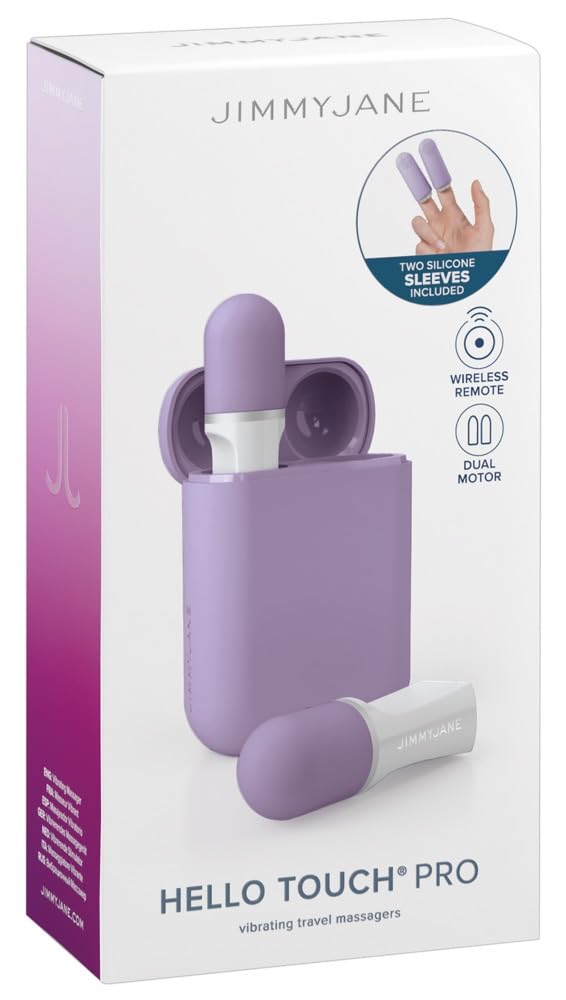
Image: The closed charging case, which serves as the wireless remote control.
Charging
The Jimmyjane Hello Touch Pro features a USB-rechargeable design for both the massagers and the charging case.
Charging the Finger Massagers
- Ensure the massagers are clean and dry.
- Insert each finger massager into its designated slot within the charging case. They will magnetically connect.
- The indicator light on the case will show charging status (e.g., blinking while charging, solid when fully charged).

Image: Finger massagers inserted into the charging case.
Charging the Charging Case
- Connect the provided USB charging cable to the charging port on the case.
- Plug the other end of the USB cable into a standard USB power adapter (not included) or a computer USB port.
- The indicator light on the case will show charging status.
- Once fully charged, disconnect the charging cable.
Cleaning and Maintenance
Proper cleaning and maintenance will ensure the longevity and hygiene of your Hello Touch Pro.
- Cleaning the Massagers: The finger massagers are splash-resistant. Clean them with mild soap and warm water after each use. Rinse thoroughly and pat dry with a lint-free cloth.
- Cleaning the Silicone Sleeves: The silicone sleeves can be removed and washed with mild soap and water. Allow them to air dry completely before reattaching.
- Cleaning the Charging Case: Wipe the charging case with a damp cloth. Do not immerse the case in water.
- Storage: Store the device in its charging case in a clean, dry place away from direct sunlight and extreme temperatures.
Troubleshooting
If you encounter any issues with your Hello Touch Pro, please refer to the following common solutions:
| Problem | Possible Cause / Solution |
|---|---|
| Massagers not turning on/vibrating. |
|
| Charging case not charging. |
|
| Remote control (case) not working. |
|
If the problem persists after trying these solutions, please contact Jimmyjane customer support.
Specifications
- Model: JJ10525
- Brand: Jimmyjane
- Power Source: USB Rechargeable (Massagers & Case)
- Vibration Functions: 10
- Material: Body-safe Silicone (massager tips), ABS Plastic (case)
- Color: Lavender
- Features: Splash-resistant design, Wireless Remote Control (integrated into case)
Warranty and Support
For warranty information, product support, or to purchase replacement parts, please visit the official Jimmyjane website or contact their customer service department. Please have your model number (JJ10525) and proof of purchase available when contacting support.
Website: www.jimmyjane.com