
Introduction
This manual provides comprehensive instructions for the proper use and maintenance of your Tayfun Vaillant VAI8-025WNI Multi Inverter Air Conditioner Remote Control. Please read this manual carefully before operating the remote control to ensure optimal performance and longevity of your device. This remote is designed for compatibility with Vaillant VAI8-025WNI Multi Inverter air conditioner models.
Product Overview
The Tayfun Vaillant VAI8-025WNI remote control features a user-friendly design with clearly labeled buttons and a digital display for easy operation of your air conditioner.
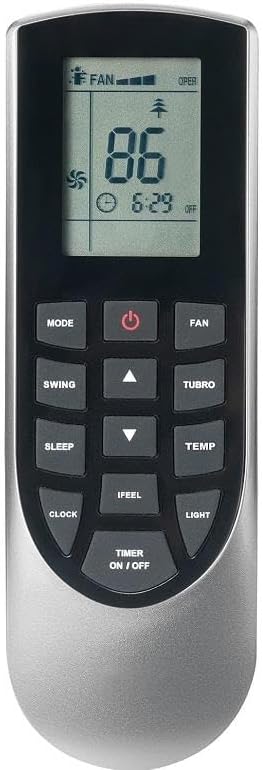
Image 1: Front view of the Tayfun Vaillant VAI8-025WNI Multi Inverter Air Conditioner Remote Control. The remote is silver and black, featuring a digital display at the top showing temperature, fan speed, and time. Below the display are various function buttons including Power, Mode, Fan, Swing, Turbo, Sleep, Temp, Clock, iFeel, Light, and Timer On/Off, along with up and down arrow buttons for adjustments.
Remote Control Buttons and Display
- Power Button (⏻): Turns the air conditioner on or off.
- MODE: Cycles through operating modes (e.g., Cool, Heat, Fan, Dry, Auto).
- FAN: Adjusts the fan speed (e.g., Low, Medium, High, Auto).
- SWING: Controls the vertical louver movement for air distribution.
- TURBO: Activates rapid cooling or heating for quick temperature changes.
- SLEEP: Engages sleep mode, which adjusts temperature and fan speed for comfortable sleep.
- TEMP (▲ / ▼): Increases or decreases the set temperature.
- CLOCK: Sets or displays the current time.
- IFEEL: Activates the 'iFeel' function, which senses the temperature at the remote's location for more precise comfort.
- LIGHT: Turns the display light on or off.
- TIMER ON / OFF: Sets the timer for automatic power on or off.
The digital display shows the current temperature setting, operating mode, fan speed, timer status, and current time.
Setup
1. Battery Installation
- Open the battery compartment cover on the back of the remote control.
- Insert two new AAA batteries, ensuring the (+) and (-) terminals match the markings inside the compartment.
- Close the battery compartment cover securely.
2. Compatibility Check
Before use, verify that this remote control is compatible with your specific air conditioner model. Locate the label on the right side of your wall-mounted air conditioner unit, which displays the model number. Compare this model number with the VAI8-025WNI model number specified for this remote control. If the model numbers match, the remote control will operate your air conditioner without issues.
Operating Instructions
Point the remote control directly at the air conditioner's receiver when operating.
1. Power On/Off
Press the ⏻ (Power) button once to turn the air conditioner on. Press it again to turn the air conditioner off.
2. Selecting Operating Mode
Press the MODE button repeatedly to cycle through the available operating modes:
- AUTO: The air conditioner automatically selects the operating mode based on the room temperature.
- COOL: For cooling the room.
- DRY: For dehumidifying the room.
- FAN: Operates only the fan, without cooling or heating.
- HEAT: For heating the room.
3. Adjusting Temperature
In COOL or HEAT mode, press the TEMP ▲ button to increase the temperature or the TEMP ▼ button to decrease it. The set temperature will be displayed on the remote's screen.
4. Adjusting Fan Speed
Press the FAN button repeatedly to select the desired fan speed (e.g., Auto, Low, Medium, High). The selected fan speed will be indicated on the display.
5. Swing Function
Press the SWING button to activate or deactivate the automatic vertical louver movement, which helps distribute air evenly throughout the room.
6. TURBO Function
Press the TURBO button to quickly reach the desired temperature. This function operates the air conditioner at maximum power for a short period.
7. SLEEP Mode
Press the SLEEP button to activate sleep mode. This mode adjusts the temperature and fan speed gradually over time to maintain a comfortable sleeping environment while conserving energy.
8. Setting the Clock
Press the CLOCK button. Use the TEMP ▲ and TEMP ▼ buttons to set the current time. Press CLOCK again to confirm.
9. IFEEL Function
Press the IFEEL button to activate this function. The remote control will then measure the temperature at its location and send this information to the air conditioner, allowing the unit to adjust its operation for more precise comfort where you are.
10. LIGHT Function
Press the LIGHT button to turn the air conditioner's display light on or off.
11. Timer ON/OFF
Press the TIMER ON / OFF button to set a time for the air conditioner to automatically turn on or off. Use the TEMP ▲ and TEMP ▼ buttons to adjust the desired time. Press TIMER ON / OFF again to confirm or cancel the timer.
Maintenance
1. Battery Replacement
Replace batteries when the remote control's display becomes dim or the remote fails to operate the air conditioner. Always replace both batteries simultaneously with new AAA batteries. Do not mix old and new batteries or different types of batteries.
2. Cleaning the Remote Control
Wipe the remote control with a soft, dry cloth. Do not use liquid cleaners, abrasive cleaners, or chemical sprays, as these may damage the remote's surface or internal components.
3. Storage
If the remote control will not be used for an extended period, remove the batteries to prevent leakage and potential damage to the device.
Troubleshooting
- Remote control not working:
- Check if the batteries are inserted correctly with the correct polarity.
- Replace old batteries with new ones.
- Ensure there are no obstructions between the remote control and the air conditioner's receiver.
- Make sure you are within the effective operating range of the air conditioner.
- Air conditioner not responding to commands:
- Verify that the remote control's model number matches your air conditioner's model number.
- Check if the air conditioner unit is powered on.
- Display is dim or blank:
- Replace the batteries.
Specifications
- Brand: Tayfun
- Model: VAI8-025WNI
- Compatibility: Vaillant VAI8-025WNI Multi Inverter Air Conditioners
- Material: 1st Class ABS Plastic
- Sensor: Super fast sensor for responsive operation (e.g., iFeel function)
- Keypad: Soft keypad for comfortable use
- Power Source: 2 x AAA Batteries (not included)
- First Available Date: February 6, 2024
Warranty and Support
Specific warranty information for this product is not provided in this manual. For details regarding warranty coverage, technical support, or service inquiries, please contact the seller or the manufacturer directly. Ensure you have your purchase receipt and product model number available when seeking support.