
1. Introduction
Thank you for choosing the Ingco 20V Lithium-Ion Rotary Hammer Drill CRHLI20168. This manual provides essential information for the safe and efficient operation, maintenance, and troubleshooting of your new tool. Please read this manual thoroughly before first use and keep it for future reference.
The Ingco CRHLI20168 is a versatile cordless rotary hammer drill designed for drilling, hammer drilling, and light chiseling tasks in various materials including concrete, masonry, wood, and metal. Its 20V lithium-ion battery provides cordless convenience and powerful performance.
2. General Safety Instructions
WARNING: Read all safety warnings, instructions, illustrations, and specifications provided with this power tool. Failure to follow all instructions listed below may result in electric shock, fire, and/or serious injury.
Work Area Safety:
- Keep the work area clean and well-lit. Cluttered or dark areas invite accidents.
- Do not operate power tools in explosive atmospheres, such as in the presence of flammable liquids, gases, or dust. Power tools create sparks which may ignite the dust or fumes.
- Keep children and bystanders away while operating a power tool. Distractions can cause you to lose control.
Electrical Safety:
- Power tool plugs must match the outlet. Never modify the plug in any way.
- Avoid body contact with earthed or grounded surfaces, such as pipes, radiators, ranges, and refrigerators. There is an increased risk of electric shock if your body is earthed or grounded.
- Do not expose power tools to rain or wet conditions. Water entering a power tool will increase the risk of electric shock.
Personal Safety:
- Always wear eye protection. Use safety glasses, goggles, or a face shield.
- Wear hearing protection when operating the tool for extended periods.
- Dress properly. Do not wear loose clothing or jewelry. Keep your hair and clothing away from moving parts.
- Stay alert, watch what you are doing, and use common sense when operating a power tool.
3. Product Components
Familiarize yourself with the components of your Ingco Rotary Hammer Drill before operation.
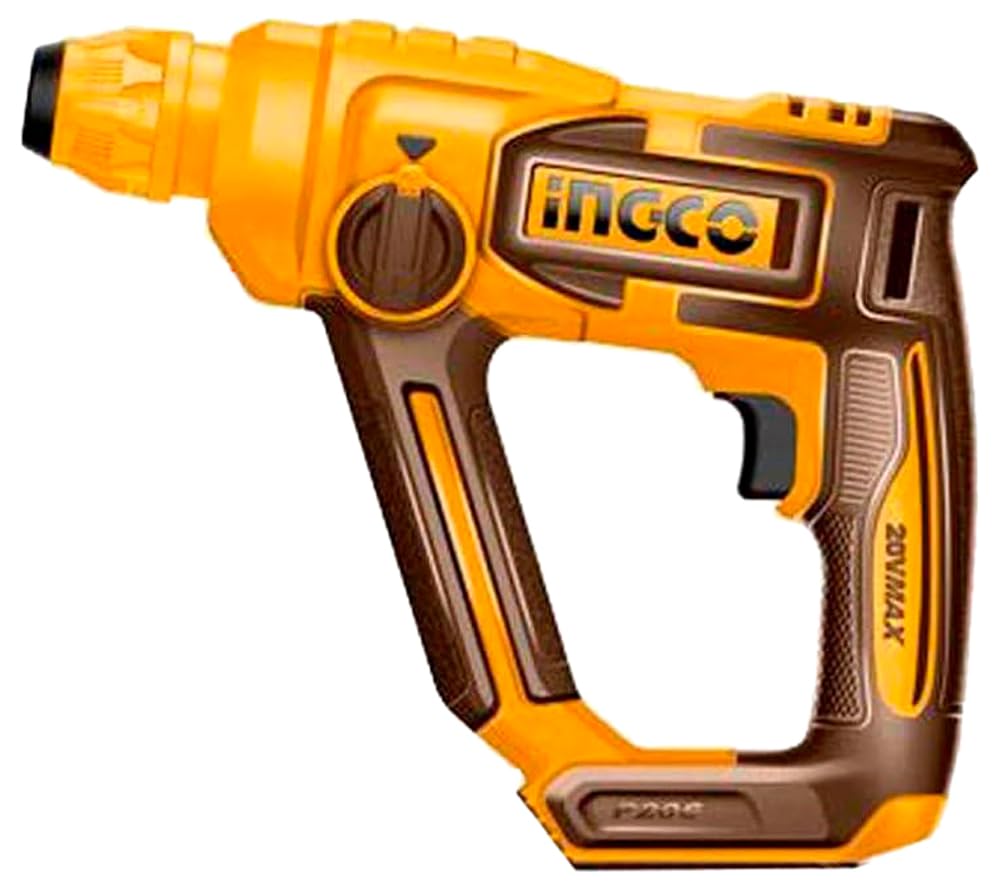
Figure 1: Ingco 20V Lithium-Ion Rotary Hammer Drill CRHLI20168. This image shows the main body of the rotary hammer drill, including the handle, chuck, and battery slot. The tool is yellow and black.
- Chuck: For holding drill bits and chisels.
- Mode Selector Switch: To select drilling, hammer drilling, or chiseling mode.
- Trigger Switch: Activates the tool and controls speed.
- Forward/Reverse Switch: Changes the rotation direction.
- Auxiliary Handle: Provides additional grip and control.
- Depth Gauge: For setting drilling depth.
- Battery Pack: 20V Lithium-Ion battery (sold separately or included in kit).
- LED Work Light: Illuminates the work area.
4. Setup
4.1 Battery Installation and Charging:
- Ensure the battery pack is fully charged before first use. Refer to the battery charger manual for charging instructions.
- To install the battery, align the battery pack with the receptacle on the tool handle and slide it in until it clicks into place.
- To remove the battery, press the battery release button and slide the battery pack out.
4.2 Bit Installation:
- Always ensure the tool is switched off and the battery is removed before changing bits.
- Pull back the chuck sleeve and insert the SDS-Plus drill bit or chisel into the chuck.
- Rotate the bit slightly until it engages with the locking mechanism.
- Release the chuck sleeve. Pull on the bit to ensure it is securely locked. A slight axial play is normal for SDS-Plus systems.
- To remove the bit, pull back the chuck sleeve and pull the bit out.
4.3 Auxiliary Handle and Depth Gauge Adjustment:
- Loosen the auxiliary handle by twisting it counter-clockwise.
- Adjust the handle to a comfortable and secure position.
- Insert the depth gauge into the hole on the auxiliary handle.
- Set the desired drilling depth by sliding the depth gauge.
- Tighten the auxiliary handle by twisting it clockwise to secure both the handle and the depth gauge.
5. Operating Instructions
5.1 Selecting Operating Mode:
Rotate the mode selector switch to choose the appropriate function:
- Drilling Mode (Drill Symbol): For drilling in wood, metal, and plastic without hammer action.
- Hammer Drilling Mode (Hammer and Drill Symbol): For drilling in concrete, brick, and masonry with hammer action.
- Chiseling Mode (Chisel Symbol): For light chiseling work. The rotation is disengaged, allowing only hammer action.
5.2 Starting and Stopping:
- To start the tool, press the trigger switch.
- To stop the tool, release the trigger switch.
- The integrated LED work light will illuminate when the trigger is pressed.
5.3 Speed Control and Direction:
- The tool features variable speed control. Press the trigger switch gently for lower speeds and harder for higher speeds.
- Use the forward/reverse switch to change the rotation direction. Ensure the tool is completely stopped before changing direction.
5.4 Drilling Tips:
- Always secure your workpiece.
- Apply steady, even pressure. Do not force the tool.
- For deep holes, periodically withdraw the bit to clear debris.
- When drilling into hard materials, use appropriate drill bits and consider cooling the bit with water if necessary.
6. Maintenance
Regular maintenance ensures optimal performance and extends the life of your tool.
- Cleaning: After each use, clean the tool with a soft cloth. Do not use harsh chemicals or abrasive cleaners. Keep ventilation openings clear of dust and debris.
- Chuck Maintenance: Periodically clean the chuck and apply a small amount of grease to the SDS-Plus shank of your bits to ensure smooth operation and prevent wear.
- Battery Care: Store batteries in a cool, dry place. Do not store fully discharged batteries for extended periods.
- Inspection: Regularly inspect the tool for any signs of damage, loose screws, or worn parts. If any damage is found, have the tool repaired by a qualified service technician before further use.
7. Troubleshooting
This section addresses common issues you might encounter with your rotary hammer drill.
| Problem | Possible Cause | Solution |
|---|---|---|
| Tool does not start. | Battery not installed correctly or discharged. | Ensure battery is fully inserted. Charge the battery. |
| Reduced power or performance. | Battery low or bit is dull/worn. | Recharge or replace battery. Replace or sharpen the drill bit. |
| Excessive vibration or noise. | Loose bit or damaged internal components. | Ensure bit is securely locked. If problem persists, discontinue use and contact service. |
| Bit gets stuck in workpiece. | Incorrect drilling technique or hitting rebar. | Use appropriate pressure. If hitting rebar, reposition the drill. Use reverse function to extract. |
8. Specifications
| Feature | Value |
|---|---|
| Brand | Ingco |
| Model | CRHLI20168 |
| Power Source | Battery Powered |
| Voltage | 20V |
| No-load Speed | 0-850 rpm |
| Impact Rate | 0-5100 bpm |
| Drill Type | Hammer Drill |
| Special Features | Cordless, Battery-powered, Built-in LED work light |
| Material | Metal |
| Color | Yellow |
| Included Components | Tools (refer to product packaging for specific inclusions) |
9. Warranty and Support
Ingco products are manufactured to high-quality standards. For information regarding the standard manufacturer's warranty, please refer to the warranty card included with your product or visit the official Ingco website. Keep your purchase receipt as proof of purchase.
For technical support, spare parts, or service inquiries, please contact your local Ingco dealer or authorized service center. Contact information can typically be found on the Ingco official website or on the product packaging.
Extended protection plans may be available from third-party providers. These plans are separate from the manufacturer's warranty and their terms and conditions should be reviewed directly with the provider.


