
1. Introduction
This manual provides essential information for the safe and effective use of your ELOMILE SG121238BS High-Speed Cooling Fan. This fan is designed for applications requiring high airflow and efficient heat dissipation, such as in industrial equipment, servers, or high-performance computing systems. Please read this manual thoroughly before installation and operation.
2. Safety Information
Observe the following safety precautions to prevent damage to the product or injury to yourself:
- Ensure the power supply matches the fan's voltage and current requirements (DC 12V, 2.7A).
- Disconnect power before installation, maintenance, or cleaning.
- Avoid touching the fan blades while the fan is operating.
- Install the fan in a well-ventilated area, free from obstructions to airflow.
- Do not expose the fan to water or excessive moisture.
- Keep out of reach of children.
3. Package Contents
Verify that all items are present in the package:
- 1 x ELOMILE SG121238BS High-Speed Cooling Fan
4. Specifications
| Parameter | Value |
|---|---|
| Model | SG121238BS |
| Dimensions (L x W x H) | 120 x 120 x 38 mm (4.72 x 4.72 x 1.5 inches) |
| Voltage | DC 12V |
| Current | 2.7A |
| Rotational Speed | 6500 RPM |
| Air Volume | 210.38 CFM |
| Wind Pressure | 21.60 mmH2O |
| Noise Level | 64 dB-A |
| Bearing Type | Ball Bearing |
| Material | Frame: Plastic; Internal components: Copper |
| UPC | 768553114345 |
5. Setup and Installation
Follow these steps for proper installation of the cooling fan:
- Preparation: Ensure the power to the device where the fan will be installed is completely off and disconnected.
- Mounting: Position the fan in the desired location, ensuring proper airflow direction (typically, the side with the label is the exhaust side). Secure the fan using appropriate screws through the mounting holes at each corner.
- Wiring: Connect the fan's power cable to a compatible DC 12V power source. Pay attention to polarity (red wire typically positive, black wire negative, yellow/blue wires for RPM sensing or PWM control if present). This fan has multiple colored wires, so consult your device's wiring diagram if unsure.
- Verification: Once installed and wired, double-check all connections before restoring power.
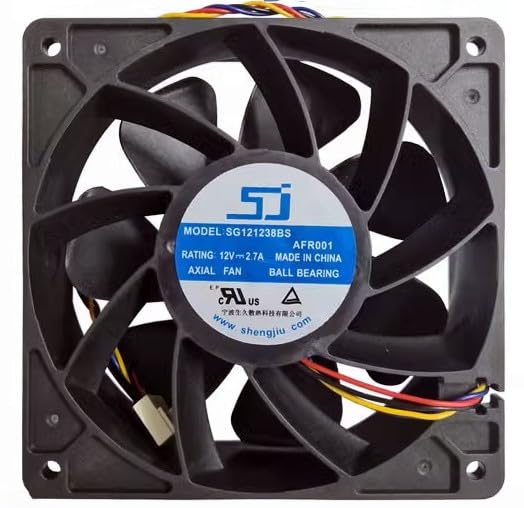
Figure 5.1: Front view of the ELOMILE SG121238BS fan, showing the central label with model number and specifications, and the four mounting holes.

Figure 5.2: Angled view of the ELOMILE SG121238BS fan, highlighting the fan blades and the robust frame structure.
6. Operation
Once properly installed and connected to a 12V DC power source, the ELOMILE SG121238BS fan will begin to operate, providing high-speed airflow for cooling. The fan is designed for continuous operation in appropriate environments.
- Ensure adequate space around the fan for optimal airflow.
- Monitor the fan's performance periodically to ensure it is running smoothly and quietly (relative to its specified noise level).
7. Maintenance
Regular maintenance helps ensure the longevity and optimal performance of your fan:
- Cleaning: Periodically disconnect power and gently clean the fan blades and frame using a soft brush or compressed air to remove dust and debris. Accumulation of dust can reduce efficiency and increase noise.
- Inspection: Check for any loose connections or signs of wear on the fan blades or wiring.
- Do not lubricate the fan bearings; they are sealed ball bearings designed for maintenance-free operation.

Figure 7.1: Side view of the ELOMILE SG121238BS fan, illustrating its compact 38mm depth, important for installation in tight spaces.
8. Troubleshooting
| Problem | Possible Cause | Solution |
|---|---|---|
| Fan does not spin | No power; incorrect wiring; faulty fan | Check power supply and connections. Ensure correct polarity. If issues persist, the fan may be faulty. |
| Fan is unusually noisy | Dust accumulation; obstruction; worn bearings | Clean fan blades and frame. Remove any obstructions. If noise persists and is excessive, the fan may need replacement. |
| Reduced airflow | Dust accumulation; blocked vents; incorrect installation direction | Clean fan and surrounding vents. Verify fan is installed to push/pull air in the correct direction for your application. |

Figure 8.1: Back view of the ELOMILE SG121238BS fan, illustrating the motor hub and the multi-colored wiring for power and potential signal connections.
9. Warranty and Support
ELOMILE is committed to providing quality products. If you have any questions, concerns, or require technical assistance regarding your SG121238BS fan, please contact ELOMILE customer service via email. Please refer to your purchase documentation for specific warranty terms and contact details.
For inquiries, please use the contact information provided at the point of purchase or on the official ELOMILE website.