
1. Safety Information
Read all instructions carefully before installation and use. Retain this manual for future reference.
- Electrical Safety: Installation must be performed by a qualified electrician in accordance with all local and national electrical codes. Ensure power is disconnected at the circuit breaker before any installation or maintenance.
- Glass Handling: The cabinet features tempered glass. Handle with care to prevent breakage. In case of breakage, tempered glass shatters into small, relatively harmless pieces.
- Weight Capacity: Do not exceed the maximum weight capacity of 30 lbs per glass shelf.
- Water Exposure: The cabinet is IP44-rated for water resistance, suitable for bathroom environments. However, avoid direct water spray onto electrical components.
- Certifications: This unit is ETL certified, and its critical components are UL certified, ensuring compliance with safety standards.

Image: Tempered glass mirror with safety film, designed to be durable and non-fragmenting if broken, reducing risk of injury compared to ordinary glass.
2. Product Overview
The ExBrite LED Lighted Medicine Cabinet provides illuminated storage for your bathroom. It features adjustable lighting, defogging capabilities, and internal power options.
Key Features:
- Stepless Dimming: Brightness adjustable from 10% to 100%.
- Stepless Color Temperature: Adjustable from 3000K (warm) to 6000K (cool).
- Enhanced Defogging: Rapid defogging function with a 60-minute auto-off timer.
- Interior Sensor Light: 6000K LED light activates automatically when the door opens.
- Tempered Glass Shelves: Three adjustable 6mm thick shelves, each supporting up to 30 lbs.
- Integrated Power: Two 1800W high-power dual outlets and two USB ports inside the cabinet.
- Durable Construction: Double-layer aluminum frame for stability and longevity.
- Soft-Close Hinges: 110° soft-close hinges for smooth and quiet operation.
- High Color Rendering Index (CRI): CRI > 90 for accurate color representation.
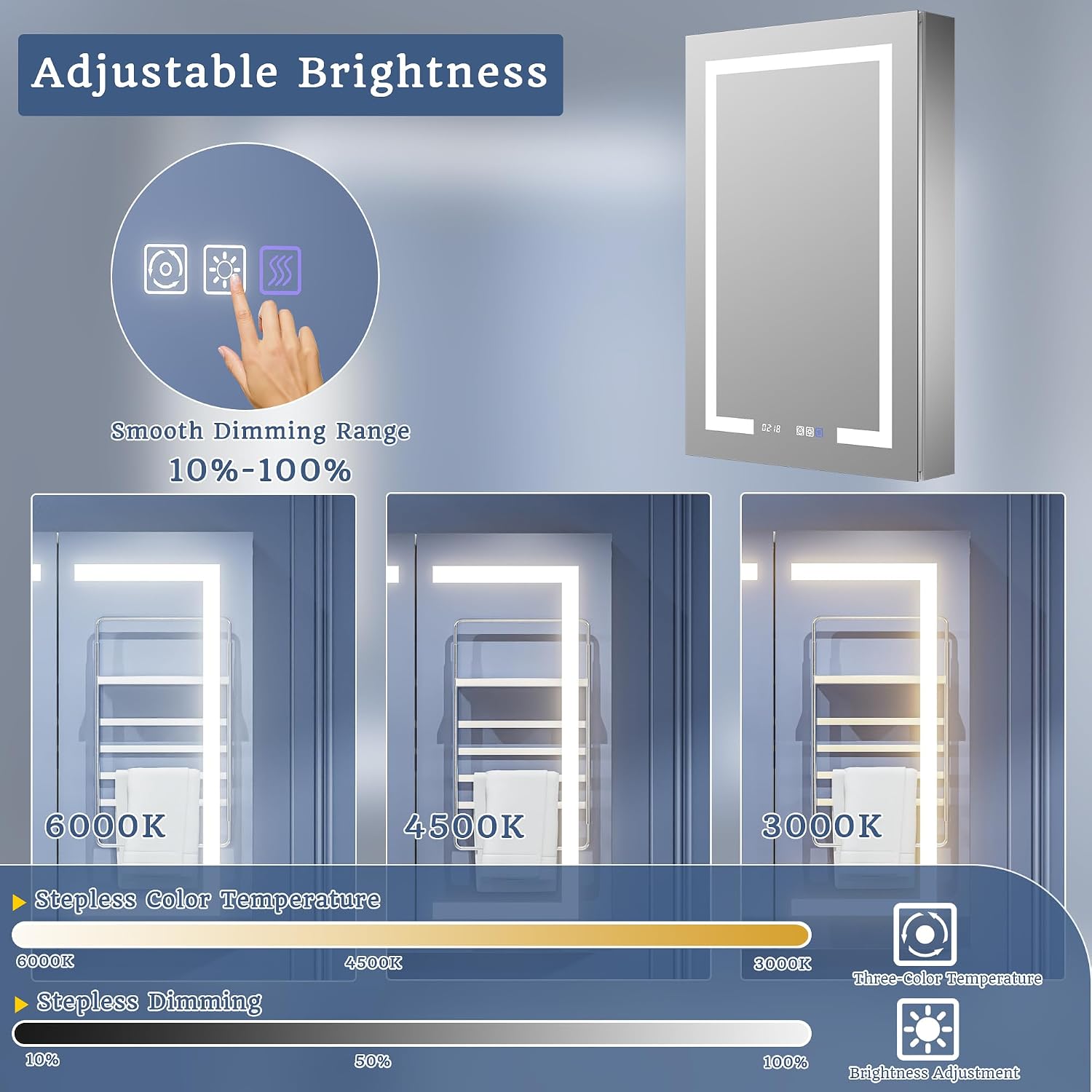
Image: Front view of the ExBrite LED Lighted Medicine Cabinet, showcasing its illuminated mirror and sleek design.

Image: Interior view of the medicine cabinet, highlighting the adjustable tempered glass shelves, internal 6000K LED sensor light, two power outlets, and two USB ports.

Image: Illustration comparing the double-layer aluminum frame, which provides superior stability and prevents deformation, to a single-layer frame.
3. Setup and Installation
This medicine cabinet supports both surface-mount and recessed installation. Professional installation by a qualified electrician is recommended.
3.1 Pre-Installation Checks
- Verify all components are present and undamaged.
- Ensure the wall structure can support the cabinet's weight (approximately 45.3 lbs).
- Confirm electrical wiring is available at the installation location.
3.2 Tools Required (Not Included)
- Measuring tape
- Pencil
- Level
- Drill
- Screwdriver
- Wire strippers
- Safety glasses
3.3 Installation Dimensions

Image: Detailed diagram illustrating the overall cabinet dimensions (24 inches wide, 36 inches high, 5 1/4 inches deep) and the recommended cutout dimensions for recessed installation (23 1/4 inches wide, 35 1/4 inches high, 4 3/8 inches deep).

Image: Reference table providing cutout dimensions (width, height, depth) for various medicine cabinet sizes, including 24"x36".
3.4 Mounting Options

Image: Visual guide demonstrating both recessed mounting, where the cabinet is largely flush with the wall, and surface mounting, where the cabinet is installed directly onto the wall surface.
Surface Mounting:
- Mark the desired location on the wall.
- Secure the mounting bracket to the wall using appropriate fasteners.
- Hang the cabinet onto the mounting bracket.
- Connect electrical wiring as per local codes.
Recessed Mounting:
- Carefully cut an opening in the wall according to the specified cutout dimensions.
- Ensure electrical wiring is accessible within the cutout.
- Insert the cabinet into the wall opening.
- Secure the cabinet to the wall studs or blocking using mounting screws.
- Connect electrical wiring as per local codes.

Image: Illustration of the double-assured wall bracket system designed for faster, easier, and more stable installation, ensuring a cleaner and more precise wall fit.
3.5 Electrical Connection
- Ensure the main power supply is OFF before connecting any wires.
- Connect the cabinet's electrical wires to the household wiring (Live, Neutral, Ground) according to the wiring diagram provided in the packaging and local electrical codes.
- Secure all connections with wire nuts and ensure they are properly insulated.
- Restore power and test all functions.
4. Operating Instructions
The ExBrite medicine cabinet features intuitive touch controls for various functions.
4.1 Light Control (Dimming & Color Temperature)
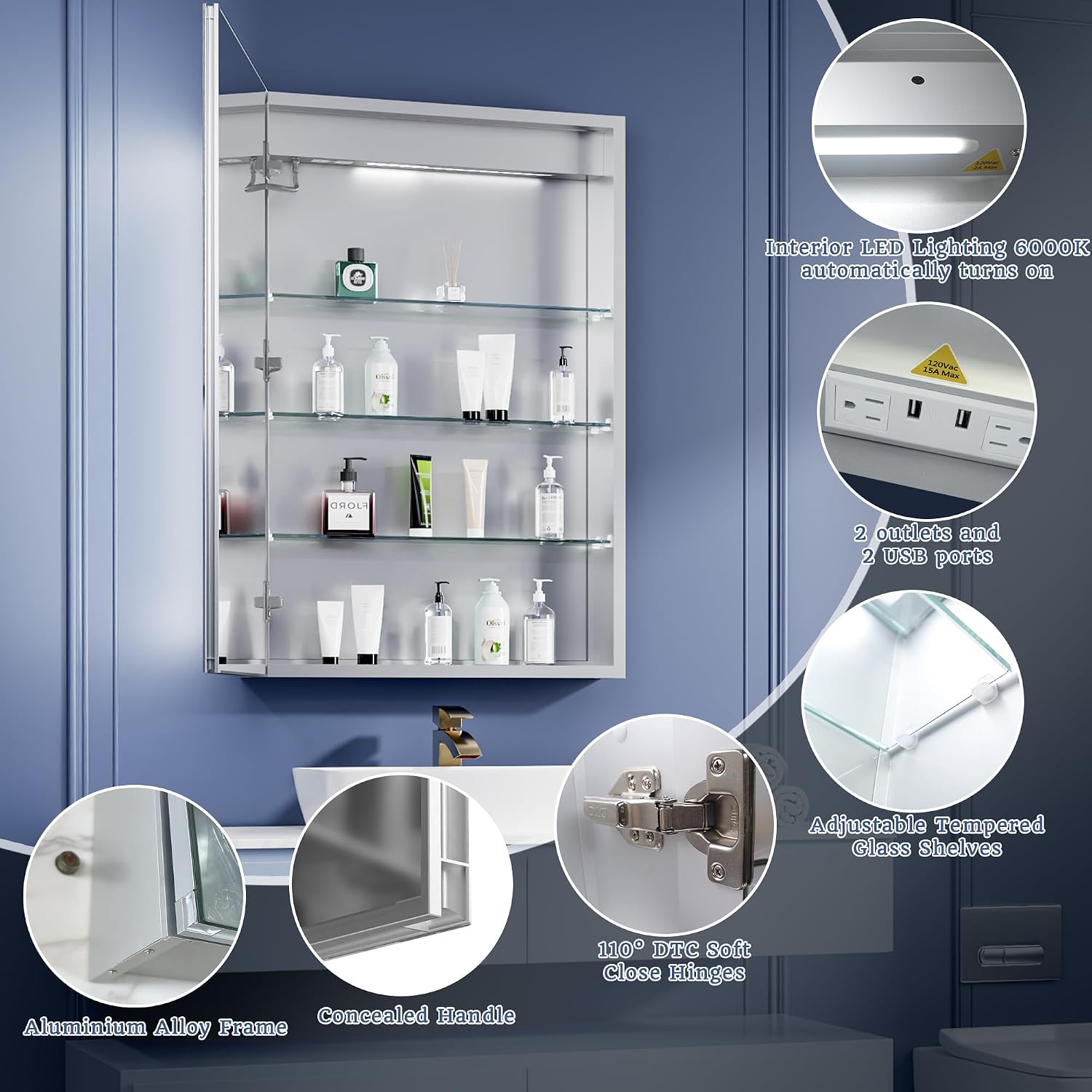
Image: The mirror's touch controls for adjusting brightness and color temperature. The brightness can be smoothly dimmed from 10% to 100%, and the color temperature can be adjusted from 3000K (warm) to 6000K (cool).
- Power On/Off: Tap the power icon on the mirror surface to turn the LED lights on or off.
- Brightness Adjustment: Press and hold the brightness icon to cycle through brightness levels from 10% to 100%. Release at the desired brightness.
- Color Temperature Adjustment: Press and hold the color temperature icon to cycle through color temperatures from 3000K to 6000K. Release at the desired color.
- Memory Function: The cabinet retains the last brightness and color temperature settings when turned off and on.
4.2 Defog Function

Image: The anti-fog function in action, showing a clear reflection area on the mirror. The defogger quickly warms the mirror surface to approximately 40°C.
- Activate Defog: Tap the defog icon on the mirror surface to activate the defogging function.
- Automatic Shut-off: The defog function will automatically turn off after 60 minutes or when the main light is turned off.
4.3 Interior Sensor Light
- The 6000K LED interior light automatically illuminates when the cabinet door is opened, providing visibility for stored items.
4.4 Power Outlets and USB Ports
- The two 1800W high-power dual outlets and two USB ports inside the cabinet are designed for charging and powering small electronic devices such as electric toothbrushes, shavers, and hairdryers.
- Ensure devices are compatible with the power specifications.
5. Maintenance
Regular cleaning and care will ensure the longevity and optimal performance of your medicine cabinet.
- Cleaning the Mirror: Use a soft, lint-free cloth and a non-abrasive glass cleaner. Spray cleaner onto the cloth, not directly onto the mirror surface, to avoid liquid seeping into electrical components.
- Cleaning the Frame and Shelves: Wipe the aluminum frame and glass shelves with a soft, damp cloth. For stubborn spots, use a mild, non-abrasive cleaner. Dry thoroughly.
- Avoid Harsh Chemicals: Do not use abrasive cleaners, ammonia-based products, or solvents, as these can damage the mirror finish or frame.
- Electrical Components: Keep water and cleaning solutions away from outlets, USB ports, and light strips.
- Hinge Care: The 110° soft-close hinges are designed for durability. Periodically check for smooth operation and clean any dust accumulation.
6. Troubleshooting
If you encounter issues with your medicine cabinet, refer to the following common problems and solutions.
| Problem | Possible Cause | Solution |
|---|---|---|
| LED lights do not turn on. | No power supply; loose wiring; faulty switch. | Check circuit breaker. Ensure all electrical connections are secure. Contact a qualified electrician if wiring is suspected. |
| Defog function not working. | Defog function not activated; electrical issue. | Tap the defog icon to activate. Check power supply. |
| Brightness or color temperature cannot be adjusted. | Incorrect operation; touch sensor issue. | Ensure you are pressing and holding the correct icon. Clean the mirror surface around the touch controls. |
| Outlets/USB ports not providing power. | No power to the cabinet; internal wiring issue. | Check main power supply to the cabinet. Ensure devices are properly plugged in. |
| Interior sensor light not working. | Sensor obstruction; faulty sensor. | Ensure nothing is blocking the sensor. Open and close the door fully to reset. |
For issues not listed here or if solutions do not resolve the problem, please contact ExBrite customer support or a qualified technician.
7. Specifications
| Feature | Detail |
|---|---|
| Model Number | 11FXMC2436V4LX |
| Dimensions (W x H x D) | 24" x 36" x 5.5" |
| Weight | 45.3 lbs |
| Material | Aluminum frame, Tempered Glass mirror and shelves |
| Light Source | LED |
| Color Temperature | 3000K - 6000K (Stepless Adjustment) |
| Brightness | 10% - 100% (Stepless Dimming) |
| Color Rendering Index (CRI) | > 90 |
| Defog Function | Yes, with 60-minute auto-off |
| Interior Light | 6000K LED, sensor-activated |
| Outlets | 2 x 1800W high-power dual outlets |
| USB Ports | 2 |
| Shelves | 3 adjustable tempered glass shelves (6mm thick, 30 lbs capacity each) |
| Hinges | 110° soft-close |
| Installation Type | Surface-mount or Recessed |
| Certifications | ETL certified unit, UL certified components |
8. Warranty and Support
ExBrite is committed to product quality and customer satisfaction.
- Warranty: This product typically comes with a 1-year warranty from the date of purchase, covering manufacturing defects. Please refer to your purchase documentation for specific warranty terms.
- Returns: A 30-day easy return policy is generally available. Consult your retailer's return policy for details.
- Customer Support: For technical assistance, warranty claims, or any questions regarding your ExBrite medicine cabinet, please contact ExBrite customer service. Contact information can usually be found on the product packaging or the official ExBrite website.


