
1. Introduction
Thank you for choosing the pxton PX-666S Walkie Talkie. This manual provides essential information for the safe and efficient operation of your device. The PX-666S is a versatile two-way radio designed for various applications, offering reliable communication with features such as VOX, noise reduction, and a built-in flashlight. This device has been certified by the FCC (FCC ID: 2AX68GTR8).
The pxton PX-666S walkie talkie is compatible with PX-888S, PX-777S, and PX-888S Pro models, allowing them to be used together and share programming tools and cables (programming cable sold separately).
2. Package Contents
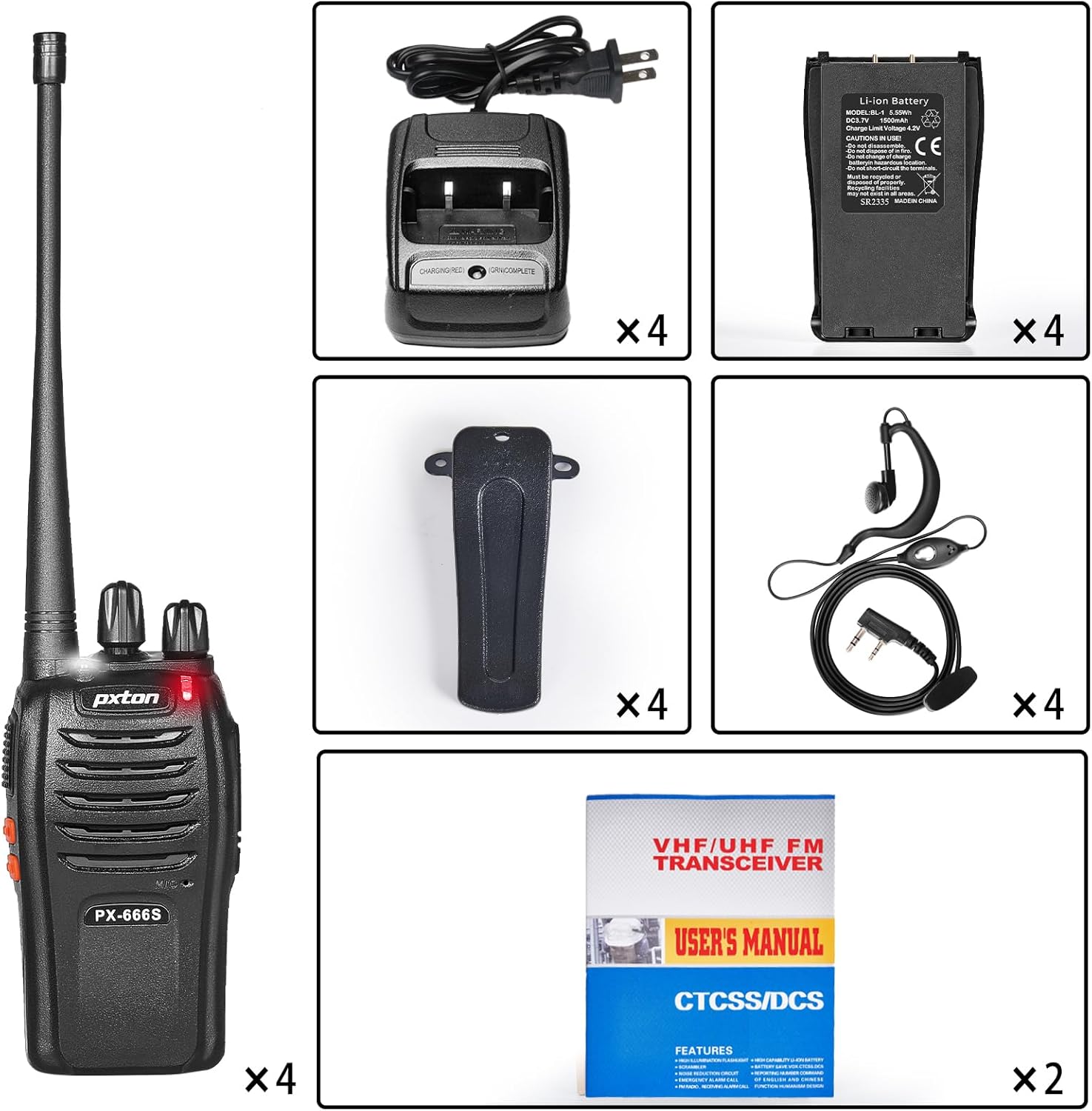
Upon opening your pxton PX-666S package, please verify that all the following items are included:
- 4 x pxton PX-666S Walkie Talkies
- 4 x Charging Docks
- 4 x 1500mAh Lithium-Ion Batteries
- 4 x Belt Clips
- 4 x Earphones
- 2 x User Manuals
3. Product Overview
The pxton PX-666S walkie talkie is designed for ease of use and durability. Familiarize yourself with the device's components and features for optimal performance.
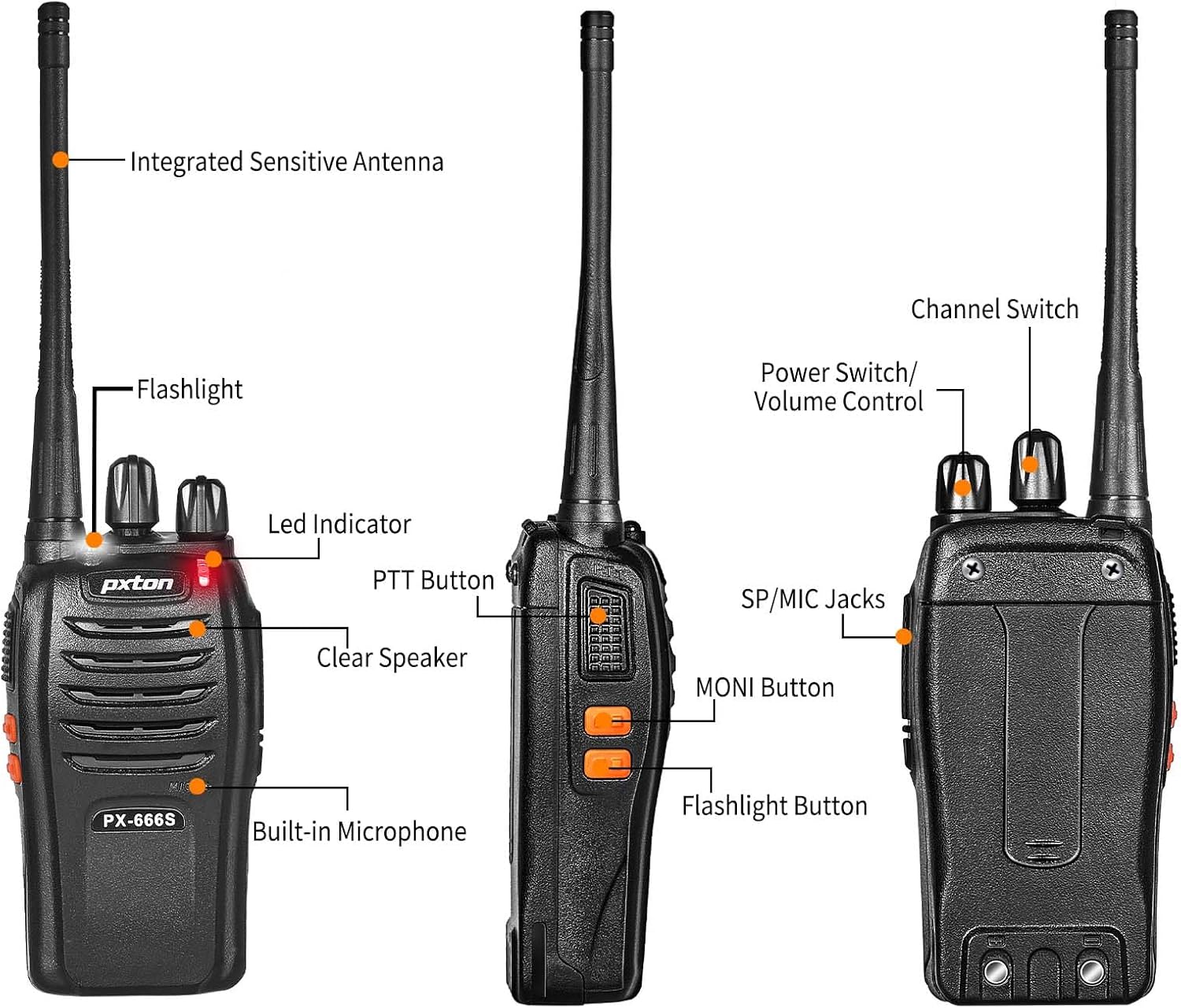
Key Components:
- Integrated Sensitive Antenna: For optimal signal transmission and reception.
- Flashlight: Built-in LED light for illumination.
- LED Indicator: Displays operational status (e.g., transmitting, receiving, low battery).
- PTT Button (Push-to-Talk): Press and hold to transmit, release to receive.
- Clear Speaker: For audio output.
- Built-in Microphone: For voice input.
- SP/MIC Jacks: For connecting external audio accessories like earphones.
- MONI Button (Monitor): Temporarily disables squelch to listen for weak signals.
- Channel Switch: Rotary knob to select desired communication channel.
- Power Switch/Volume Control: Rotary knob to turn the device on/off and adjust volume.

4. Setup
4.1 Battery Installation
- Ensure the walkie talkie is powered off.
- Locate the battery compartment cover on the back of the unit.
- Slide the cover down or unclip it to remove.
- Insert the 1500mAh Lithium-Ion battery, ensuring the contacts align correctly.
- Replace the battery compartment cover and secure it.
4.2 Charging the Battery
Before first use, fully charge the battery. A full charge typically takes 3-4 hours.
- Connect the charging dock to a power outlet using the provided adapter.
- Place the walkie talkie (with battery installed) into the charging dock.
- The LED indicator on the charging dock will show the charging status (e.g., red for charging, green for fully charged).
- Remove the walkie talkie once charging is complete.

4.3 Attaching Accessories
- Belt Clip: Align the belt clip with the screw holes on the back of the walkie talkie and secure it with the provided screws.
- Earphone: Insert the earphone plug into the SP/MIC jacks on the side of the walkie talkie.
5. Operating Instructions
5.1 Power On/Off and Volume Control
Rotate the Power Switch/Volume Control knob clockwise to turn the walkie talkie on. Continue rotating to increase the volume. Rotate counter-clockwise to decrease volume and turn the device off.
5.2 Channel Selection
The PX-666S features 16 memory channels. Rotate the Channel Switch knob to select your desired communication channel. Ensure all radios in your group are set to the same channel for communication.
5.3 Transmitting and Receiving
- To Transmit: Press and hold the PTT (Push-to-Talk) button on the side of the walkie talkie. Speak clearly into the microphone. Release the PTT button when you finish speaking.
- To Receive: Ensure the PTT button is not pressed. The walkie talkie will automatically receive signals on the selected channel.
5.4 VOX Function (Voice Operated Transmission)
The VOX function allows for hands-free operation. When activated, the radio will automatically transmit when it detects your voice, without needing to press the PTT button. The PX-666S offers 5 levels of VOX sensitivity adjustment. Refer to the full user manual for detailed programming instructions to enable and adjust VOX sensitivity.
5.5 Monitoring Function
Press the MONI button to temporarily disable the squelch function. This allows you to listen to very weak signals that might otherwise be filtered out, or to check if a channel is clear before transmitting.
5.6 Scanning Function
The scanning function allows the radio to automatically scan through all available channels to find active conversations. Refer to the full user manual for instructions on how to activate and use the scanning feature.
5.7 Flashlight
The PX-666S includes a built-in LED flashlight. Press the Flashlight Button (if present, or refer to specific button mapping in the full manual) to turn the flashlight on or off.
5.8 Emergency Alarm
In an emergency, the walkie talkie can activate an alarm. Consult the full user manual for specific instructions on how to trigger and deactivate the emergency alarm function.
5.9 Noise Reduction and Automatic Squelch
The PX-666S features noise reduction technology and automatic squelch to ensure clear audio by filtering out background noise and weak signals. These functions operate automatically.
5.10 TOT (Time-Out Timer)
The Time-Out Timer (TOT) limits the duration of a transmission to prevent accidental continuous transmission and conserve battery life. If the PTT button is held down for longer than the preset time, the radio will stop transmitting.
5.11 Low Battery Alert and Power Saving Mode
The walkie talkie will provide an alert when the battery level is low. It also features a power-saving mode to extend battery life during periods of inactivity.

6. Communication Range
The actual communication range of the pxton PX-666S walkie talkies can vary significantly based on environmental conditions and terrain. Typical ranges are:
- Open Areas (e.g., flat terrain, mountain peaks): Up to 3 miles
- Suburban or Countryside: Approximately 1.2 miles
- City Limits (with buildings and obstructions): Around 0.6 miles

7. Maintenance
7.1 Battery Care
- Always use the original pxton 1500mAh Lithium-Ion battery and charging dock.
- Do not disassemble, short-circuit, or dispose of batteries in fire.
- Avoid exposing batteries to extreme temperatures.
- If the radio will not be used for an extended period, remove the battery.
7.2 Cleaning
Clean the walkie talkie with a soft, damp cloth. Do not use harsh chemicals or abrasive cleaners. Ensure the device is dry before use or charging.
7.3 Storage
Store the walkie talkie in a cool, dry place away from direct sunlight and extreme temperatures.
8. Troubleshooting
If you encounter issues with your pxton PX-666S walkie talkie, please refer to the following common problems and solutions:
| Problem | Possible Cause | Solution |
|---|---|---|
| No power | Battery not installed correctly or discharged. | Ensure battery is correctly installed. Charge the battery fully. |
| Cannot transmit or receive | Incorrect channel selected; out of range; low battery. | Verify all radios are on the same channel. Move closer to other radios. Charge battery. |
| Poor audio quality / Static | Weak signal; interference; volume too low. | Move to an area with fewer obstructions. Adjust volume. Use MONI button to check for weak signals. |
| Radio transmits continuously (TOT) | PTT button stuck or held too long. | Release PTT button. Check for physical obstruction of PTT button. |
| Battery life is short | Battery not fully charged; old battery; frequent transmissions. | Ensure battery is fully charged. Consider replacing old batteries. Utilize power-saving mode. |
If the problem persists, please contact pxton customer support for assistance.
9. Specifications
| Feature | Specification |
|---|---|
| Model Number | PX-666S |
| Item Weight | 2.82 pounds (for 4-pack) |
| Product Dimensions | 9.9 x 4.4 x 6.9 inches |
| Battery Type | 1500mAh Lithium Ion (included) |
| Voltage | 3.7 Volts |
| Number of Channels | 16 |
| Frequency Range | UHF |
| Talking Range Maximum | 3 Miles (open areas) |
| Special Features | Automatic Squelch, Battery Saver Mode, Long Range, Rechargeable, Voice Operated Transmission (VOX), Noise Reduction, TOT, Flashlight, Monitoring, Scan Function, Emergency Alarm |
| Water Resistance Level | Water Resistant |
| Manufacturer | Shenzhen Puxintong Electronics Co.Ltd |
10. Warranty and Support
pxton offers a 30-day unconditional return policy for your product. Additionally, pxton provides lifelong after-sales service for the PX-666S walkie talkies. If you encounter any issues or require assistance, please do not hesitate to reach out to pxton customer support. We are committed to helping you resolve any problems.
For support, please visit the official pxton store or contact their customer service channels.


