
1. Introduction
Thank you for purchasing the SURFOU Wireless Doorbell. This manual provides detailed instructions for installation, operation, and maintenance to ensure optimal performance and longevity of your device. Please read this manual carefully before use and retain it for future reference.
Key Features:
- Extended Wireless Range: Up to 300 meters (1000 feet) in open areas.
- Easy Installation: No wiring required, simple setup.
- Customizable Melodies: 55 selectable ringtones.
- Adjustable Volume: 5 levels of volume control, from 0dB (mute) to 110dB.
- Memory Function: Retains your last selected melody and volume settings after power off.
- Durable Design: IP55 waterproof and dustproof transmitter for outdoor use.
- Wide Operating Temperature: -30°C to 70°C (-22°F to 158°F).
2. Package Contents
Please check the package to ensure all items are present and in good condition:
- 1 x Wireless Doorbell Transmitter (Push Button)
- 1 x Wireless Doorbell Receiver (Chime Unit)
- 1 x 12V 23A Alkaline Battery (for Transmitter)
- 2 x Mounting Screws
- 2 x Wall Anchors
- 1 x Double-sided Adhesive Tape
- 1 x Mini Screwdriver
- 1 x User Manual
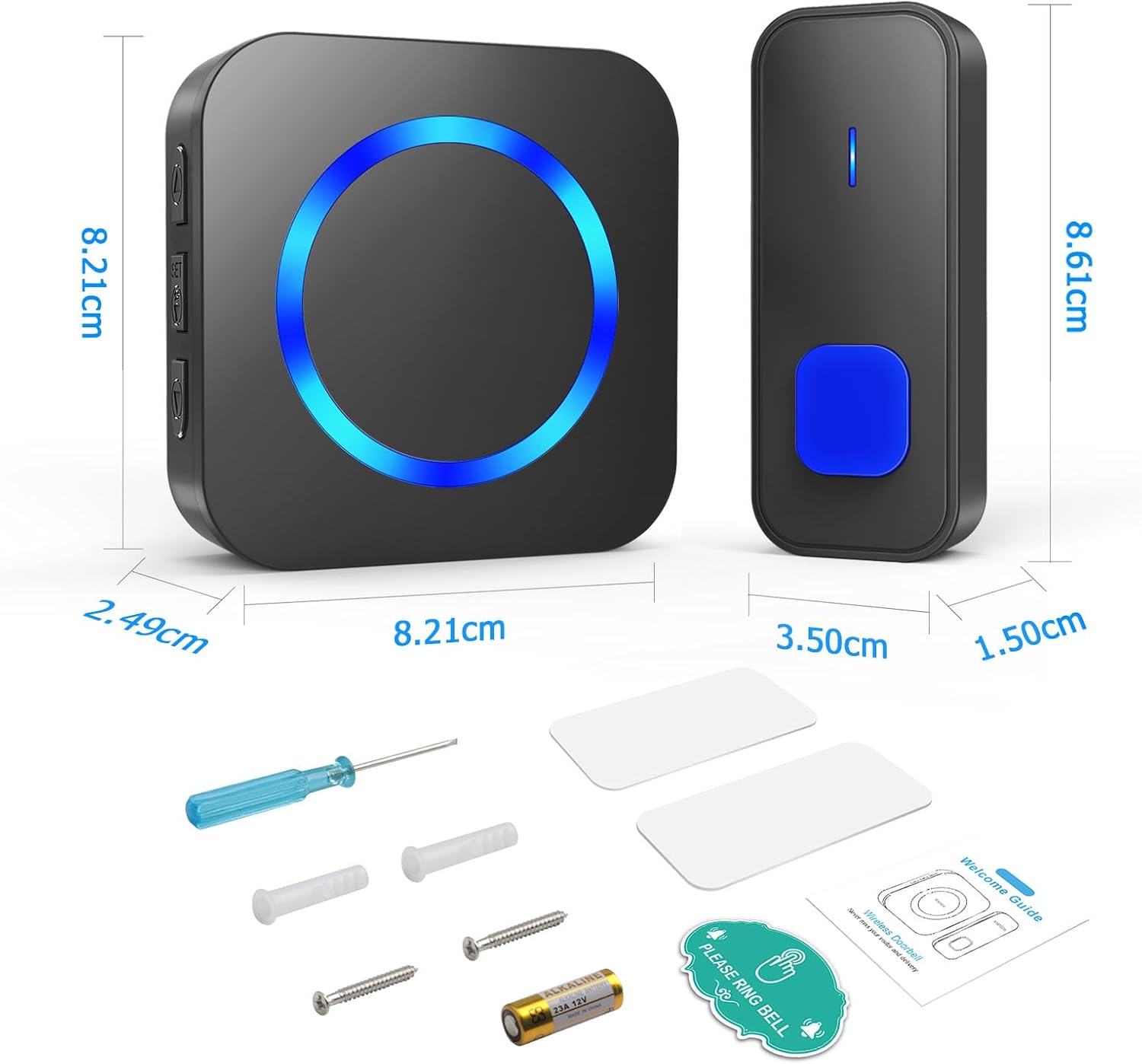
Image: This image provides a clear view of the SURFOU wireless doorbell components, including the transmitter and receiver, with their dimensions labeled in centimeters. Below the units, the package contents are displayed: a screwdriver, mounting screws, wall anchors, double-sided adhesive tape, a 12V 23A battery for the transmitter, and a welcome guide/manual.
3. Setup and Installation
The SURFOU Wireless Doorbell offers flexible installation options. No complex wiring is required.
3.1 Transmitter (Push Button) Installation
Choose a suitable location near your door. Ensure the surface is clean and dry.
- Method 1: Adhesive Tape Installation
- Clean the back of the transmitter and the desired mounting surface.
- Peel off one side of the double-sided adhesive tape and attach it firmly to the back of the transmitter.
- Peel off the other side of the tape and press the transmitter firmly onto the wall for at least 30 seconds.
- Method 2: Screw Installation
- Open the back cover of the transmitter using the provided mini screwdriver.
- Mark the desired mounting points on the wall through the screw holes on the transmitter's back plate.
- Drill two holes at the marked positions. Insert the wall anchors if installing on masonry or drywall.
- Align the transmitter's back plate with the holes and secure it with the provided screws.
- Close the back cover of the transmitter.
3.2 Receiver (Chime Unit) Setup
The receiver is designed for plug-and-play convenience.
- Simply plug the receiver into any standard electrical outlet indoors.
- Ensure the receiver is within the effective wireless range of the transmitter (up to 300 meters in open areas).
- You can move the receiver to different outlets as needed to ensure you hear the chime in various rooms.

Image: This image illustrates two simple installation methods for the SURFOU wireless doorbell transmitter. Method 1 shows the use of double-sided adhesive tape for quick, non-invasive mounting. Method 2 demonstrates a more secure installation using screws and a drill, with an internal view of the transmitter showing the battery compartment and mounting points.

Image: This image illustrates the impressive 300-meter wireless range of the SURFOU doorbell system in an open area. It shows how the signal can effectively pass through various obstacles like doors and walls, ensuring reliable communication between the outdoor transmitter and indoor receiver. The diagram also depicts a typical house layout with multiple receivers placed strategically to cover different areas.
4. Operating Instructions
4.1 Changing Melodies
- Press the 'Melody Selection' button on the side of the receiver to cycle through the 55 available ringtones.
- Once you hear your desired melody, stop pressing the button. The doorbell will automatically save this selection.
4.2 Adjusting Volume
- Press the 'Volume Control' button on the side of the receiver to adjust the volume level.
- There are 5 volume levels, ranging from 0dB (mute) to 110dB. Cycle through them until you reach your preferred volume.
- The receiver will remember your last volume setting.
4.3 Pairing Additional Transmitters/Receivers (Optional)
If you have purchased additional SURFOU wireless doorbell components, you can easily pair them:
- Plug in the new receiver.
- Press and hold the 'Volume Control' button on the receiver for approximately 5 seconds until you hear a 'ding' sound and the LED indicator flashes rapidly. This indicates it's in pairing mode.
- Immediately press the transmitter button you wish to pair.
- If successful, the receiver will chime with the selected melody.
- Repeat for any other transmitters or receivers.
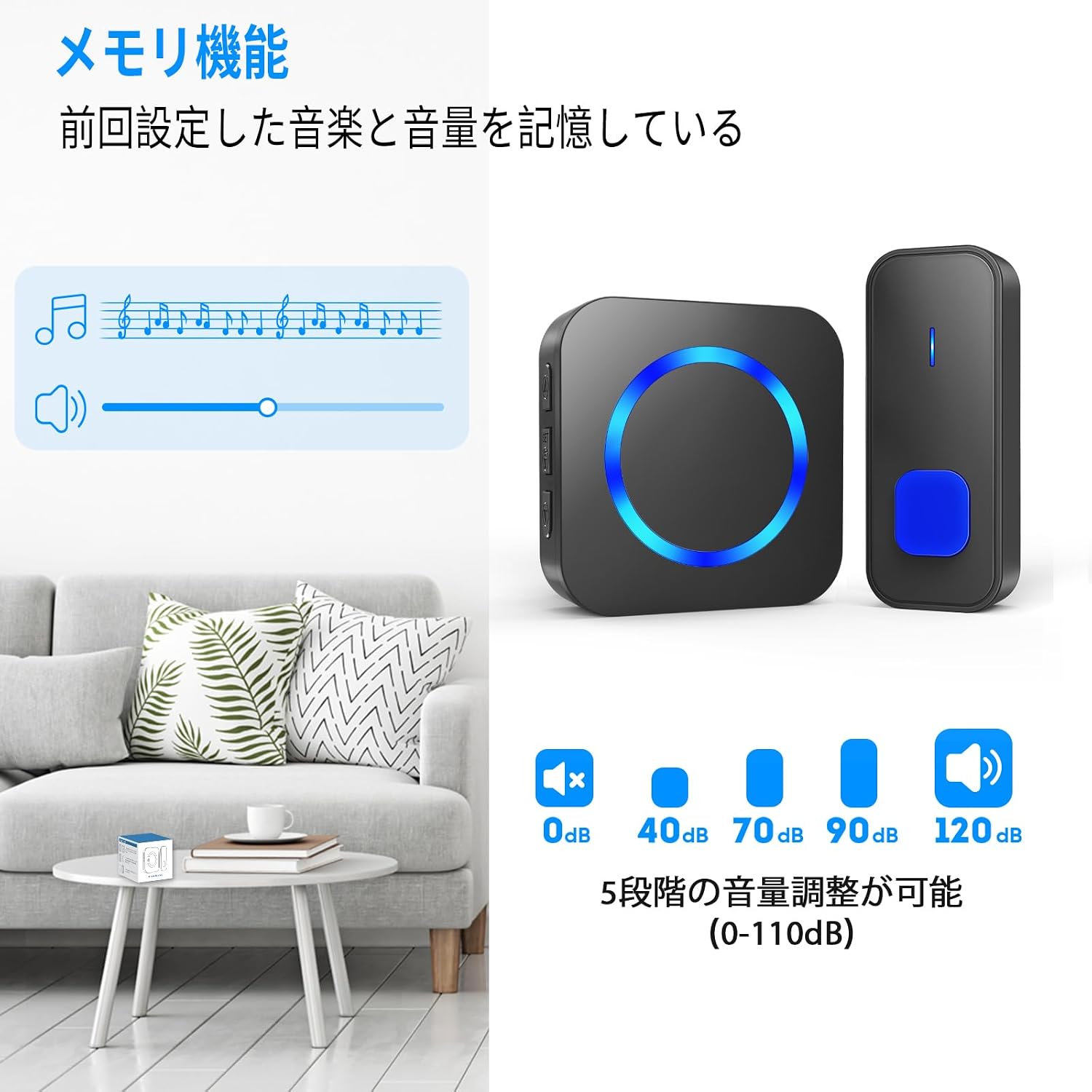
Image: This image highlights the customizable sound features of the SURFOU wireless doorbell. It shows the receiver unit alongside musical notes, indicating the availability of multiple melodies. Below, a scale from 0dB (mute) to 120dB demonstrates the 5-level volume adjustment feature. The text "Memory Function" confirms that the device remembers the last selected melody and volume setting.

Image: This image demonstrates the plug-and-play convenience of the SURFOU wireless doorbell receiver, shown plugged into a wall outlet. Accompanying icons represent key features: an LED light indicator, 55 selectable ringtones, 5 levels of volume adjustment, and a mute option for silent operation.
5. Maintenance
- Cleaning: Wipe the doorbell units with a soft, dry cloth. Do not use abrasive cleaners or solvents.
- Battery Replacement: The transmitter uses a 12V 23A alkaline battery. When the transmitter's LED indicator no longer lights up or the signal range decreases significantly, it's time to replace the battery. Use the mini screwdriver to open the transmitter, replace the battery, and re-secure the cover.
- Environmental Conditions: While the transmitter is IP55 waterproof and dustproof, avoid immersing it in water. Ensure the operating temperature remains within -30°C to 70°C (-22°F to 158°F).
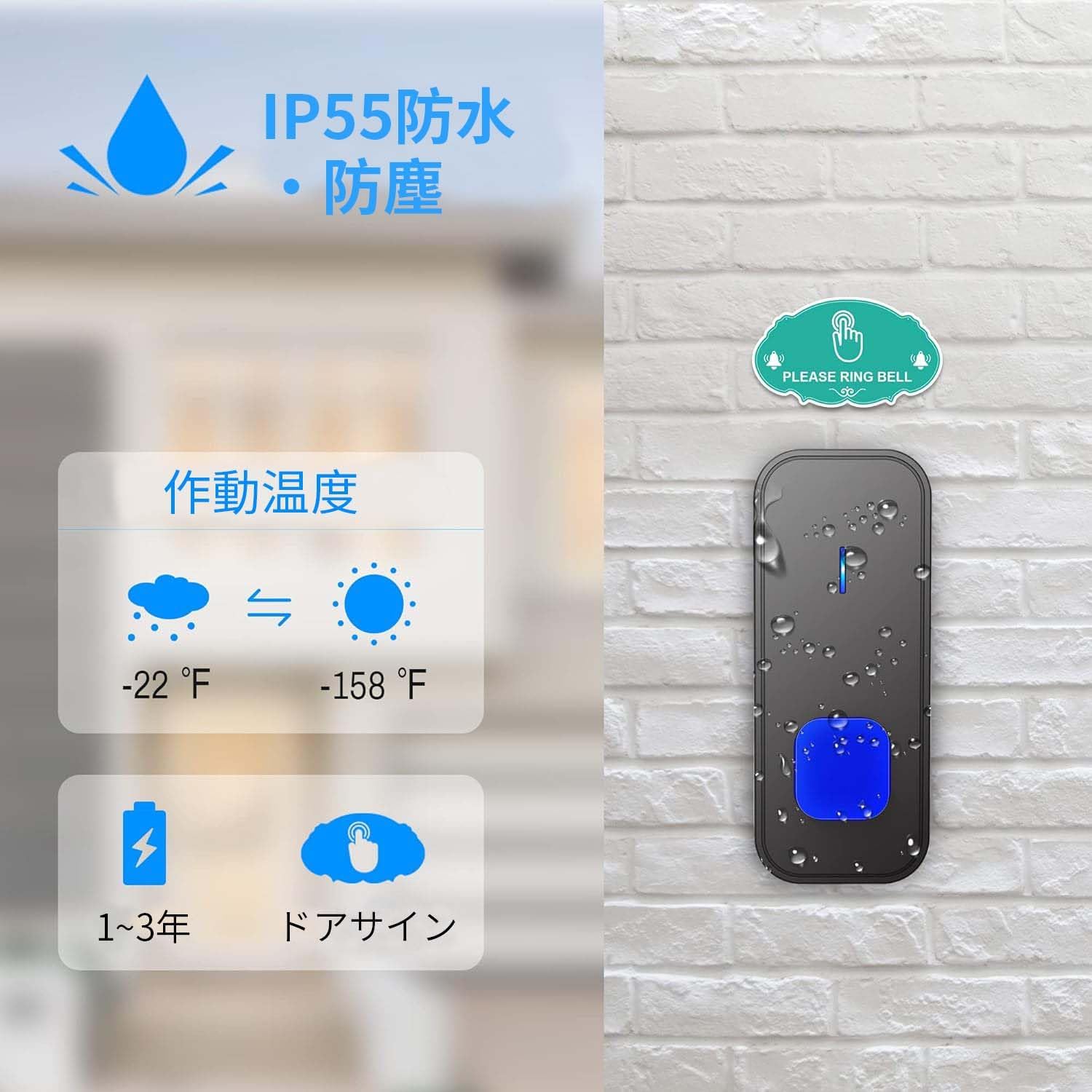
Image: This image details the robust design of the SURFOU wireless doorbell transmitter. It prominently displays the IP55 waterproof and dustproof rating, indicating its resilience against outdoor elements. The operating temperature range of -22°F to 158°F (-30°C to 70°C) is also shown, along with an estimated battery life of 1 to 3 years, highlighting its durability and low maintenance.
6. Troubleshooting
| Problem | Possible Cause | Solution |
|---|---|---|
| Doorbell does not ring. | 1. Receiver not plugged in or powered. 2. Transmitter battery is dead. 3. Units are out of range or signal interference. 4. Units are not paired. | 1. Ensure receiver is securely plugged into a working outlet. 2. Replace the transmitter battery (12V 23A). 3. Move receiver closer to the transmitter or away from large metal objects/electronics. Ensure no significant obstacles are between units. 4. Re-pair the transmitter and receiver as per Section 4.3. |
| Short wireless range. | 1. Obstacles (walls, metal structures) blocking signal. 2. Signal interference from other devices. 3. Low transmitter battery. | 1. Reposition units to minimize obstacles. The theoretical range is 300m in open areas; actual range is reduced by walls. 2. Move units away from other wireless devices (e.g., Wi-Fi routers, microwaves). 3. Replace the transmitter battery. |
| Receiver rings randomly. | External signal interference. | Change the melody or re-pair the units to reset the signal code. |
| Volume is too low/high. | Volume setting needs adjustment. | Press the 'Volume Control' button on the receiver to adjust to your desired level. |

Image: This image emphasizes the reliability of the SURFOU wireless doorbell. One part shows a hand pressing the outdoor transmitter button, while the other shows people inside a home, suggesting that visitors won't be missed. Key features highlighted are low signal transmission delay, stable signal, and good signal penetration, ensuring consistent performance.
7. Specifications
| Feature | Detail |
|---|---|
| Model | 1T2-B |
| Brand | SURFOU |
| Wireless Range | Up to 300m (1000ft) in open areas |
| Ringtones | 55 selectable melodies |
| Volume Levels | 5 levels (0dB to 110dB) |
| Transmitter Waterproof Rating | IP55 |
| Operating Temperature | -30°C to 70°C (-22°F to 158°F) |
| Transmitter Battery | 1 x 12V 23A Alkaline Battery |
| Receiver Power | AC Plug-in (Standard Outlet) |
| Product Dimensions (Transmitter) | Approx. 8.61 x 3.50 x 1.50 cm |
| Product Dimensions (Receiver) | Approx. 10.4 x 9.6 x 8 cm |
| Product Weight | 220 g (total package weight) |
8. Warranty and Support
For warranty information or technical support, please refer to the contact details provided with your purchase or visit the official SURFOU website. Keep your purchase receipt as proof of purchase for warranty claims.


