
GLOBE Electric D'Angelo 65000084
GLOBE Electric D'Angelo 65000084 Wall Sconce Instruction Manual
Model: D'Angelo 65000084
Introduction
This manual provides comprehensive instructions for the installation, operation, and maintenance of your GLOBE Electric D'Angelo 65000084 Wall Sconce. Please read this manual thoroughly before installation and retain it for future reference.
The GLOBE Electric D'Angelo 65000084 is a versatile 1-Light Wall Sconce featuring an integrated LED reading light and USB-A/USB-C charging ports. It offers both plug-in and hardwired installation options.
Safety Information
- Always turn off the power at the main circuit breaker before beginning installation.
- Consult a qualified electrician if you are unsure about the installation process.
- Do not exceed the recommended wattage for the main light bulb (1x E26/Medium Base 60W Bulb, sold separately).
- Ensure all connections are secure and properly insulated.
- This fixture is designed for indoor use only.
Package Contents
Verify that all components are present before beginning installation:
- Wall Sconce Fixture (Matte Black with White Fabric Shade)
- Integrated LED Reading Light
- USB-A and USB-C Charging Ports
- Mounting Hardware
- Removable Black Braided Fabric Cord (for plug-in option)
- Note: E26/Medium Base 60W Bulb is sold separately.
Setup and Installation
Option 1: Plug-In Installation
- Prepare the Mounting Surface: Choose a suitable location on a wall near an electrical outlet.
- Attach Mounting Hardware: Secure the mounting bracket to the wall using the provided screws and anchors. Ensure it is level and firmly attached.
- Connect Fixture: Attach the sconce fixture to the mounting bracket.
- Insert Bulb: Screw in one E26/Medium Base 60W bulb (not included) into the main light socket.
- Plug In: Insert the removable black braided fabric cord into the sconce and then into a standard electrical outlet.
- Adjust Cord Length: The cord can be easily shortened for a cleaner appearance by wrapping excess cord behind the fixture or using cord management clips (not included).

Image: A woman reading under the light of the sconce, with an inset showing the plug connected to a wall outlet. This illustrates the plug-in installation method.

Image: A side-by-side comparison showing the sconce installed as a plug-in (with visible cord) and hardwired (with no visible cord), highlighting the versatility of installation.
Option 2: Hardwired Installation
- Turn Off Power: IMPORTANT: Ensure power is OFF at the main circuit breaker before starting.
- Prepare Wiring: Remove the existing fixture (if any) and expose the junction box wiring.
- Attach Mounting Hardware: Secure the mounting bracket to the junction box using the provided screws.
- Make Electrical Connections:
- Connect the fixture's black wire to the house's black (live) wire.
- Connect the fixture's white wire to the house's white (neutral) wire.
- Connect the fixture's ground wire to the house's ground wire (or green screw on the mounting bracket).
- Secure all connections with wire nuts (not included) and electrical tape.
- Mount Fixture: Carefully tuck the wires into the junction box and attach the sconce fixture to the mounting bracket.
- Insert Bulb: Screw in one E26/Medium Base 60W bulb (not included) into the main light socket.
- Restore Power: Turn the power back on at the main circuit breaker.
Image: A side-by-side comparison showing the sconce installed as a plug-in (with visible cord) and hardwired (with no visible cord), illustrating the seamless look of hardwired installation.
Operating Instructions
- Main Light (E26 Bulb): The main light is controlled by an on/off pull chain switch located on the fixture. Pull the chain to turn the light on or off.
- LED Integrated Reading Light: The LED reading light features an adjustable gooseneck arm. It is controlled by a rocker switch located on the fixture. Flip the switch to turn the reading light on or off. The LED provides 2700 Kelvin (warm white) light at 120 Lumens.
- USB Charging Ports: The sconce includes fast-charging 2.1A combined USB-A and USB-C ports. Simply plug your compatible devices into these ports for charging. These ports are active when the sconce is powered.

Image: An exploded diagram highlighting the key features of the sconce: white fabric shade, matte black finish, USB-A and USB-C ports, main light pull switch, LED reading light rocker switch, adjustable gooseneck arm, and removable braided cord.
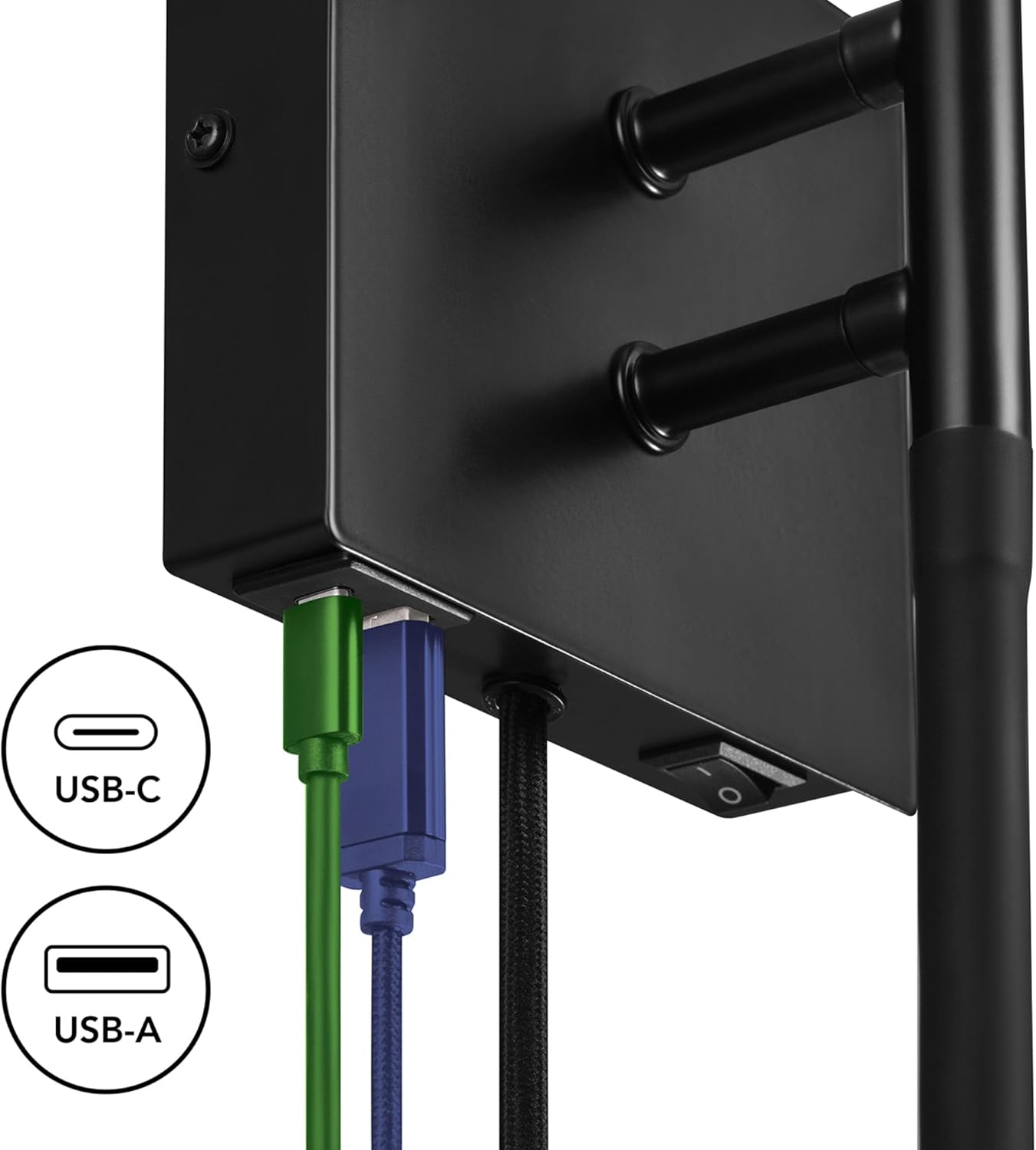
Image: A close-up view of the USB-C and USB-A charging ports on the sconce, with charging cables plugged in, demonstrating their function.

Image: A close-up of the adjustable gooseneck LED reading light, showing its illumination and flexibility.
Maintenance
- Cleaning: Disconnect power before cleaning. Wipe the fixture with a soft, dry cloth. Do not use abrasive cleaners or solvents.
- Bulb Replacement: Ensure power is off before replacing the E26 bulb. Allow the bulb to cool completely before handling.
- LED Reading Light: The LED reading light is integrated and not user-replaceable.
Troubleshooting
| Problem | Possible Cause | Solution |
|---|---|---|
| Main light does not turn on. |
|
|
| LED reading light does not turn on. |
|
|
| USB ports are not charging devices. |
|
|
Specifications
| Brand | GLOBE Electric |
| Model Name | D'Angelo |
| Item Model Number | 65000084 |
| Color | Matte Black, White Fabric Shade |
| Material | Iron (Fixture), Polyester (Shade) |
| Product Dimensions | 6.25"L x 5.88"W x 20.25"H |
| Power Source | Hardwired/Plug-in |
| Voltage | 120 Volts |
| Main Light Bulb Base | E26 (Medium Base) |
| Main Light Max Wattage | 60W (Bulb not included) |
| LED Reading Light Wattage | 2 Watts |
| LED Reading Light Brightness | 120 Lumens |
| LED Reading Light Color Temperature | 2700 Kelvin (Warm White) |
| USB Charging Ports | USB-A and USB-C (2.1A combined output) |
| Indoor/Outdoor Usage | Indoor |
| Item Weight | 2.13 Pounds |
| UPC | 058219846100 |

Image: A technical drawing showing the dimensions of the sconce in inches and centimeters, along with the cord length and hardwired option details.
Warranty Information
This product is sold without an explicit warranty. For any issues or concerns, please refer to the retailer's return policy or contact GLOBE Electric customer support.
Customer Support
For further assistance, please visit the GLOBE Electric store or contact their customer service department.
- GLOBE Electric Store: Visit Store
Ask a question about this manual
Ask about setup, troubleshooting, compatibility, parts, safety, or missing instructions. Manuals+ will review the question and use this page’s manual context to help answer it.