
Abolee FTS006R
Abolee Tower Fan FTS006R User Manual
Model: FTS006R
Introduction
Thank you for purchasing the Abolee Tower Fan FTS006R. This manual provides important information regarding the safe operation, installation, maintenance, and troubleshooting of your new fan. Please read this manual thoroughly before use and retain it for future reference.
Important Safety Instructions
- Read all instructions before using this fan.
- This appliance has a polarized plug (one blade is wider than the other). To reduce the risk of electric shock, this plug is intended to fit into a polarized outlet only one way. If the plug does not fit fully into the outlet, reverse the plug. If it still does not fit, contact a qualified electrician. Do not attempt to defeat this safety feature.
- Do not operate any fan with a damaged cord or plug. Discard fan or return to an authorized service facility for examination and/or repair.
- Do not run cord under carpeting. Do not cover cord with throw rugs, runners, or similar coverings. Do not route cord under furniture or appliances. Arrange cord away from traffic area and where it will not be tripped over.
- Always unplug the fan before moving, cleaning, or servicing.
- Do not insert fingers or foreign objects into any openings.
- Do not use outdoors. This fan is for indoor use only.
- Do not use in wet locations such as bathrooms or laundry areas.
- Ensure the fan is placed on a stable, level surface to prevent tipping.
- Keep children and pets away from the fan during operation.
Package Contents
- Abolee Tower Fan FTS006R
- Remote Control
- User Manual
Product Overview
The Abolee Tower Fan FTS006R is designed to provide efficient and quiet cooling for your personal space. It features multiple speed and mode options, oscillation, a timer, and convenient control via a touch panel or remote.
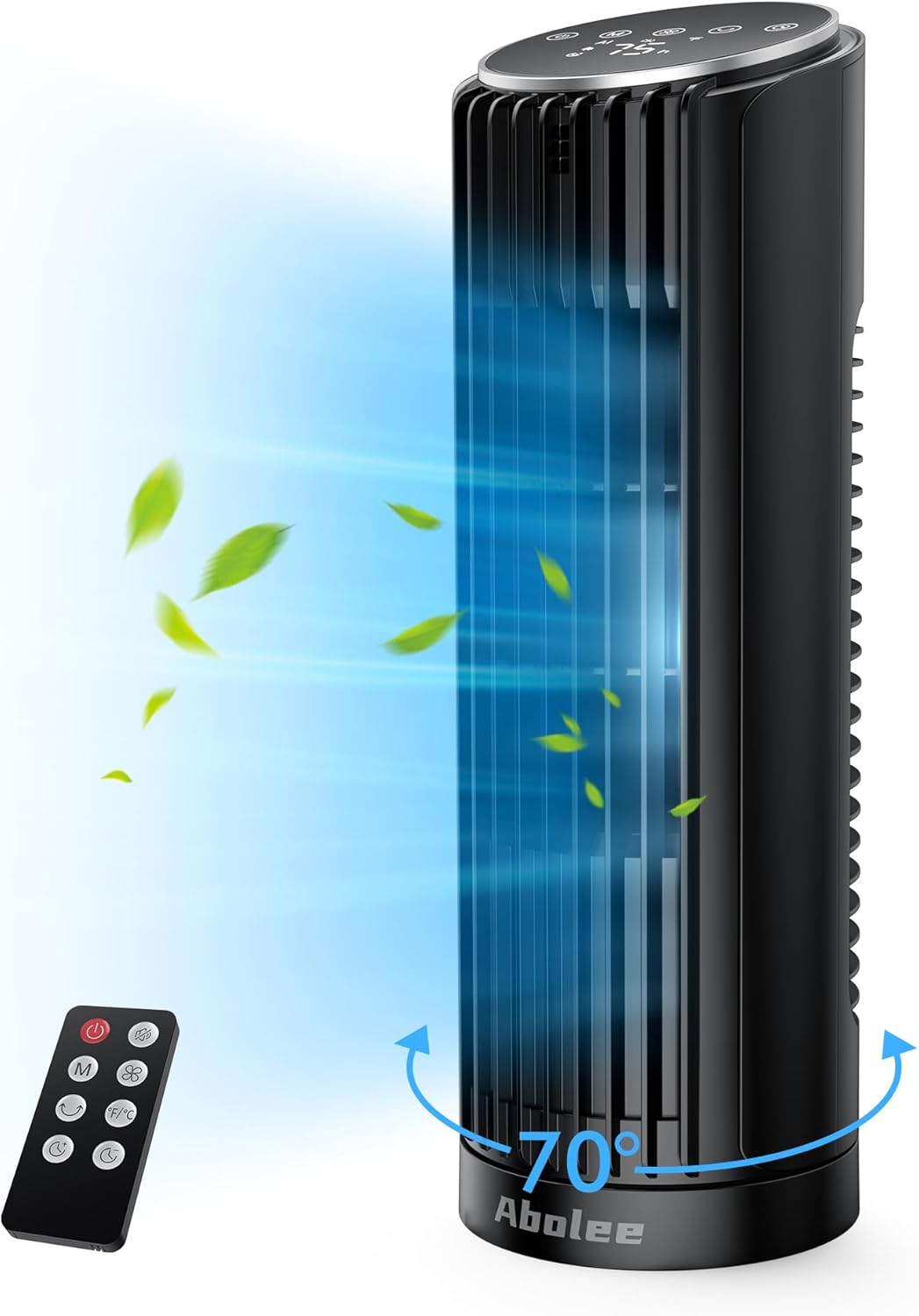
Figure 1: Abolee Tower Fan FTS006R and Remote Control
Components:
- Air Outlet: Where cooled air is expelled.
- Control Panel: Touch-sensitive buttons and LED display for fan operation.
- Air Inlet: Located at the rear, where air is drawn in.
- Base: Provides stability for the fan.
- Power Cord: For connecting to an electrical outlet.
- Remote Control: Allows convenient operation from a distance.
Setup
- Unpack: Carefully remove the fan and all accessories from the packaging. Retain packaging for storage or if return is necessary.
- Placement: Place the fan on a firm, level surface. Ensure there is at least 12 inches (30 cm) of clear space around the fan for proper airflow. Do not block the air inlet or outlet.
- Power Connection: Plug the power cord into a standard 120V AC electrical outlet. Ensure the plug is fully inserted.
- Remote Control Battery: If not pre-installed, insert the required batteries into the remote control, observing polarity.
Operating Instructions
Control Panel and Remote Control
The fan can be operated using the touch control panel on top of the unit or the included remote control. The functions are identical.

Figure 2: Control Panel and Remote Control Layout
- Power Button (⏻): Press to turn the fan ON or OFF.
- Mode Button (M): Press to cycle through the available modes: AI, Natural, Sleep, and Normal.
- Speed Button (⚙): Press to adjust the fan speed (L1, L2, L3, L4).
- Oscillation Button (↻): Press to turn the 70° oscillation ON or OFF.
- Timer Button (⏲): Press to set the auto-off timer from 1 to 12 hours.
- LED Display: Shows current settings such as ambient temperature, speed level, mode, and timer status.
Fan Modes

Figure 3: Available Wind Modes and Speed Levels
- Normal Mode: Provides a constant airflow at the selected speed level (L1-L4).
- Natural Mode: Simulates natural breeze by varying the fan speed intermittently.
- Sleep Mode: Operates at a lower, quieter speed, gradually decreasing over time to promote a comfortable sleeping environment. The LED display dims automatically.
- AI Mode: Adjusts fan speed automatically based on the ambient room temperature for optimal comfort and energy efficiency.
Oscillation Function
Press the oscillation button to activate a 70° wide-angle oscillation, distributing airflow across a larger area. Press again to stop oscillation at the current position.

Figure 4: 70° Widespread Oscillation
Timer Function
The timer allows you to set the fan to automatically turn off after a specified period. Press the timer button repeatedly to select a duration from 1 to 12 hours. The selected time will be displayed on the LED screen.
Maintenance
Regular cleaning and proper maintenance will ensure the longevity and optimal performance of your fan.
- Before Cleaning: Always unplug the fan from the power outlet before cleaning or performing any maintenance.
- Exterior Cleaning: Use a soft, damp cloth to wipe the exterior surfaces of the fan. Do not use abrasive cleaners or solvents, as these may damage the finish.
- Air Inlet/Outlet: Use a vacuum cleaner with a brush attachment or a soft brush to gently remove dust and debris from the air inlet (rear) and air outlet (front grille). Do not attempt to disassemble the fan for internal cleaning.
- Storage: If storing the fan for an extended period, clean it thoroughly, then place it back in its original packaging or cover it to protect it from dust. Store in a cool, dry place.
Troubleshooting
| Problem | Possible Cause | Solution |
|---|---|---|
| Fan does not turn on. | No power supply. Power cord not properly plugged in. | Check if the power outlet is working. Ensure the power cord is securely plugged into the outlet. |
| Weak or no airflow. | Air inlet/outlet blocked. Fan speed set too low. | Clear any obstructions from the air inlet and outlet. Increase the fan speed setting. |
| Remote control not working. | Batteries are dead or incorrectly installed. Obstruction between remote and fan. | Replace batteries with new ones, ensuring correct polarity. Remove any objects blocking the signal path. Ensure you are within range (up to 20 feet). |
| Fan makes unusual noise. | Fan is not on a level surface. Debris inside the fan. | Place the fan on a stable, level surface. Unplug the fan and gently clean the air inlets/outlets. If noise persists, contact customer support. |
Specifications
| Feature | Detail |
|---|---|
| Brand | Abolee |
| Model Name | FTS006R |
| Electric Fan Design | Floor Fan (Tower Fan) |
| Power Source | AC |
| Product Dimensions | 4.33"D x 4.33"W x 12.99"H |
| Item Weight | 3.04 pounds |
| Noise Level | 29 dB |
| Special Features | Bladeless, Oscillating, Remote Controlled, Timer, LED Display, Electronic Touch Controls |
| Control Method | Remote, Touch Control |
| Number of Power Levels | 4 |
| Oscillation Angle | 70° |
| Timer | 1-12 Hours |
| Indoor/Outdoor Usage | Indoor |
Warranty and Customer Support
Abolee products are manufactured to high-quality standards. For information regarding warranty coverage, please refer to the warranty card included with your purchase or visit the official Abolee website. If you encounter any issues or have questions about your Abolee Tower Fan FTS006R, please contact our customer support team for assistance.
Contact Information: Please refer to your purchase documentation or the Abolee official website for the most up-to-date customer support contact details.
Ask a question about this manual
Ask about setup, troubleshooting, compatibility, parts, safety, or missing instructions. Manuals+ will review the question and use this page’s manual context to help answer it.