
1. Introduction
Thank you for purchasing the DOUBLE E Mack Licensed RC Crane. This remote-controlled construction vehicle is designed to provide an engaging and realistic play experience, simulating real crane actions. This manual provides essential information for the safe and effective operation, maintenance, and care of your RC crane.
2. Package Contents
- RC Crane
- Remote Control
- Rechargeable Battery (3.6V/300mAh Nichrome)
- Charging Cable
- Product Manual (this document)
Please ensure all items are present before proceeding with setup.
3. Safety Information
- Not suitable for children under 6 years due to small parts.
- Adult supervision is recommended during operation.
- Do not operate near water, heat sources, or electrical outlets.
- Avoid operating in crowded areas to prevent accidents.
- Always turn off the crane and remote control when not in use.
- Dispose of batteries responsibly according to local regulations.
4. Setup
4.1 Battery Installation
For the RC Crane:
- Locate the battery compartment on the underside of the crane. It is typically secured by a small screw.
- Use a small screwdriver to open the battery compartment cover.
- Connect the 3.6V/300mAh rechargeable Nichrome battery to the crane's battery connector, ensuring correct polarity.
- Place the battery inside the compartment and close the cover, securing it with the screw.
For the Remote Control:
- Locate the battery compartment on the back of the remote control.
- Open the battery compartment cover.
- Insert 2 x 1.5V AA batteries (not included) into the compartment, observing the correct polarity (+/-).
- Close the battery compartment cover.

Figure 4.1: RC Crane underside with battery and charging cable.
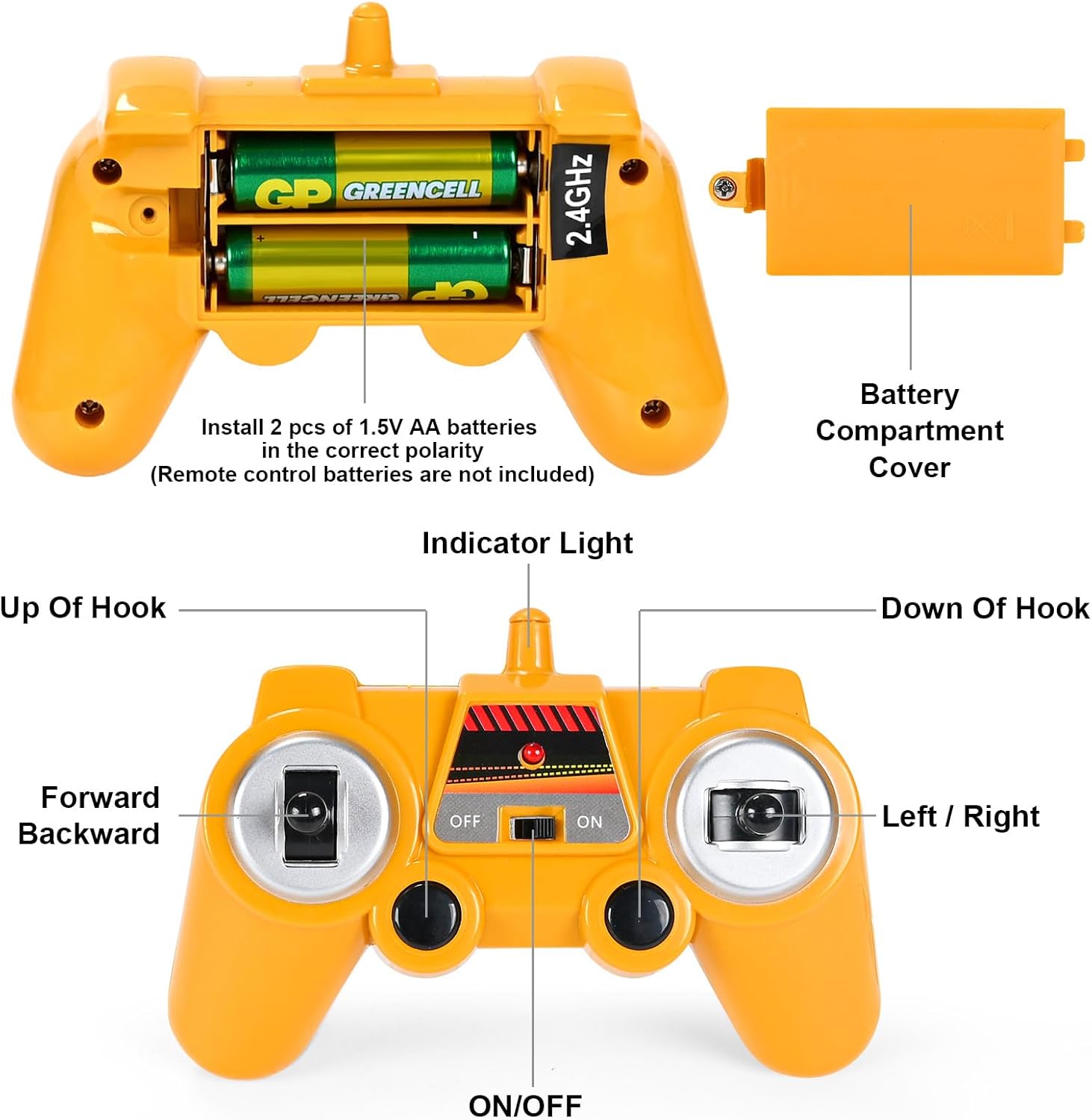
Figure 4.2: Remote control with battery compartment details.
4.2 Charging the Battery
The crane's rechargeable battery should be fully charged before first use. Connect the charging cable to the battery and a suitable USB power source (e.g., computer USB port, USB wall adapter). The indicator light on the charging cable will show charging status (refer to charger instructions for specific light behavior). A full charge typically takes approximately 1 hour, providing double the playtime compared to some other similar toys.
The battery features auto power-off protection for safety.
4.3 Pairing Procedure (2.4GHz Wireless Control)
- Ensure both the RC crane and the remote control are turned OFF.
- Turn ON the RC crane. The crane's lights may flash, indicating it is in pairing mode.
- Turn ON the remote control. The remote control's indicator light should stop flashing and become solid, indicating successful pairing.
- If pairing fails, turn off both devices and repeat the steps.
5. Operating Instructions
The DOUBLE E Mack RC Crane features a 2.4GHz wireless control system for stable and uninterrupted play. Its highly simulated design allows for realistic construction actions.
5.1 Remote Control Functions
Figure 5.1: Remote Control Layout.
- Left Joystick: Controls Forward/Backward movement of the crane.
- Right Joystick: Controls Left/Right steering of the crane.
- Hook Up/Down Buttons: Control the raising and lowering of the crane hook.
- ON/OFF Switch: Powers the remote control on or off.
5.2 Crane Operation
- Driving: Use the left joystick for forward and backward motion, and the right joystick for steering.
- Hook Control: Use the dedicated buttons on the remote to raise or lower the hook.
- Boom Adjustment: The crane's boom needs to be adjusted manually to extend or retract.
- Console Rotation: The crane's console can be rotated manually for precise positioning.
- LED Headlights: The crane features LED headlights for enhanced realism and play in low-light conditions.
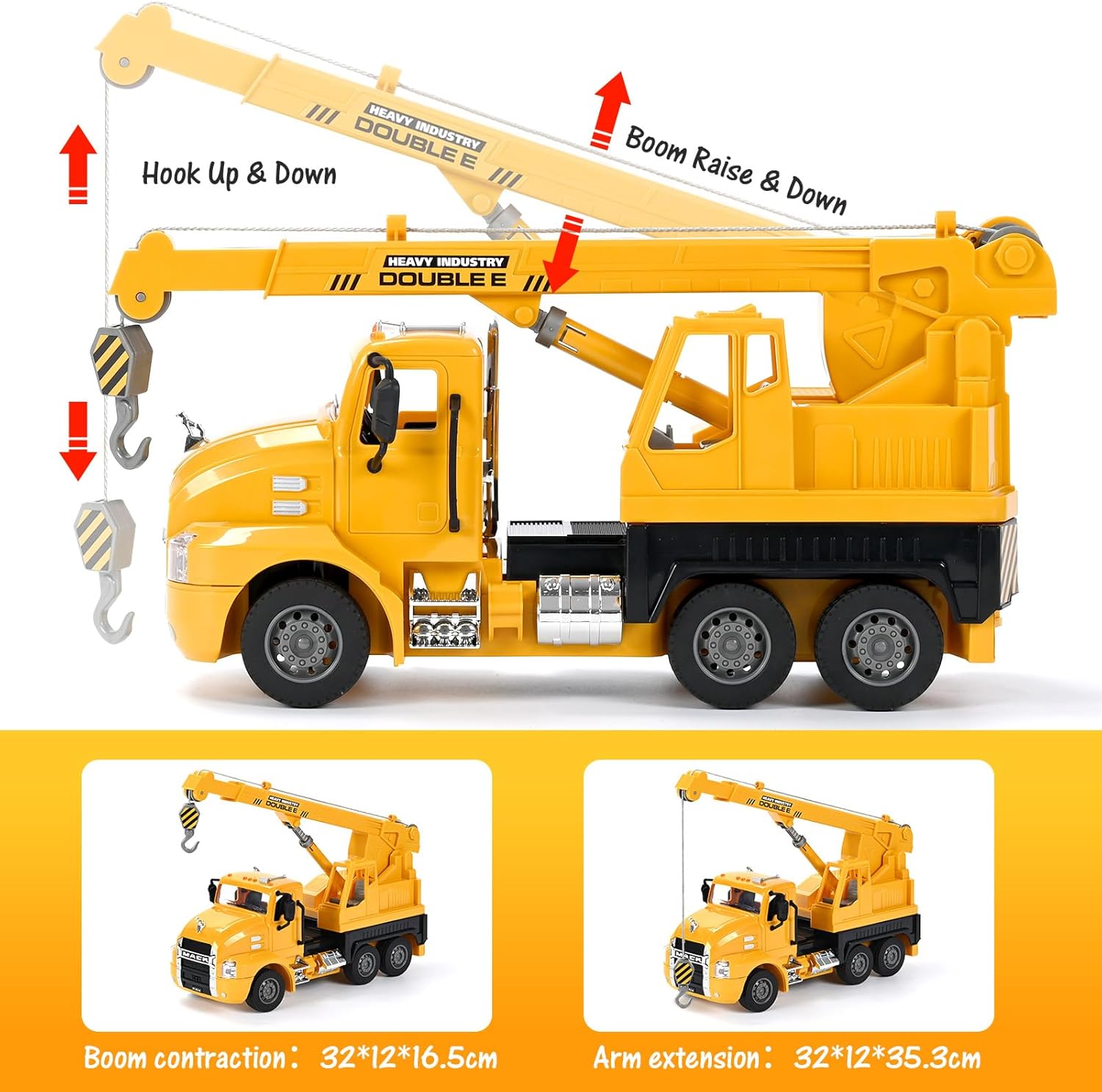
Figure 5.2: Crane Boom and Hook Movement.

Figure 5.3: Key features of the RC Crane.
5.3 Product Demonstration Video
Video 5.1: Official demonstration of the DOUBLE E Mack Licensed Remote Control Engineering Vehicle Series, showcasing the crane's movements and features.
6. Maintenance
- Cleaning: Wipe the crane and remote control with a soft, damp cloth. Do not use harsh chemicals or immerse in water.
- Storage: Store the product in a cool, dry place away from direct sunlight when not in use. Remove batteries from both the crane and remote if storing for extended periods.
- Battery Care: Do not overcharge the battery. If the battery is not used for a long time, charge it periodically to maintain its lifespan.
7. Troubleshooting
- Crane not responding: Ensure both the crane and remote control are turned ON and properly paired. Check battery levels in both devices.
- Short playtime: Ensure the crane's battery is fully charged. Battery performance can decrease over time; consider replacing if significantly degraded.
- Interference: If experiencing interference, move to an area with less wireless activity. The 2.4GHz system is designed for anti-interference, but extreme conditions may affect performance.
- Boom/Hook not moving: Ensure the crane is powered on and the remote is paired. Check for any physical obstructions or damage to the boom or hook mechanism. Remember the boom needs manual adjustment.
8. Specifications
| Feature | Detail |
|---|---|
| Product Dimensions | 1 x 1 x 1 inches |
| Item Weight | 2.33 pounds |
| Country of Origin | China |
| Model Number | E536-003 |
| Recommended Age | 6 - 18 years |
| Battery Type | 3.6V/300mAh Nichrome (Rechargeable) |
| Control Frequency | 2.4GHz |
9. Warranty & Support
DOUBLE E products are manufactured with high-quality materials and undergo strict quality control. For any product-related inquiries, technical support, or warranty claims, please contact our customer service team.
Contact Information:
- Email: superkidsservice@hotmail.com
- For more information, scan the QR code below or visit our official store.
