
1. Product Overview
The Kaschun K1-N is a professional-grade 4-channel audio mixer designed for versatile sound mixing. It features a durable steel chassis with sealed rotary controls for longevity. Equipped with built-in Bluetooth, 99 DSP effects, and advanced EQ adjustments, it delivers studio-quality sound suitable for stage performances, live gigs, karaoke, studio recording, and streaming.
Key features include a digital display USB player for direct playback, 48V phantom power for condenser microphones, and a multi-voltage power supply for global compatibility. Its analog circuitry ensures clean, noise-free audio with professional clarity.

Image: Kaschun K1-N 4-Channel Audio Mixer supporting multiple device connections via USB and Bluetooth.
2. Key Features
- 99 DSP Effects: Enhance your audio with a wide range of built-in digital signal processing effects, including various reverbs, delays, chorus, flanger, phaser, and more.
- 48V Phantom Power: Dedicated phantom power switches for each XLR/1/4" combo input allow for the use of condenser microphones.
- Advanced EQ: Features per-channel 3-band EQ with gain controls and a 7-band master stereo graphic equalizer for precise sound shaping.
- Flexible Connectivity: Supports XLR, 1/4" (balanced/unbalanced), instrument, mic, and line-level sources. Includes USB/PC compatibility and Bluetooth wireless streaming.
- USB MP3 Player: Built-in digital display USB player for direct playback with intuitive controls (play/pause/skip).
- Rugged Construction: Durable steel chassis with sealed rotary controls designed to resist dust and grime, ensuring reliability in various environments.

Image: The mixer's digital display showing the 99 DSP effects available for selection.

Image: A close-up of the 4-channel mixing console, emphasizing the 7-band stereo graphic equalizer for master output adjustment.
3. Inputs and Outputs
The Kaschun K1-N mixer offers a comprehensive array of inputs and outputs to accommodate various audio setups.
Input Section:
- MIC/LINE Combo Inputs (Channels 1-4): Accepts both XLR and 1/4" (TRS/TS) connectors for microphones, instruments, or line-level devices. Each channel includes a gain knob, 3-band EQ (High/Mid/Low), FX/Send control, Pan control, and a channel volume fader.
- 48V Phantom Power: Individual switches for +48V phantom power on each combo input, essential for condenser microphones.
- USB/MP3 Input: Dedicated section for USB drive playback or connection to a PC for audio input. Also supports Bluetooth streaming.
- TAPE/REC IN (RCA): Stereo RCA inputs for connecting external playback devices like CD players or tape decks.
Output Section:
- MAIN OUT (XLR & 1/4" TRS): Balanced stereo outputs for connecting to main speakers or power amplifiers.
- SEND/RETURN (1/4" TS): For connecting external effects processors.
- PHONES (1/4" TRS): Stereo headphone output with dedicated volume control for monitoring.
- TAPE/REC OUT (RCA): Stereo RCA outputs for recording the main mix to an external recorder.
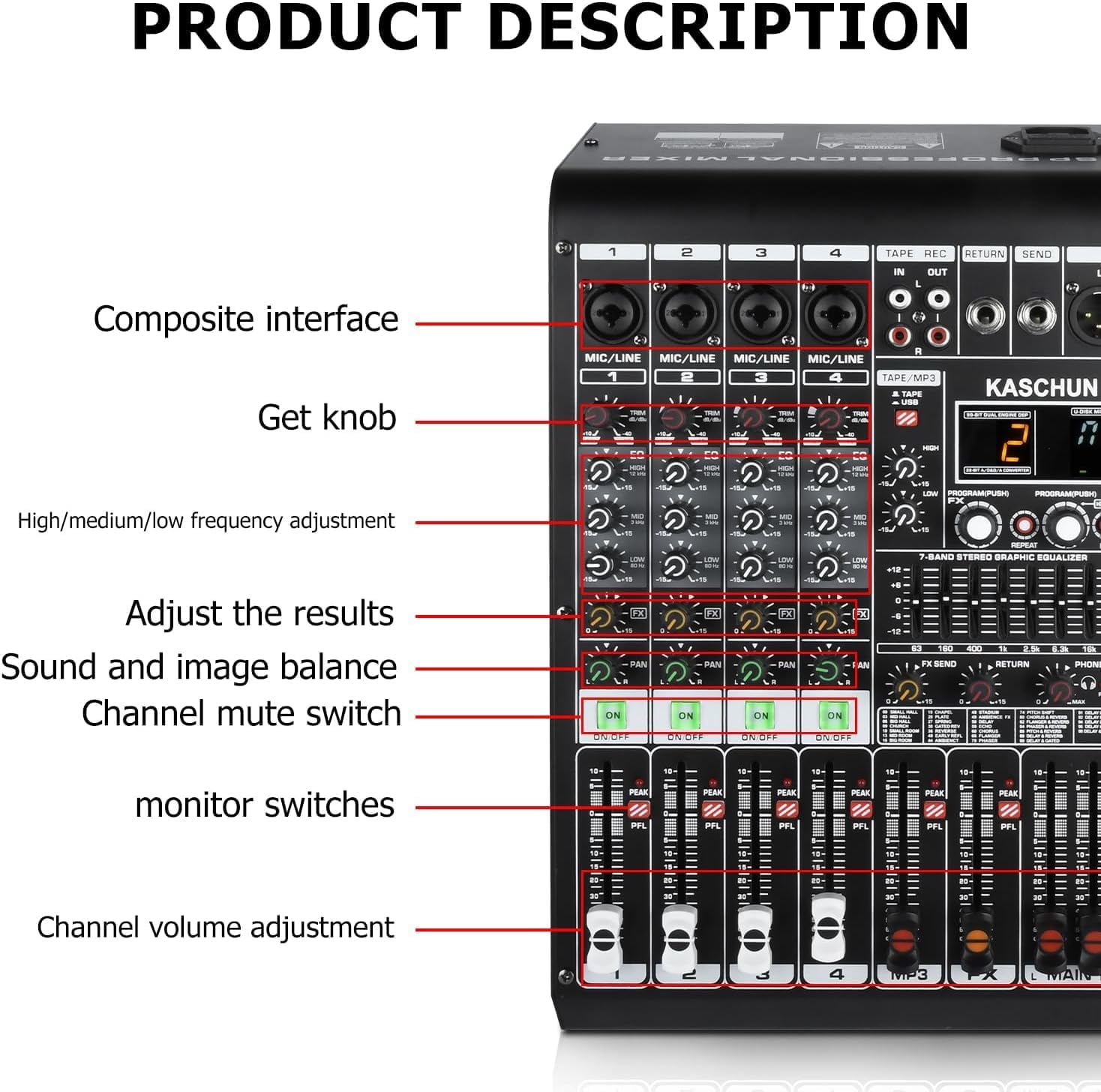
Image: Detailed view of the mixer's controls, including composite interfaces, gain knobs, frequency adjustments, balance, mute, monitor switches, and channel volume faders.
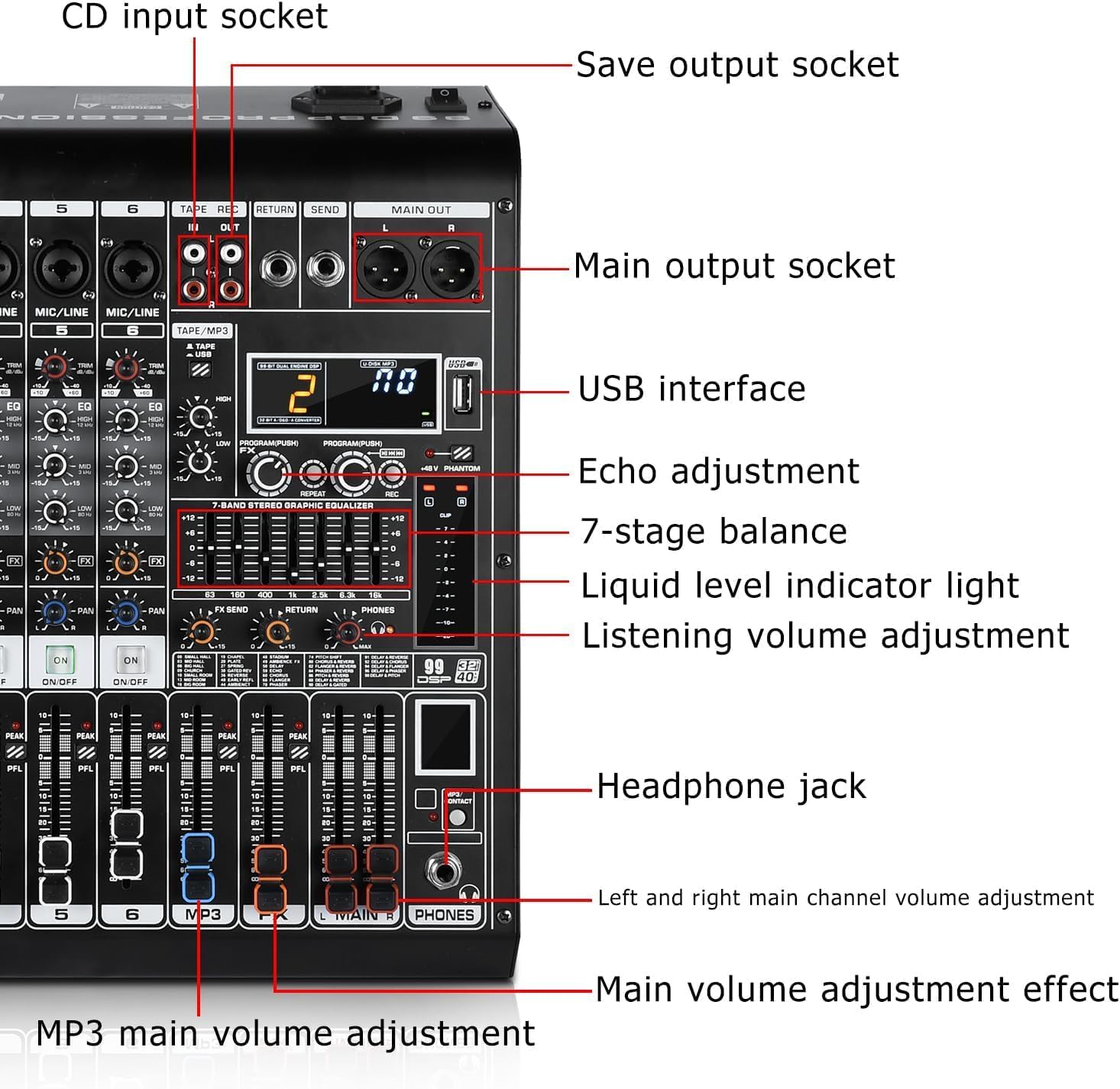
Image: Close-up of the mixer's input and output section, labeling CD input, save output, main output, USB interface, echo adjustment, 7-stage balance, liquid level indicator, listening volume, headphone jack, and main volume controls.
4. Setup Guide
- Power Connection: Connect the provided multi-voltage power adapter (100V-240V +/-15V DC) to the mixer's DC input and then to a suitable power outlet.
- Microphone Connection:
- For dynamic microphones, connect via XLR or 1/4" cable to any MIC/LINE input (Channels 1-4).
- For condenser microphones, connect via XLR cable to any MIC/LINE input (Channels 1-4) and activate the +48V PHANTOM power switch for that specific channel.
- Instrument/Line-Level Device Connection: Connect instruments (e.g., guitar, keyboard) or line-level devices (e.g., media players) using 1/4" TS/TRS cables to the MIC/LINE inputs (Channels 1-4) or stereo RCA inputs (TAPE/REC IN).
- Output Connection: Connect your main speakers or power amplifier to the MAIN OUT (XLR or 1/4" TRS) connectors. For monitoring, connect headphones to the PHONES output.
- USB/PC Connection: Insert a USB drive into the USB port for MP3 playback. To use the mixer as an audio interface with a computer, connect a USB cable from the mixer's USB port to your PC.
- Bluetooth Connection: Activate Bluetooth on your device (e.g., smartphone, tablet) and search for the mixer's Bluetooth ID (usually displayed on the mixer's screen). Pair your device to stream audio wirelessly.
5. Operating Instructions
- Power On: Ensure all connections are secure, then press the POWER button to turn on the mixer.
- Adjusting Input Levels (Gain): Use the GAIN knob for each channel to set the input sensitivity. Adjust until the PEAK LED occasionally flashes, indicating a strong signal without clipping.
- Equalization (EQ): Use the HIGH, MID, and LOW knobs on each channel to adjust the tone. The 7-band master EQ can be used for overall mix adjustment.
- Using DSP Effects:
- Select an effect program (1-99) using the PROGRAM knob in the DSP section.
- Use the FX/SEND knob on individual channels to send a portion of that channel's signal to the selected effect.
- Adjust the overall effect level using the FX/SEND master control.
- USB MP3 Player Operation: Use the controls (Play/Pause, Skip Forward/Backward, Mode) in the USB PLAYER section to manage audio playback from a USB drive.
- Bluetooth Streaming: Once paired, audio from your Bluetooth device will play through the mixer. Adjust its volume via the USB PLAYER section or your connected device.
- Monitoring: Use the PHONES volume knob to adjust the headphone output level for monitoring your mix.
- Main Output Level: Use the main STEREO fader to control the overall output volume of the mixer.
6. Maintenance
- Cleaning: Use a soft, dry cloth to clean the mixer's surface. Avoid liquid cleaners or solvents that could damage the finish or internal components.
- Dust Protection: Keep the mixer covered when not in use to prevent dust accumulation, especially on rotary controls and faders.
- Storage: Store the mixer in a cool, dry place away from direct sunlight and extreme temperatures.
- Cable Management: Ensure cables are neatly organized and not under tension to prevent damage to connectors and inputs.
7. Troubleshooting
- No Sound Output:
- Check if the mixer is powered on and all cables are securely connected.
- Ensure channel gain and volume faders are up, and the main stereo fader is not at minimum.
- Verify that connected speakers/amplifiers are powered on and functioning correctly.
- Distorted Audio:
- Reduce the GAIN knob on the input channel if the PEAK LED is constantly lit.
- Lower the channel volume fader or the main stereo fader.
- Check the input level of the connected device to ensure it's not sending an overly hot signal.
- No Phantom Power: Ensure the +48V PHANTOM switch is activated for the specific channel connected to a condenser microphone.
- Bluetooth Connectivity Issues:
- Ensure the mixer's Bluetooth mode is active.
- Check that your device's Bluetooth is on and within range (approx. 3ft).
- Forget the device on your phone/tablet and re-pair.
- Noise/Hum in Audio:
- Ensure all cables are properly shielded and in good condition.
- Check for ground loops by trying different power outlets or using a ground loop isolator if necessary.
- Keep audio cables away from power cables.
8. Specifications
| Feature | Detail |
|---|---|
| Item Weight | 8 pounds |
| Package Dimensions | 18 x 14 x 8 inches |
| Item Model Number | K1-N |
| Power Source | Corded Electric (100V-240V +/-15V DC) |
| Number of Channels | 4 (Mic/Line) + Stereo Line Inputs (USB/MP3/Bluetooth) |
| Connectivity Technology | USB, Bluetooth |
| DSP Effects | 99 Built-in Digital Multi-Effects |
| Phantom Power | +48V (switchable per channel) |
| Equalization | 3-band per channel, 7-band master graphic EQ |
9. Warranty & Support
For warranty information, please refer to the product packaging or contact the retailer directly. Protection plans are available for purchase separately, offering extended coverage for 2-Year or 3-Year periods, or a Complete Protect monthly plan.
For product support, troubleshooting assistance, or to explore other products, please visit the official Kaschun Store on Amazon: Kaschun Store.
This product is eligible for a 30-day refund/replacement return policy.
10. Product Videos
Audio Mixer 4 Channel Overview
This video provides a brief overview of the 4-channel audio mixer, demonstrating its compact design and key features. It highlights the various inputs and controls, offering a quick visual guide to the product's capabilities.
Professional Audio Mixer Features
This video showcases the professional features of the audio mixer, including its DSP effects, USB interface, 48V phantom power, 3-band EQ, and Bluetooth 5.0 connectivity. It illustrates how these features contribute to a versatile and high-quality audio mixing experience.