
Introduction
This manual provides detailed instructions for the setup, operation, and maintenance of your Aureday 92-inch Phone Tripod. Please read this guide thoroughly before using the product to ensure proper functionality and longevity. This versatile tripod is designed to enhance your photography and videography experience with its adjustable height, flexible gooseneck, and remote control capabilities.
Package Contents
Verify that all items listed below are included in your package:
- 1 x Tripod Stand
- 1 x 15-inch Gooseneck Extension
- 1 x Ball Head Mount
- 1 x Phone Holder
- 1 x Wireless Remote Control
- 1 x Carrying Bag
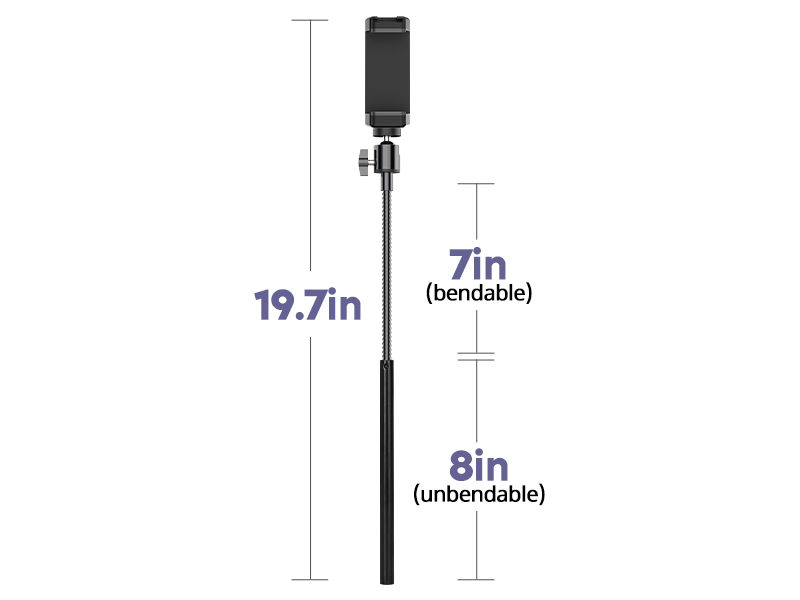
Image: All components of the Aureday Phone Tripod package.
Setup Instructions
Follow these steps to assemble your Aureday Phone Tripod:
- Open the Tripod: Gently spread the tripod legs until they are fully extended and stable.
- Secure the Base: Tighten the knob at the base of the tripod to lock the legs in position, ensuring maximum stability.
- Attach the Gooseneck: Screw the 15-inch gooseneck extension onto the top of the tripod pole.
- Install the Ball Head: Attach the ball head mount to the top of the gooseneck.
- Mount the Phone Holder: Secure the phone holder onto the ball head.
- Adjust Height: Use the flip-locks on the tripod pole to extend or retract the sections to your desired height. Ensure all locks are securely fastened after adjustment.
- Insert Phone: Open the phone holder clamp and carefully place your smartphone inside.

Image: Step-by-step visual guide for tripod assembly.
Setup Video Guide
Video: An unboxing and assembly guide for the Aureday Tripod, demonstrating how to set up the device.
Operating Instructions
Height Adjustment
The tripod features multiple extendable sections. Unlock the flip-locks on each section to extend the pole to your desired height, from a minimum of 13.5 inches to a maximum of 92 inches. Securely close all flip-locks after adjustment to maintain stability.

Image: Visual representation of the tripod's adjustable height.
Gooseneck and Ball Head Usage
The 15-inch gooseneck provides flexible positioning for your device, allowing you to achieve various angles, including overhead shots. The ball head offers 360-degree rotation and tilt, enabling precise adjustments for both portrait and landscape orientations. Loosen the knob on the ball head to adjust the angle, then tighten to secure.
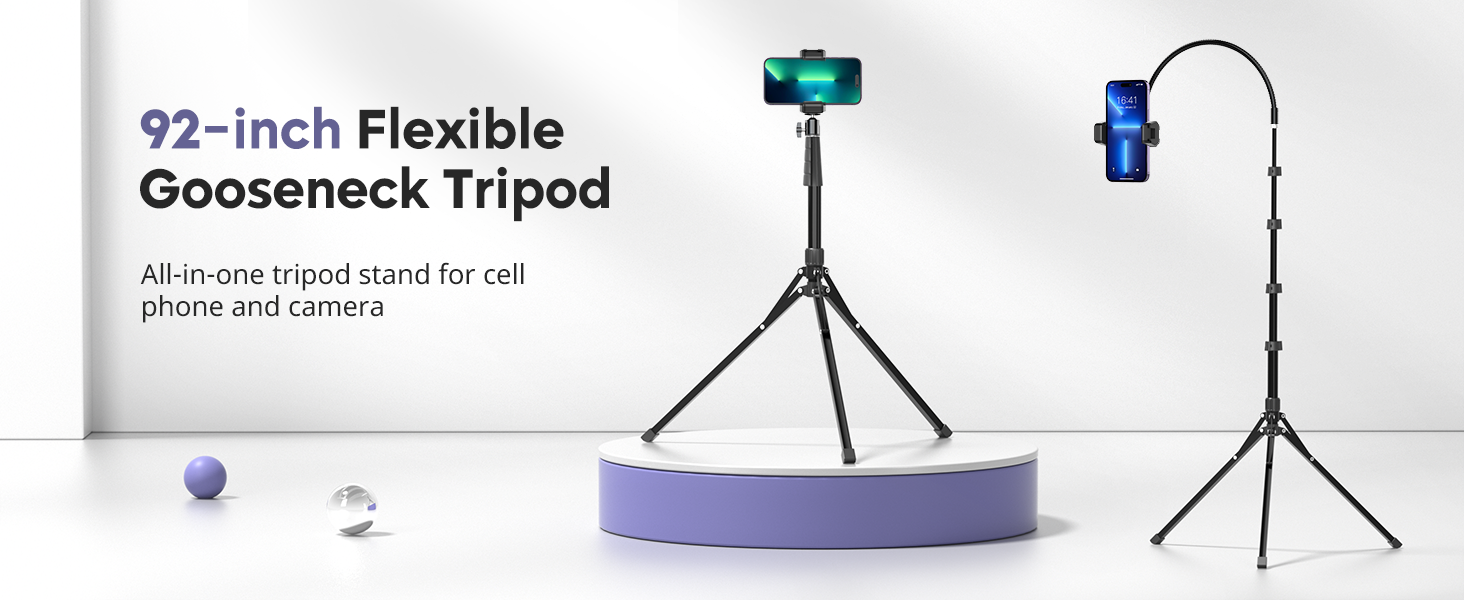
Image: Flexible gooseneck and ball head for versatile angles.
Wireless Remote Control
The included wireless remote control allows you to remotely trigger your phone's camera for photos and videos. Pair the remote with your smartphone via Bluetooth. This feature is ideal for capturing shots without touching your device, reducing camera shake and enabling self-portraits or group photos from a distance.
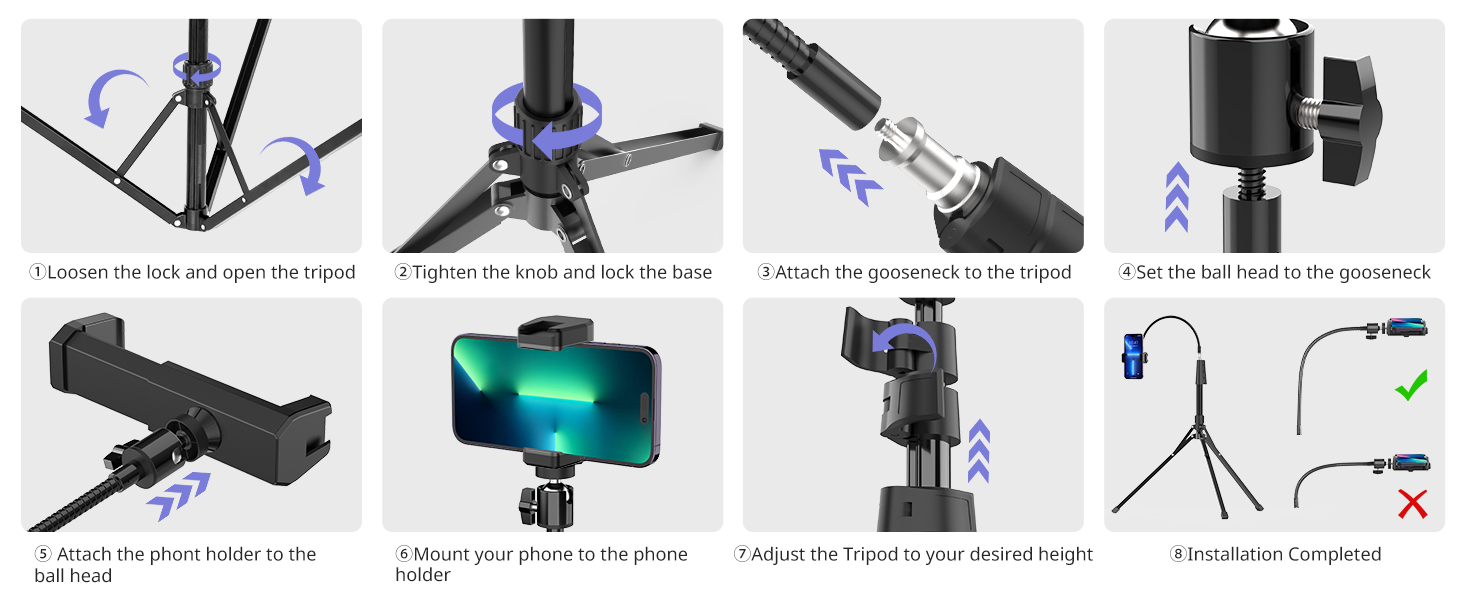
Image: Wireless remote control for hands-free operation.
Phone Holder and Accessory Compatibility
The adjustable phone clamp accommodates smartphones from 2.8 to 5.7 inches wide. The tripod also features a standard 1/4-inch screw mount and a cold shoe mount on the phone holder, allowing compatibility with DSLRs, action cameras, webcams, ring lights, projectors, microphones, and LED lights.
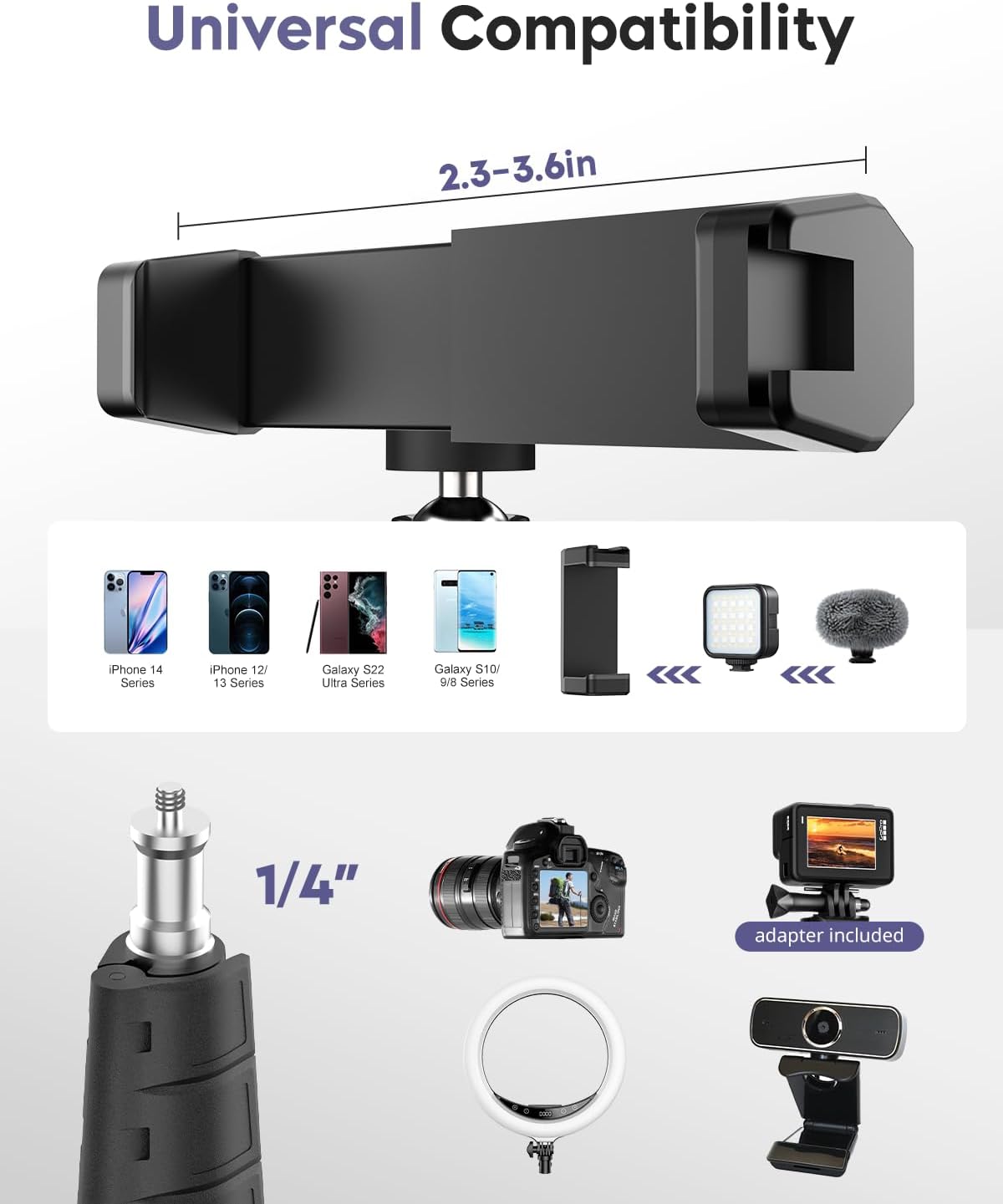
Image: Universal compatibility with various devices.
Gooseneck and Phone Holder Orientation Video
Video: Demonstrates how to adjust the gooseneck and phone holder for both landscape and portrait setups.
Features
- Extra-Long Reach: Extends from 16 inches to 92 inches, providing impressive height and flexibility for diverse shooting angles.
- Sturdy and Stable Design: Constructed from high-quality aluminum alloy with an upgraded four-knob design for enhanced stability and durability. Features non-slip rubber feet.
- Flexible Gooseneck: The 15-inch gooseneck (7-inch bendable, 8-inch unbendable) allows for precise and creative positioning.
- Wide Compatibility: Adjustable phone clamp fits all iPhone and Android smartphones (2.8 to 5.7 inches). Standard 1/4-inch screw mount and cold shoe mount support various cameras and accessories.
- Portable: Folds down to a compact 16 inches for easy storage and transport in the included carrying bag.

Image: Enhanced stability features of the tripod.
Specifications
| Attribute | Value |
|---|---|
| Product Dimensions | 16 x 92 x 92 inches (fully extended) |
| Item Weight | 2.25 pounds |
| Item Model Number | 92in |
| Maximum Height | 92 Inches |
| Minimum Height | 13.5 Inches |
| Material | Aluminum |
| Special Feature | Gooseneck, Remote Control |
| Compatible Devices | Camera, Smartphone |
| Color | Black |
| Batteries | 1 C battery required (for remote) |
Maintenance
To ensure the longevity and optimal performance of your Aureday Phone Tripod, follow these maintenance guidelines:
- Cleaning: Wipe down the tripod with a soft, dry cloth after each use to remove dust and debris. For stubborn dirt, use a slightly damp cloth and dry thoroughly.
- Storage: Store the tripod in its carrying bag in a cool, dry place away from direct sunlight and extreme temperatures.
- Lubrication: Periodically check the moving parts, such as the flip-locks and ball head, for smooth operation. Apply a small amount of silicone-based lubricant if necessary, avoiding excessive application.
- Inspection: Regularly inspect the tripod for any signs of wear, damage, or loose components. Tighten any loose screws or connections. Do not use if any part is broken or damaged.
Troubleshooting
If you encounter any issues with your Aureday Phone Tripod, refer to the following common troubleshooting tips:
- Tripod Instability: Ensure all flip-locks on the pole sections are securely fastened and the base knob is tightened. Make sure the legs are fully spread on a flat, stable surface.
- Phone Not Secure: Verify that the phone holder clamp is fully extended and gripping your phone firmly. The clamp should be centered on your phone for balanced support.
- Remote Control Not Connecting: Check if the remote control has a working battery. Ensure Bluetooth is enabled on your smartphone and the remote is in pairing mode. Re-pair the remote if necessary.
- Gooseneck Not Holding Position: Ensure the ball head knob is tightened after adjusting the gooseneck's position. The gooseneck is designed to be firm to hold its shape.
If the issue persists, please contact customer support.
Warranty & Support
Aureday provides a 12-month free service to ensure your complete satisfaction with this product. If you have any questions, concerns, or require assistance, please do not hesitate to contact our customer support team. We are committed to providing dependable support and resolving any issues you may encounter.
Please retain your proof of purchase for warranty claims.