
Important Safety Information
Please read all instructions carefully before assembly and use. Retain this manual for future reference.
- Exercise caution during assembly. Some components may have sharp edges.
- Assembly is recommended with two people for easier handling and to prevent injury due to the product's size and weight.
- Ensure all screws and fasteners are securely tightened before placing a television or other items on the stand.
- Do not exceed the maximum weight capacity of the stand or the TV mount. This stand is designed for TVs up to 85 inches.
- Keep children and pets away from the assembly area.
- Always unplug the power strip before cleaning or performing any maintenance.
Package Contents
Verify that all components are present before beginning assembly.
- TV Stand Components (Engineered Wood, Iron, Metal, Steel parts)
- TV Mount Hardware
- Power Outlet Strip with 4 AC Outlets and 4.76-foot Power Cord
- Screw Pack (includes various screws, bolts, and tools for stand assembly)
- Assembly Instructions Manual
Note: Screws for attaching the TV to the mount bracket are typically not included and must be purchased separately based on your TV's specific requirements (e.g., M8 screws for some 75-inch Samsung TVs).
Setup and Assembly Instructions
Follow these steps carefully for proper assembly. Each accessory is labeled for easy identification.
Step 1: Unpack and Identify Components
Carefully remove all parts from the packaging. Lay them out on a clean, soft surface to prevent scratches. Refer to the included parts list to identify each component.

Image: Overview of the TV stand components and hardware before assembly.
Step 2: Assemble the Base and Shelving Units
Begin by assembling the main frame and the three-tier shelving units. Ensure that countersinks are on the correct side and use the appropriate screws for each hole. Some screws may appear similar; double-check the labels.

Image: Detailed view of the stand's open shelves design and sturdy construction.
Step 3: Install the TV Mount Column
Attach the central column that supports the TV mount to the main stand structure. This column also features cable management openings.

Image: Technical diagram illustrating the full dimensions and components, including the central mount column.
Step 4: Attach the TV Mounting Bracket
Secure the TV mounting bracket to the central column. This bracket allows for height adjustment and swivel functionality. Refer to the diagram for proper orientation and secure fastening.
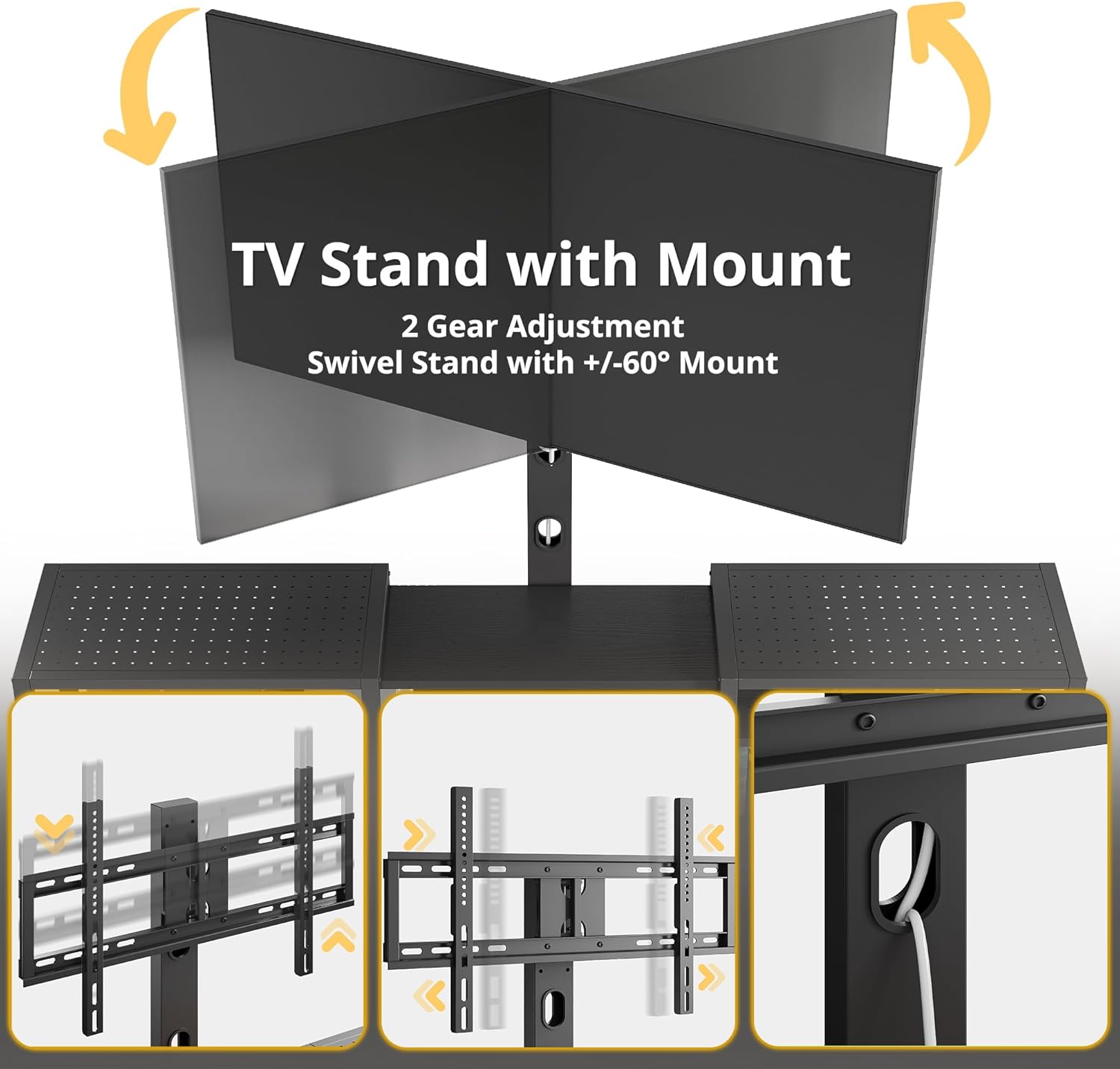
Image: Detailed view of the TV mount, highlighting its swivel and height adjustment features.
Step 5: Install the Power Outlet
Integrate the built-in power strip into the designated slot on the stand. Ensure the power cord is routed neatly through the cable management openings.

Image: Close-up of the integrated power outlet, showing the 4 AC sockets and cable routing.
Step 6: Mount Your Television
Attach the TV mounting hooks (not included) to the back of your television. With the help of a second person, carefully lift your TV and hook it onto the stand's mounting bracket. Ensure the TV is securely seated and level. This stand supports TVs from 48 to 85 inches.

Image: The IRONCK TV stand with a large television mounted, demonstrating its compatibility with TVs up to 85 inches.
Assembly Video Guide
Video: Official IRONCK guide demonstrating the assembly and features of the 79 Inch TV Stand with Mount.
Operating Instructions
Swivel TV Mount
The integrated TV mount allows for a swivel range of +/- 60 degrees (30 degrees left and 30 degrees right). Gently push the television to adjust the viewing angle as desired. The mount also offers two height adjustment positions for optimal screen placement.
Image: Visual representation of the TV mount's swivel capability.
Integrated Power Outlet
The TV stand includes a built-in power strip with four 120V/12A AC outlets. Plug your television, gaming consoles, sound systems, and other electronic devices directly into these outlets for convenient power access and reduced cable clutter. The power cord for the strip is 4.76 feet long.
Image: Example of devices plugged into the integrated power strip.
Storage Shelves
Utilize the three tiers of open shelving for organizing media devices, books, decorative items, or other accessories. The metal hole shelves provide ventilation for electronics.

Image: The open shelf design, providing ample storage space for various items.
Maintenance
- Cleaning: Wipe surfaces with a soft, damp cloth. Avoid harsh chemicals or abrasive cleaners that may damage the finish.
- Dusting: Regularly dust the stand to prevent buildup.
- Fasteners: Periodically check all screws and bolts to ensure they remain tight. Re-tighten if necessary.
- Power Outlet: Inspect the power cord and outlets for any signs of damage. Discontinue use if damage is found and contact customer support.
Troubleshooting
- TV Mount Swivel Feels Loose: Ensure all fasteners connecting the mount to the column and the TV to the mount are securely tightened. If the issue persists, contact customer support.
- Missing TV Mounting Screws: The product package typically includes screws for assembling the stand itself, but not for attaching your specific TV to the mount. You will need to acquire M8 screws or other sizes as specified by your television manufacturer.
- Stand Wobbles: Check that all assembly screws are fully tightened. Ensure the adjustable feet pads are properly leveled on an even surface. Adjust the feet as needed to stabilize the stand.
- Power Outlet Not Working: Verify that the power strip's cord is securely plugged into a functional wall outlet. Check for any tripped circuit breakers. If the issue continues, the power strip may be faulty; contact customer support.
Specifications
| Model Number | HK-TS-03 |
| Brand | IRONCK |
| Dimensions (W x D x H) | 78.8" x 15.8" x 24.6" (199.9 cm x 40.1 cm x 62.5 cm) |
| Item Weight | 77.6 pounds (35.2 kg) |
| Material | Engineered Wood, Iron, Metal, Steel |
| Color | Black |
| Number of Shelves | 3 |
| TV Size Compatibility | 48" to 85" |
| Swivel Angle | +/- 60 degrees |
| Power Outlet | 4 AC Outlets, 120V/12A, UL Certified |
| Power Cord Length | 4.76 feet |
| Additional Features | Adjustable feet, Cable management |
Warranty and Support
This product is manufactured by IRONCK. For any questions regarding assembly, missing parts, or product functionality, please contact IRONCK customer support. Refer to your purchase documentation for specific warranty details and contact information.
Typically, IRONCK products come with a standard manufacturer's warranty covering defects in materials and workmanship. Please retain your proof of purchase for warranty claims.
For direct assistance, you may visit the IRONCK store page on Amazon or contact the seller, IRONCK Direct, through the Amazon platform.

