
1. Introduction
This manual provides essential instructions for the installation, operation, and maintenance of your PopBloom Hertz 54 LED Planted Aquarium Lighting system. This 60-watt light is specifically designed for 24-inch (60cm) freshwater aquariums, offering advanced smart-APP control for comprehensive lighting management. It features a full spectrum output with four adjustable channels to mimic natural light cycles, promoting optimal plant growth and fish coloration.
2. Safety Instructions
- Always disconnect power before performing any maintenance or installation.
- This product is designed for indoor use only and is not water resistant. Avoid direct contact with water.
- Ensure the power supply is compatible with your local voltage (100-265V).
- Do not operate the light if the power cord or plug is damaged.
- Keep out of reach of children.
- Do not attempt to disassemble or modify the light fixture. This will void the warranty.
- Ensure proper ventilation around the light to prevent overheating.
3. Package Contents
Verify that all components are present in the package:
- 1x PopBloom Hertz 54 LED Light Panel (54cm)
- 1x Arm Kit for mounting
- 1x Power Supply
- 1x Power Plug
- 1x User Manual (this document)
4. Product Overview
The PopBloom Hertz 54 LED light is engineered for freshwater planted aquariums, providing a comprehensive lighting solution with smart control capabilities.
Key Features:
- Full Spectrum Output: Mimics natural sunlight for optimal aquatic plant growth and vibrant fish colors.
- 4 Independent Channels: Allows precise control over red, moonlight, day white, and vivid color LEDs.
- Smart-APP Control: Manage settings, schedules, and special effects via the SmartLife or Tuya Smart app (2.4GHz Wi-Fi required).
- Natural Simulation: Features sunrise, sunset, moonlight, 24-day-night cycle, and 4 seasons simulation.
- DIY Mode: Customize up to 8 time points for brightness and channel settings.
- Efficient Heat Dissipation: Aluminum chassis design ensures silent operation without a fan.
- Daisy Chain Capability: Control up to 10 light panels simultaneously with one system.
Light Panel Dimensions:
The light panel measures 54cm (21.3 inches) in length, 12cm (4.7 inches) in width, and 3.6cm (1.4 inches) in height.

Image: Detailed view of the PopBloom Hertz 54 LED light panel with its precise dimensions indicated.
LED Channels and Functions:
| Channel | LEDs | Wattage | Function |
|---|---|---|---|
| Channel 1 | Red | 10 W | Plant Growth Red |
| Channel 2 | Blue | 8 W | Moonlight |
| Channel 3 | White | 33 W | Day White Adjust |
| Channel 4 | Mixed Color | 12 W | Vivid Color |

Image: Visual representation of the four distinct LED channels and their specific roles in the lighting system.

Image: Technical graphs detailing the spectral output and photosynthetic photon flux (PPF) of the light, both in air and underwater.

Image: Representation of the light's spectrum, highlighting its high Color Rendering Index (CRI 90) and its benefits for aquatic life.
5. Setup
5.1 Arm Kit Installation
The included arm kit allows for flexible mounting on various tank types (rimless, horizontal, rimmed). Follow these steps to install the arm kit and mount the light:
- Assemble the arm kit components according to the diagram. The arm is scalable from 2-16cm and has an adjustable height of 19-34cm.
- Attach the mounting clamp to the edge of your aquarium. Ensure it is securely fastened.
- Slide the light panel onto the arm kit. The light can be installed from either the length side or the width side, depending on your preference and tank setup.
- Adjust the height and position of the light over your aquarium for optimal coverage.

Image: Instructions for installing the adjustable arm kit, demonstrating its versatility for different aquarium rim styles and light panel orientations.
5.2 Power Connection
- Connect the power supply to the light panel.
- Plug the power supply into a suitable electrical outlet.
- The light will power on, typically in a default mode.
6. Operating Instructions (Smart-APP Control)
This lighting system is controlled via a smart application, offering extensive customization and scheduling options. The app supports both iOS and Android devices.
6.1 App Download and Installation
- Scan the QR code provided in the product packaging or search for "SmartLife" or "Tuya Smart" in your device's app store.
- Alternatively, download the app from these links: SmartLife App or Tuya Smart App.
- Install the app on your smartphone or tablet.
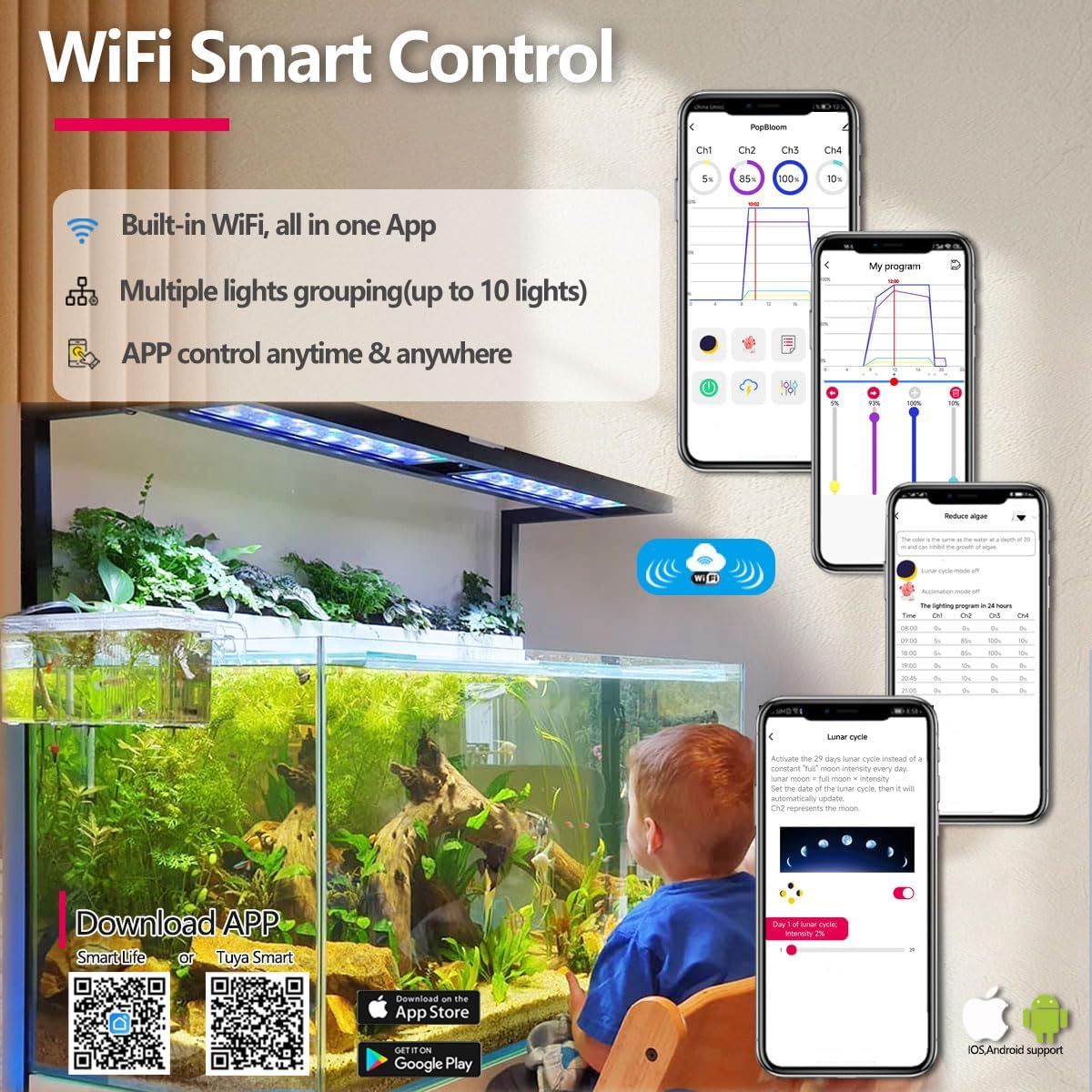
Image: Visual guide for downloading the SmartLife or Tuya Smart app, demonstrating the Wi-Fi control feature and various app interfaces.
6.2 Device Pairing
- Ensure your smartphone is connected to a 2.4GHz Wi-Fi network. This light system does not support 5GHz Wi-Fi.
- Open the SmartLife or Tuya Smart app and create an account or log in.
- Follow the in-app instructions to add a new device. Typically, you will select 'Lighting' or 'Light Source (Wi-Fi)'.
- Put the light into pairing mode (refer to the app's instructions for specific steps, usually involving a power cycle or holding a button if available).
- Confirm the device is found and connected within the app.
6.3 App Functions
The app provides comprehensive control over your aquarium lighting:
- Master Control: Adjust overall brightness and color balance.
- Program Mode: Create custom lighting schedules with up to 8 time points for each channel.
- Acclimation Mode: Gradually increase light intensity for new setups or sensitive inhabitants.
- Lunar Cycle: Simulate a 29-day lunar cycle with automatic intensity adjustments.
- Lightning Effect: Simulate lightning storms for a dynamic visual effect.
- Preset Modes: Choose from various pre-programmed lighting scenarios (e.g., Tropical Spring).
- Group Control: Manage up to 10 PopBloom lights simultaneously from a single app interface.

Image: Feature comparison between Smart-APP control and traditional remote control, emphasizing the advanced capabilities of the app.

Image: Overview of the PopBloom app's main interface, showcasing different control modes and settings for comprehensive light management.
7. Maintenance
Regular maintenance ensures the longevity and optimal performance of your PopBloom Hertz 54 LED light.
- Cleaning: Periodically wipe the light panel and lenses with a soft, dry cloth to remove dust and water spots. Ensure the light is unplugged before cleaning. Do not use abrasive cleaners or solvents.
- Ventilation: Ensure the aluminum chassis remains clear of obstructions to allow for proper heat dissipation.
- Cable Inspection: Regularly check the power cord and connections for any signs of wear or damage. Replace immediately if damage is found.
8. Troubleshooting
If you encounter issues with your PopBloom Hertz 54 LED light, refer to the following common problems and solutions:
| Problem | Possible Cause | Solution |
|---|---|---|
| Light does not turn on. | No power supply. Damaged power cord/adapter. | Check if the power plug is securely connected to the outlet and the light. Inspect the power cord and adapter for damage. Contact support if damaged. |
| Cannot connect to the app. | Incorrect Wi-Fi frequency. Light not in pairing mode. App issues. | Ensure your phone is connected to a 2.4GHz Wi-Fi network. Follow app instructions to put the light into pairing mode. Restart the app and your phone. Reinstall the app if necessary. |
| Light intensity or color is incorrect. | App settings are incorrect. Interference. | Check the settings in the SmartLife/Tuya Smart app, including program mode and channel adjustments. Ensure no other devices are interfering with the light's operation. |
| Light flickers or behaves erratically. | Unstable power supply. Loose connection. | Ensure the power source is stable. Try plugging into a different outlet. Check all cable connections to the light and power adapter. |
9. Specifications
| Feature | Specification |
|---|---|
| Model Number | FK4BP1-A |
| Panel Dimensions (L x W x H) | 54 x 12 x 3.6 cm (21.5 x 4.7 x 1.4 inches) |
| Suitable Tank Size | (60-80) x 60 cm / (24-30) x 24 inches |
| Electrical Power | 60 Watts |
| LED Quantity | 112 pcs |
| Number of Channels | 4 (Plant Growth Red, Moonlight, Day White Adjust, Vivid Color) |
| AC Adaptor Input | 100-265V (Worldwide suitable) |
| Control Method | Smart-APP (Wi-Fi 2.4GHz) |
| Material | Aluminum |
| Water Resistance Level | Not Water Resistant |
| Indoor/Outdoor Usage | Indoor |
10. Warranty and Support
10.1 Manufacturer Warranty
This PopBloom Hertz 54 LED Planted Aquarium Lighting system comes with a one-year manufacturer warranty from the date of purchase. This warranty covers defects in materials and workmanship under normal use. It does not cover damage caused by misuse, accident, unauthorized modification, or improper installation.
10.2 Customer Support
For technical assistance, warranty claims, or any questions regarding your product, please contact PopBloom customer support through the retailer where you purchased the product or visit the official PopBloom website for contact information.