
UBPET F10
UBPET F10 Automatic Cat Feeder User Manual
Model: F10 | Brand: UBPET
Introduction
The UBPET F10 Automatic Cat Feeder is designed to provide fresh, portion-controlled meals for your pets throughout the day. Featuring advanced semiconductor cooling technology, it ensures wet food remains fresh for up to 24 hours. With programmable feeding schedules and multiple meal compartments, this feeder supports healthy eating habits for cats and small to medium-sized dogs, offering convenience and peace of mind for pet owners.
Safety Information
- Ensure the feeder is placed on a stable, level surface to prevent tipping.
- Do not immerse the main base unit in water. The base is not washable; only wipe it with a dry cloth.
- Keep the power cord away from pet chewing to prevent damage and electrical hazards.
- Do not place heavy objects on top of the feeder.
- Supervise your pet during initial use to ensure they adapt to the feeder.
- Do not store wet food in the feeder for more than 24 hours.
Package Contents
- UBPET F10 Automatic Wet Food Feeder
- Power Adapter
- User Manual
Product Overview
The UBPET F10 features a sleek design with a 5-meal food tray and an integrated control panel. Its semiconductor cooling system ensures food freshness, while pet-friendly design elements enhance safety and ease of use.

Figure 1: UBPET F10 Automatic Cat Feeder, top view with lid closed.
Key Components:
- Main Unit: Houses the cooling system and electronic controls.
- 5-Meal Food Tray: Features five isolated portions for different meal types or times. Each grid has a maximum capacity of 300g (290ml).
- Control Panel: Located under the top cover, with an LCD screen and buttons for setting time, schedule, and cooling modes.
- Semiconductor Cooling Chip: Provides continuous refrigeration to keep wet food fresh.
- Secure Locking Snap: Prevents pets from opening the feeder.
- Hidden Buttons: Prevents accidental tampering by pets.
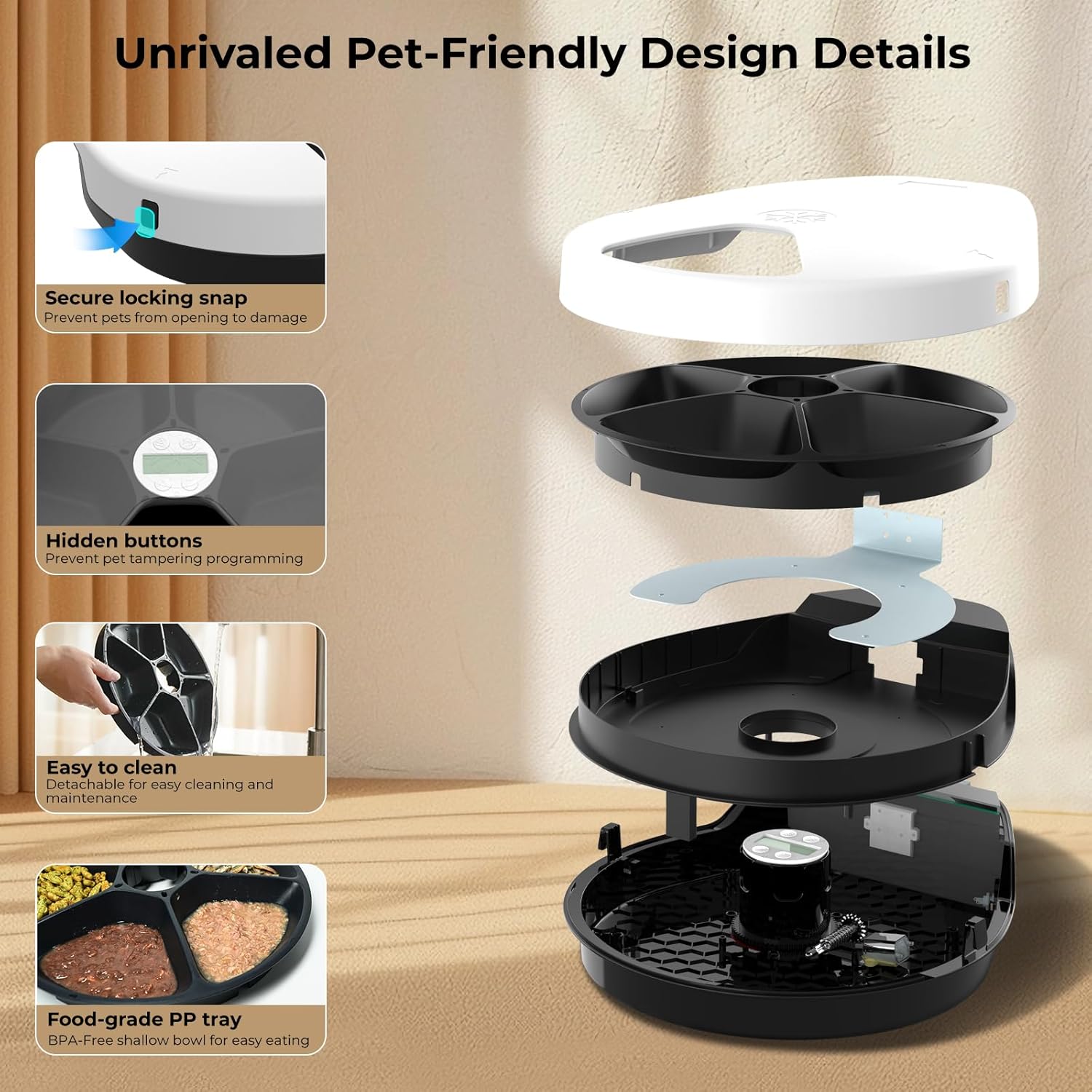
Figure 2: Exploded view of the UBPET F10 feeder, highlighting its detachable parts and hidden control panel.

Figure 3: Illustration of the unique semiconductor refrigerating technology, which eliminates the need for ice packs.
Setup
Follow these steps to set up your UBPET F10 Automatic Cat Feeder for the first time.
- Unpack: Carefully remove all components from the packaging.
- Placement: Place the feeder on a flat, stable surface, at least 4 inches (10cm) away from any walls to ensure proper ventilation for the cooling system.
- Connect Power: Plug the power adapter into the feeder's power port and then into a wall outlet. The display will light up.
- Fill Food Tray: Open the top cover by pressing the side buckles. Fill the five compartments with your pet's desired wet or dry food.
- Close Cover: Securely close the top cover, ensuring the buckles snap into place.
Video 1: General overview of the UBPET F10 automatic wet food cat feeder, including initial setup and features.
Operating Instructions
The UBPET F10 allows for precise control over feeding times and cooling settings.
1. Setting the Time and Feeding Schedule:
The feeder supports 1 instant feeding and up to 4 scheduled feedings per day. The display shows the current time and programmed meal times.

Figure 4: Close-up of the UBPET F10's LCD screen and control buttons for setting time and cooling modes.
- Access Control Panel: Open the top cover to reveal the control panel and LCD screen.
- Set Current Time: Long press the 'Settings' button (gear icon) until the hour display flashes. Use the 'Up' (▲) and 'Down' (▼) buttons to adjust the hour. Press 'Settings' again to move to minutes and adjust.
- Program Meal Times: After setting the current time, press 'Settings' to cycle through meal time settings (1 to 4). For each meal, adjust the hour and minutes using the 'Up' (▲) and 'Down' (▼) buttons. The feeder will automatically rotate to the next available food compartment at the set time.
- Instant Feed: To dispense food immediately, short press the 'Power/Cooling' button (snowflake icon). This will rotate the tray to the next available portion.

Figure 5: Visual representation of the 24-hour feeding schedule, showing a cat eating from the feeder at different times.
2. Adjusting Cooling Modes:
The UBPET F10 offers 3 temperature settings to keep food fresh, suitable for various environmental temperatures.
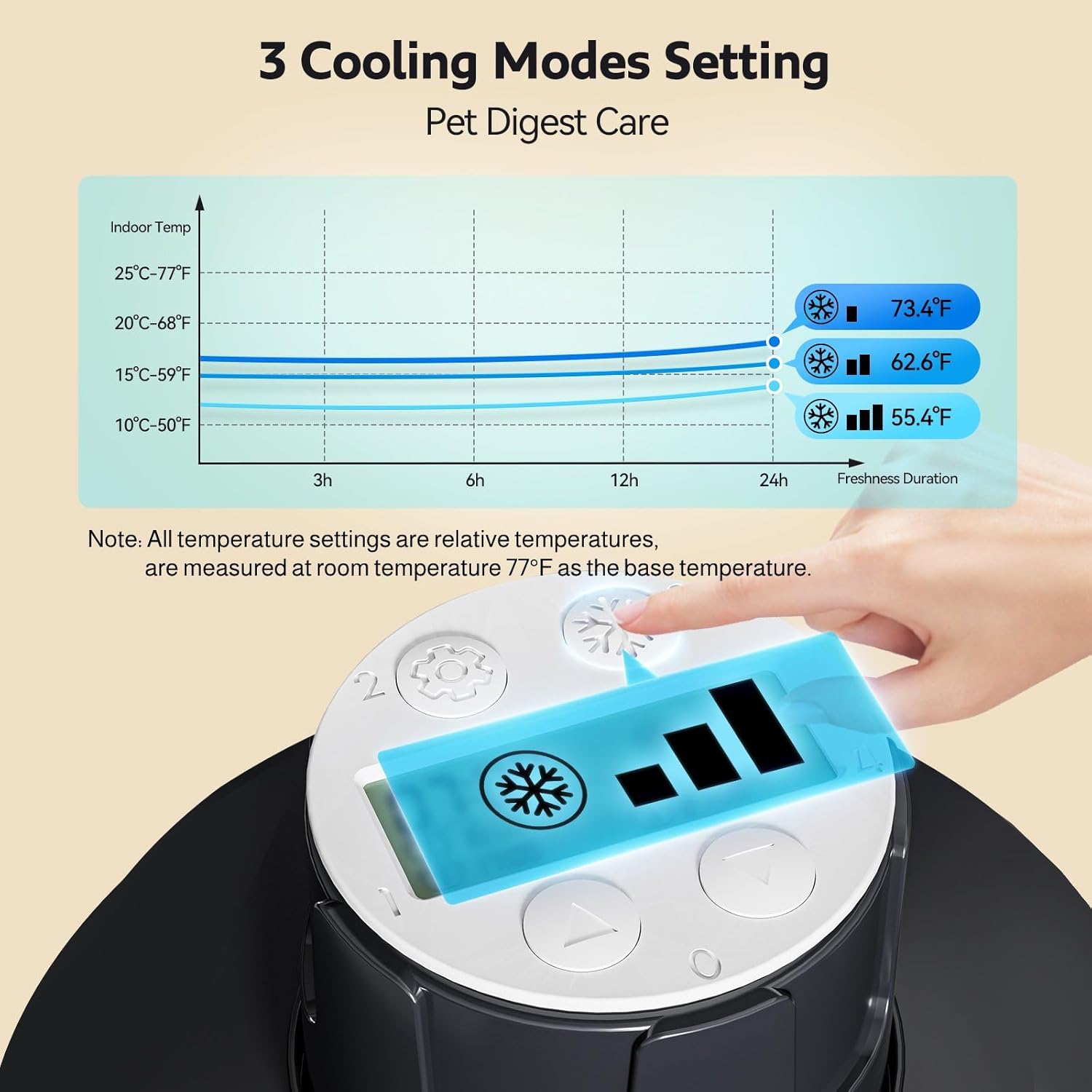
Figure 6: Graph illustrating the three cooling modes (Level 1, 2, 3) and their corresponding temperature ranges relative to room temperature.
- Activate Cooling: Long press the 'Power/Cooling' button (snowflake icon) for about 3 seconds to turn the cooling function on or off.
- Change Cooling Level: Short press the 'Power/Cooling' button (snowflake icon) to cycle through the 3 cooling levels (indicated by bars on the display). Choose the level appropriate for your environment and food type.
Video 2: Detailed instructions on how to use and program the UBPET F10 Cat feeder, including setting meal times and cooling modes.
Maintenance
Regular cleaning ensures hygiene and extends the life of your feeder.
- Unplug Feeder: Always unplug the power cord before cleaning.
- Remove Food Tray: Open the top cover and lift out the 5-meal food tray.
- Clean Food Tray: The food tray is made of food-grade BPA-free ABS material and can be rinsed under running water or placed in the dishwasher for thorough cleaning. Please clean the meal plate regularly to prevent bacteria buildup.
- Clean Base Unit: The main base unit is not washable. Wipe the interior and exterior of the base with a dry cloth. Due to the cooling function, water droplets may form inside; this is normal. Ensure to wipe off any water left inside and outside the base in time.
- Reassemble: Once all parts are dry, place the food tray back into the base unit and close the top cover securely.

Figure 7: Visual guide demonstrating the simple cleaning process of the detachable food tray.
Video 3: Step-by-step guide on how to properly clean the UBPET F10 Cat feeder.
Troubleshooting
If you encounter any issues with your UBPET F10 feeder, please refer to the common problems and solutions below.
| Problem | Possible Cause | Solution |
|---|---|---|
| Feeder does not turn on. | Power adapter not connected properly or power outage. | Ensure the power adapter is securely plugged into both the feeder and the wall outlet. Check the power source. |
| Tray does not rotate at scheduled time. | Incorrect time setting, food stuck, or tray not properly seated. | Verify the current time and meal schedule settings. Check for any obstructions in the food compartments or under the tray. Ensure the tray is correctly placed. |
| Cooling function not working. | Cooling mode not activated or incorrect setting. | Long press the 'Power/Cooling' button to activate cooling. Short press to cycle through cooling levels. Ensure proper ventilation around the feeder. |
| Feeder makes noise when rotating. | Normal operation sound. | A low noise level (<40dB) is normal during operation and should not scare pets. |
| Pet is tampering with settings. | Buttons are accessible to curious pets. | The feeder features hidden buttons under the top cover to prevent accidental changes. Ensure the lid is securely closed. |
For issues not listed above or if problems persist, please contact UBPET customer support.
Specifications
| Feature | Detail |
|---|---|
| Product Model | F10 |
| Brand | UBPET |
| Dimensions (LxWxH) | 14.17 x 11.8 x 3.54 inches |
| Item Weight | 3.08 pounds |
| Material | Polypropylene (BPA-free ABS for food tray) |
| Food Tray Capacity | 5 grids, max 300g (290ml) per grid |
| Cooling Technology | Semiconductor Refrigeration (3 temperature settings) |
| Feeding Schedule | 1 instant feed + 4 programmable timed feedings |
| Power Mode | Power direct charging |
| Noise Level | <40dB |
| Target Species | Cat, Dog (small to medium breeds), dieting pets, elderly pets |
Warranty and Support
UBPET provides a limited warranty for the F10 Automatic Cat Feeder. For detailed warranty information, product support, or any inquiries, please refer to the contact information provided in your product packaging or visit the official UBPET website. Our customer service team is available to assist you with any questions or concerns.
Related documentsF10


Ask a question about this manual
Ask about setup, troubleshooting, compatibility, parts, safety, or missing instructions. Manuals+ will review the question and use this page’s manual context to help answer it.