
BLITZWILL BLITZWILL-52L
BLITZWILL 52-inch Flush Mount Ceiling Fan User Manual
Model: BLITZWILL-52L
1. Introduction
This manual provides detailed instructions for the safe installation, operation, and maintenance of your BLITZWILL 52-inch Flush Mount Ceiling Fan. This product integrates a lighting fixture, fan, and air circulator, offering versatile functionality for various indoor and covered outdoor spaces.
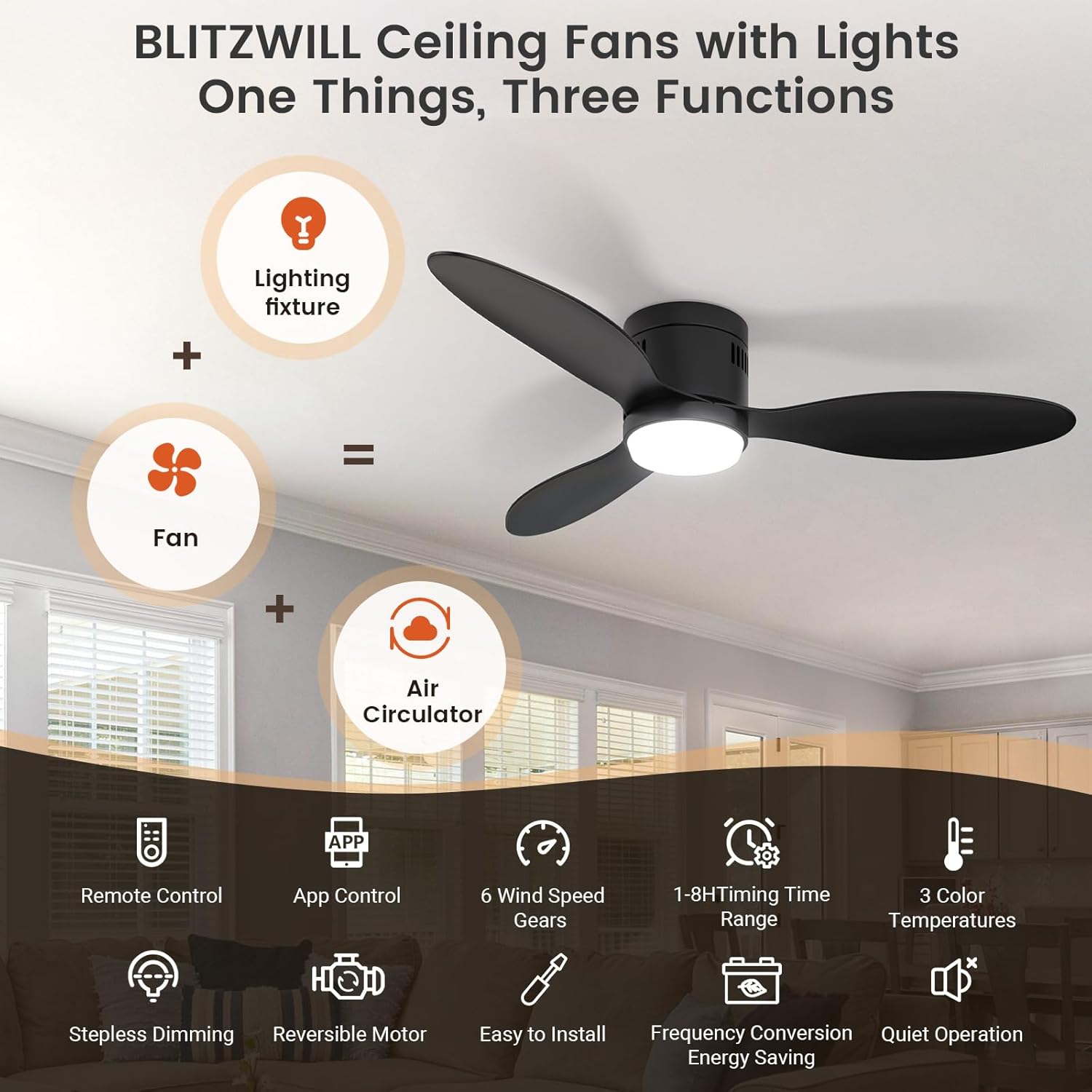
Figure 1: Product Overview - Combining lighting, fan, and air circulation with smart features.
2. Safety Information
Please read all safety instructions carefully before installation and use. Failure to follow these instructions may result in electric shock, fire, or serious personal injury.
- Ensure the power is turned off at the circuit breaker before beginning installation or performing any maintenance.
- All wiring must be in accordance with national and local electrical codes. If you are unsure about wiring, consult a qualified electrician.
- Mount the fan only to an outlet box marked "Acceptable for Fan Support of 35 lbs (15.9 kg) or less" and use the mounting screws provided with the outlet box.
- Do not operate the fan with a damaged power cord or plug.
- Keep hands, hair, and loose clothing away from the rotating fan blades during operation.
- This fan is designed for indoor and covered outdoor use. Avoid direct exposure to rain.
- Do not attempt to repair or modify the fan yourself. Contact customer support for assistance.
3. Package Contents
Verify that all components are present and undamaged before proceeding with installation.
- Main Body (Fan Motor and Light Housing)
- ABS Blades (3x)
- Lamp Base
- Lamp Shade
- Remote Control and Receiver
- Mounting Hardware (Screws, Expansion Screws, Wire Caps, Balance Pack)
- Wall Mounting Bracket for Remote Control
- Product Instruction Manual

Figure 2: Included Components and Hardware.
4. Specifications
| Feature | Detail |
|---|---|
| Brand | BLITZWILL |
| Model Number | BLITZWILL-52L |
| Size | 52 inch |
| Color | Black |
| Product Dimensions | 51.97"D x 51.97"W x 17.72"H |
| Item Weight | 11.13 pounds |
| Power Source | DC |
| Wattage | 24 watts |
| Voltage | 120 Volts |
| Noise Level | 35 dB |
| Number of Blades | 3 |
| Speed Settings | 6 RPM (6 speeds) |
| Light Type | LED (3000K/4000K/6500K, Stepless Dimmable) |
| Control Method | App, Remote |
| Timing Options | 1-2H (Remote), 1-8H (App) |
| Special Features | Reversible Motor, Memory Function, Easy to Install |
| Recommended Room Size | 12 ft. x 12 ft. to 18 ft. x 18 ft. |
| Recommended Height | 8-10 ft. |

Figure 3: Product Dimensions and Room Recommendations.
5. Setup (Installation)
The BLITZWILL ceiling fan is designed for easy and flexible installation. Ensure you have all components listed in Section 3 before starting.
Installation Steps:
- Prepare the Installation Area: Turn off power at the circuit breaker. Ensure the mounting location is suitable for fan support.
- Mount the Bracket: Secure the mounting bracket to the ceiling outlet box using the provided screws.
- Connect Wiring: Follow the wiring diagram in the detailed instruction manual to connect the fan's electrical wires to your household wiring. Ensure all connections are secure.
- Attach the Fan Body: Carefully lift and attach the main fan body to the mounted bracket.
- Install Blades: Securely attach the three ABS blades to the fan motor housing.
- Install Light Kit: Connect the lamp base and attach the lamp shade.
- Final Checks: Double-check all connections and ensure the fan is securely mounted.
For a visual guide, refer to the detailed installation videos provided by BLITZWILL or consult the full product instruction manual included in the package.
6. Operating Instructions
Your BLITZWILL ceiling fan can be controlled via the included remote control or the dedicated 2.4GHz WiFi APP.
6.1 Remote Control Operation
The remote control allows for convenient adjustment of fan speed, light settings, and timing functions from a distance of up to 65.62 feet.

Figure 4: Remote Control Functions.
- Power Button: Turns the fan and light on/off.
- Fan Speed (1-6): Adjusts fan speed from gentle breeze (1) to powerful airflow (6).
- Fan Direction (F/R): Switches between forward (summer) and reverse (winter) rotation.
- Light Switch: Toggles the light on/off.
- Brightness Adjustment: Dims or brightens the light (stepless dimming).
- Color Temperature Adjustment: Cycles through 3000K (warm), 4000K (natural), and 6500K (cool) light.
- Timing: Sets a timer for 1 or 2 hours (remote only).
6.2 APP Control Operation
The BLITZWILL app provides enhanced control and additional features, including lighting scenes, device sharing, and extended timing options.
Connecting to the APP:
- Scan the QR code (found in the full manual) to install the "Blitzhome" app.
- Open the app, enable Bluetooth and 2.4G WiFi on your device.
- Turn on lights via wall switch or remote.
- Press and hold the "Fan switch" button on the remote for 5+ seconds.
- Upon beep/light flash, network configuration is successful.
- Add device on the app, enter WiFi password to complete settings.

Figure 5: App Connection Steps.
APP Features:
- Lighting Function & Scenes: Control brightness (1%-100%) and color temperature (3000K/4000K/6500K). Access preset lighting scenes like Night, Reading, Work, and Casual.
- Fan Function: Adjust 6-speed settings, switch between normal and natural wind modes, and control forward/reverse rotation.
- Timing Function: Set timers from 1 to 8 hours for automated operation.
- Memory Function: The fan retains your last light and brightness settings for convenience.
- Device Sharing: Share control of the fan with other users.

Figure 6: App Lighting Control and Scenes.

Figure 7: App Fan Control and Timer.
6.3 Reversible Motor Function
The reversible motor allows for year-round comfort. Switch airflow directions using the app or remote control.
- Summer Mode (Forward Rotation): Air flows downward, creating a cooling effect.
- Winter Mode (Reverse Rotation): Air flows upward, circulating warm air evenly throughout the room.

Figure 8: Summer vs. Winter Operation Modes.
6.4 Official Product Video
Watch the official BLITZWILL product video for a visual demonstration of the fan's features and functionality.
Video 1: BLITZWILL: Stylish, Smart, and Comfort Throughout the Year! This video showcases the fan's design, smart control features, and year-round usability.
7. Maintenance
Regular maintenance ensures optimal performance and longevity of your ceiling fan.
- Cleaning: Before cleaning, ensure the power is off. Use a soft, damp cloth to wipe down the fan blades and motor housing. Do not use abrasive cleaners or solvents.
- Blade Inspection: Periodically check the fan blades for any signs of damage or looseness. Tighten screws if necessary.
- Light Source: The LED light source is integrated and designed for long life. Do not attempt to replace it.
8. Troubleshooting
If you encounter issues with your BLITZWILL ceiling fan, refer to the following common problems and solutions:
| Problem | Possible Cause | Solution |
|---|---|---|
| Fan does not turn on. | No power, loose wiring, remote control battery dead, remote not paired. | Check circuit breaker. Verify all wiring connections. Replace remote batteries. Re-pair remote control (refer to Section 6.1). |
| Light does not turn on. | No power to light, light switch off, LED failure. | Check power supply. Ensure light switch on remote/app is on. If LED is faulty, contact customer support. |
| Fan wobbles. | Loose blades, unbalanced blades, loose mounting. | Ensure all blade screws are tight. Use the included balance kit to balance blades. Check mounting bracket for secure installation. |
| Remote control not responding. | Low battery, interference, remote not paired. | Replace batteries. Ensure no obstructions between remote and receiver. Re-pair remote control. |
| APP control not working. | Incorrect WiFi network (not 2.4GHz), app not connected, device offline. | Ensure your phone is connected to a 2.4GHz WiFi network. Follow app connection steps (Section 6.2). Check internet connection. |
If the problem persists after trying these solutions, please contact BLITZWILL customer support.
9. Warranty and Support
BLITZWILL is committed to providing high-quality products and excellent customer service.
- Warranty: This product comes with a 2-Year Warranty from the date of purchase. Please retain your proof of purchase for warranty claims.
- Customer Support: For any installation, operation, or post-purchase inquiries, our professional support team is available 24/7 to assist you.
- Contact Information: Refer to the contact details provided in the full product instruction manual or visit the official BLITZWILL website for support.
Related documentsBLITZWILL-52L


Ask a question about this manual
Ask about setup, troubleshooting, compatibility, parts, safety, or missing instructions. Manuals+ will review the question and use this page’s manual context to help answer it.