1. Introduction
Thank you for choosing the FEELWORLD FW568 PRO 6-inch field monitor. This professional video accessory is designed to enhance your DSLR or mirrorless camera setup by providing a clear, high-resolution display with advanced monitoring features. This manual provides detailed instructions for the proper setup, operation, and maintenance of your device. Please read this manual thoroughly before use to ensure optimal performance and longevity of the product.
2. Safety Information
- Do not expose the monitor to rain or moisture to avoid electric shock or fire.
- Avoid placing the monitor in direct sunlight or near heat sources.
- Use only the specified power adapters and accessories.
- Do not disassemble or modify the monitor. Refer all servicing to qualified personnel.
- Clean the screen with a soft, dry cloth. Avoid using harsh chemicals.
3. Package Contents
Please check that all items are present in your package:
- FW568 PRO Monitor x 1
- HDMI Cable x 1
- Micro HDMI Cable x 1
- Mini Hot Shoe Mount + Hex Wrench x 1
- USB-A to USB-C Adapter x 1
- Sunshade x 1
- Cable Management Tie x 1
- User Manual x 1

Image: The FW568 PRO monitor displayed with all its included accessories, such as HDMI cables, hot shoe mount, USB adapter, sunshade, and cable tie.
4. Product Overview
The FW568 PRO features a 6-inch 1920x1080 Full HD IPS screen with 1200 nits brightness, ensuring clear visibility in various lighting conditions. It is designed to be lightweight, weighing only 204g, making it suitable for gimbal use and mobile shooting setups.

Image: An overview of the FW568 PRO monitor, illustrating its 6-inch screen, 1200nit brightness, HDMI 2.0 support, 9:16 marker, waveform, HDR, and 3D LUT capabilities.
4.1 Ports and Controls
- HDMI In/Out: Supports 4K HDMI signals up to 4096x2160p.
- DC IN 12V: Power input for continuous operation.
- DC OUT 8.4V: Power output to power DSLR or mirrorless cameras.
- 5V Type-C: Additional power input option.
- 3.5mm Headphone Jack: For audio monitoring.
- F1, F2, F3 Buttons: Customizable function buttons.
- MENU, V, ^, U/EXIT Buttons: For menu navigation and control.

Image: A close-up view of the FW568 PRO monitor's side, showing the HDMI In, HDMI Out, DC IN 12V, and DC OUT 8.4V ports.

Image: A detailed view of the top-mounted F1, F2, and F3 customizable function buttons on the FW568 PRO monitor.
5. Setup
5.1 Powering the Monitor
The FW568 PRO offers multiple power options:
- DC Power Input: Connect a 12V DC power adapter (1.5A, 5.5*2.1mm power plug) to the DC IN 12V port for continuous power.
- NP-F Battery Plate: Install a standard NP-F series battery (e.g., NP-F550, NP-F750, NP-F970) onto the integrated battery plate. A fully charged NP-F750 battery (4400mAh) can power the monitor for approximately 3 hours.
- 5V Type-C Input: Use a 5V Type-C power source for operation.

Image: Three panels illustrating the NP-F battery plate, DC IN 12V port, and 5V Type-C port for powering the FW568 PRO monitor.
5.2 Connecting to a Camera
Connect your DSLR or mirrorless camera to the monitor using an HDMI cable. Use the provided HDMI or Micro HDMI cable as appropriate for your camera's output port. The monitor supports 4K HDMI input and output.
The FW568 PRO also features a DC 8.4V power output, allowing you to power your camera directly from the monitor using an optional dummy battery adapter and power cable. This extends your camera's operating time.

Image: The FW568 PRO monitor connected to a Sony camera, demonstrating the DC 8.4V output powering the camera via a dummy battery adapter.
5.3 Mounting the Monitor
The monitor includes a 1/4-inch screw thread for versatile mounting options. Use the included Mini Hot Shoe Mount to attach the monitor to your camera's hot shoe or a camera cage. The hot shoe mount allows for 180-degree viewing angle adjustment and 360-degree rotation for optimal positioning.

Image: A diagram showing the FW568 PRO monitor mounted on a camera via the hot shoe mount, highlighting its 180-degree upper tilt and 360-degree base rotation capabilities.
The F970 external install kit allows for mounting additional accessories like wireless transmitters or LED lights directly to the monitor, reducing overall rig size and weight.
6. Operating
6.1 Basic Operation
- Power On/Off: Press and hold the power button (U/EXIT) to turn the monitor on or off.
- Menu Navigation: Use the MENU button to access the main menu. Use the V (down) and ^ (up) buttons to navigate through menu options. Press MENU again or U/EXIT to confirm selections or exit.
6.2 Key Features
The FW568 PRO includes a variety of professional monitoring tools:
- Waveform, Vector Scope, Histogram: Visual aids for exposure and color analysis. These can be adjusted horizontally or vertically in the menu.
- Peaking Filter: Highlights sharp edges to assist with focus.
- False Colors: Helps evaluate exposure levels.
- Pixel to Pixel: Displays the image at its native resolution.
- Ratio Marker, Nine Grids: Composition aids.
- Embedded Audio: Monitor audio levels directly on screen.
- 3D LUT: Supports loading up to 32 custom 3D LUTs via a USB flash drive for real-time color grading preview.
- HDR: High Dynamic Range support for improved contrast and color.

Image: A display of the FW568 PRO screen showing various monitoring tools including Vectorscope, Brightness Histogram, YUV Parade, and Y Parade, used for detailed video analysis.
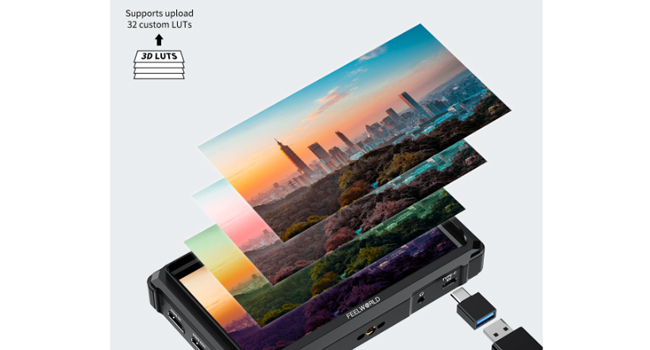
Image: The FW568 PRO monitor demonstrating the ability to load custom 3D LUTs, with multiple color layers representing different looks applied to an image.

Image: A side-by-side comparison on the FW568 PRO screen, showing the visual difference between HDR Off and HDR On, with HDR On displaying enhanced contrast and detail.
6.3 Custom Functions (F-Keys)
The F1, F2, and F3 buttons are customizable. You can assign frequently used functions (e.g., Peaking, False Color, LUTs) to these buttons for quick access. Refer to the monitor's on-screen menu for detailed instructions on customizing these functions.
7. Maintenance
- Cleaning: Gently wipe the screen and body with a soft, lint-free cloth. For stubborn marks, slightly dampen the cloth with water. Do not use alcohol-based cleaners or solvents.
- Storage: When not in use, store the monitor in a dry, cool place, away from direct sunlight and extreme temperatures. Use the included sunshade for protection during storage or transport.
- Battery Care: If using NP-F batteries, ensure they are charged regularly and stored properly to maintain their lifespan.
8. Troubleshooting
| Problem | Possible Cause | Solution |
|---|---|---|
| No image on screen | No power; Incorrect HDMI connection; Camera output issue | Check power supply (battery or adapter). Ensure HDMI cable is securely connected to both monitor and camera. Verify camera's HDMI output settings. |
| Image flickering or distorted | Faulty HDMI cable; Incompatible resolution/frame rate | Try a different HDMI cable. Adjust camera's output resolution/frame rate to a supported format (e.g., 1080p, 4K 30Hz/60Hz). |
| Monitor does not turn on | Battery depleted; Power adapter not connected; Power button not pressed correctly | Charge or replace battery. Connect power adapter. Press and hold the power button for a few seconds. |
| No audio | Audio not enabled; Headphone issue; Camera audio output issue | Check monitor's audio settings. Ensure headphones are properly connected and functional. Verify camera's audio output. |
9. Specifications
| Feature | Detail |
|---|---|
| Screen Size | 6 inches |
| Resolution | 1920x1080 (Full HD) |
| Brightness | 1200 nits |
| Contrast Ratio | 1000:1 |
| Viewing Angle | 160° |
| HDMI Support | 4K HDMI Input/Output (up to 4096x2160p) |
| Power Input | DC 12V, 5V Type-C, NP-F Battery Plate |
| Power Output | DC 8.4V |
| Monitor Dimensions (L x H x D) | 161mm x 96mm x 33.3mm (6.34 x 3.78 x 1.31 inches) |
| Monitor Weight | 204g (0.45 lbs) |
| Manufacturer | Feelworld |
| Advanced Features | Waveform, Vector Scope, Histogram, Peaking Focus Assist, False Colors, Pixel to Pixel, Ratio Marker, Nine Grids, Embedded Audio, 3D LUT, HDR |

Image: A diagram illustrating the physical dimensions of the FW568 PRO monitor: 161mm length, 96mm height, and 33.3mm thickness.

Image: A table recommending NP-F series batteries (NP-F550, NP-F750, NP-F970) with their capacities, voltages, watt-hours, dimensions, weights, and approximate running times for the FW568 PRO monitor.
10. Warranty and Support
For warranty information and technical support, please refer to the official FEELWORLD website or contact your local distributor. Keep your purchase receipt as proof of purchase for warranty claims.
Official FEELWORLD Website: www.feelworld.cn


