1. Introduction
This manual provides comprehensive instructions for the safe and efficient operation of your BLITZWILL 42-inch Flush Mount Ceiling Fan. Please read all instructions carefully before installation and use, and retain this manual for future reference.
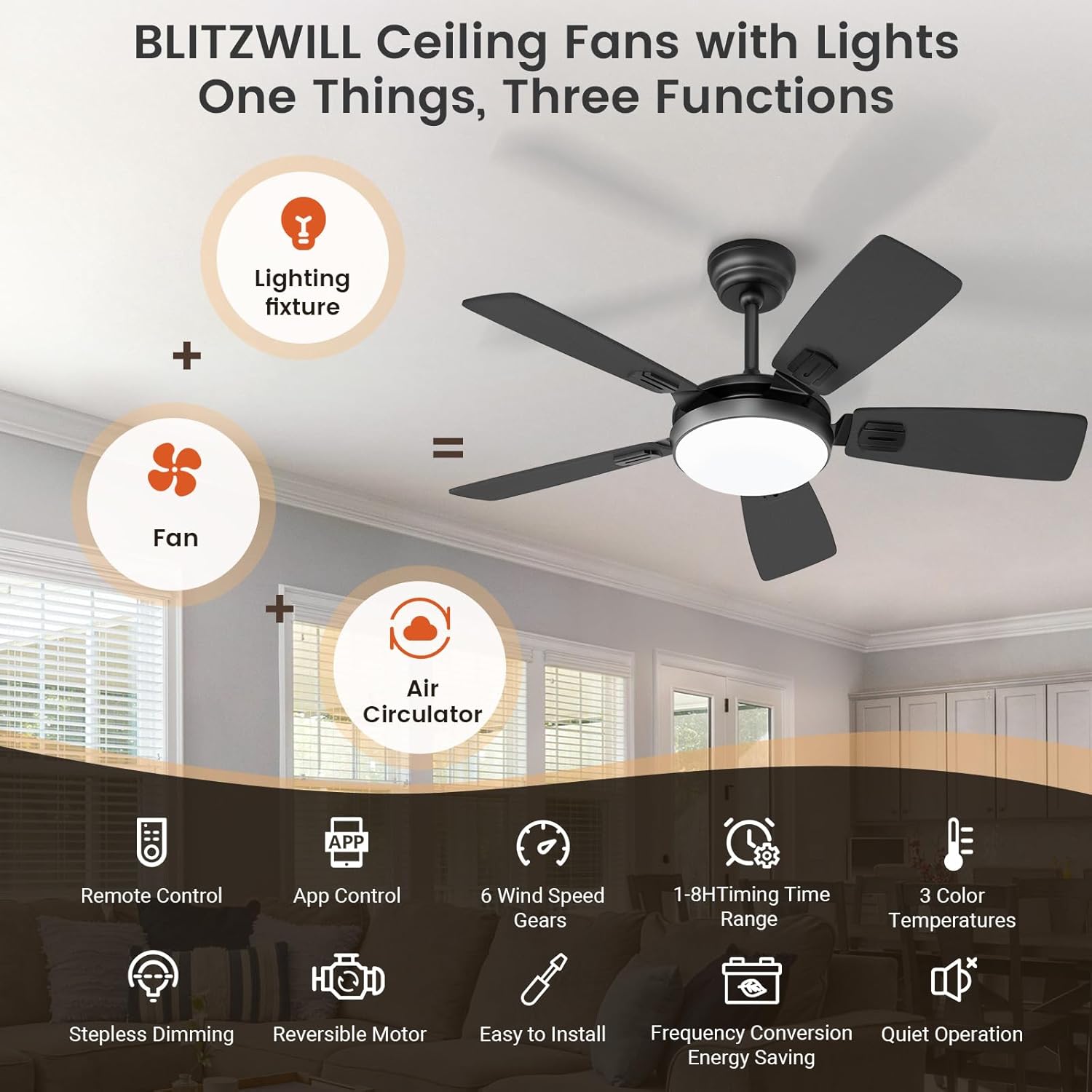
The BLITZWILL ceiling fan combines a lighting fixture, fan, and air circulator into one versatile unit, offering smart control via both a remote and a dedicated mobile application. It features a quiet, energy-efficient DC motor, reversible airflow for year-round comfort, and adjustable 3-color dimmable LED lighting.
2. Key Features
- 2.4GHz WiFi APP/Remote Control: Effortlessly adjust 6 wind speeds, 3-color temperature, brightness, timing, and reverse function. The app offers additional features like Lighting Scenes and Device Sharing.
- Year-round Usability with Reversible Motor: Switch airflow direction for summer cooling (downward airflow) or winter warm air distribution (upward airflow).
- 6 Speeds and 1-8H Timing: Customize comfort with 6 wind settings and 8 timer options (1-2H via remote, 1-8H via app) for various activities like sleep, leisure, or fitness.
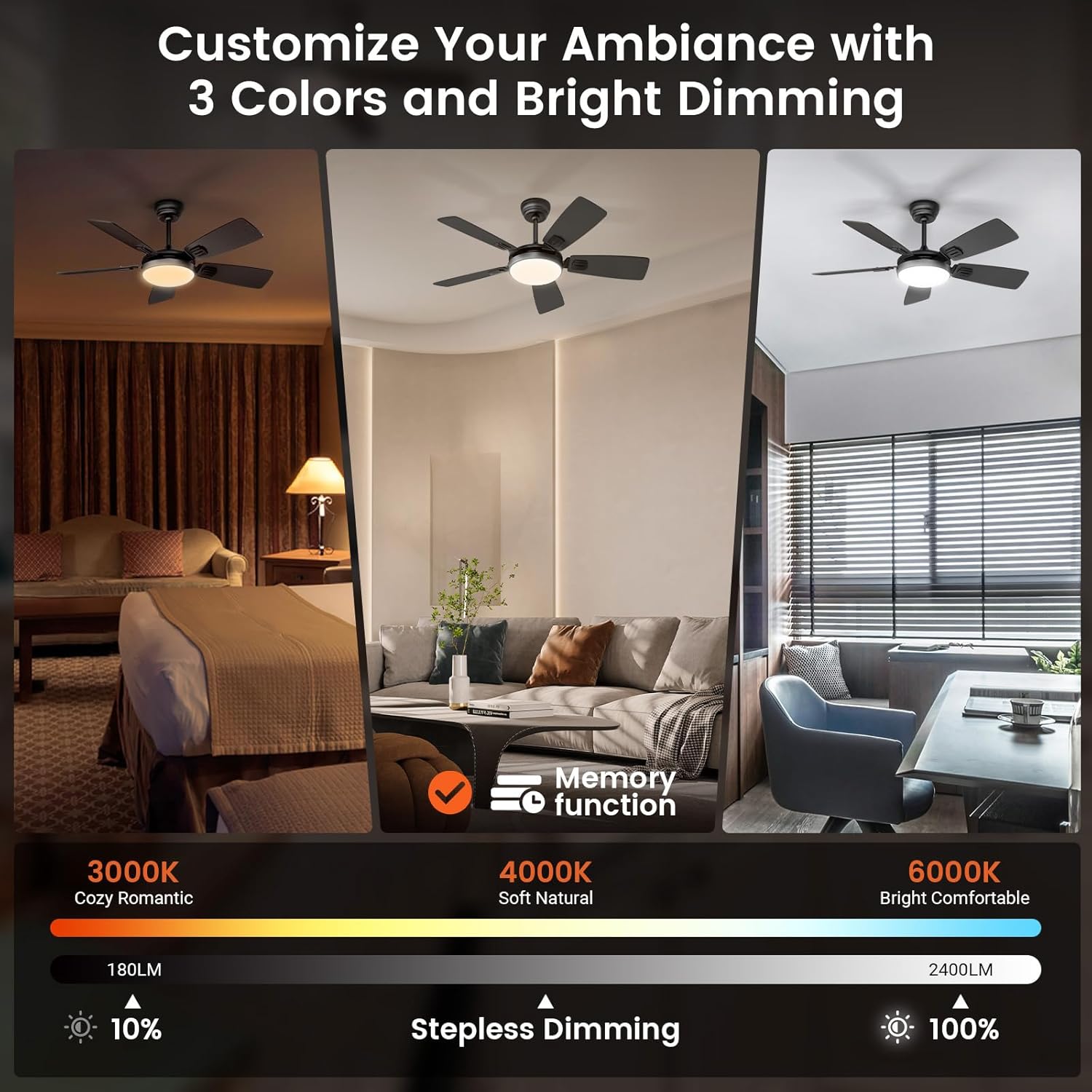
- Memorable & Adjustable 3 Colors and Brightness: Offers 3 color temperatures (3000K/4000K/6500K) and stepless dimming (1% to 100%). Flicker-free LEDs and memory function for convenience.
- Easy and Flexible Installation: Includes 4-inch and 8-inch downrods, suitable for various ceiling heights and pitches up to 18 degrees. Detailed instructions and videos are available.
- Powerful, Quiet and Energy-Efficient DC Motor: Robust 24W pure copper DC motor delivers powerful performance with noise levels below 35 decibels, ensuring a serene environment.
- Dual-finish Fan Blade Design: Features dual-finish fan blades (black on side A, dark walnut on side B) to match any home decor aesthetic.
3. Setup & Installation
The BLITZWILL ceiling fan is designed for easy installation. Please follow the steps below. For visual guidance, refer to the official installation video provided by the seller.
3.1 Unboxing and Component Identification
Before beginning installation, ensure all components are present and undamaged. Refer to the parts list in your physical manual.

3.2 Assembly Steps
The assembly process involves attaching the fan blades to the motor, installing the light kit, and preparing the downrod. The fan blades offer a dual-finish design (black and dark walnut) allowing you to choose the side that best matches your decor.
3.3 Mounting the Fan
The fan supports both flat and sloped ceiling installations (up to 18 degrees). Ensure your ceiling is structurally sound to support the fan's weight (approximately 15.02 pounds).

4. Operating Instructions
Your BLITZWILL ceiling fan can be controlled via the included remote control or the dedicated mobile application. Both methods offer comprehensive control over fan speed, light settings, and other smart features.
4.1 Smart Dual Control (Remote & App)
Experience upgraded home control with dual functionality. The mobile app provides additional features like Lighting Scenes and Device Sharing, allowing control from anywhere.

4.2 App Control Features
The BLITZWILL app provides extensive control options, including lighting functions, scene modes, fan speed adjustments, timing, and device sharing.

4.3 Remote Control Features
The remote control allows direct adjustment of fan speed, light brightness, color temperature, and timing functions.

4.4 Lighting Adjustment
Customize your lighting with 3 color temperatures and stepless dimming from 1% to 100%. The memory function retains your last settings.

4.5 Fan Speed and Timing
The fan offers 6 speed settings and flexible timing options (1-8 hours via app, 1-2 hours via remote) to suit various needs, from gentle sleep breezes to strong airflow for fitness.

4.6 Reversible Motor Function
The reversible motor allows you to change the direction of airflow for optimal comfort in both summer and winter. Downward airflow creates a cooling effect, while upward airflow helps circulate warm air.

5. Maintenance
Regular cleaning and inspection will ensure the longevity and optimal performance of your BLITZWILL ceiling fan. Always turn off the power before performing any maintenance.
- Cleaning: Use a soft, damp cloth to wipe down the fan blades and motor housing. Avoid using harsh chemicals or abrasive cleaners.
- Blade Inspection: Periodically check that all blade screws are tight. Loose screws can cause wobbling and noise.
- Light Cover: Gently wipe the light cover to remove dust and ensure optimal light output.
6. Troubleshooting
If you encounter issues with your BLITZWILL ceiling fan, refer to the following common troubleshooting steps and official video guides.
6.1 Remote Control Pairing Failure
If your remote control fails to pair with the fan, follow these steps:
- Turn off the wall switch and wait for 10 seconds. Always cut off the power first.
- Turn on the wall switch and wait for the light to turn on for 2 seconds.
- Immediately press and hold the "Light Switch" button on the remote for 5-20 seconds until the light flashes, indicating successful pairing.
- Check whether the remote control function can be triggered normally.
6.2 APP Network Configuration Failure
If the mobile app fails to connect to the fan's network, follow these instructions:
- Turn off the wall switch and wait for 3 minutes or 10 seconds, depending on the scenario (3 min if network configuration just failed, 10 sec if it's been a while).
- Turn on the wall switch and wait for the light to turn on for 2 seconds.
- Immediately press and hold the "Fan Key" on the remote for 5-20 seconds until you hear a "beep" sound.
- Connect to the network according to the app instructions. Note: Connection time varies with WiFi signal strength, up to 3 minutes. The remote will be inactive during this time to avoid signal interference.
6.3 Reset Network Configuration Through Wall Switch
If you need to reset the network configuration using only the wall switch, follow these steps:
- Turn off the wall switch and wait for 2 seconds.
- Turn on the wall switch and wait for the light to light up for 2 seconds.
- Repeat the above operation 8 times, once every 4 seconds on average.
- The light will change to a different color each time. After switching 8 times in a row, until you hear a "beep", the light will enter the "breathing" mode, and then enter the reset network configuration mode.
- If the same color appears continuously, it will be invalid and you need to re-operate.
- Automatically enter the reset network configuration mode. Note: Connection time varies with WiFi signal strength, up to 3 minutes. The remote will be inactive during this time to avoid signal interference.
7. Specifications
| Attribute | Value |
|---|---|
| Brand | BLITZWILL |
| Model | B0CWMWG9Y6 |
| Color | Black |
| Electric Fan Design | Ceiling Fan |
| Power Source | DC |
| Style | 5 Blades |
| Product Dimensions | 41.73"D x 41.73"W x 17.72"H |
| Room Type | Living Room, Bedroom, Covered Outdoor, Indoor, Dining Room |
| Noise Level | 35 dB |
| Wattage | 24 watts |
| Voltage | 120 Volts |
| Included Components | Light Kit, Remote, Cord |
| Control Method | App, Remote |
| Item Weight | 15.02 pounds |
8. Warranty & Support
Information regarding product warranty and customer support is not available in the provided data. Please refer to the product packaging or the manufacturer's official website for details.
9. Additional Information
9.1 Energy Efficiency
The BLITZWILL ceiling fan features a variable frequency DC motor, which is significantly more energy-efficient and quieter compared to traditional AC motors.

9.2 Usage Scenarios
The versatile design and dual-finish blades allow the BLITZWILL ceiling fan to seamlessly integrate into various indoor and covered outdoor spaces.