
sofirn sofirn Q8 Plus bundle sofirn SC13
Sofirn Q8 Plus & SC13 Flashlight Bundle User Manual
Model: Sofirn Q8 Plus, Sofirn SC13
Introduction
Thank you for choosing the Sofirn Q8 Plus and SC13 Flashlight Bundle. This manual provides essential information for the safe and effective operation, maintenance, and troubleshooting of your new flashlights. The Sofirn Q8 Plus is a high-power, ultra-bright flashlight designed for extensive illumination, while the Sofirn SC13 is a compact, versatile EDC (Everyday Carry) flashlight. Both models feature USB-C rechargeable capabilities and robust construction.
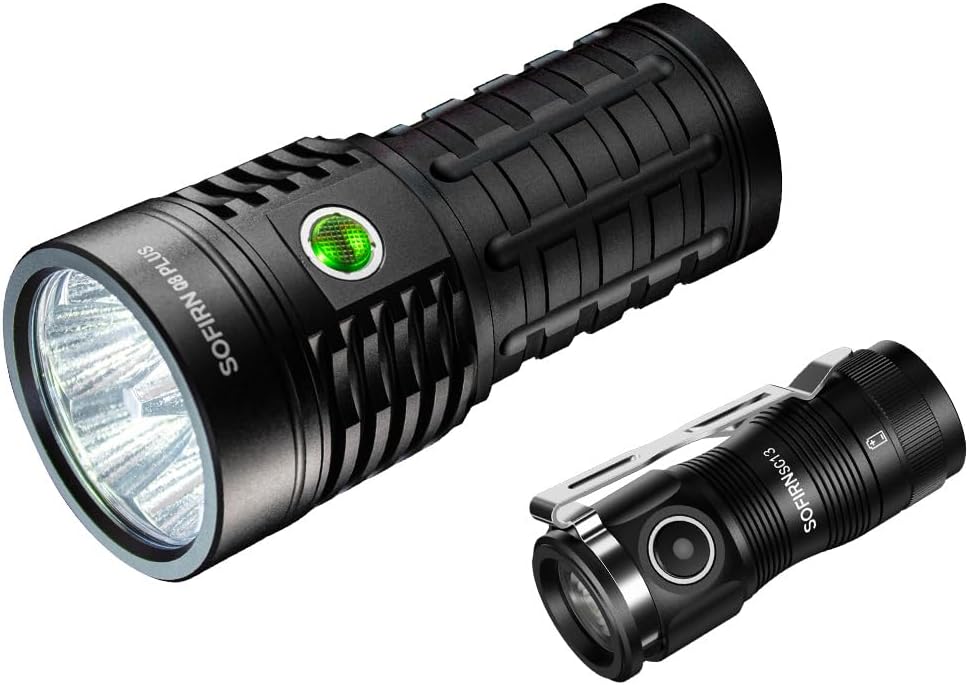
Image: The Sofirn Q8 Plus (larger) and Sofirn SC13 (smaller) flashlights, showcasing the bundle.
Setup
Battery Installation and Initial Charge
Both the Sofirn Q8 Plus and SC13 come with pre-installed Lithium-Ion batteries. Before first use, it is recommended to fully charge both flashlights.
- Q8 Plus: Unscrew the tail cap to ensure the battery insulating film is removed. Screw it back on tightly.
- SC13: Unscrew the head of the flashlight to ensure the battery insulating film is removed. Screw it back on tightly.
- Connect the included USB-C charging cable to the flashlight's USB-C port and plug the other end into a compatible USB power adapter (e.g., 5V 3A for Q8 Plus).
- The indicator light will show charging status. For SC13, a red light indicates charging (0-70%), and a green light indicates charging (70-100%) or fully charged. For Q8 Plus, the button light will indicate charging status (blinking for charging, steady for fully charged).
- Allow the flashlights to charge until the indicator shows a full charge. This typically takes about 5 hours for the Q8 Plus.

Image: The Sofirn Q8 Plus connected via USB-C for charging, with indicator lights showing charging and discharging states.

Image: The Sofirn SC13 connected via USB-C for charging, with indicator lights showing battery levels (red for low, green for high).
Operating Instructions
Sofirn Q8 Plus Operation (Anduril 2.0 UI)
The Q8 Plus utilizes the advanced Anduril 2.0 user interface, offering a wide range of modes and customization. Basic operation is as follows:
- Turn On/Off: Single click the side switch.
- Change Brightness (Ramping): While on, press and hold the switch to ramp up or down. Release and press again to change direction.
- Turbo Mode: From ON, double-click to activate Turbo (16000 lumens). Double-click again to return to the previous brightness.
- Moonlight Mode: From OFF, press and hold the switch for 1 second.
- Battery Check: From OFF, triple-click. The main LEDs will flash out the voltage (e.g., 4 flashes, pause, 1 flash for 4.1V).
- Lockout Mode: From OFF, 4 clicks to activate. The light will flash once to confirm. To unlock, 4 clicks again.
- Momentary Turbo: From lockout mode, hold the switch.
- Momentary Moonlight: From lockout mode, single click and hold.

Image: The Sofirn Q8 Plus illuminating a wide area, highlighting its 16000 lumens output, 554 meters beam distance, 120-degree flood, 10-hour runtime at medium, Anduril 2.0 UI, IPX8 water resistance, and solid build.
Sofirn SC13 Operation
The SC13 offers multiple lighting modes for various situations:
- Turn On/Off: Single click the side switch.
- Change Brightness: While on, press and hold the switch to cycle through Moonlight (1lm), Low (10lm), Medium (150lm), High (500lm). Release to select.
- Turbo Mode: Double-click from ON or OFF to activate Turbo (1300 lumens). Double-click again to return to the previous mode.
- Strobe Mode: Triple-click from ON or OFF to activate Strobe. Single click to turn off.
- Lockout Function: From OFF, rapidly click the switch 3 times to activate lockout. The light will flash once to confirm. To unlock, rapidly click 3 times again. This prevents accidental activation during transit or storage.

Image: The Sofirn SC13 in hand, illustrating its various lighting modes: Moonlight (1lm), Low (10lm), Medium (150lm), High (500lm), Turbo (1300lm), and Strobe (1300lm), along with its Fresnel Lens.

Image: A hand demonstrating the 3-click lockout/unlock function of the Sofirn SC13, preventing accidental activation.
Maintenance
Proper maintenance ensures the longevity and optimal performance of your Sofirn flashlights.
- Cleaning: Wipe the flashlight body with a clean, soft cloth. For optical surfaces, use a lens cleaning cloth. Avoid harsh chemicals.
- Lubrication: Periodically apply silicone grease to the O-rings and threads to maintain water resistance and smooth operation.
- Battery Care: Recharge batteries regularly, even if not frequently used, to prevent deep discharge. Store flashlights with a partial charge (around 50%) if storing for extended periods.
- Water Resistance: Ensure all parts are screwed on tightly to maintain the water-resistant seal (IPX8 for Q8 Plus). Avoid submerging the flashlight beyond its rated depth.
Troubleshooting
| Problem | Possible Cause | Solution |
|---|---|---|
| Flashlight does not turn on. | Battery low or depleted; Battery insulating film not removed; Loose tail cap/head; Lockout mode activated. | Charge the battery; Remove insulating film; Tighten tail cap/head; Deactivate lockout mode (4 clicks for Q8 Plus, 3 clicks for SC13). |
| Light flickers or dims unexpectedly. | Low battery; Loose connections; Dirty contacts. | Recharge battery; Ensure all parts are tightly screwed; Clean battery contacts and threads with a clean cloth. |
| Cannot change modes. | Incorrect operation; Lockout mode. | Refer to operating instructions for correct mode changes; Deactivate lockout mode. |
| Charging not working. | Cable issue; Power adapter issue; Dirty charging port. | Try a different USB-C cable and power adapter; Clean the USB-C port. |
Specifications
Sofirn Q8 Plus
- Max Brightness: 16000 Lumens
- Beam Distance: 605 Yards (approx. 554 meters)
- Light Source: 6 x LED
- Power Source: Battery Powered (Lithium-Ion)
- Runtime: Up to 10 hours at 1800 lumens
- Water Resistance: Water Resistant (IPX8)
- Charging: USB-C Rechargeable
- User Interface: Anduril 2.0

Image: A chart detailing the runtime of the Sofirn Q8 Plus at various brightness levels: Turbo (16000lm for 2.5h), High (7000lm for 4.5h), Med (1800lm for 10.25h), Low (200lm for 27.75h), and Moon (5lm for 40 days).
Sofirn SC13
- Max Brightness: 1300 Lumens
- Beam Distance: Up to 217 meters
- Dimensions: Length 2.54 inches, Diameter 1.12 inches
- Weight: 1.41 ounces (40g excluding battery)
- Power Source: Battery Powered (Lithium-Ion)
- Charging: USB-C Rechargeable
- Special Features: Lockout Function, Fresnel Lens
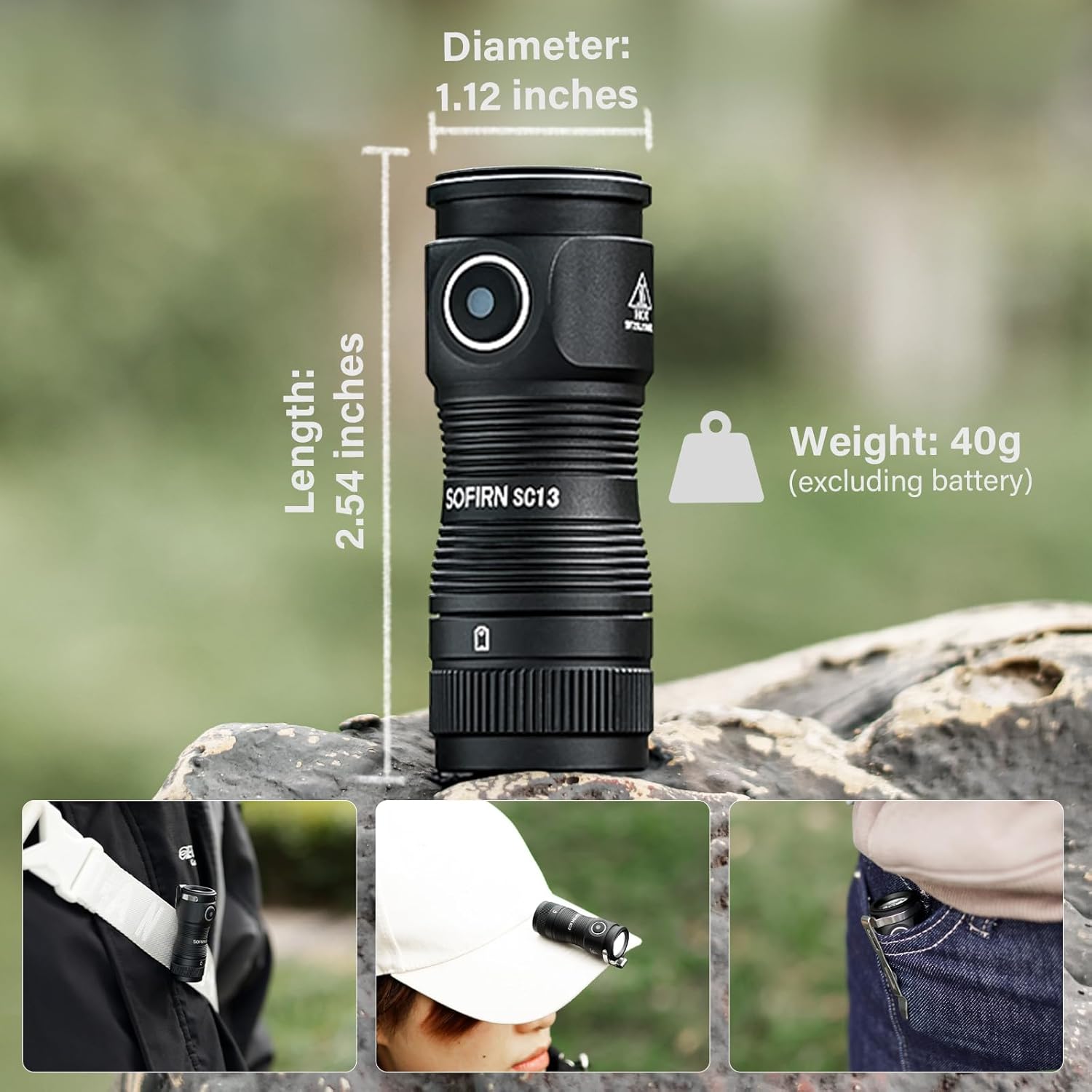
Image: The Sofirn SC13 with its dimensions (Length: 2.54 inches, Diameter: 1.12 inches, Weight: 40g excluding battery) and examples of its portability (clipped to a strap, worn on a hat, carried in a pocket).
Warranty and Support
Sofirn products are designed for durability and performance. For specific warranty details and customer support, please refer to the warranty card included with your product or visit the official Sofirn website. If you encounter any issues not covered in this manual, please contact Sofirn customer service for assistance.
For further information and product updates, visit the Sofirn Store on Amazon.
Ask a question about this manual
Ask about setup, troubleshooting, compatibility, parts, safety, or missing instructions. Manuals+ will review the question and use this page’s manual context to help answer it.