
1. Introduction
The Dayton Audio TABB-26 is a compact Bluetooth 5.0 amplifier board designed for creating portable audio solutions. It features 2 x 6W output, twin pairing (TWS) capability for stereo separation, a built-in 26650 battery holder/charger, and a USB-C charging port. This manual provides detailed instructions for the proper setup, operation, and maintenance of your TABB-26 amplifier board.
2. Safety Information
- Read all instructions carefully before use.
- Do not expose the board to moisture, water, or extreme temperatures.
- Ensure correct polarity when connecting speakers and installing the battery. Incorrect connections can damage the board or connected components.
- Use only a compatible 26650 battery (not included) and a suitable USB-C power source for charging.
- Avoid short-circuiting the battery terminals or speaker outputs.
- Keep out of reach of children.
- Do not attempt to modify or repair the board. Refer to qualified personnel for service.
3. What's in the Box
- Dayton Audio TABB-26 Amplifier Board
Note: A 26650 battery and speakers are not included and must be purchased separately.
4. Product Overview
The TABB-26 board integrates a Bluetooth 5.0 receiver, a stereo amplifier, and a 26650 battery charging circuit. Key components include speaker terminals, a volume potentiometer, a power switch, a USB-C charging port, and a line output connector.
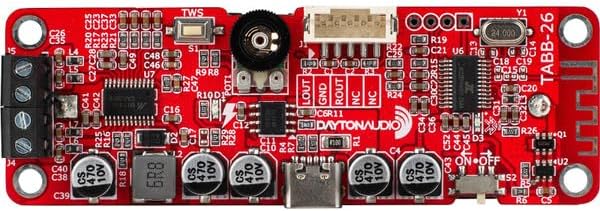
Figure 1: Top view of the TABB-26 amplifier board, highlighting the various components such as the volume knob, power switch, USB-C port, and speaker terminals.

Figure 2: Bottom view of the TABB-26 amplifier board, clearly showing the integrated 26650 battery holder.
5. Setup
5.1 Battery Installation
- Ensure the power switch on the board is in the OFF position.
- Insert a fully charged 26650 lithium-ion battery into the battery holder on the underside of the board. Observe the correct polarity (+ and -) as indicated on the holder.
5.2 Speaker Connection
- Identify the speaker output terminals on the board (typically labeled L+, L-, R+, R-).
- Connect your passive speakers to the corresponding terminals. Ensure that the positive (+) terminal of the speaker connects to the positive (+) terminal on the board, and the negative (-) to the negative (-).
- For optimal performance, use speakers with an impedance of 4-8 ohms.
5.3 Powering On/Off
- To power on the board, slide the power switch to the ON position. A blue LED indicator will typically illuminate, indicating the board is active and ready for Bluetooth pairing.
- To power off, slide the power switch to the OFF position.
6. Operating Instructions
6.1 Bluetooth Pairing (Single Mode)
- Power on the TABB-26 board. The Bluetooth indicator LED will flash, indicating it is in pairing mode.
- On your audio source device (e.g., smartphone, tablet), enable Bluetooth and search for available devices.
- Select "Dayton Audio TABB-26" (or similar name) from the list of devices.
- Once connected, the Bluetooth indicator LED on the board will stop flashing and remain solid. You can now play audio through your connected speakers.
6.2 Twin Pairing (TWS) Mode
The TABB-26 supports True Wireless Stereo (TWS) pairing, allowing two TABB-26 boards to function as a stereo pair (left and right channels).
- Ensure both TABB-26 boards are powered on and not connected to any Bluetooth device.
- On one of the boards, press and hold the TWS button (if available, or follow specific TWS pairing instructions if a dedicated button is not present, usually a double-press of the power button or a specific pairing button). The boards will attempt to connect to each other.
- Once successfully paired, one board will act as the master (left channel) and the other as the slave (right channel). The Bluetooth indicator on the master board will flash, while the slave board's indicator will be solid.
- Now, connect your audio source device to the master TABB-26 board as described in Section 6.1.
- Audio will now play in stereo across both connected speaker systems.
6.3 Volume Control
Adjust the volume using the potentiometer knob on the TABB-26 board. You can also control the volume from your connected Bluetooth audio source device.
6.4 Line Output Usage
The board features a JST PH 2.0 socket for line output. This allows you to connect the audio signal to additional components, such as another amplifier or an active subwoofer. Note that the volume control on the board also affects the line output level.
6.5 Charging
To charge the installed 26650 battery, connect a USB-C cable to the charging port on the board and plug it into a suitable USB power adapter (e.g., 5V USB charger). A green status charge light will indicate charging. This light will turn off when the battery is fully charged.
7. Maintenance
- Keep the board clean and free from dust. Use a soft, dry cloth for cleaning.
- Store the board in a cool, dry place when not in use.
- If the board will not be used for an extended period, it is recommended to remove the 26650 battery.
8. Troubleshooting
| Problem | Possible Cause / Solution |
|---|---|
| No power / Board does not turn on. |
|
| Cannot pair via Bluetooth. |
|
| No sound from speakers. |
|
| TWS pairing fails. |
|
9. Specifications
- Model: TABB-26
- Bluetooth Version: 5.0
- Output Power: 2 x 6W
- Battery Type: 26650 Lithium-ion (not included)
- Charging Port: USB-C
- Features: Twin Bluetooth Pairing (TWS), Line Output (JST PH 2.0 socket), Built-in volume and power switch, 26650 Battery Holder/Charger
10. Warranty and Support
Dayton Audio products are designed for reliability and performance. For warranty information and technical support, please refer to the official Dayton Audio website or contact your authorized dealer. Keep your purchase receipt for warranty claims.
For further assistance, please visit the Dayton Audio Store on Amazon.


