
1. Introduction
This manual provides essential instructions for the safe installation, operation, and maintenance of your Anern 4.2KW 4200W Hybrid Solar Inverter. Please read this manual thoroughly before installation and operation to ensure optimal performance and safety. This hybrid inverter integrates a 4200W inverter, a 120A MPPT solar charge controller, and a 100A AC charger into a single unit, designed for 24VDC to 230VAC systems.

Figure 1: Front view of the Anern 4.2KW Hybrid Solar Inverter.
2. Safety Instructions
Please observe the following safety precautions during installation and operation:
- Ensure all circuits are connected correctly according to the instructions.
- Install a circuit breaker for each circuit to prevent overcurrent.
- The starting power of inductive loads should be at least three times the rated power of the inverter.
- Do not attempt to disassemble or repair the inverter yourself. Refer to qualified personnel.
- Keep the inverter away from water, flammable materials, and direct sunlight.
- Ensure proper ventilation around the inverter to prevent overheating.
3. Product Overview
3.1 Key Features
- Hybrid Solar Inverter: Combines inverter, MPPT solar charge controller, and AC charger functions.
- Dual AC Output: Primary and secondary outputs for energy efficiency. The secondary output can maintain power when PV and grid inputs are absent and battery voltage is low.
- Remote Monitoring: Supports WIFI/GPRS remote monitoring (WIFI module included).
- Pure Sine Wave Output: Provides stable, high-quality AC power to protect electronic devices and extend their lifespan.
- Battery Compatibility: Suitable for lead-acid, gel, and lithium batteries (custom settings available for lithium).
- Multiple Protections: Includes protection against overcurrent, overheating, short circuits, low voltage, and overloads.
3.2 Components Included
- Anern 4.2KW Hybrid Solar Inverter
- WIFI Module
- User Manual

Figure 2: Inverter with user manual and WIFI module.
4. Setup and Installation
Follow these steps for proper installation:
- Wiring: Connect all circuits correctly as per the wiring diagram. Ensure appropriate cable gauges and circuit breakers are used for each connection (PV, AC input, battery, AC output).
- Battery Connection: Connect the battery first. The inverter is designed for 24V battery systems.
- Inverter Start-up: Power on the inverter.
- PV Connection: Connect the PV (solar panel) circuit breakers. It is recommended to connect solar modules in series.
- Grid Connection: Connect the grid (AC input) circuit breakers.
- Load Connection: Connect the load (AC output) circuit breakers.
Power-off Sequence: To power off the system, reverse the start-up sequence.
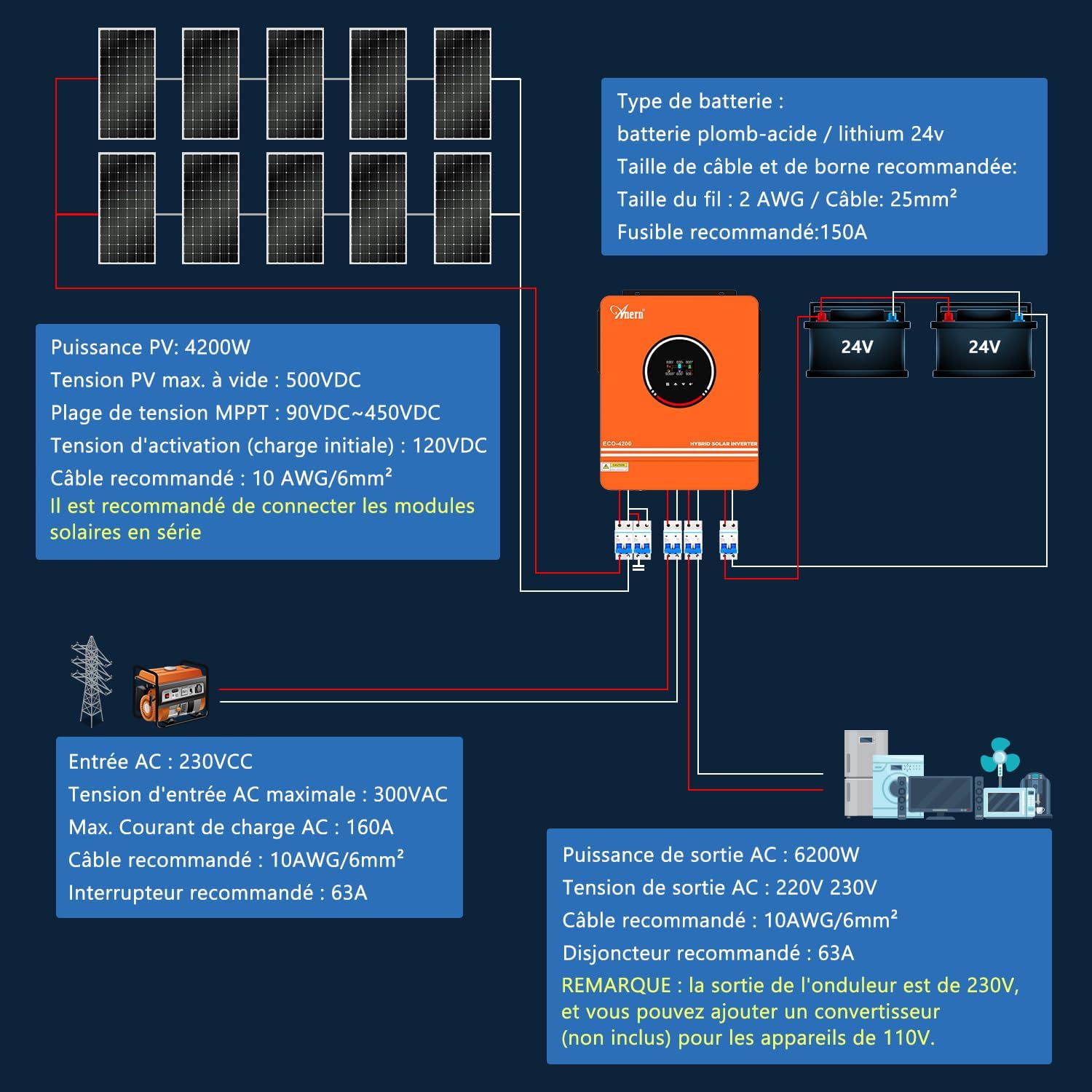
Figure 3: System wiring diagram showing PV, battery, AC input, and AC output connections.
5. Operating Modes
The inverter offers flexible operating modes to suit various energy requirements:
5.1 Charge Modes
You can select from three charging modes:
- Solar Priority: Solar energy is prioritized for charging the battery and powering loads.
- Solar + Utility: Both solar and utility power are used for charging and powering loads.
- Solar Only (No Battery): Solar power directly supplies loads without battery involvement.
5.2 Output Modes
The inverter supports two output priority modes:
- Solar Priority, then Utility: Loads are primarily powered by solar, then by utility grid.
- Solar Priority, then Battery, then Utility: Loads are powered by solar, then battery, then utility grid.

Figure 4: Overview of available charge and output modes.
6. Battery Compatibility
The inverter is compatible with various 24V battery types, including:
- Lead-acid batteries
- Gel batteries
- Lithium batteries (requires setting via "Custom" option in the inverter's program 05)
Note: The inverter can be used without batteries. If using a lithium battery, ensure it is configured correctly. The inverter is designed to connect only to a BMS PACE and cannot communicate with BMS from other manufacturers.

Figure 5: Battery compatibility information.
7. Monitoring
The inverter supports remote monitoring via WIFI/GPRS. The included WIFI module allows you to retrieve data and manage the inverter from your mobile device.

Figure 6: WIFI monitoring functionality.
8. Specifications
| Feature | Specification |
|---|---|
| Brand | Anern |
| Model Name | AN-SCI-ECO-4200W |
| Power | 4.2 KW |
| Efficiency | 98% |
| Item Weight | 10 Kilograms |
| Product Dimensions | 52L x 45W x 21.5H centimeters |
| Power Source | Solar Powered |
| Recommended Use | Home |
| Max. PV Power | 4200W |
| Max. PV Open Circuit Voltage | 500VDC |
| MPPT Voltage Range | 90VDC ~ 450VDC |
| Recommended PV Cable | 10AWG / 6mm² |
| AC Input Voltage | 230VCC |
| Max. AC Input Voltage | 300VAC |
| Max. AC Charge Current | 160A |
| Recommended AC Input Cable | 10AWG / 6mm² |
| Recommended AC Input Breaker | 63A |
| AC Output Power | 6200W |
| AC Output Voltage | 220V / 230V |
| Recommended AC Output Cable | 10AWG / 6mm² |
| Recommended AC Output Breaker | 63A |
Note: The inverter's output is 230V. A converter (not included) may be added for 110V appliances.
9. Troubleshooting
If you encounter issues with your inverter, please refer to the following general troubleshooting steps:
- No Power: Check all cable connections, circuit breakers, and battery voltage. Ensure the inverter is switched on.
- Low Output Power: Verify PV input voltage and current. Check battery charge level. Ensure loads do not exceed the inverter's rated power.
- Overheating: Ensure adequate ventilation around the inverter. Clear any obstructions from cooling vents. Reduce load if necessary.
- Error Codes: Consult the detailed user manual for specific error code interpretations and solutions.
For persistent problems, contact customer support.
10. Maintenance
Regular maintenance helps ensure the longevity and optimal performance of your inverter:
- Cleaning: Periodically clean the inverter's exterior and cooling vents to prevent dust buildup. Use a dry, soft cloth.
- Connection Checks: Annually inspect all electrical connections for tightness and signs of corrosion.
- Battery Inspection: If using lead-acid batteries, check electrolyte levels and terminal cleanliness as per battery manufacturer guidelines.
- Environmental Check: Ensure the installation environment remains within specified temperature and humidity ranges.
Always disconnect power before performing any maintenance.
11. Warranty and Support
The Anern 4.2KW Hybrid Solar Inverter comes with a 3-year manufacturer's warranty. For any product-related issues or support, please contact Anern customer service through the Amazon platform. You can also refer to the detailed manual provided with the product for further assistance.


