
Introduction
Thank you for purchasing the Mikado MD-SB102 Soundbar Bluetooth Speaker. This manual provides essential information for the safe and efficient operation of your device. Please read it thoroughly before use and retain it for future reference.

Image: Front view of the Mikado MD-SB102 Soundbar, showcasing its sleek black design.
Package Contents
Ensure all items are present in the package:
- Mikado MD-SB102 Soundbar
- Power Adapter (12V-1.5A)
- Auxiliary (AUX) Cable
- Coaxial Cable
- Mounting Hardware (for wall installation)
- User Manual (this document)
Product Features
- Home Theater Soundbar Speaker
- Bluetooth Connectivity (Wireless range up to 10 meters)
- Multiple Input Options: USB, AUX, TF Card, Coaxial
- Output Power: 20W (10W x 2)
- Frequency Response: 60 Hz - 18 KHz
- Signal-to-Noise Ratio (S/N): 75 dB
- Wall Mountable Design
- Compact Dimensions: 880mm x 75mm x 60mm
Controls and Connections
Top Panel Controls

Image: Close-up view of the top panel controls on the Mikado MD-SB102 Soundbar.
- Play/Pause Button (►): Press to play or pause audio.
- Volume Up Button (+): Press to increase volume.
- Volume Down Button (-): Press to decrease volume.
- Mode Button (M): Press to switch between input modes (Bluetooth, AUX, USB, TF Card, Coaxial).
Rear Panel Connections
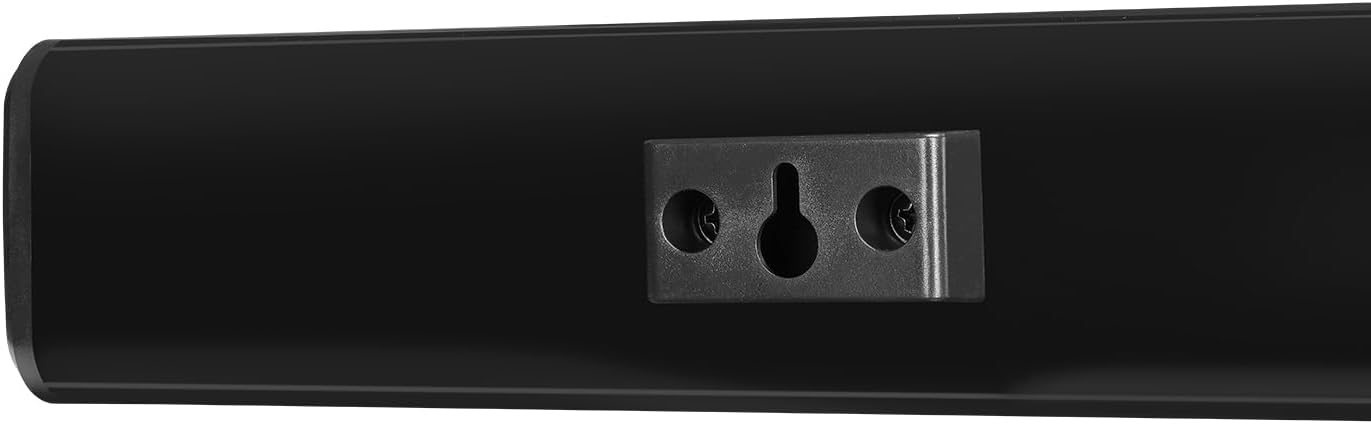
Image: Rear view of the Mikado MD-SB102 Soundbar, showing the various input ports.
- DC IN (12V): Power input port. Connect the provided power adapter here.
- ON/OFF Switch: Main power switch for the soundbar.
- AUX Input: 3.5mm audio input for connecting external devices via AUX cable.
- USB Port: For playing audio files from a USB flash drive.
- TF Card Slot: For playing audio files from a TF (MicroSD) card.
- COAX (Coaxial) Input: Digital audio input for connecting devices with coaxial output.
Setup
Placement
Place the soundbar on a stable, flat surface in front of your TV or desired listening area. Ensure there are no obstructions blocking the sound. Alternatively, you can wall-mount the soundbar.
Power Connection
- Connect the provided power adapter to the DC IN (12V) port on the rear of the soundbar.
- Plug the power adapter into a wall outlet.
- Flip the ON/OFF switch on the rear panel to the 'ON' position. The soundbar will power on.
Audio Connections
Choose one of the following methods to connect your audio source:
- AUX Connection: Use the provided 3.5mm AUX cable to connect the soundbar's AUX input to the audio output of your device (e.g., TV, smartphone, computer).
- Coaxial Connection: Use the provided coaxial cable to connect the soundbar's COAX input to the coaxial audio output of your TV or other compatible device.
- USB/TF Card: Insert a USB flash drive or TF card into the respective port on the rear panel. The soundbar will automatically switch to USB/TF mode and begin playing audio files.
Bluetooth Pairing
- Ensure the soundbar is powered on.
- Press the Mode (M) button on the top panel until the soundbar enters Bluetooth mode (indicated by a voice prompt or LED indicator).
- On your Bluetooth-enabled device (e.g., smartphone, tablet), enable Bluetooth and search for available devices.
- Select "MD-SB102" from the list of devices.
- Once paired, the soundbar will confirm the connection with an audible prompt. You can now play audio from your device through the soundbar.
Wall Mounting
The soundbar can be mounted on a wall using the included mounting hardware.

Image: Detail of the wall mount bracket on the rear of the Mikado MD-SB102 Soundbar.
- Determine the desired mounting location on the wall. Ensure it is sturdy and can support the weight of the soundbar.
- Mark the positions for drilling using the soundbar's mounting holes as a template.
- Drill pilot holes and insert wall anchors if necessary.
- Secure the mounting screws into the wall, leaving a small gap for the soundbar to hook onto.
- Carefully align the soundbar's mounting slots with the screws and slide it down to secure it in place.
Operating Instructions
Power On/Off
- To turn on: Flip the ON/OFF switch on the rear panel to 'ON'.
- To turn off: Flip the ON/OFF switch on the rear panel to 'OFF'.
Mode Selection
Press the Mode (M) button on the top panel repeatedly to cycle through available input modes: Bluetooth, AUX, USB, TF Card, Coaxial.
Volume Control
- To increase volume: Press the Volume Up (+) button.
- To decrease volume: Press the Volume Down (-) button.
Bluetooth Operation
After successful pairing (refer to 'Bluetooth Pairing' in the Setup section), ensure the soundbar is in Bluetooth mode. Play audio from your connected device. Use the Play/Pause button on the soundbar for basic playback control.
USB/TF Card Operation
When a USB drive or TF card is inserted, the soundbar will automatically switch to the corresponding mode and begin playing audio files. Use the Play/Pause and Volume buttons for control.
AUX/Coaxial Operation
Connect your audio source via AUX or Coaxial cable. Press the Mode (M) button to select the correct input. Audio will play directly from your connected device. Volume can be adjusted via the soundbar or the source device.
Maintenance
- Cleaning: Use a soft, dry cloth to clean the surface of the soundbar. Do not use liquid cleaners or abrasive materials.
- Storage: If not in use for an extended period, store the soundbar in a cool, dry place away from direct sunlight and extreme temperatures.
- Ventilation: Ensure proper ventilation around the soundbar to prevent overheating. Do not block any vents.
- Power: Always disconnect the power adapter from the wall outlet before cleaning or if the unit will be unused for a long time.
Troubleshooting
| Problem | Possible Cause | Solution |
|---|---|---|
| No power | Power adapter not connected; ON/OFF switch is off. | Ensure power adapter is securely connected and plugged into a working outlet. Flip ON/OFF switch to 'ON'. |
| No sound | Incorrect input mode; Volume too low; Audio cable not connected properly. | Press 'M' button to select correct input mode. Increase volume. Check audio cable connections. |
| Bluetooth not pairing | Soundbar not in pairing mode; Device Bluetooth is off; Out of range. | Ensure soundbar is in Bluetooth mode. Turn on Bluetooth on your device. Move device closer to soundbar (within 10m). |
| Distorted sound (AUX mode) | Poor quality AUX cable; Ground loop interference. | Try a different AUX cable. Ensure all devices are plugged into the same power strip or try a ground loop isolator if interference persists. |
Specifications
| Feature | Detail |
|---|---|
| Model Name | MD-SB102 |
| Brand | Mikado |
| Speaker Type | Soundbar |
| Connectivity Technology | Bluetooth, AUX, USB, Coaxial, TF Card |
| Wireless Communication | Bluetooth (10 Meter Range) |
| Output Power | 20W (10W x 2) |
| Frequency Response | 60 Hz - 18 KHz |
| Signal-to-Noise Ratio | 75 dB |
| Power Adapter | 12V-1.5A |
| Product Dimensions (D x W x H) | 0.7D x 88W x 6H cm (880x75x60mm) |
| Mounting Type | Wall Mount |
| Control Method | On-device buttons |
| Compatible Devices | Laptops, Desktop Computers, Smartphones, TVs |
Warranty Information
The Mikado MD-SB102 Soundbar comes with a 24-month limited warranty from the date of purchase. This warranty covers manufacturing defects and workmanship under normal use. It does not cover damage caused by misuse, accidents, unauthorized modifications, or improper installation. Please retain your purchase receipt as proof of purchase for warranty claims.
Customer Support
For technical assistance, warranty claims, or further inquiries, please contact Mikado customer support. Refer to the contact information provided on the product packaging or the official Mikado website.


