
SEDETA 1.5m
SEDETA 59-inch Office Desk with Drawers Instruction Manual
Model: 1.5m
1. Introduction
Thank you for choosing the SEDETA 59-inch Office Desk with Drawers. This manual provides essential information for the proper assembly, operation, and maintenance of your new desk. Please read these instructions carefully before beginning assembly and retain them for future reference.
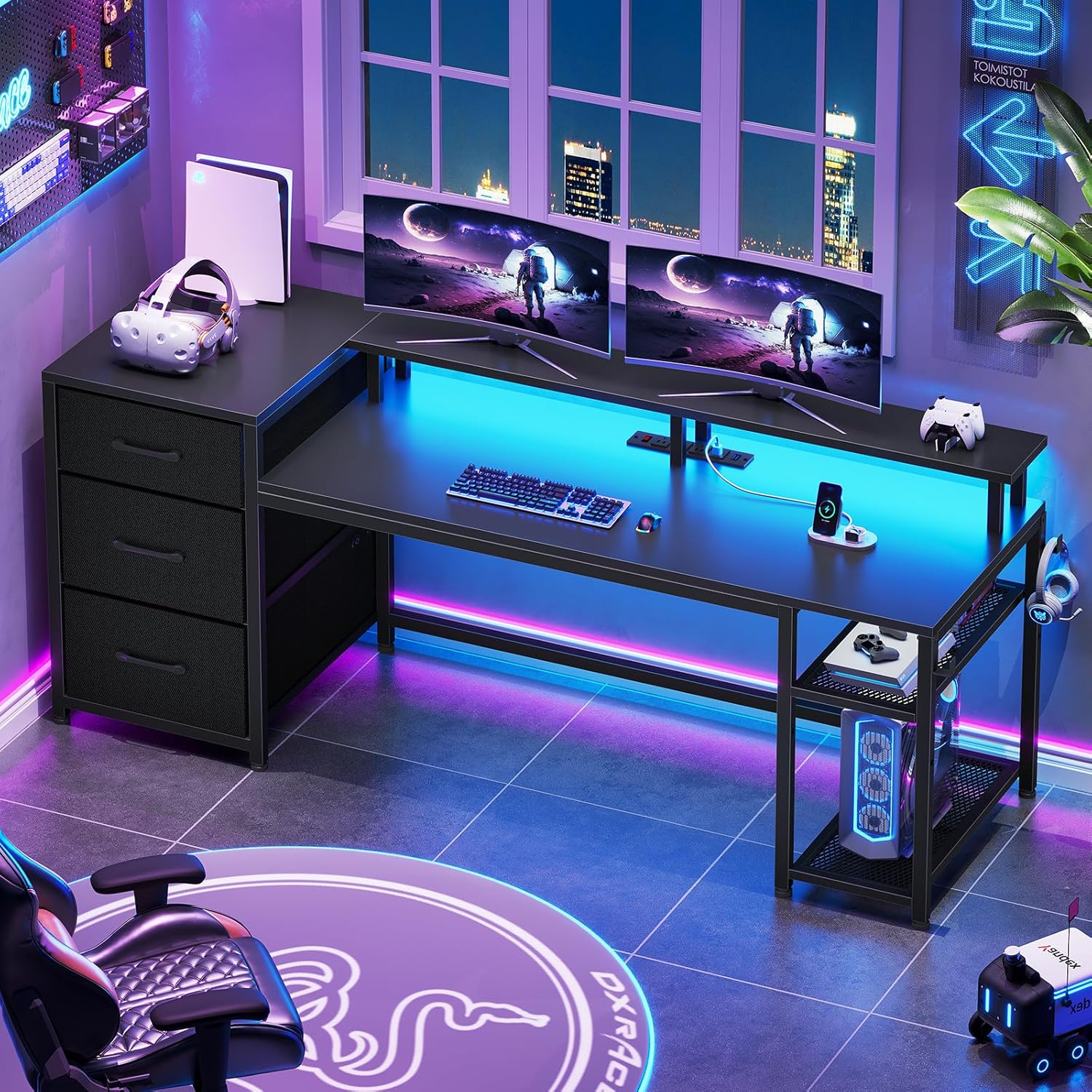
Image 1.1: The SEDETA 59-inch Office Desk with Drawers, showcasing its design and LED lighting in a modern office or gaming environment.
2. Safety Information
To ensure safe use and prevent injury or damage, please observe the following:
- Children are not permitted to climb or play on the product.
- Do not overload the desk or its shelves beyond the recommended weight capacity.
- Ensure all screws and fasteners are securely tightened during assembly and periodically check for looseness.
- Keep liquids away from electrical components, including the power outlet and LED lights.
- Place the desk on a level surface to prevent instability.
3. Product Features
The SEDETA 59-inch Office Desk is designed for versatility and functionality, offering a comprehensive solution for your home office or gaming setup. Key features include:
- Spacious 59-inch Tabletop: Provides ample workspace for multiple monitors, keyboards, and other essentials.
- Reversible Design: The storage shelf and drawers can be configured on either the left or right side to suit your space and preference.
- Integrated Power Outlet: Features 4 AC outlets and 2 PowerIQ-enabled USB charging ports for convenient power access for up to 4 devices simultaneously.
- Three Fabric Drawers: Includes two file drawers suitable for legal/letter/A4 size documents and one smaller fabric drawer for miscellaneous items.
- LED Light Strip: An RGB LED light strip with APP control, multiple colors, 29 flashing modes, and music sync function to enhance your environment.
- Ergonomic Monitor Stand: Raises monitors to a suitable height to reduce neck and back strain.
- Adjustable CPU Shelves: Two-layer adjustable shelves protect your CPU from moisture and dust while providing effective heat dissipation.
- L Hooks: Two integrated L hooks offer convenient storage for headphones or backpacks.

Image 3.1: The desk's reversible design allows the storage unit to be placed on either side.

Image 3.2: Detail of the convenient charging station built into the desk.
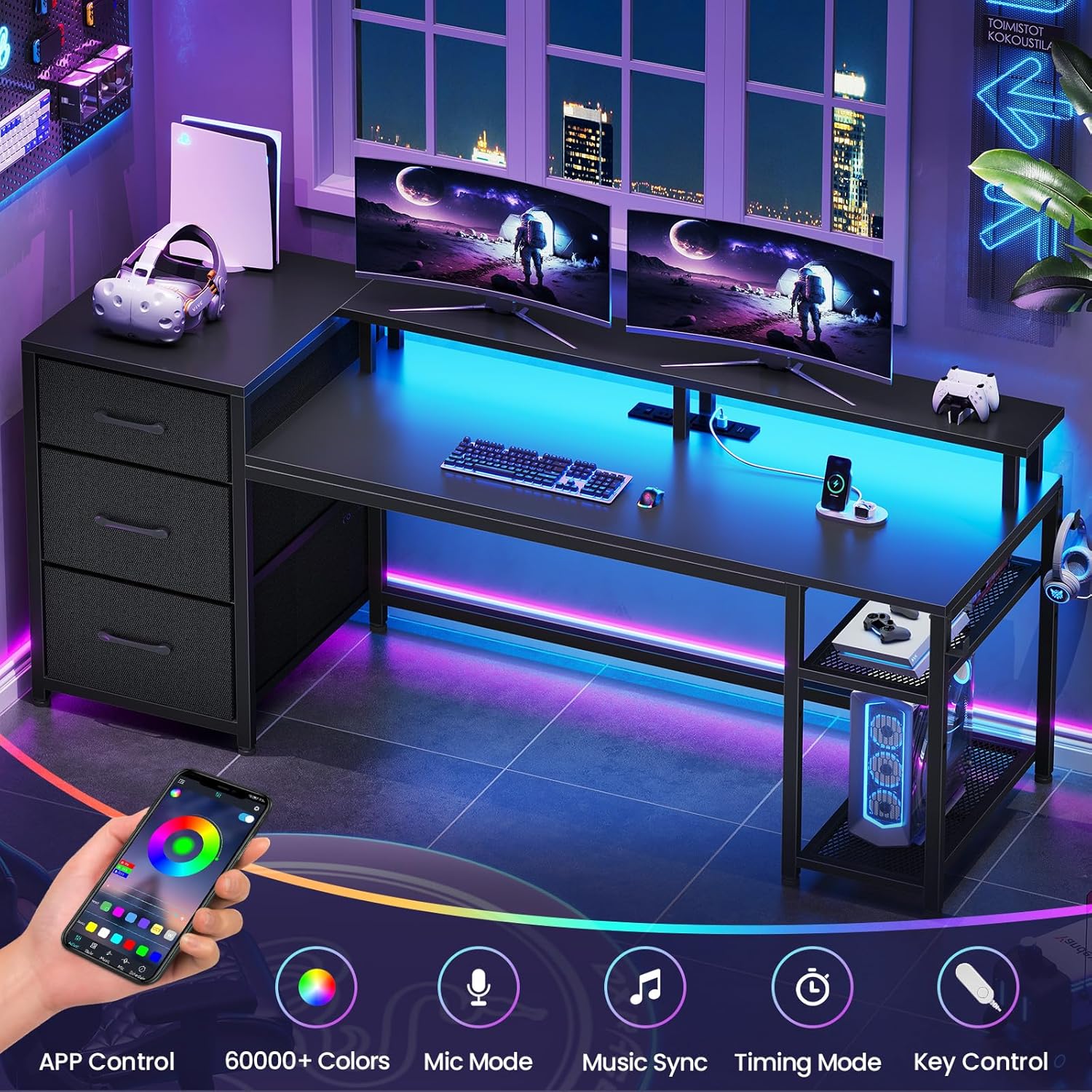
Image 3.3: The RGB LED light strip offers customizable lighting options.

Image 3.4: The monitor stand promotes ergonomic posture.
4. Components List
Before assembly, please verify that all components listed below are present and undamaged. Refer to the assembly video for visual identification of each part.
- Computer Desk Panels
- Assembly Kit (screws, nuts, tools)
- 4 AC outlets
- 2 PowerIQ-enabled USB charging ports with a switch
- 2 fabric file drawers
- 1 small fabric drawer
- 2-layer adjustable CPU shelves
- 2 L hooks
- LED light strip
- Remote control (for LED lights)
- Monitor stand components

Image 4.1: Overview of desk dimensions and key components.
5. Setup and Assembly
Assembly of the SEDETA 59-inch Office Desk is designed to be straightforward with clear instructions and numbered parts. It is recommended to have two people for assembly.
5.1. Assembly Video Guide
For a detailed visual guide, please refer to the official installation video:
Video 5.1: Official installation video for the SEDETA 59-inch Office Desk with Drawers. This video provides step-by-step instructions for assembling the desk, including the frame, shelves, and drawers.
5.2. General Assembly Steps
- Unpack and Identify: Carefully unpack all components and compare them against the components list.
- Assemble the Frame: Connect the main metal frame components using the provided screws.
- Install Shelves: Attach the CPU shelves and other storage shelves to the frame.
- Attach Desk Panels: Secure the main tabletop and the side storage top to the frame.
- Install Drawers: Assemble the fabric drawers and insert them into the designated slots.
- Mount Power Outlet: Secure the integrated power outlet into the tabletop cutout.
- Attach Monitor Stand: Assemble and attach the monitor stand to the main tabletop.
- Apply LED Strip: Adhere the LED light strip to the underside of the monitor stand or desired location.
- Attach L Hooks: Secure the L hooks to the side of the desk frame.
- Adjust Leg Pads: Ensure the desk is level and stable by adjusting the leg pads.

Image 5.2: The CPU stand offers adjustable heights for optimal placement and ventilation.

Image 5.3: The convenient iron hook for headphones or bags.
6. Operating Instructions
6.1. Power Outlet Usage
The integrated power outlet provides convenient access to power for your devices:
- Plug the desk's main power cord into a wall outlet.
- Use the 4 AC outlets for standard electronic devices.
- Utilize the 2 USB charging ports for charging smartphones, tablets, and other USB-powered devices.
- The red switch on the power outlet controls the power flow to all outlets and USB ports. Ensure it is in the 'ON' position for power.
6.2. LED Light Strip Operation
The LED light strip offers customizable lighting options:
- Connect the LED light strip to the power source as instructed during assembly.
- Use the provided remote control or download the specified mobile application to control the lights.
- Explore various colors, brightness levels, and 29 flashing modes.
- Activate the music sync function to make the lights react to sound and music.
- Set a timer for automatic shut-off using the app or remote.
Video 6.1: Display video showcasing the features and functionality of the SEDETA 59-inch Office Desk, including the LED lights and storage options.
7. Maintenance
Regular maintenance will help prolong the life and appearance of your desk:
- Cleaning: Wipe surfaces with a soft, damp cloth. Avoid harsh chemicals or abrasive cleaners.
- Dusting: Regularly dust the desk, especially around the power outlet and LED lights, to prevent buildup.
- Fastener Check: Periodically check all screws and connections to ensure they remain tight. Tighten any loose fasteners.
- Leg Pad Adjustment: If the desk feels wobbly, adjust the leg pads at the bottom of the frame to ensure stability on uneven floors.

Image 7.1: The desk is constructed from high-quality P2 Particle Board for durability.

Image 7.2: The heavy coated steel tube frame provides robust support.
8. Troubleshooting
If you encounter any issues with your SEDETA desk, please refer to the following common solutions:
- Desk is Wobbly: Ensure all assembly screws are fully tightened. Adjust the leveling foot pads on the bottom of the desk legs to compensate for uneven flooring.
- LED Lights Not Working: Check that the LED strip is properly connected to its power source and that the desk's main power cord is plugged into a functional wall outlet. Verify the power switch on the integrated outlet is 'ON'. Check the remote control battery if applicable.
- Power Outlets Not Functioning: Confirm the desk's main power cord is securely plugged into a live wall outlet. Ensure the red power switch on the integrated outlet is in the 'ON' position.
- Missing or Damaged Parts: If your item arrived damaged, scratched, or with missing parts, please contact SEDETA customer service for assistance.
9. Specifications
| Feature | Detail |
|---|---|
| Brand | SEDETA |
| Model Number | 1.5m |
| Product Dimensions | 18.5"D x 59"W x 34.3"H |
| Item Weight | 44 Pounds |
| Color | Black |
| Top Material Type | Engineered Wood (P2 Particle Board) |
| Base Material | Alloy Steel |
| Number of Drawers | 3 (2 file, 1 small) |
| Number of Shelves | 2 (CPU shelves) |
| Special Feature | Built-In USB Outlet, LED Lights, Monitor Stand, Reversible Design |
| Maximum Weight Recommendation | 352 Pounds |
| Required Assembly | Yes (Recommended 2 people) |
10. Warranty and Support
The SEDETA 59-inch Office Desk comes with a limited warranty. For specific details regarding warranty coverage, please refer to the documentation included with your purchase or contact SEDETA customer service.
If you require assistance with assembly, have questions about product features, or need to report damaged/missing parts, please contact SEDETA customer support. Contact information can typically be found on the product packaging or the official SEDETA website.
Ask a question about this manual
Ask about setup, troubleshooting, compatibility, parts, safety, or missing instructions. Manuals+ will review the question and use this page’s manual context to help answer it.