
SEDETA ac7bb41e-28c3-4811-bb85-b3271f7e93e8
SEDETA 59-inch Reversible Office Desk with Drawers and LED Lights Instruction Manual
Model: ac7bb41e-28c3-4811-bb85-b3271f7e93e8
Introduction
This manual provides comprehensive instructions for the assembly, operation, and maintenance of your SEDETA 59-inch Reversible Office Desk. Please read this manual thoroughly before assembly and use to ensure proper function and safety.
Important Safety Information
- Children are not allowed to climb or play on the product.
- Ensure all screws and fasteners are securely tightened before use.
- Do not overload the desk or shelves beyond their weight capacity.
- Keep liquids away from electrical components (power outlet, LED lights).
- Place the desk on a level surface to prevent instability.
Parts List
Before beginning assembly, verify that all components are present and undamaged. Refer to the assembly diagram for visual identification of parts.
- Main Desktop Panel (1)
- Monitor Stand Shelf (2)
- Side Storage Top Panel (3)
- Desk Frame Legs (4)
- Side Storage Frame (5, 6)
- CPU Shelves (7)
- Monitor Stand Supports (8)
- Crossbars (9, 10, 11)
- Drawer Support Bars (12)
- Diagonal Braces (13)
- Drawer Handles (14)
- L-Hooks (15)
- Fabric Drawers (16, 17)
- Power Outlet Unit (18)
- LED Light Strip (19)
- Assembly Hardware (Screws A, B, C, D, E, F, G, H, I)
Setup and Assembly
Follow the numbered steps and diagrams carefully. It is recommended to assemble the desk with two people.
Assembly Video Guide
Detailed installation video for the SEDETA 59-inch Office Desk with Drawers. This video demonstrates each step of the assembly process, from unboxing to final setup, ensuring a smooth build.
Step-by-Step Assembly
- Prepare Drawers: Attach handles (F) to the fabric drawers (16, 17). Insert drawer support bars (14) into the designated slots on the larger drawers.
- Assemble Side Frames: Attach adjustable feet (H) to the bottom of the desk frame legs (4) and side storage frames (5, 6). Secure the CPU shelves (7) between the desk frame legs (4) using screws (D).
- Connect Frames: Attach the crossbars (9, 10, 11) to connect the desk frame legs (4) and side storage frames (5, 6) using screws (D). Ensure all connections are firm.
- Install Diagonal Braces and Hooks: Attach the diagonal braces (13) to the main desk frame (5) for added stability using screws (C). Install the L-hooks (15) onto the side storage frame (6) as desired using screws (C, E).
- Attach Main Desktop: Carefully place the main desktop panel (1) onto the assembled frame. Secure it using screws (B) from underneath.
- Install Power Outlet: Insert the power outlet unit (18) into the pre-cut opening on the main desktop panel (1) and secure it with screws (G).
- Assemble Monitor Stand: Attach the monitor stand supports (8) to the monitor stand shelf (2) using screws (B). Secure the LED light strip (19) to the underside of the monitor stand shelf (2) using screws (G, I). Place the assembled monitor stand onto the main desktop panel (1) and secure it with screws (B).
- Attach Side Storage Top: Place the side storage top panel (3) onto the side storage frame (5, 6) and secure it with screws (B).
- Insert Drawers: Slide the fabric drawers (16, 17) into their respective compartments within the side storage unit.
- Reversible Configuration: The side storage unit can be installed on either the left or right side of the main desk during assembly to suit your preference.
Visual Assembly Aids

Image: Overview of the assembled SEDETA 59-inch Office Desk, showcasing its main features including the monitor stand, drawers, and LED lighting.

Image: Detailed dimensions of the desk, including the main desktop, monitor stand, and side storage unit, to assist with space planning.

Image: Illustration demonstrating the reversible design of the desk, allowing the storage unit to be placed on either the left or right side.
Operating Instructions
LED Lights Operation
The integrated RGB LED light strip offers multiple colors and 29 flashing modes. Control is available via a dedicated app or key control.
- App Control: Download the specified app (refer to packaging or quick start guide for QR code/name) to control colors, modes, and music sync functions.
- Music Sync: The built-in sensitivity adjustable microphone allows the LED light color to change with the rhythm of sound and music.
- Timer Function: Set specific times for the lights to turn on or off via the app.

Image: A gaming setup featuring the desk with its LED lights illuminated, demonstrating various color options and control methods.

Image: Visual representation of the LED light strip's features, highlighting app control, multiple colors, music sync, and timer functions.
Power Outlet and USB Ports
The desk includes a built-in power outlet with 2 AC outlets and 2 PowerIQ-enabled USB charging ports, providing power for up to 4 devices simultaneously.
- Connect the desk's power cord to a standard wall outlet.
- Use the AC outlets for devices requiring standard power.
- Use the USB ports (5V/2A) for charging compatible USB devices.
- Maximum power capacity: 1500W.

Image: Close-up of the integrated power outlet unit, showing 2 AC outlets and 2 USB ports, with devices charging.
Image: Diagram detailing the power outlet's specifications, including a 5.3-foot power cord, 1500W max power, 120V/12A AC outlets, and 5V/2A USB ports.
Storage and Organization
The desk features various storage options to keep your workspace organized.
- Fabric Drawers: Three fabric drawers are included. Two larger drawers are designed to hold legal, letter, or A4 size files. A smaller drawer is suitable for sundries.
- Monitor Stand: The elevated monitor stand helps raise your monitor to an ergonomic height, reducing neck and back strain. It can accommodate dual monitors.
- CPU Shelf: The 2-layer adjustable CPU shelves protect your computer host from moisture and dust while providing easy access.
- L-Hooks: Two L-hooks are provided for hanging headphones, backpacks, or other accessories.

Image: A view of the desk highlighting its storage capabilities, including two-tier open shelves, one small fabric drawer, and two legal/letter/A4 file drawers.
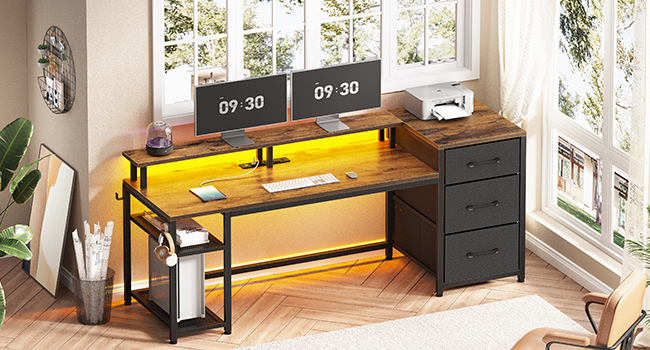
Image: Close-up of the fabric drawers, illustrating their capacity for various file sizes (legal, letter, A4) and general storage.

Image: Diagram showing how the monitor stand helps maintain correct posture and reduces neck tension by elevating the screen.

Image: Illustration of the CPU stand, highlighting its two different installation heights for effective heat dissipation and easy cleaning.

Image: Close-up of the iron hook, demonstrating its use for hanging headphones or a backpack, keeping the desk clear.
Product Display Video
Product display video showcasing the features and functionality of the SEDETA 59-inch Office Desk with Drawers, including its storage, LED lights, and overall design.
Maintenance
- Cleaning: Wipe surfaces with a soft, damp cloth. Avoid harsh chemicals or abrasive cleaners.
- Fasteners: Periodically check all screws and bolts to ensure they remain tight. Retighten as necessary.
- Electrical Components: Keep the power outlet and LED lights dry. Do not attempt to repair electrical components yourself.
Troubleshooting
| Problem | Possible Cause | Solution |
|---|---|---|
| Desk is wobbly. | Loose fasteners; uneven floor. | Ensure all screws are tightened. Adjust the leveling feet on the bottom of the desk. |
| LED lights not working. | Power connection issue; faulty strip. | Check if the LED strip is properly connected to power. Ensure the power outlet is functioning. If issues persist, contact customer support. |
| Power outlets/USB ports not working. | Desk power cord unplugged; circuit breaker tripped. | Verify the desk's main power cord is securely plugged into a working wall outlet. Check your home's circuit breaker. |
| Drawers do not slide smoothly. | Obstruction; improper installation. | Check for any items blocking the drawer's path. Ensure the drawer support bars are correctly installed. |
Specifications
- Brand: SEDETA
- Model Number: ac7bb41e-28c3-4811-bb85-b3271f7e93e8
- Product Dimensions: 18.5"D x 59"W x 34.3"H
- Color: Rustic Brown (Current Product)
- Material: Engineered Wood (Top), Alloy Steel (Base/Frame)
- Weight: 44 Pounds
- Maximum Weight Recommendation: 352 Pounds
- Number of Drawers: 3 (Fabric)
- Number of Shelves: 2 (CPU Shelves)
- Special Features: Built-In USB Outlet, LED Lights, Reversible Design, Monitor Stand, L-Hooks
- Power Outlet: 2 AC Outlets (120V/12A), 2 USB Ports (5V/2A), Max 1500W, 5.3-Foot Power Cord
- Assembly: Required
Warranty and Support
SEDETA is committed to providing quality products and customer satisfaction.
- After-sales Service: If your item arrives damaged, scratched, or with missing parts, please contact SEDETA customer service.
- Contact: We will send you a free replacement or offer a partial refund. Refer to your purchase documentation for specific contact details or visit the official SEDETA store on Amazon: SEDETA Store.
Related documentsac7bb41e-28c3-4811-bb85-b3271f7e93e8

Ask a question about this manual
Ask about setup, troubleshooting, compatibility, parts, safety, or missing instructions. Manuals+ will review the question and use this page’s manual context to help answer it.