
1. Introduction
This manual provides detailed instructions for the installation, operation, and maintenance of your WEILAILIFE 8MP PoE Security Camera System (Model: WEILAI-NPOE8002). Please read this manual thoroughly before using the product to ensure proper functionality and safety. Keep this manual for future reference.
2. Package Contents
Please verify that all items listed below are included in your package:
- 1 x 4K 8MP 8-Channel Network Video Recorder (NVR) with 1TB HDD
- 2 x 4K 8MP PoE Cameras
- 2 x LAN Cables for Cameras (18.2 meters each)
- 1 x USB Mouse
- 1 x HDMI Connection Cable (1 meter)
- 1 x 48V2A Power Supply for NVR
- 1 x Remote Control
- 1 x LAN Cable (1 meter)
- 1 x Instruction Manual
- 1 x Warning Label
- 2 x Camera Mounting Screw Packs
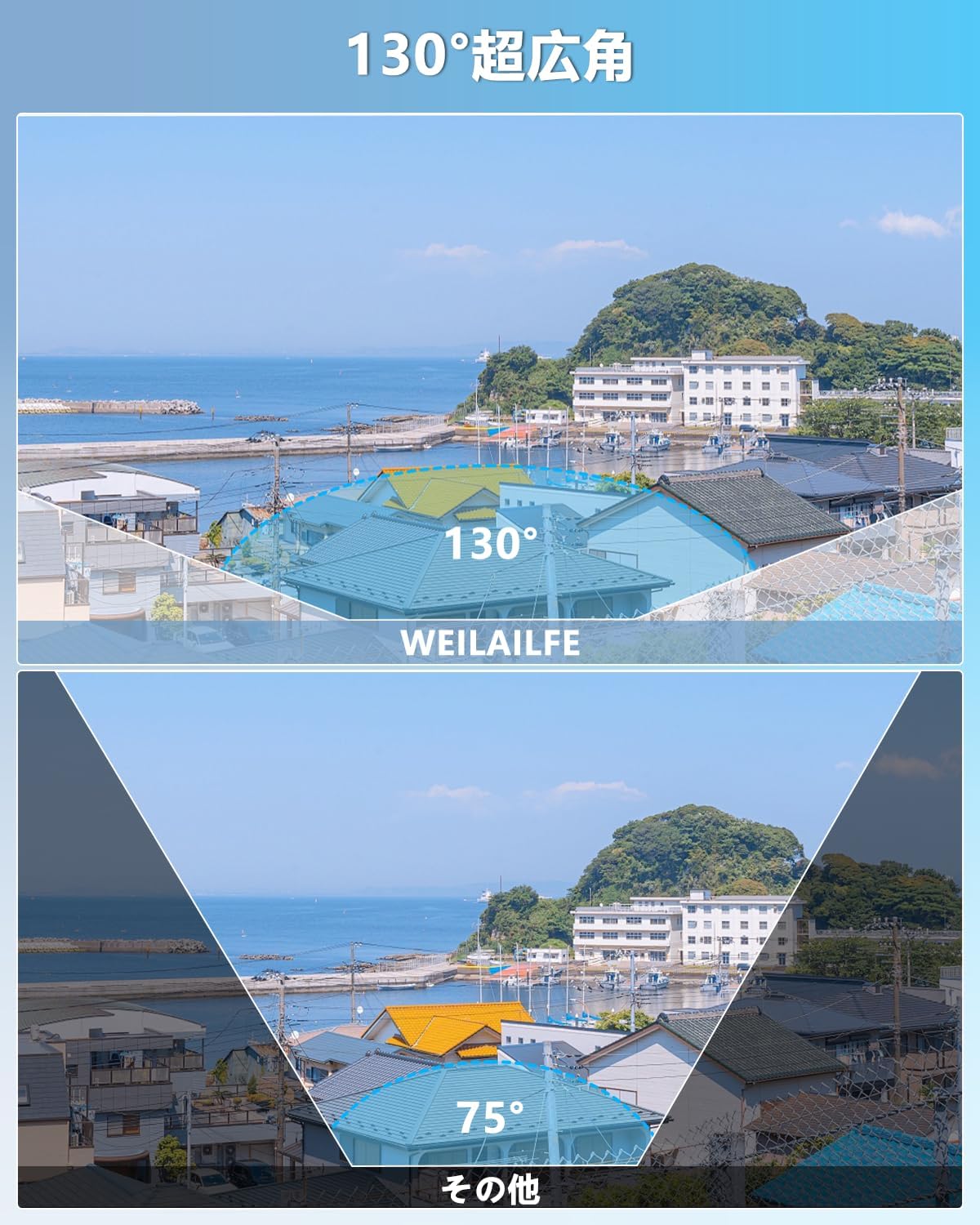
Image: Overview of the WEILAILIFE 8MP PoE Security Camera System components, including NVR, cameras, cables, and accessories.
Video: An unboxing and installation video demonstrating the contents of the security camera system package and initial setup steps.
3. Product Features
- 4K 8MP Ultra-High Resolution: Provides 3264 x 2488 resolution for clear and detailed 24/7 surveillance.
- Two-Way Audio: Communicate with visitors or deter intruders remotely via the dedicated app on your smartphone, tablet, or PC.
- 130° Ultra-Wide Angle Lens: Offers a broad field of view to minimize blind spots and enhance surveillance coverage.
- PIR & Dual Detection: Advanced recognition algorithms and infrared detection send real-time notifications for abnormal activity, effectively filtering out false alarms from leaves, clouds, animals, or insects.
- H.265 Compression Technology & IP66 Weatherproof: High-sensitivity CMOS and H.265 compression save storage space (more than double that of H.264) while maintaining image quality. IP66 dustproof and waterproof rating ensures durability in various outdoor and indoor conditions.
- Free APP & No Monthly Fees: Download the free "Honestview" or "Eseecloud" app from your smartphone's app store (iOS/Android) for remote monitoring without subscription fees.
- Plug & Play & Expandable: Easy setup by connecting cameras to the NVR with LAN cables. The system is expandable up to 8 cameras to suit your needs.

Image: Illustration of the two-way audio feature, showing a person communicating with a delivery person via the camera system.
Image: Comparison of a 130-degree wide-angle view from the WEILAILIFE camera versus a standard 75-degree view, highlighting the broader coverage.

Image: Diagram illustrating PIR (Passive Infrared) and AI human detection zones, showing how the system accurately identifies human movement.

Image: The camera installed outdoors in rainy conditions, demonstrating its IP66 waterproof and dustproof capabilities, suitable for temperatures from -25°C to 50°C.
4. Setup
4.1. System Connection
Follow these steps to connect your NVR and cameras:
- Connect the NVR to your router using the provided LAN cable.
- Connect the cameras to the NVR's PoE ports using the camera LAN cables.
- Connect a monitor to the NVR via HDMI or VGA port.
- Plug the USB mouse into a USB port on the NVR.
- Connect the NVR to its power supply.
- The system will boot up, and live camera feeds should appear on the monitor within seconds.

Image: A diagram showing the simple plug-and-play connection of IP cameras to the NVR and router using LAN cables.
Video: A step-by-step guide demonstrating how to connect the NVR to a router, cameras, monitor, and power supply, followed by the system booting up.
4.2. App Setup for Remote Monitoring
To enable remote monitoring on your smartphone:
- Download the "Eseecloud" app from your smartphone's app store (iOS or Android).
- Register a new account using your email or phone number and follow the prompts to set a password.
- In the app, tap the "+" icon to add a device.
- Scan the QR code located on the NVR to add the device to your app.
- Once added, you can view live feeds and manage your system remotely.

Image: Various devices (smartphone, tablet, PC) displaying live camera feeds, illustrating the remote access capability of the system.
Video: A detailed demonstration of setting up the security camera system, including scanning QR codes and connecting to the app for remote viewing.
5. Operation
5.1. Live View
After successful setup, you can view live camera feeds on your connected monitor or through the Eseecloud app on your smartphone, tablet, or PC. The app supports simultaneous viewing of multiple camera streams.
5.2. Two-Way Audio
Use the two-way audio feature via the app to communicate through the camera's built-in microphone and speaker. This allows for real-time conversations with individuals near the camera.
5.3. Motion Detection & Alerts
The system utilizes PIR and AI dual detection to accurately identify human movement. When motion is detected, you will receive real-time notifications on your app or via email. You can customize detection zones to focus on specific areas.

Image: A smartphone displaying a motion detection alert, with an overlay showing detection zones and identified human figures in the camera's view.
5.4. Recording & Storage
The NVR comes with a 1TB HDD for continuous 24/7 recording. H.265 compression ensures efficient storage, allowing for longer recording times while maintaining video quality. The system also supports cloud storage options.

Image: Three panels illustrating different recording modes: continuous recording, scheduled recording, and motion-triggered recording.
5.5. Night Vision
The IR-LED system automatically activates infrared mode in dark conditions, allowing you to see clearly up to 24 meters at night.

Image: A split image showing the camera's view in daylight (color) and at night (infrared black and white), demonstrating automatic switching.
6. Maintenance
To ensure optimal performance and longevity of your security camera system, follow these maintenance guidelines:
- Regular Cleaning: Gently wipe the camera lens and housing with a soft, damp cloth to remove dust and dirt. Avoid using harsh chemicals that could damage the lens or finish.
- Cable Inspection: Periodically check all cables (LAN, power) for any signs of wear, damage, or loose connections. Secure or replace damaged cables promptly.
- Software Updates: Check the Eseecloud app or WEILAILIFE website for any available firmware or software updates for your NVR and cameras. Keeping your system updated ensures the latest features and security patches.
- Environmental Protection: While the cameras are IP66 rated, extreme weather conditions can still impact performance. Ensure cameras are installed in locations that offer some protection from direct, prolonged exposure to severe elements if possible.
7. Troubleshooting
If you encounter any issues with your WEILAILIFE security camera system, refer to the following common troubleshooting steps:
- No Video Feed:
- Check all power connections to the NVR and cameras.
- Ensure LAN cables are securely connected to both the NVR and cameras.
- Verify that the monitor is correctly connected to the NVR via HDMI or VGA and is set to the correct input source.
- Restart the NVR and cameras.
- No Remote Access via App:
- Confirm that the NVR is connected to the internet (check the WAN port indicator light).
- Ensure your smartphone has a stable internet connection.
- Verify that the device ID was correctly added to the Eseecloud app.
- Check the NVR's network settings to ensure DHCP is enabled and the network status is green.
- Poor Video Quality:
- Clean the camera lens to remove any smudges or dirt.
- Ensure the camera is properly focused (if adjustable).
- Check network bandwidth. A slow internet connection can affect streaming quality.
- False Motion Alerts:
- Adjust the motion detection sensitivity settings in the NVR or app.
- Refine the motion detection zones to exclude areas with frequent irrelevant movement (e.g., trees swaying).
If these steps do not resolve your issue, please contact customer support.
8. Specifications
| Feature | Detail |
|---|---|
| Brand | WEILAILIFE |
| Model Number | WEILAI-NPOE8002 |
| Connectivity Technology | Wired |
| Video Capture Resolution | 3264x2488, 4K (8MP) |
| Special Features | 4K 8MP, PIR & Dual Detection, Two-Way Audio, Expandable, Remote Monitoring |
| Number of Channels | 8 |
| Communication Interface | Wired (RJ45) |
| Max Memory Capacity | 1 TB (HDD included) |
| Power Source Type | Corded Electric |
| Operating System | Linux |
| Compatible Devices | Camera, Smartphone, Tablet, TV, Desktop PC |
| Camera Description | Front |
| Night Vision | 845nm 3 Infrared Dot Matrix Lamp Super Night Vision |
| Night Vision Range | 20 meters |
| Frame Rate | 15 fps |
| Recording Mode | Manual |
| USB Ports | 2 |
| Hardware Interface | HDMI, USB, VGA |
| Lens Type | Wide Angle |
| Video Input | RJ45 |
| Field of View | 130 degrees |
| Signal Format | Digital |
| Optical Sensor Technology | CMOS |
| Color | White |
| Product Dimensions | 19 x 39 x 28 cm |
| Recommended Use | Indoor/Outdoor Security |
| Product Weight | 3 kg |
| Country of Origin | China |
9. Warranty & Support
WEILAILIFE is committed to providing high-quality products and excellent customer service. Your product comes with a 12-month quality guarantee.
For any questions, concerns, or malfunctions during consideration or use, please do not hesitate to contact us. Our dedicated service center in Japan is located at: Chiba Rose Avenue Inage Tendai 1F, 5-8-9 Tendai, Inage-ku, Chiba City, Chiba Prefecture.
You can also reach our Japanese-speaking support team via email:
Email: info-jp@weilailifetech.com (24-hour response)
LINE Service: https://lin.ee/EqPKtnq

Image: QR code for WEILAILIFE LINE service, aiming to be the top service provider in the industry.

Image: Various certification documents, including trademark registration and compliance certificates, indicating product quality and adherence to standards.


