
COLSUR S32
COLSUR 3-in-1 Charging Station User Manual
Model: S32
Product Overview
The COLSUR 3-in-1 Charging Station (Model S32) is a versatile device designed to simultaneously charge your iPhone, Apple Watch, and AirPods. It integrates a digital alarm clock and a night light with adjustable settings, providing a comprehensive bedside or desk solution. The unit includes an 18W power adapter and features additional USB-A and USB-C charging ports for other devices. Its design prioritizes efficient charging and user convenience, aiming to reduce cable clutter.

Image: The COLSUR 3-in-1 Charging Station in use, showing an iPhone wirelessly charging, an Apple Watch on its charging dock, and AirPods on their charging case, alongside the digital clock display and night light.

Image: A detailed diagram of the COLSUR 3-in-1 Charging Station, highlighting key components such as the snooze touch button, LED light area, adjustment setting button, earphone charging area (with two connector types), watch charging area, wireless charging for mobile phone, dual alarm clock, and USB-A & Type-C output interface.
Setup
- Unpack: Carefully remove all components from the packaging. The package includes the 3-in-1 charging station, an 18W high-efficiency adapter, and a detachable charging case for headphones and Apple Watch.
- Connect Power: Plug the provided 18W high-efficiency adapter into a power outlet and connect it to the charging station.
- Activate Alarm Clock: Locate and pull out the insulation strip from the back of the alarm clock unit to activate its internal battery and display.
- Position: Place the charging station on a stable, flat surface, such as a nightstand or desk.
Operating Instructions
Charging Devices
The station supports simultaneous charging of multiple devices.
- Wireless Phone Charging: Place your compatible smartphone (e.g., iPhone 8 and newer, Samsung Galaxy S20 and newer) on the designated wireless charging pad. The magnetic suction chip assists in aligning the phone for optimal charging. The raised wireless charging panel is designed to accommodate camera protrusions. Ensure your phone case does not exceed 5mm in thickness and does not contain magnets, metal, grips, stands, or credit cards, as these can interfere with wireless charging.
- Apple Watch Charging: Place your Apple Watch (Series 2-9, SE, Ultra) on the dedicated charging area. The detachable charging case provides exclusive wireless charging for Apple Watch.
- Earbuds Charging: Place your AirPods (1/2/3/Pro 1) or other compatible earbuds on the earbud charging area. The detachable charging case includes Apple Lightning and Type-C adapters for broad compatibility.
- Additional Wired Charging: Utilize the integrated USB-A and USB-C ports on the side of the unit to charge other devices via cable.

Image: A chart illustrating the universal wireless charging compatibility of the station, showing various iPhone models (11-15 series), Apple Watch models, Samsung Galaxy S series, and AirPods models.

Image: A transparent diagram illustrating that phone cases for wireless charging should not exceed 5mm in thickness and should not contain magnets, metal, grips, stands, or credit cards.
Night Light Operation
The integrated night light offers adjustable color modes and brightness levels.
- Turn On/Off: Touch the top of the lampshade to turn the night light on or off.
- Adjust Brightness: With the light on, touch and hold the top of the lampshade to cycle through brightness levels from 10% to 100%.
- Change Color Mode: Short press the adjustment setting button (refer to product diagram) to switch between white, warm white, and warm light modes.
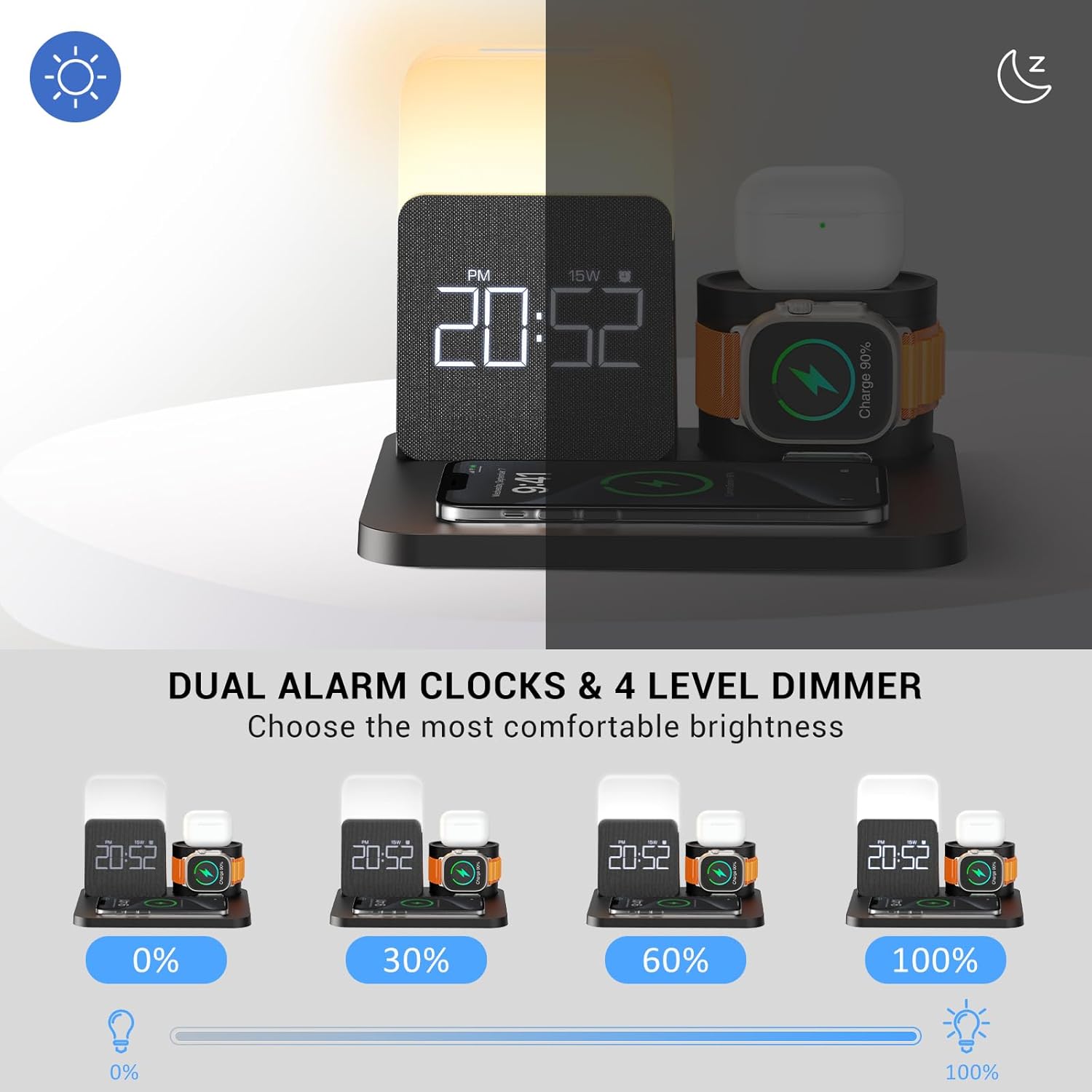
Image: The COLSUR charging station demonstrating four levels of night light brightness (0%, 30%, 60%, 100%) and the dual alarm clock display.
Alarm Clock Settings
The alarm clock features dual alarms, snooze, and adjustable display brightness.
- Set Alarms: Use the adjustment setting buttons (refer to product diagram) to set up to two independent alarms. The smart chips and built-in battery memory function will retain your alarm settings even if power is interrupted.
- Snooze Function: When an alarm sounds, touch the top of the lampshade to activate the snooze mode. The alarm will sound again after five minutes.
- Adjust Display Brightness: The LED display brightness can be adjusted through levels of 0%, 10%, 30%, 50%, and 100% for clear visibility in various lighting conditions. Refer to the product's control buttons for specific adjustment methods.

Image: A visual representation of the dual alarm clock feature, showing different alarm times set for morning wake-up and exercise time.
Maintenance
- Cleaning: Disconnect the power adapter before cleaning. Use a soft, dry cloth to wipe the surface of the charging station. Do not use abrasive cleaners or solvents.
- Storage: When not in use for extended periods, store the device in a cool, dry place away from direct sunlight and extreme temperatures.
- Handling: Handle the device with care to avoid dropping or impacting it, which could damage internal components.
Troubleshooting
| Problem | Possible Cause / Solution |
|---|---|
| Device not charging wirelessly. |
|
| Alarm clock display is off or not working. |
|
| Night light not functioning. |
|
| Slow charging speed. |
|
Specifications
- Brand: COLSUR
- Model: S32
- Input Voltage: 120 Volts
- Amperage: 2 Amps
- Connectivity Technology: USB
- Connector Type: USB Type C
- Special Feature: Wireless Charging, Alarm Clock, Night Light
- Compatible Devices: Airpods, Cellular Phones (iPhone 8-15 series, Samsung Galaxy S20-S22 series, Note 10), Smartwatches (Apple Watch 2-9, SE, Ultra)
- Included Components: 3-in-1 charging station, 18W high-efficiency adapter, detachable charging case for headphones and Apple Watch
- Dimensions: 7.64 x 6.38 x 5.98 inches
- Weight: 1.52 pounds
Warranty and Support
For any questions or assistance regarding your COLSUR 3-in-1 Charging Station, please contact COLSUR customer support. While specific warranty details are not provided in this manual, COLSUR is committed to customer satisfaction.
You can often find support contact information on the product packaging, the manufacturer's official website, or through your point of purchase.
Related documentsS32

Ask a question about this manual
Ask about setup, troubleshooting, compatibility, parts, safety, or missing instructions. Manuals+ will review the question and use this page’s manual context to help answer it.