
Bell+Howell 2900
Bell+Howell Elegant Cordless Table Lamp User Manual
Model: 2900
Introduction
Thank you for choosing the Bell+Howell Elegant Cordless Table Lamp. This user manual provides detailed instructions for the safe and efficient operation of your new lamp. Designed for versatility and convenience, this LED wireless lamp offers three distinct light colors and dimmable brightness, making it perfect for various settings from bedrooms to cafes. Its cordless and rechargeable design ensures portability and a clutter-free environment.
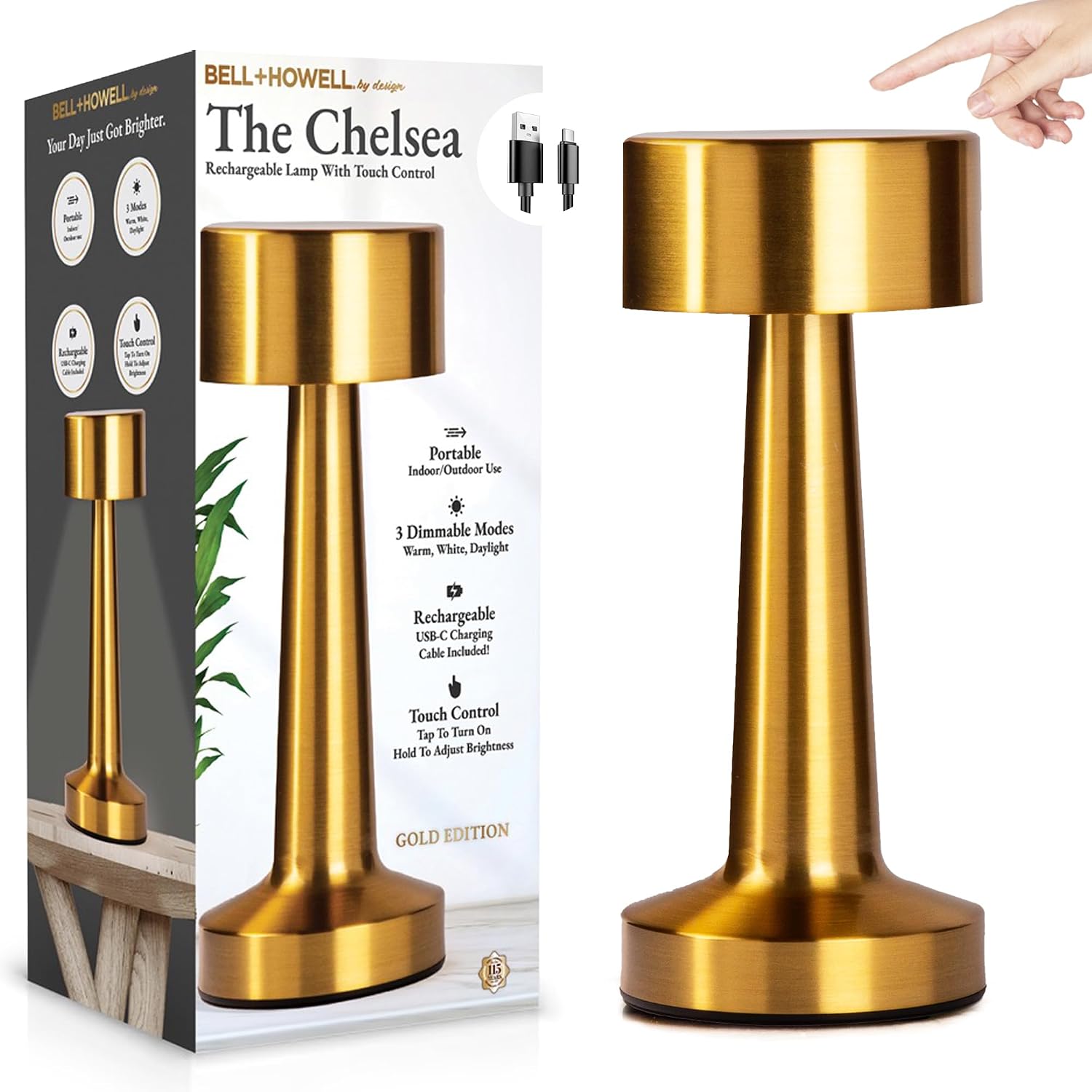
Figure 1: Bell+Howell Elegant Cordless Table Lamp and Packaging.

Figure 2: Overview of the Bell+Howell LED Table Lamps with touch control and rechargeable functionality.
What's in the Box
Upon unboxing, please ensure all components are present and in good condition:
- 1x Bell+Howell by Design Wireless Lamp
- 1x USB-C Charging Cable
Features
- Effortless Touch Activation: Simple tap control for power and settings adjustment.
- Cordless and Rechargeable: Freedom from cords with a built-in rechargeable battery.
- Feather-Light Portability: Lightweight design for easy movement and placement anywhere.

Figure 3: The lamp's lightweight and portable design allows for use in various settings.
- Adaptable Lighting Modes: Three distinct light colors: Warm, White, and Daylight.
- Dimmable Brilliance: Adjustable brightness to suit any activity or mood.
- Durable Metal Base: A sturdy metal base provides stability and an elegant aesthetic.

Figure 4: The lamp features a sturdy and elegant metal base.
- Versatile Placement: Suitable for various indoor environments including bedrooms, cafes, kitchens, living rooms, and restaurants.

Figure 5: The lamp's versatility allows it to be used in a wide range of indoor settings.
Setup
- Unpack: Carefully remove the lamp and all accessories from the packaging.
- Initial Charge: Before first use, fully charge the lamp using the provided USB-C cable. Connect the USB-C end to the lamp's charging port and the USB-A end to a compatible USB power adapter (not included). The charging indicator (if present, or observe light behavior) will confirm charging.

Figure 6: The cordless design allows flexible placement after charging.
- Placement: Place the lamp on a stable, flat surface in your desired location. Ensure it is away from direct heat sources or excessive moisture.
Operating Instructions
Power On/Off and Light Mode Selection
The lamp features intuitive touch control:
- To Turn On/Off and Cycle Modes: Simply tap the top surface of the lamp. Each tap will cycle through the light modes (Warm, White, Daylight) and then turn off.

Figure 7: Tap the lamp's top for power and mode selection.

Figure 8: Choose from Warm, White, or Natural Daylight settings.
Adjusting Brightness (Dimming)
To adjust the brightness for any of the three light modes:
- To Dim/Brighten: While the lamp is on, press and hold your finger on the top surface. The brightness will gradually increase or decrease. Release your finger when the desired brightness level is reached.

Figure 9: Adjust brightness by holding your finger on the touch surface.
Maintenance
Proper maintenance ensures the longevity and optimal performance of your lamp:
- Cleaning: Wipe the lamp with a soft, dry cloth. Do not use abrasive cleaners, solvents, or harsh chemicals, as these may damage the finish.
- Battery Care: To prolong battery life, avoid fully discharging the lamp frequently. Recharge it when the light dims significantly or before it completely runs out. If storing for an extended period, charge the lamp every 3-6 months.
- Storage: Store the lamp in a cool, dry place away from direct sunlight and extreme temperatures.
Troubleshooting
| Problem | Possible Cause | Solution |
|---|---|---|
| Lamp does not turn on. | Battery is depleted. | Connect the lamp to a power source using the USB-C cable and allow it to charge for at least 2 hours. |
| Light is dim or flickers. | Low battery. | Recharge the lamp fully. |
| Cannot change light mode or dim. | Incorrect touch gesture or sensor obstruction. | Ensure you are tapping/holding the top surface correctly. Clean the touch surface to remove any debris. |
| Lamp not charging. | Faulty cable, adapter, or port. | Try a different USB-C cable or power adapter. Ensure the charging port is clean and free of debris. |
Specifications
| Feature | Detail |
|---|---|
| Brand | Bell+Howell |
| Model Name | Chrome Black (Model 2900) |
| Lamp Type | Wireless Lamp Cordless Table Lamp |
| Light Source Type | Rechargeable LED |
| Number of Light Sources | 3 (Warm, White, Daylight) |
| Control Method | Touch |
| Power Source | Wireless, Rechargeable (USB-C) |
| Material | Acrylonitrile Butadiene Styrene, Plastic (Shade), Metal (Base) |
| Finish Type | Elegant |
| Product Dimensions | 11.8"D x 13.4"W x 17.4"H |
| Item Weight | 3 Pounds |
| Voltage | 5 Volts (DC) |
| Indoor/Outdoor Usage | Indoor |
| Water Resistance Level | Not Water Resistant |
| Included Components | 1x Bell+Howell by Design Wireless Lamp |
| UPC | 080313029028 |
Warranty and Support
For warranty information or technical support, please refer to the documentation included with your purchase or contact Bell+Howell customer service.
For further assistance, you may visit the official Bell+Howell store on Amazon: Bell+Howell Store.
Related documents2900


Ask a question about this manual
Ask about setup, troubleshooting, compatibility, parts, safety, or missing instructions. Manuals+ will review the question and use this page’s manual context to help answer it.