
Introduction
The 3M PELTOR Comtac Earmuff is a tactical communications and hearing protection headset designed to provide both auditory situational awareness and protection from hazardous noise levels. This manual provides essential information for the proper setup, operation, and maintenance of your Comtac earmuffs to ensure optimal performance and longevity.
Safety Information
Always read and understand all safety warnings and instructions before using this product. Improper use can result in hearing damage or other injuries.
- Hearing Protection: This device helps protect against hazardous steady-state and impulse noise. Ensure the earmuffs are properly fitted to achieve the stated Noise Reduction Rating (NRR).
- Environmental Awareness: While the talk-through function enhances situational awareness, always remain vigilant in noisy environments.
- Battery Safety: Use only specified batteries. Do not mix old and new batteries or different types of batteries. Dispose of batteries according to local regulations.
- Proposition 65 Warning: This product may expose you to chemicals known to the State of California to cause cancer and birth defects or other reproductive harm. For more information, go to www.P65Warnings.ca.gov.
Package Contents
Verify that all items are present in your package:
- 3M PELTOR Comtac Earmuff
- AAA Batteries (2 per ear, included)
- Instruction Manual (this document)
Setup
1. Battery Installation
The Comtac earmuffs require two AAA batteries per ear cup (total of four AAA batteries). Batteries are typically included with the product.
- Gently remove the ear cushion from each ear cup. This usually involves carefully prying it off the rim of the ear cup. Some users find this step requires moderate force, but the design allows for removal without damage.
- Locate the battery compartment.
- Insert two AAA batteries into each compartment, ensuring correct polarity (+/-).
- Carefully reattach the ear cushions, ensuring they are securely seated around the ear cup rim.

Figure 1: Side view of the earmuff on a head, illustrating proper fit and ear cup placement.
2. Fitting the Earmuffs
Proper fit is crucial for both hearing protection and comfort.
- Adjust the headband to fit comfortably over your head. The headband is typically metal and designed for durability.
- Ensure the ear cups fully enclose your ears, creating a tight seal around them. Adjust the height of the ear cups on the headband as needed.
- If wearing with other headgear (e.g., helmets), ensure the earmuffs maintain a proper seal. The design allows for fitting under various tactical helmets.
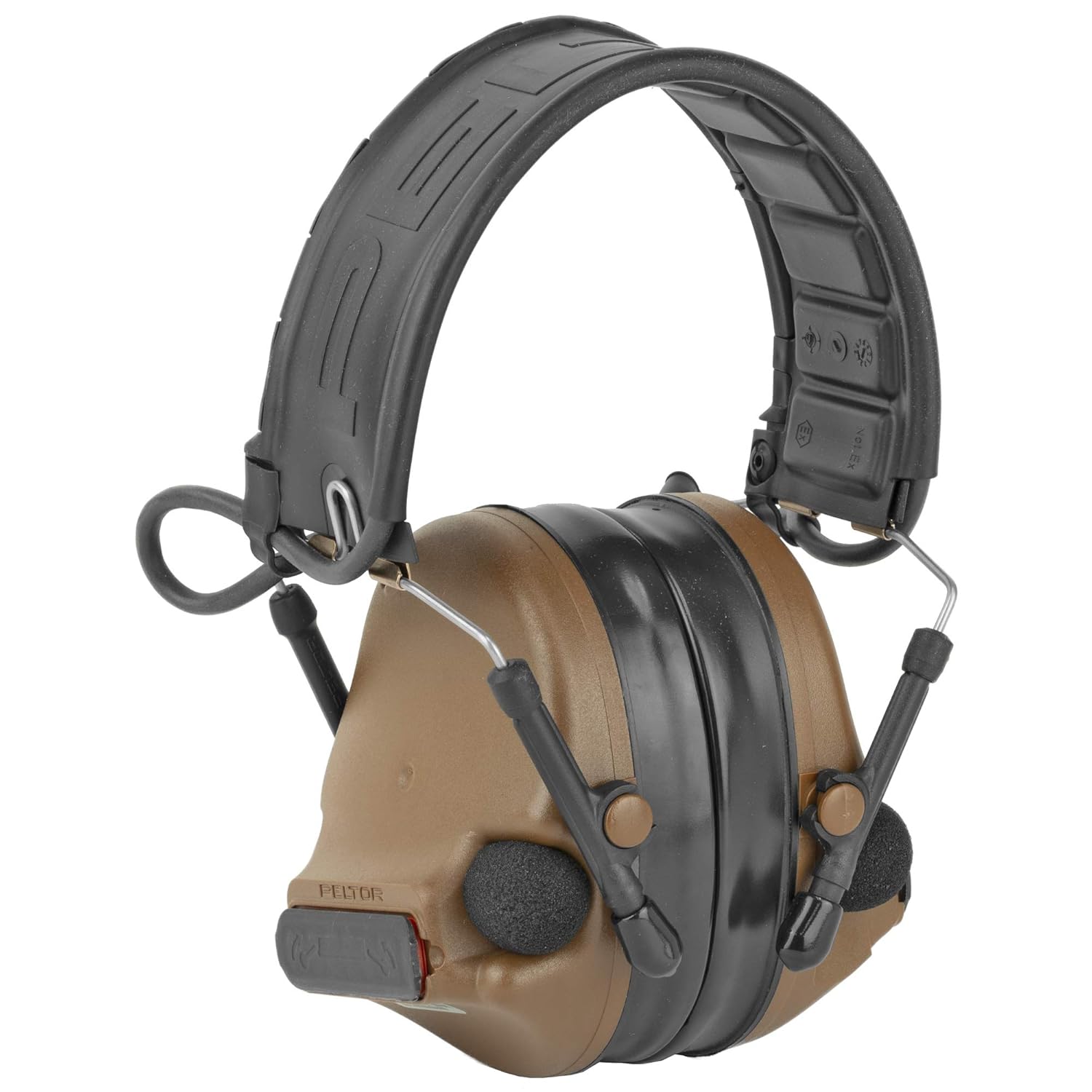
Figure 2: Front-side view of the 3M PELTOR Comtac Earmuff, highlighting the overall design and components.
Operating Instructions
1. Power On/Off and Volume Control
Each ear cup typically has independent power and volume controls.
- Press and hold the power button (often integrated with volume controls) to turn the unit on or off.
- Use the '+' and '-' buttons to adjust the volume of the environmental listening feature.
- The left and right sides operate independently, allowing for individual volume adjustment if needed.
2. Environmental Listening (Talk-Through)
The Comtac earmuffs feature an environmental listening function, also known as "talk-through," which allows you to hear your surroundings and engage in face-to-face conversations while still being protected from loud noises.
- Microphones on the ear cups pick up ambient sounds, which are then reproduced inside the earmuffs.
- When a loud noise occurs, the system instantly reduces the volume to a safe level, then restores normal listening once the hazardous noise subsides. This compression technology ensures continuous situational awareness without abrupt sound cut-offs.
3. Two-Way Communications
For models equipped with communication capabilities (e.g., single or dual comm variants), the headset allows for clear, intelligible two-way audio communications via radios and intercoms. The Hearing Defender variant can be upgraded with communication downleads and boom mics (sold separately) to enable this functionality.
4. Advanced Audio Settings
The Comtac earmuffs offer advanced audio adjustments for specific situations:
- Gain Boost: To amplify quiet sounds or maintain audibility when wearing inner earplugs, hold the volume up button for approximately ten seconds after turning on the headset. This boosts the gain significantly.
- Frequency Response Adjustment: By holding the volume down button, you can adjust the frequency response of the headset. This allows you to tailor the sound profile, for example, by boosting lows if highs are too sharp, enhancing comfort during prolonged exposure to constant noise.
Maintenance
1. Cleaning and Storage
Proper care ensures the longevity and performance of your earmuffs.
- Clean the earmuffs with a damp cloth.
- Allow them to air dry completely before storage.
- Store in a cool, dry place.
- Avoid extreme temperatures and direct sunlight, which can degrade materials.
2. Replacing Ear Cushions and Headband Cover
The ear cups and headband cover are designed to be replaceable, contributing to the product's long-term usability.
- Ear Cushions: To replace, gently pry off the old cushion from the ear cup. Align the new cushion and press it firmly around the rim until it snaps into place, ensuring a secure seal.
- Headband Cover: The headband cover can also be replaced. Refer to specific replacement kit instructions for detailed steps.
Troubleshooting
- Difficulty with Battery Replacement: If you find it challenging to remove or reattach the ear cushions for battery access, apply steady, even pressure. The cushions are designed to be removed and reinstalled, though they require a firm pull to ensure a tight seal during use. Avoid excessive force that could damage the plastic.
- No Sound or Low Volume:
- Check battery levels and ensure they are inserted with correct polarity.
- Replace all batteries if they are old or depleted.
- Ensure the earmuffs are powered on and volume is adjusted appropriately for both sides.
- Static Interference or Glitches:
- Ensure batteries are fresh and properly seated.
- If issues persist, try replacing all batteries.
- Contact 3M customer support if the problem continues after basic troubleshooting.
- Poor Hearing Protection:
- Ensure ear cups form a complete seal around your ears. Adjust headband and ear cup position.
- Check ear cushions for wear or damage; replace if necessary.
- Consider using inner earplugs in conjunction with the earmuffs for additional protection in extremely loud environments.
Specifications
| Model Number | PELMT17H682FB-09-CY |
| Product Dimensions | 8 x 5.75 x 4.75 inches |
| Item Weight | 13.6 ounces |
| Material Type | Synthetic |
| Batteries Required | Yes (2 AAA batteries per ear, included) |
| Style | Tactical |
| Care Instructions | Clean with a damp cloth, allow to air dry, store in a cool, dry place, avoid extreme temperatures and direct sunlight. |
Warranty and Support
For warranty information, technical support, or service inquiries, please contact 3M customer service directly. Retain your proof of purchase for warranty claims.
Visit the official 3M website for the most up-to-date support resources and contact information: www.3m.com


