
Introduction
Thank you for choosing the CAZOKASI K50 Portable Waist Fan. This device is designed to provide personal cooling in various environments, featuring a powerful 10000mAh rechargeable battery, multiple speed settings, and additional functionalities like an LED light and emergency power bank. Please read this manual thoroughly before use to ensure safe and optimal operation.
Important Safety Instructions
- Do not immerse the fan in water or other liquids.
- Keep out of reach of children.
- Avoid placing fingers or foreign objects into the fan blades.
- Do not disassemble, repair, or modify the fan yourself. Contact customer support for assistance.
- Use only the provided charging cable or a certified equivalent.
- Do not expose the fan to extreme temperatures or direct sunlight for prolonged periods.
- Ensure proper ventilation when charging or operating the fan.
Product Overview
The CAZOKASI K50 is a versatile personal cooling device. Familiarize yourself with its components:

Figure 1: Key Components of the CAZOKASI K50 Waist Fan. This image highlights the main features: the durable manganese steel clamp, the digital battery indicator, the protective silicone cover, the integrated LED SOS light, and the USB output port for charging other devices.
- 1. Air Outlet: Directs airflow for cooling.
- 2. Power Button/Speed Control: Turns the fan on/off and adjusts fan speed.
- 3. Battery Indicator: Digital display showing remaining battery percentage.
- 4. USB-C Input Port: For charging the fan.
- 5. USB-A Output Port: For emergency charging of other devices.
- 6. LED Light Button: Activates the LED light.
- 7. LED Light: Provides illumination.
- 8. Manganese Steel Clip: Securely attaches the fan to clothing or a belt.
- 9. Silicone Protective Cover: Enhances durability and drop protection.
Setup
1. Initial Charging
Before first use, fully charge the fan. Connect the provided USB-C cable to the fan's input port and the other end to a USB power adapter (not included) or a computer's USB port. The battery indicator will show the charging progress and full charge (100%).
2. Attaching the Fan
The fan can be worn in several ways:
- Waist Clip: Use the manganese steel clip to attach the fan to your belt or waistband. Ensure the air outlet is positioned to direct airflow towards your body.
- Neck Lanyard: Attach the included lanyard to the designated loops on the fan and wear it around your neck.
- Desktop Use: Place the fan on a flat surface for stationary cooling.

Figure 2: Manganese Steel Clip. The robust clip ensures secure attachment to your clothing or belt, preventing accidental detachment during activity.

Figure 3: Multi-functional Use. The fan's design allows for versatile use as a neck fan, waist fan, desktop fan, and even an emergency power bank, adapting to various needs and environments.
Operating Instructions
1. Power On/Off and Fan Speed Adjustment
- Power On: Press and hold the Power Button for 2 seconds to turn the fan on. It will start at the lowest speed setting.
- Adjust Speed: Short press the Power Button repeatedly to cycle through the 5 available fan speeds. The digital display will show the current speed level.
- Power Off: Press and hold the Power Button for 2 seconds to turn the fan off.
2. LED Light Operation
- Turn On/Off: Short press the LED Light Button to turn the light on or off.
- SOS Mode: Long press the LED Light Button to activate the SOS flashing mode for emergencies. Long press again to turn off.

Figure 4: LED Lighting Function. The integrated LED light provides illumination for over 45 hours, with an additional SOS mode for emergency signaling, making it useful in low-light conditions.
3. Emergency Power Bank Function
The fan can serve as an emergency power bank. Connect your device's charging cable to the USB-A Output Port on the fan. The fan will automatically begin charging your device. Note that using this feature will consume the fan's battery life.

Figure 5: Emergency Power Supply. The fan's USB-A output port allows it to function as a portable power bank, providing a convenient charging solution for your phone or other small devices when power is unavailable.
Durability Features
The CAZOKASI K50 is built for robust outdoor use with enhanced durability features:
- Manganese Steel Clip: Unlike common plastic clips, the manganese steel clip offers superior strength and toughness, resisting breakage and aging.
- Silicone Protective Cover: An ultra-thick silicone cover complements the high-strength plastic shell, designed to withstand impacts and protect the fan from drops up to 2 meters.
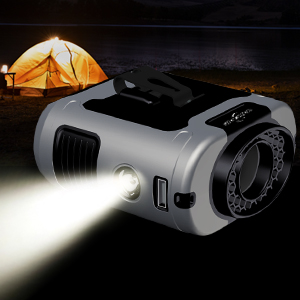
Figure 6: Drop Protection. The fan's robust construction and silicone protective cover are designed to absorb shocks, ensuring functionality even after accidental drops.
Maintenance
- Cleaning: Use a soft, dry cloth to wipe the exterior of the fan. Do not use abrasive cleaners or solvents. For the air inlet/outlet, use a soft brush or compressed air to remove dust.
- Storage: When not in use for extended periods, store the fan in a cool, dry place. Ensure the battery is partially charged (around 50%) before storage to prolong battery life. Recharge every 3-6 months if stored for a long time.
- Battery Care: Avoid completely draining the battery frequently. Charge the fan regularly to maintain battery health.
Troubleshooting
| Problem | Possible Cause | Solution |
|---|---|---|
| Fan does not turn on. | Battery is depleted. | Charge the fan using the USB-C cable. |
| Fan does not turn on. | Power button not pressed correctly. | Press and hold the Power Button for 2 seconds. |
| Weak airflow. | Low battery or low speed setting. | Charge the fan or increase the fan speed. |
| LED light not working. | Battery is depleted or button not pressed. | Charge the fan or short press the LED Light Button. |
| Device not charging from USB-A port. | Fan battery is too low or cable is faulty. | Ensure fan has sufficient charge. Try a different USB cable. |
Specifications
| Feature | Detail |
|---|---|
| Model Name | K50 WAIST FAN |
| Brand | CAZOKASI |
| Battery Capacity | 10000mAh |
| Power Source | Battery Powered |
| Number of Speeds | 5 |
| Max Wind Speed | 16000 RPM |
| Operating Voltage | 5 Volts |
| Wattage | 10 watts |
| Noise Level | 52 Decibels |
| Product Dimensions | 3.8"D x 1.8"W x 3.4"H |
| Item Weight | 0.7 Pounds |
| Material | Acrylonitrile Butadiene Styrene (ABS) |
| Special Features | Wearable, Direct-Flow Design, Longer Battery Life, Manganese Steel Clip, LED Light, Emergency Power Bank |

Figure 7: Power and Performance. The fan features a 10000mAh battery providing 8-40 hours of operation and a powerful motor with 16000 RPM for effective cooling.
Warranty and Support
For warranty information or technical support, please refer to the product packaging or contact CAZOKASI customer service directly. Keep your purchase receipt for warranty claims.