
Introduction
The Roland GO:KEYS 3 is a 61-note music creation keyboard designed for ease of use and musical exploration. It features a ZEN-Core engine with a wide variety of sounds, auto-accompaniment functions, and connectivity options for modern music creation. This manual provides essential information for setting up, operating, and maintaining your instrument.
Setup
What's in the Box
- Roland GO:KEYS 3 Unit
- AC Adapter
- 8 x AA Batteries (for portable use)
Ensure all components are present before proceeding with setup.
Powering the Instrument
The GO:KEYS 3 can be powered using the included AC adapter or 8 AA batteries.
- AC Adapter: Connect the AC adapter to the DC IN port on the rear panel and then to a power outlet.
- Batteries: Open the battery compartment on the underside of the unit and insert 8 AA batteries, ensuring correct polarity.
Press the power button located on the top panel to turn the instrument on or off.
Basic Connections
- Headphones: Connect headphones to the Phones jack for private practice.
- External Audio Input: Use the Aux In port to connect an external audio device (e.g., smartphone, tablet) and play along with your favorite music.
- Pedal: Connect a sustain pedal (sold separately) to the Pedal jack for enhanced piano performance.
- USB Connectivity:
- USB-A port: For connecting a USB memory device for audio file playback, backup, and Roland Cloud Connect adapter.
- USB-C port: For connecting to a computer or mobile device for USB audio/MIDI functionality.
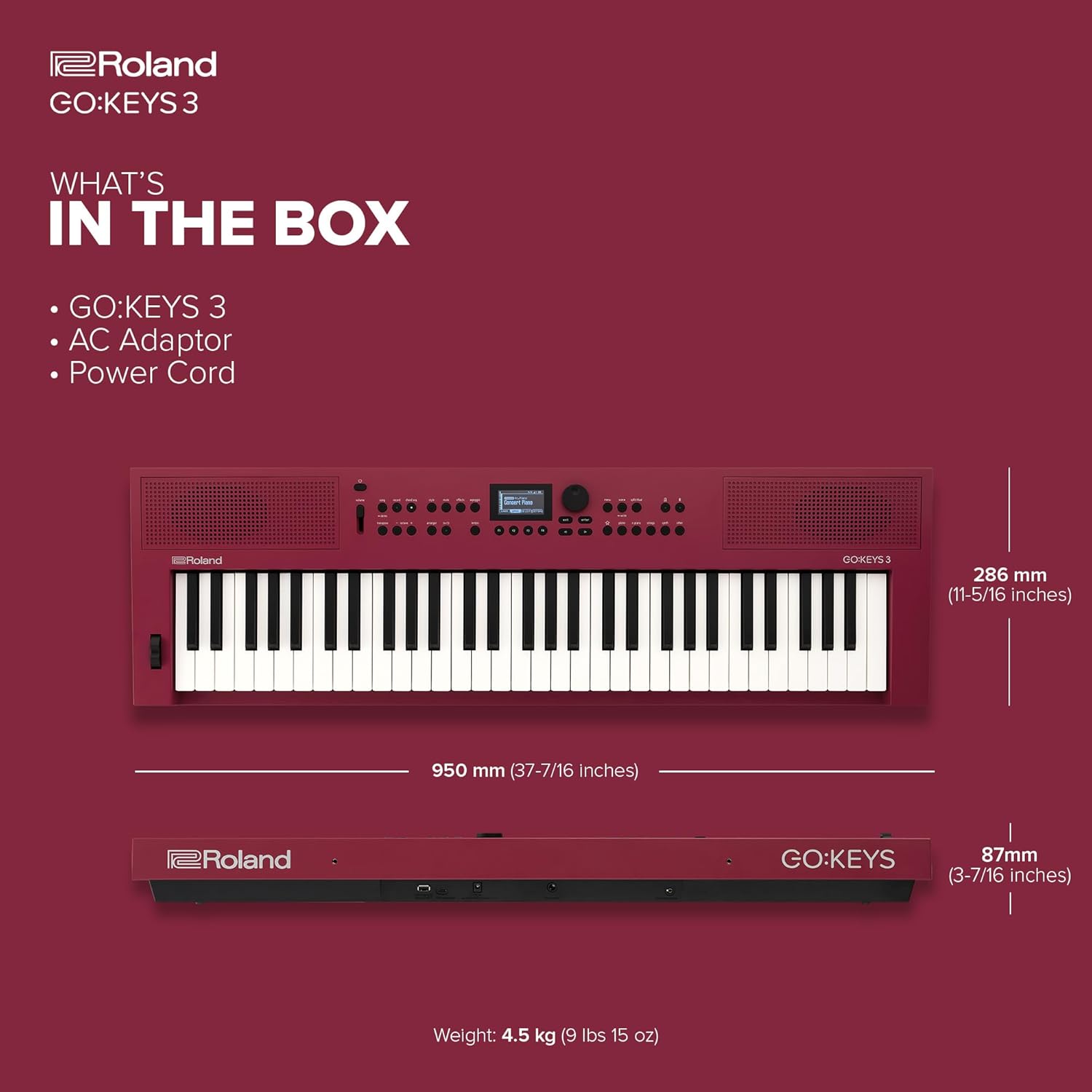
Image: Rear panel of the Roland GO:KEYS 3, showing the power input, pedal input, auxiliary input, phones/output, USB-A, and USB-C ports.
Key Features
- 61-Note Keyboard with Expressive Touch Sensitivity: Provides a responsive playing experience suitable for various musical styles.
- ZEN-Core Engine: Access over 1000 high-quality Roland sounds, offering a diverse palette for music creation.
- Auto-Accompaniment: Features over 200 onboard music styles to provide backing tracks for your playing.
- Chord Sequencer: Includes user editing features and over 300 ready-to-play presets for creating chord progressions.
- Built-In Stereo Speakers: Allows for immediate playback and practice without external amplification.
- Bluetooth Audio/MIDI Support: Enables wireless music streaming from mobile devices and MIDI communication for song creation.
- USB Audio/MIDI Interface: Facilitates connection to computers and mobile devices for integration with music software.
- USB Memory/WC-1 Port: Supports backup, audio file playback, and connection of the optional WC-1 adapter for Roland Cloud Connect.

Image: Top-down view of the Roland GO:KEYS 3, highlighting the 61-note keyboard and control panel.
Operating Instructions
Selecting Sounds (Tones)
The GO:KEYS 3 offers a vast library of sounds. Use the dedicated sound category buttons and the data entry knob to browse and select your desired instrument tones.

Image: Close-up of the Roland GO:KEYS 3 control panel, showing the display and various buttons for sound selection and functions.
Using Auto-Accompaniment
Engage the auto-accompaniment feature to play along with various musical styles. Select a style, then play chords with your left hand while playing melodies with your right. The keyboard will automatically generate a full backing band.
Bluetooth Connectivity
To stream audio or use MIDI over Bluetooth:
- Activate Bluetooth on your mobile device.
- On the GO:KEYS 3, navigate to the Bluetooth settings (refer to the on-screen display for menu options).
- Select the GO:KEYS 3 from your device's Bluetooth list to pair.
- Once connected, you can stream audio through the keyboard's speakers or use it as a MIDI controller wirelessly.

Image: A person interacting with a smartphone while playing the Roland GO:KEYS 3, demonstrating Bluetooth connectivity for music streaming or app integration.
Recording and Performance Effects
The GO:KEYS 3 includes features for recording your performances and applying various effects. Consult the on-screen display and dedicated buttons for recording functions, and explore the available digital effects to enhance your sound.
Video: Official Roland US video demonstrating the features and sounds of the Roland GO:KEYS 3.
Maintenance
Proper care will ensure the longevity and optimal performance of your Roland GO:KEYS 3.
- Cleaning: Use a soft, dry cloth to wipe the surface of the instrument. Avoid abrasive cleaners, waxes, or solvents. For stubborn dirt, lightly dampen the cloth with water and a mild, neutral detergent, then wipe dry immediately.
- Storage: Store the instrument in a cool, dry place away from direct sunlight, extreme temperatures, and humidity. If storing for an extended period, remove the batteries to prevent leakage.
- Handling: Avoid dropping the instrument or subjecting it to strong impacts. Do not place heavy objects on the keyboard.
Troubleshooting
If you encounter issues with your GO:KEYS 3, try the following basic troubleshooting steps:
- No Power:
- Ensure the AC adapter is securely connected to both the instrument and a working power outlet.
- If using batteries, check that they are inserted correctly and are not depleted.
- No Sound:
- Check the Master Volume knob and ensure it is turned up.
- If using headphones, ensure they are fully plugged in and functioning correctly.
- Verify that a sound (tone) is selected and not muted.
- Bluetooth Connection Issues:
- Ensure Bluetooth is enabled on both the GO:KEYS 3 and your mobile device.
- Try unpairing and re-pairing the devices.
- Ensure no other devices are interfering with the Bluetooth signal.
- Unexpected Behavior:
- Try turning the power off and on again.
- If the issue persists, consult the full owner's manual for a factory reset procedure.
Specifications
| Feature | Detail |
|---|---|
| Brand | Roland |
| Model Name | GO:KEYS 3 |
| Item Model Number | GOKEYS3-RD |
| Number of Keys | 61 |
| Operating System | ZEN-Core |
| Power Source | Battery Powered or Corded Electric |
| Connectivity Technology | Bluetooth, USB |
| Connector Type | USB-A, USB-C, 3.5mm |
| Special Features | Built-In Speaker, Digital Display, Digital Effects, Microphone Input, Preset Tones & Rhythms |
| Item Weight | 15.85 pounds |
| Product Dimensions | 11.26 x 37.4 x 3.43 inches |
Warranty and Support
For warranty information and technical support, please refer to the documentation included with your product or visit the official Roland website. Keep your proof of purchase for any warranty claims.


