
1. Introduction
This manual provides detailed instructions for the installation, operation, and maintenance of the Sure-Lites All-Pro APC7RG Combination LED Exit Sign and Emergency Light. This unit is designed to meet code requirements for emergency egress lighting in commercial buildings, offering both an illuminated exit sign and emergency lighting with adjustable LED heads.

Image 1.1: Overview of the Sure-Lites All-Pro APC7RG Combination LED Exit Sign and Emergency Light units.
2. Safety Information
Please read and understand all instructions before installation and operation. Retain this manual for future reference.
- Electrical Safety: All wiring must be performed by a qualified electrician in accordance with national and local electrical codes. Ensure power is disconnected at the circuit breaker before installation or servicing.
- Product Integrity: Do not modify or alter the product. Use only manufacturer-specified replacement parts.
- Location: This unit is UL certified and damp location listed. Ensure the installation environment is suitable.
- Battery: The unit contains a nickel-cadmium battery. Dispose of batteries according to local regulations.
3. Package Contents
Verify that all components are present before beginning installation:
- Sure-Lites All-Pro APC7RG Combination LED Exit Sign and Emergency Light Unit
- Snap-fit canopy with captive mounting screws
- Directional chevrons (snap-in/snap-out)
- Installation hardware (screws, wire nuts)
- Nickel Cadmium Battery (pre-installed or separate)
4. Setup and Installation
The APC7RG is designed for easy installation with universal J-box mounting and snap-fit construction, allowing for installation in under 5 minutes.
4.1 Mounting Options
The unit offers universal surface mounting flexibility and can be configured for:
- Ceiling mount
- Wall mount
- End mount
It supports configurable single or double faces.
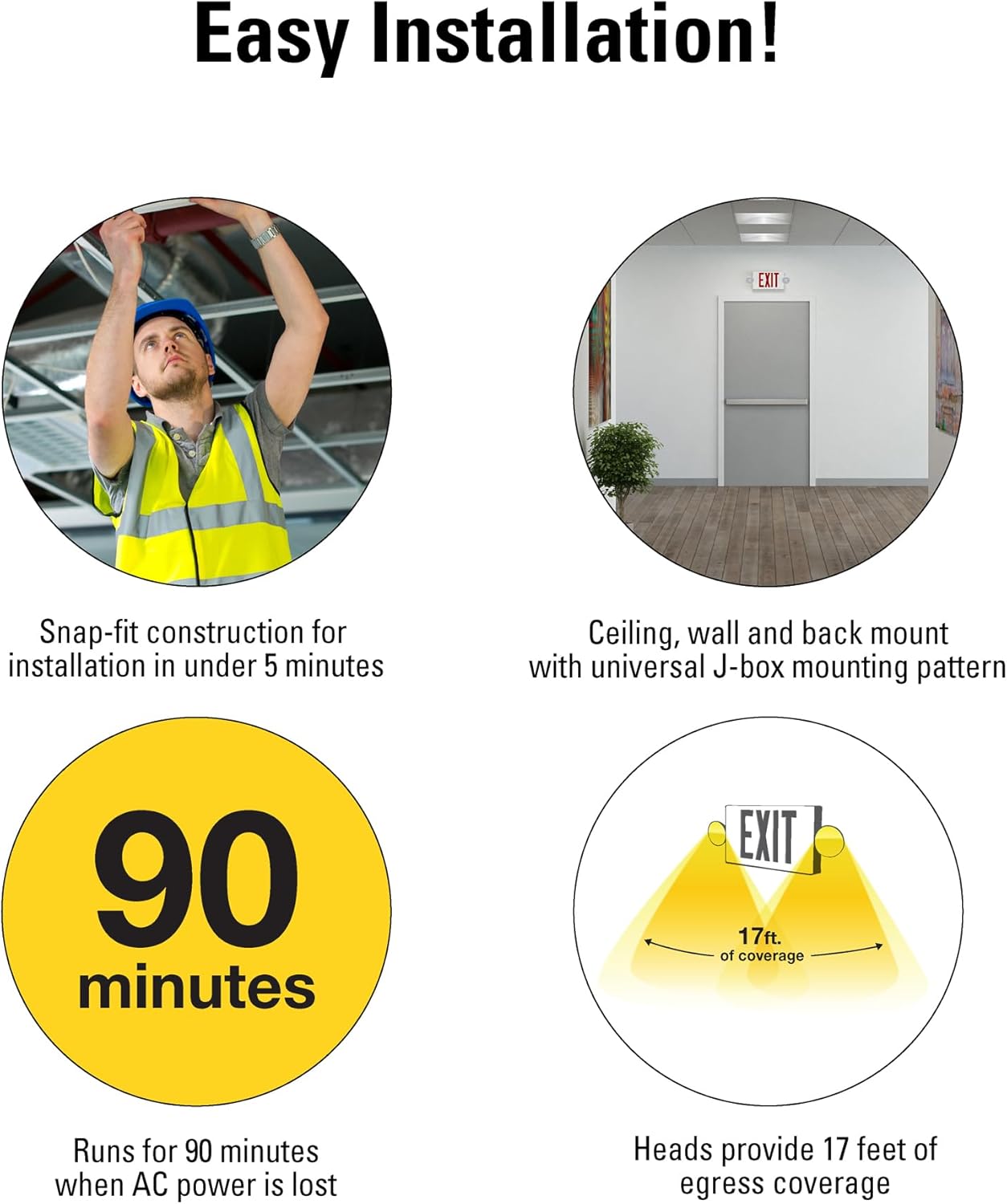
Image 4.1: Key installation and performance features.
4.2 Wiring
- Ensure power is OFF at the circuit breaker.
- Connect the unit's wiring to the building's AC power supply (120V) according to local electrical codes.
- Secure the unit to the universal J-box using the provided hardware and snap-fit canopy.
4.3 Field Selectable Features
The APC7RG exit face is illuminated with long-lasting LEDs that are field selectable for red or green letters. The unit is pre-set to red letters and can be easily changed to green letters during installation. Snap-in/snap-out directional chevrons (arrows) can also be configured to indicate the direction of egress.

Image 4.2: Exploded view highlighting field-selectable features and components.

Image 4.3: Example of selectable red or green exit sign faces in commercial environments.
5. Operating Instructions
5.1 Normal Operation
When AC power is supplied, the LED exit sign will illuminate, and the battery will charge. A power indicator light (usually green) located on the bottom of the exit sign will confirm AC power is present and the battery is charging.
5.2 Emergency Operation
In the event of an AC power failure, the unit will automatically switch to battery backup mode. The exit sign and emergency lights will operate for a minimum of 90 minutes, providing up to 17 feet of emergency egress coverage.
5.3 Testing
A test switch is located on the bottom of the exit sign. Press and hold the test switch to simulate a power outage. The unit should switch to battery power, and the exit sign and emergency lights should illuminate. Release the switch to return to normal operation. Regular testing is recommended to ensure proper functionality.
6. Maintenance
- Battery: The nickel-cadmium battery is designed for no maintenance. However, it is recommended to perform monthly 30-second functional tests and annual 90-minute discharge tests to ensure the battery holds a charge and the unit operates correctly during an emergency.
- Cleaning: Clean the exterior of the unit with a soft, damp cloth. Do not use abrasive cleaners or solvents.
- Inspection: Periodically inspect the unit for any physical damage or discoloration.
7. Troubleshooting
Refer to the table below for common issues and their solutions.
| Problem | Possible Cause | Solution |
|---|---|---|
| Exit sign or emergency lights do not illuminate during power outage. | Battery not charged or faulty; unit not connected to AC power. | Ensure AC power is connected and indicator light is on. Allow 24 hours for initial battery charge. If problem persists, battery may need replacement. |
| Power indicator light is off. | No AC power; faulty wiring; indicator light malfunction. | Check circuit breaker. Verify wiring connections. Contact a qualified electrician if necessary. |
| Emergency lights do not stay on for 90 minutes during test. | Battery capacity reduced. | Perform a full 90-minute discharge test and recharge. If run time is still insufficient, the battery may need replacement. |
8. Specifications
Key technical details for the Sure-Lites All-Pro APC7RG unit:

Image 8.1: Product dimensions and certifications.
| Feature | Detail |
|---|---|
| Brand | Sure-Lites |
| Model Name | APC7RG Case Pack |
| Part Number | APC7RG |
| Material | High-impact, UV resistant thermoplastic (Polycarbonate) |
| Color | White finish, Red/Green selectable light |
| Product Dimensions (L x W x H) | 16.57" x 2.32" x 8.26" |
| Light Source Type | LED |
| Number of Light Sources | 2 (emergency heads) |
| Wattage | 2.01 watts |
| Brightness | 156 lumens |
| Voltage | 120 Volts |
| Power Source | Corded Electric |
| Battery Type | Nickel Cadmium (NiCAD) |
| Average Battery Life (Emergency Run Time) | 90 minutes |
| Egress Coverage | Up to 17 feet |
| Installation Type | Flush Mount (Universal J-box) |
| Certifications | UL 924, NEC, NFPA101, NFPA70, CEC Title 20 compliant, Damp Location Listed |
| Item Weight | 21.4 pounds (for 8-pack) |
9. Warranty and Support
9.1 Warranty Information
The Sure-Lites All-Pro APC7RG unit comes with a 5-year limited warranty. The NiCad battery carries a seven-year pro-rated warranty. Please refer to the warranty documentation included with your purchase for full terms and conditions.
9.2 Customer Support
For technical assistance, replacement parts, or warranty claims, please contact Sure-Lites customer support. Contact information can typically be found on the manufacturer's website or on the product packaging.


