
Introduction
Thank you for choosing the ODK L-Shaped Gaming/Office Desk. This manual provides essential information for the assembly, operation, and maintenance of your new desk. Please read it carefully before beginning assembly and keep it for future reference.

Figure 1: Overview of the ODK L-Shaped Gaming/Office Desk, showcasing its spacious design and integrated features like drawers and a side shelf.
Setup and Assembly
The ODK L-Shaped Desk is designed for straightforward assembly. It is recommended to have two people for assembly to ensure stability and ease of handling. All necessary tools, including a wrench, are included in the package.
Package Contents
Before starting, verify that all parts listed in the instruction manual are present and undamaged. Refer to the included assembly diagram for a complete list of components.
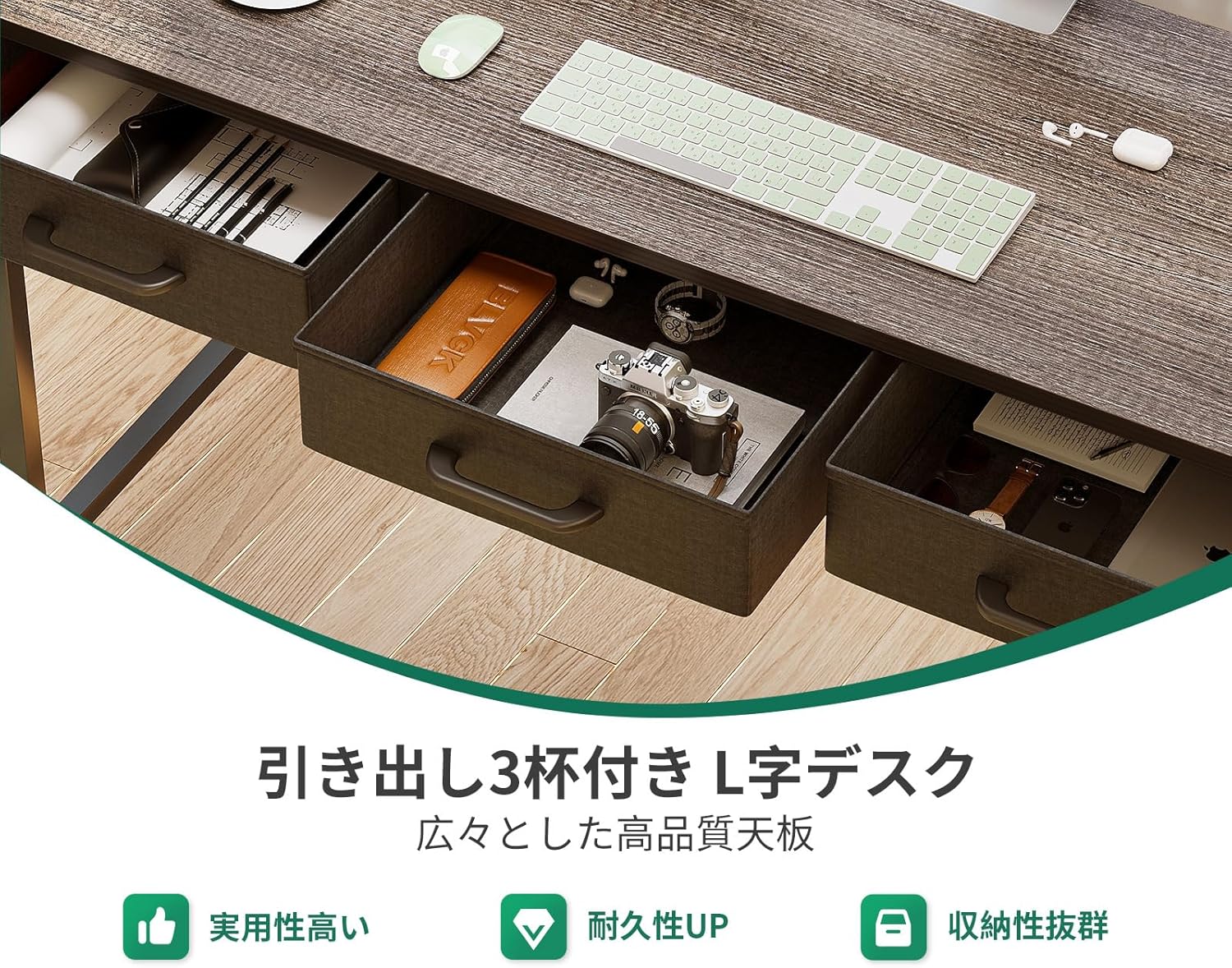
Figure 2: Detailed dimensions and component breakdown of the desk, including the main desktop, drawers, and shelving unit.
Assembly Steps
- Unpack and Organize: Carefully remove all components from the packaging. Lay them out on a clean, soft surface to prevent scratches. Identify each part according to the assembly diagram.
- Assemble the Frame: Connect the metal frame components using the provided screws and wrench. Ensure all connections are secure but do not overtighten until the entire frame is assembled.
- Attach the Desktop: Place the desktop panels onto the assembled frame. Secure them with the designated screws.
- Install Drawers and Shelves: Insert the fabric drawers into their designated slots. Attach the shelving unit to either the left or right side of the desk, depending on your preferred configuration.
- Connect Power Unit: Secure the integrated power strip (with AC outlets and USB ports) to the designated area on the desktop.
- Final Tightening: Once all components are in place, systematically tighten all screws to ensure the desk is stable and rigid.
Reversible Configuration
The L-shaped design allows for flexible placement of the storage rack and drawers. You can configure the longer side of the desk to be on either the left or right, adapting to your room layout and personal preference.

Figure 3: The desk's reversible design, allowing the L-shape to be oriented to the left or right to suit different room layouts.
Operating Instructions
Storage and Organization
The desk features three integrated fabric drawers and a multi-tier shelving unit, providing ample space for books, documents, office supplies, and gaming accessories. Utilize these storage options to keep your workspace tidy and organized.

Figure 4: The three integrated drawers offer convenient storage for various items, helping to maintain a clutter-free desktop.
Integrated Power Outlets and USB Ports
The desk is equipped with two standard AC outlets and two USB ports (5V-2A) for convenient power access. This allows you to easily charge your laptop, smartphone, gaming devices, and other electronics directly from your desk, reducing cable clutter.
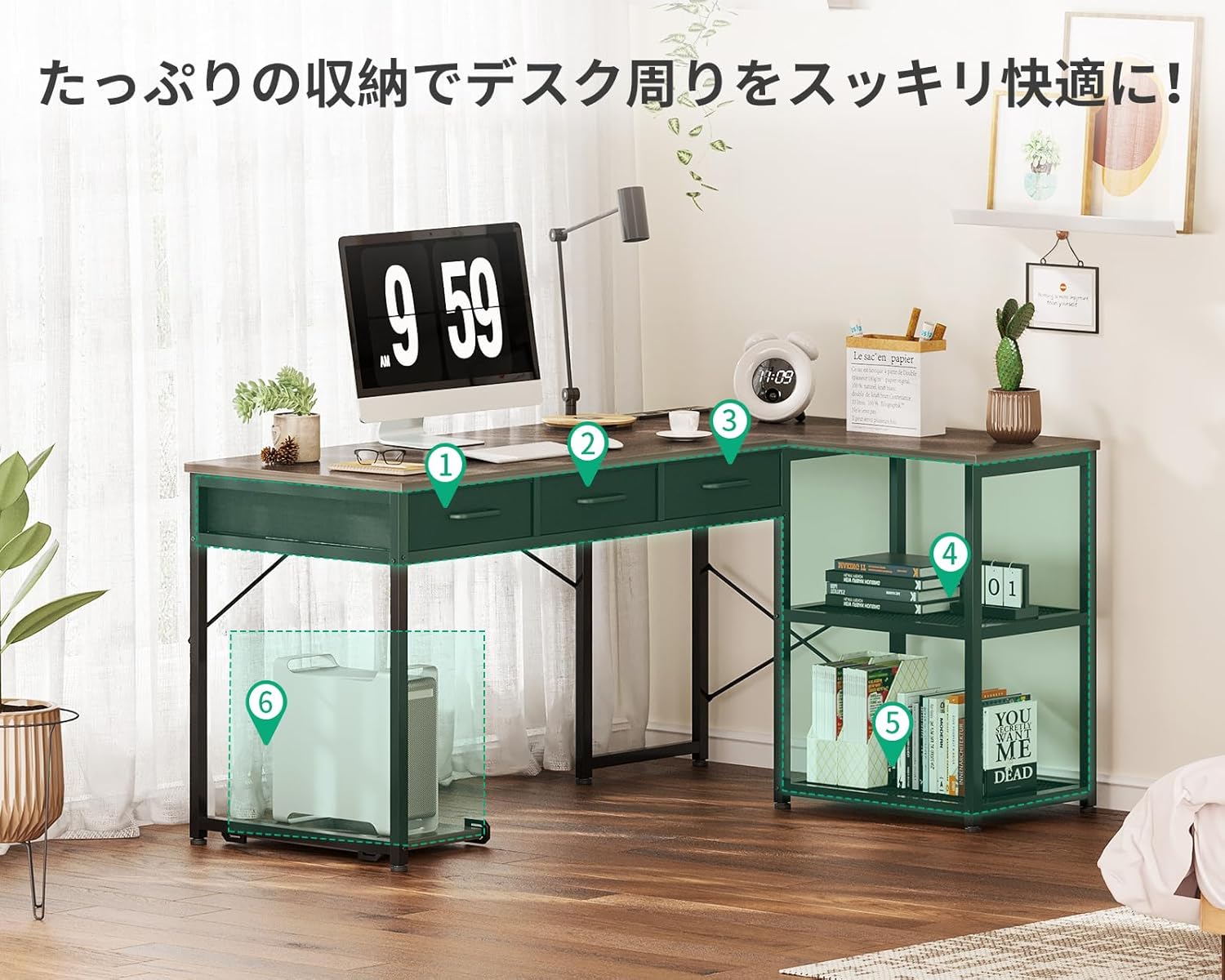
Figure 5: The built-in power strip provides easy access to charging for multiple devices, enhancing productivity and convenience.
Movable PC Stand
A movable PC stand is included to keep your computer tower off the floor, protecting it from dust and improving airflow. The stand can be positioned anywhere under the desk for optimal convenience.

Figure 6: The movable PC stand helps protect your computer from dust and allows for flexible placement under the desk.
Maintenance
To ensure the longevity and appearance of your ODK L-Shaped Desk, follow these simple maintenance guidelines:
- Cleaning: Wipe the desk surface with a soft, damp cloth. For stubborn marks, a mild soap solution can be used, followed by drying with a clean cloth. Avoid abrasive cleaners or harsh chemicals, as they may damage the melamine finish.
- Spills: Immediately wipe up any spills to prevent liquid absorption and potential damage to the desktop.
- Stability Check: Periodically check all screws and bolts to ensure they remain tight. Retighten if necessary to maintain the desk's stability and prevent wobbling.
- Weight Distribution: Avoid placing excessive weight on any single point of the desk. Distribute heavy items evenly across the surface and shelves. The desktop has a load capacity of 50kg.
Troubleshooting
If you encounter any issues with your ODK L-Shaped Desk, refer to the following common troubleshooting tips:
| Problem | Possible Cause | Solution |
|---|---|---|
| Desk is wobbly or unstable. | Loose screws or uneven floor. | Ensure all assembly screws are securely tightened. Adjust the adjustable feet at the bottom of the desk legs to level the desk on uneven surfaces. |
| Drawers do not slide smoothly. | Improper installation or obstruction. | Check that the fabric drawers are inserted correctly and are not overloaded. Ensure no items are obstructing the drawer's path. |
| Power outlets/USB ports not working. | Not properly connected or power source issue. | Verify that the desk's power cord is securely plugged into a functional wall outlet. Check the connection of the integrated power unit to the desk. |
| Missing or damaged parts upon arrival. | Shipping damage or packaging error. | Do not proceed with assembly. Contact ODK customer support immediately for assistance and replacement parts. |
Specifications
- Model: 135*100*78.2 (ASIN: B0CWH1Q6N4)
- Dimensions (L x W x H): 135 cm x 100 cm x 78.2 cm (53.1 x 39.4 x 30.8 inches)
- Weight: Approximately 19.9 KG (43.9 lbs)
- Package Dimensions: 112 x 57.5 x 10 cm (44.1 x 22.6 x 3.9 inches)
- Package Weight: Approximately 22.4 KG (49.4 lbs)
- Material: High-strength Melamine Board (Desktop), Steel Frame (Base)
- Finish Type: Powder Coated (Frame)
- Color: Gray (Current Model)
- Desktop Load Capacity: 50 kg (110 lbs)
- Power Outlets: 2 x AC Outlets (100-240V/15A)
- USB Ports: 2 x USB Ports (5V-2A)
- Special Features: Integrated USB/AC outlets, Movable PC Stand, Reversible L-shape configuration, 3 Fabric Drawers, Storage Shelf.
- Room Type: Office, Study, Gaming Room
Warranty and Support
ODK is committed to providing high-quality products. While specific warranty terms are not detailed in this manual, if you encounter any issues or defects with your desk, please do not hesitate to contact our customer support team.
For assistance, please contact ODK JP customer service. Provide your purchase details and a description of the issue for prompt support.
Contact Information:
- Seller Name: ODK JP
- Seller Link: ODK JP Seller Page


