
AKLUER 520A-A
AKLUER Walking Pad with Incline and Foot Massage User Manual
Model: 520A-A
Product Overview
The AKLUER Walking Pad is a versatile fitness device designed for both walking and foot massage. It features a dual-sided design, allowing users to switch between a traditional walking surface and an acupressure foot massage mat. This compact and portable treadmill is ideal for home or office use, providing a quiet and efficient way to stay active.
- Advanced Foot Therapy Technology: Features a high elasticity foot acupressure mat to relieve foot pain and fasciitis, stimulating blood circulation and reducing inflammation.
- Dual Sport Modes: Easily switch between walking mode and massage mode to suit different needs.
- Powerful & Quiet Motor: Equipped with an upgraded 2.5HP motor, operating at less than 45dB for a smooth and quiet experience.
- Multi-Function LED Display & Remote Control: Real-time display of speed, distance, time, and calories. Adjustable speed via touch screen or remote control.
- Space-Saving Design: Compact dimensions (43.5"D x 21.5"W x 5.1"H) and transportation wheels for easy mobility and storage.

Figure 1: AKLUER Walking Pad in both active use and under-desk setup.

Figure 2: Illustration of the dual-sided functionality, highlighting both the massage and traditional walking surfaces.
Package Contents and Setup
Before beginning, ensure all components are present in the package. The AKLUER Walking Pad requires minimal assembly.

Figure 3: Treadmill Package Contents.
Package Includes:
- 1 x Remote Controller
- 1 x Lubricating Oil
- 2 x Supporting Bracket
- 2 x Plain Gasket
- 1 x Hex Tool
- 1 x User Manual
- 2 x Socket Head Cap Screw M8x30
- 1 x Treadmill Belt (pre-installed)
Initial Setup:
- Unpacking: Carefully remove the walking pad and all accessories from the packaging.
- Placement: Place the walking pad on a flat, stable surface. Ensure there is adequate clear space around the unit for safe operation.
- Bracket Installation (Optional): If desired, attach the supporting brackets using the provided hex tool, plain gaskets, and socket head cap screws. These brackets can provide additional stability or elevation.
- Power Connection: Connect the power cord to the walking pad and then to a standard electrical outlet.

Figure 4: Installation of Optional Supporting Brackets.
Operating Instructions
The AKLUER Walking Pad offers two distinct modes of operation: Walking Mode and Massage Mode. The unit can be reversed 180 degrees to switch between these modes.
Switching Modes:
To switch between Walking Mode (Side B) and Massage Mode (Side A), gently lift and rotate the walking pad 180 degrees. Ensure the unit is powered off before rotating.

Figure 5: Reversing the Walking Pad for Dual Modes.
Using the Remote Control and LED Display:
The walking pad is primarily controlled via the included remote control. The LED display provides real-time feedback on your activity.

Figure 6: LED Display and Remote Control.
- Power On/Off: Use the power button on the remote control to turn the unit on or off.
- Speed Adjustment: Use the '+' and '-' buttons on the remote to increase or decrease speed.
- Mode Selection (Massage): When in Massage Mode (Side A), the remote allows selection of massage intensity levels P1-P5.
- Display Information:
- Side B (Walking Mode): Displays Calories, Time, Speed, and Distance.
- Side A (Massage Mode): Displays massage levels P1-P5 and a 10-minute countdown timer.
Walking Mode (Side B):
This side provides a traditional treadmill surface for walking, jogging, or light running.
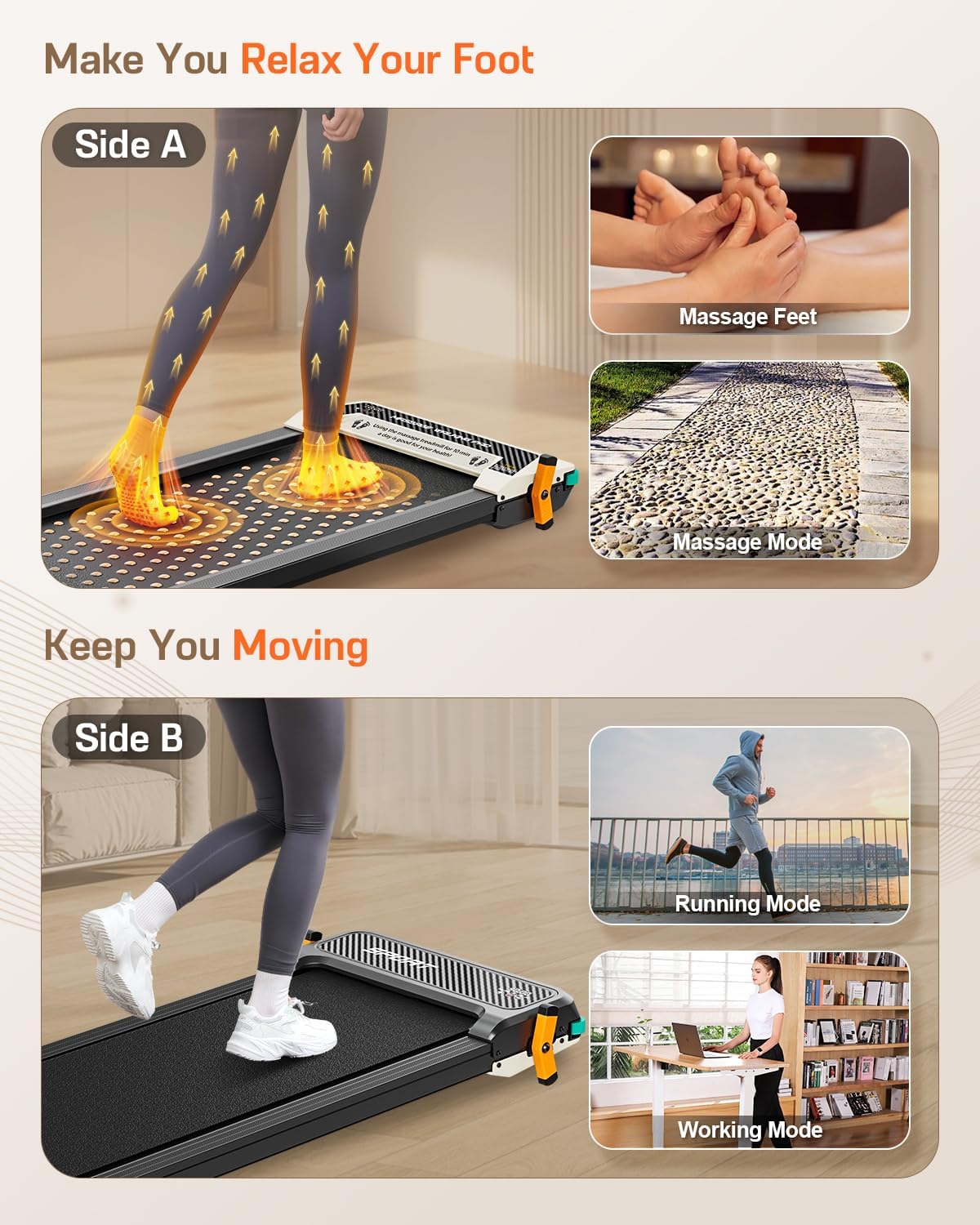
Figure 7: Walking Mode (Side B) in use.
- Speed Range:
- Working Mode: 0.6 - 2.0 MPH
- Walking Mode: 1.0 - 3.0 MPH
- Running Mode: 2.0 - 4.0 MPH
- Starting: Step onto the belt and use the remote to start and adjust speed.
- Stopping: Use the remote to decrease speed to zero or press the stop button.
Massage Mode (Side A):
This side features an acupressure mat designed to stimulate foot acupoints and relieve fatigue.

Figure 8: Acupressure Massage Surface.
- Usage: Use barefoot or with thin socks for optimal acupressure effect.
- Intensity: Adjust massage intensity using the remote control (P1-P5).
- Duration: The massage mode typically operates with a 10-minute countdown timer.

Figure 9: Understanding Initial Massage Sensation.
Note: Initial use of the massage side may cause some discomfort as the massage points stimulate tense muscles. This sensation is normal and typically subsides with continued use as your feet adapt.
Maintenance
Regular maintenance ensures the longevity and optimal performance of your AKLUER Walking Pad.
- Cleaning: Wipe down the walking pad regularly with a damp cloth to remove dust and sweat. Avoid using abrasive cleaners.
- Belt Lubrication: The running belt requires periodic lubrication to reduce friction and extend its lifespan. Use the provided lubricating oil.
- Turn off and unplug the walking pad.
- Lift the edge of the running belt.
- Apply a small amount of lubricating oil evenly under the center of the belt.
- Plug in the unit and run it at a low speed (e.g., 1 MPH) for 1-2 minutes to distribute the lubricant.
- Storage: When not in use, the walking pad can be stored upright against a wall or under furniture due to its compact design and transport wheels.

Figure 10: Space-Saving Storage and Transport Wheels.
Troubleshooting
This section addresses common issues you might encounter with your AKLUER Walking Pad.
| Problem | Possible Cause | Solution |
|---|---|---|
| Unit does not power on. | Not plugged in; power switch off; remote control battery low or lost. | Ensure power cord is securely plugged into both the unit and a working outlet. Check the main power switch on the unit. Replace remote control batteries. Note: The unit cannot be operated without the remote control. |
| Belt stops or stutters during use. | Belt requires lubrication; motor overload; loose belt. | Apply lubricating oil to the belt (refer to Maintenance section). Ensure user weight does not exceed 330 lbs. Contact customer support if the issue persists after lubrication. |
| Unusual noise from the unit. | Loose components; belt friction; foreign object. | Inspect for any loose screws or components and tighten if necessary. Lubricate the belt. Check for any objects caught under the belt. |
| LED display not working correctly. | Loose connection; internal fault. | Ensure all connections are secure. If the problem persists, contact customer support. |
Specifications
Detailed technical specifications for the AKLUER Walking Pad.
| Feature | Detail |
|---|---|
| Brand | AKLUER |
| Model Name | 520A-A |
| Color | Black |
| Product Dimensions (LxWxH) | 43.5"D x 21.5"W x 5.1"H |
| Item Weight | 48.5 Pounds |
| Material | Aluminum |
| Maximum Speed | 4 Miles per Hour |
| Minimum Speed | 0.6 Miles per Hour |
| Maximum Horsepower | 2.5 Horsepower |
| Maximum Weight Recommendation | 330 Pounds |
| Assembly Required | No (Minimal setup) |
| Display Type | LED |
| Power Source | Corded Electric |
| Metrics Measured | Distance, Time, Speed, Calories |
| Special Feature | Portable, Dual-Sided (Walking/Massage) |

Figure 11: Motor Specifications and Speed Modes.

Figure 12: Running Belt Construction.
Warranty Information
The AKLUER Walking Pad comes with a 1-year warranty from the date of purchase. This warranty covers manufacturing defects and malfunctions under normal use. Please retain your proof of purchase for warranty claims.
For detailed warranty terms and conditions, please refer to the official AKLUER website or contact customer support.
Customer Support
Should you have any questions, concerns, or require assistance with your AKLUER Walking Pad, please do not hesitate to contact our customer support team.
- Online Support: Available 24 hours a day, 7 days a week.
- Contact Method: For support related to your Amazon purchase, you can typically find contact information for the seller (FEICHISPORT) through your Amazon order details.

Figure 13: Customer Support Information.
Ask a question about this manual
Ask about setup, troubleshooting, compatibility, parts, safety, or missing instructions. Manuals+ will review the question and use this page’s manual context to help answer it.