
1. Product Overview
The Dowinx LS-665503 Gaming Chair is designed for comfort and style, featuring a unique dog-themed aesthetic combined with ergonomic support. It is suitable for extended periods of use, whether for gaming, office work, or relaxation.

Figure 1: Dowinx Gaming Chair LS-665503, showcasing its unique design and color scheme.
Key Features:
- Unique Dog-Themed Design: Features intricate Shiba Inu embroidery, dog-shaped headrest and lumbar pillow, and charming dog ear accessories with bells and ribbons.
- Ergonomic Comfort: Natural S-curve design with 3D cushioning provides excellent support for the waist and back, reducing fatigue during long sessions.
- Premium Materials: Constructed with high-quality PU leather for a luxurious feel and water resistance, complemented by soft suede fabric in key areas for enhanced touch and comfort.
- Adjustable Reclining: Smooth reclining mechanism allows for adjustment up to 140 degrees, providing optimal relaxation.
- Height Adjustment: Easily adjust the chair's height to suit your desk and personal preference.
- Integrated Ottoman: A retractable footrest provides additional comfort for relaxation.

Figure 2: Detailed view of the chair's headrest and lumbar support, emphasizing the Shiba Inu motif.
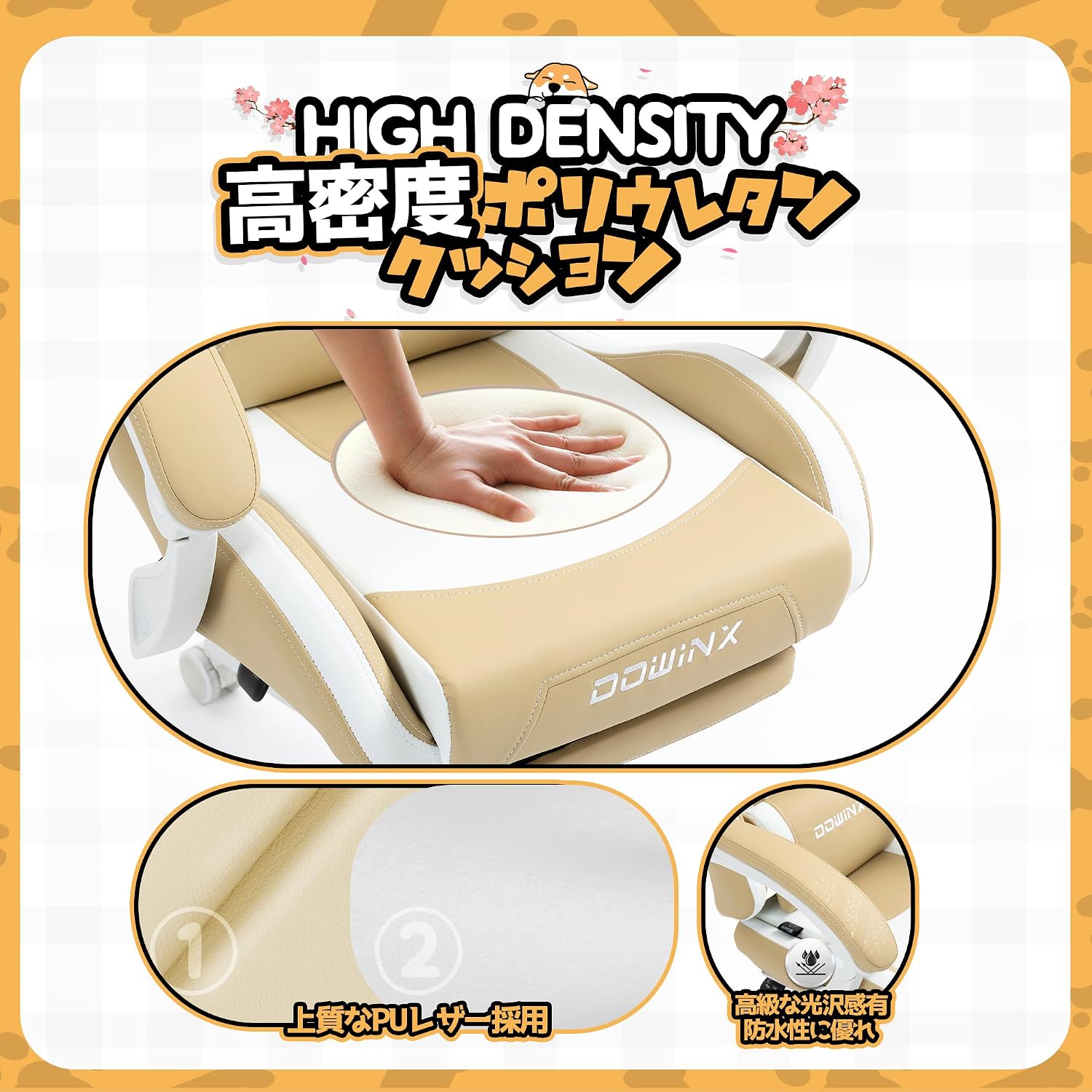
Figure 3: Illustration of the chair's high-density cushioning and material quality.
2. Setup and Assembly
Your Dowinx Gaming Chair LS-665503 comes with all necessary tools and a detailed assembly instruction manual in both English and Japanese. Please refer to the included manual for step-by-step assembly instructions.
Ensure all components are present and undamaged before beginning assembly. If any parts are missing or damaged, please contact customer support as outlined in the warranty section.
3. Operating Instructions
Reclining Function:
To recline the chair, locate the reclining lever on the side of the chair (typically on the right side when seated). Pull the lever upwards and lean back to your desired angle. Release the lever to lock the position. The chair supports reclining up to 140 degrees.
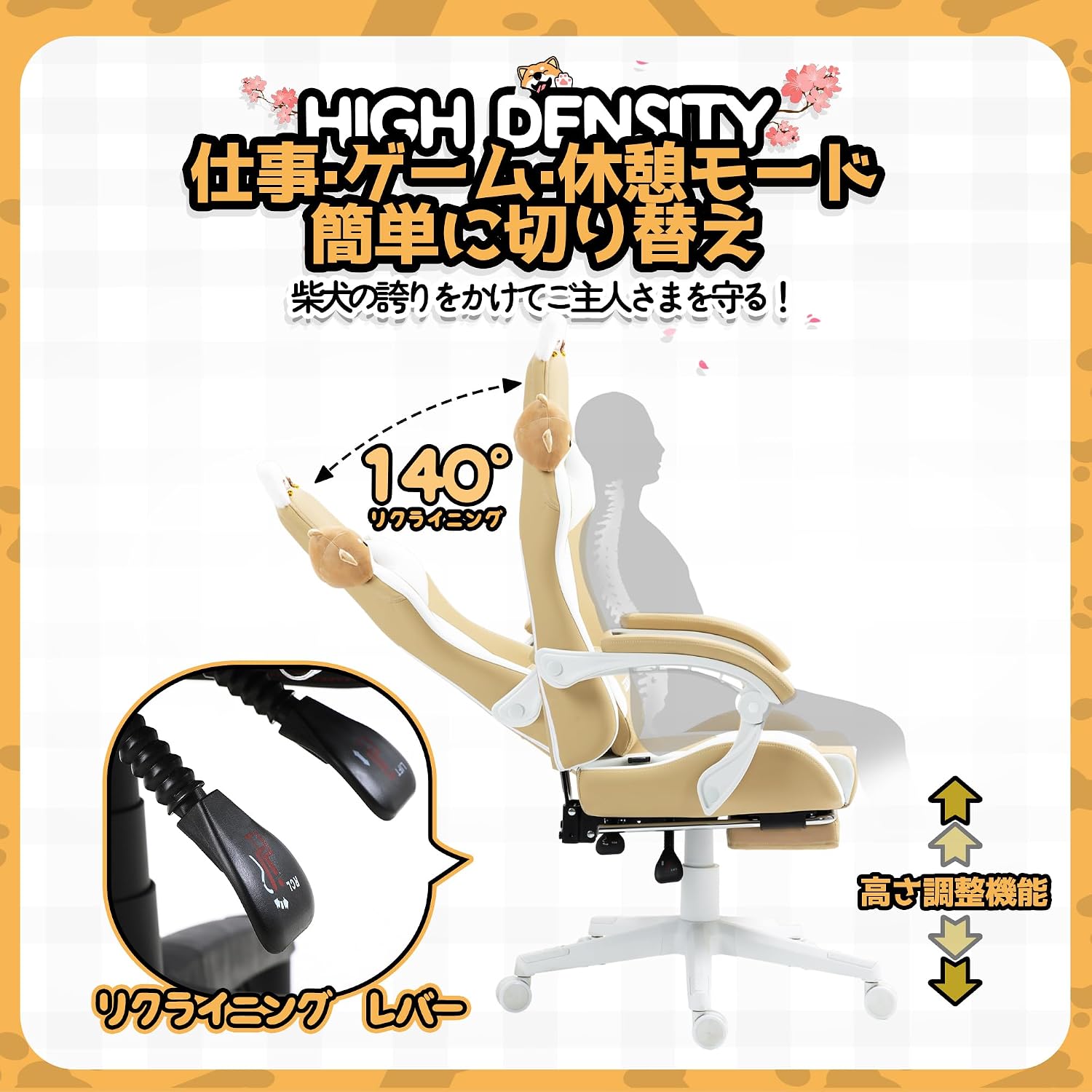
Figure 4: Reclining and height adjustment mechanisms.
Height Adjustment:
To adjust the chair's height, locate the height adjustment lever (usually next to the reclining lever). While seated, pull the lever up to lower the chair. To raise the chair, stand up slightly and pull the lever up. Release the lever to lock the height.
Armrest Adjustment:
The armrests are adjustable to provide optimal support for your arms and shoulders. Refer to the detailed assembly manual for specific instructions on armrest adjustment mechanisms.
Lumbar Support and Headrest:
The chair features an adjustable lumbar pillow and headrest for personalized comfort. Adjust their positions to best support your lower back and neck.
Retractable Ottoman:
For added relaxation, pull out the ottoman located beneath the seat. Push it back in when not in use.

Figure 5: Chair features including the retractable ottoman and side pocket.
4. Maintenance
Cleaning:
To clean the chair, wipe it with a soft, damp cloth. For stubborn stains, use a mild soap solution and wipe dry immediately. Avoid harsh chemicals or abrasive cleaners, as they may damage the PU leather or suede fabric.
General Care:
- Regularly check and tighten all screws and bolts to ensure stability.
- Avoid exposing the chair to direct sunlight or extreme temperatures, which can cause material degradation.
- Keep sharp objects away from the chair to prevent punctures or tears in the upholstery.
5. Troubleshooting
If you encounter any issues with your Dowinx Gaming Chair, please refer to the following common troubleshooting tips:
| Problem | Possible Cause | Solution |
|---|---|---|
| Missing or Damaged Parts | Shipping damage or packaging error. | Inspect all parts upon arrival. Contact Dowinx customer support immediately for replacements. |
| Chair is Unstable/Wobbly | Loose screws or improper assembly. | Ensure all screws and bolts are securely tightened. Re-check assembly steps in the manual. |
| Reclining/Height Adjustment Not Working Smoothly | Mechanism obstruction or damage. | Check for any obstructions. If the issue persists, contact customer support. |
| Dog Ear/Headrest Accessories Fall Off | Loose attachment or wear. | Re-attach securely. If they continue to fall off, consider using a stronger adhesive or contacting support for advice. |
| Footrest Not Smoothly Retracting/Extending | Mechanism obstruction or lack of lubrication. | Check for obstructions. A small amount of silicone lubricant may help if the mechanism is stiff. |
6. Specifications
| Attribute | Detail |
|---|---|
| Manufacturer | Dowinx |
| Model Number | LS-665503 |
| Material | Faux Leather (PU Leather) |
| Color | Yellow (Brown/Beige) |
| Size | Medium |
| Product Weight | 22 kg |
| Package Weight | 22.5 kg |
| Package Dimensions | 77.5 x 57.6 x 27.5 cm |
| Other Functions | Height adjustment, Lumbar adjustment, Dog design, Reclining, Cushioning |
| Care Instructions | Wipe clean |
| Batteries Required | No |
7. Warranty and Support
Dowinx provides a 1-year quality warranty for the LS-665503 Gaming Chair from the date of purchase. This warranty covers manufacturing defects and material flaws under normal use.
For warranty claims, technical support, or inquiries regarding missing/damaged parts, please refer to the contact information provided in the assembly manual included with your product. Please have your purchase details and model number (LS-665503) ready when contacting support.


