
1. Introduction
This manual provides detailed instructions for the installation, operation, and maintenance of your SIXTOP 4-Core 2+64G Android Car Stereo. This unit is designed as an upgrade replacement radio for Hyundai Tucson IX35 models manufactured between 2010 and 2015. It features a 10.1-inch touch screen, 2GB RAM, 64GB ROM, a 4-core CPU, and a HiFi audio chipset, offering a high-performance in-car entertainment and navigation experience.
Key features include Wireless Apple Carplay, Android Auto, Mirror Link, GPS Navigation, Wi-Fi connectivity, Bluetooth, FM/RDS Radio, Steering Wheel Control, and an AHD backup camera.
2. Setup and Installation
2.1 Compatibility Check
This car stereo is specifically designed for Hyundai Tucson IX35 models from 2010 to 2015. Important: It is not compatible with original radios that have a large screen or factory navigation system. Please verify your car's center console configuration before purchase.

Image: Dashboard compatibility check. The image shows three dashboard configurations: 'Before' (standard radio), a green checkmark indicating compatibility with a standard radio, and a red cross indicating incompatibility with a large screen or navigation system.
2.2 Package Contents
Ensure all components are present in the package:
- Car Stereo with Frame
- AHD Rear Camera
- Microphone
- Power Cords (various)
- Video Extension Cable
- Installation Tool
- RCA Cable
- GPS Antenna
- USB Cables
- Screws
- User Manual

Image: Overview of included accessories and the dimensions of the car stereo unit and its frame.
2.3 Wiring Diagram (Backup Camera)
The included AHD backup camera requires specific wiring for proper function. Connect the camera's power cable to the car's reversing light positive pole and ground. The video signal cable connects to the car stereo's camera input.

Image: Detailed wiring diagram showing connections for the backup camera to the car stereo and the car's power system.
3. Operating Instructions
3.1 HD Touchscreen and User Interface
The unit features a 10.1-inch capacitive touch screen with a resolution of 1024x600, providing a responsive and smooth user experience. The Android operating system allows for intuitive navigation and access to various functions.
3.2 Wireless Apple Carplay and Android Auto
Synchronize your smartphone with the car stereo for access to phonebook, email, notifications, map navigation, and music applications. Voice control is supported via your phone's voice assistant.
- Connection: Ensure your phone's Wi-Fi is on. Connect via Bluetooth, then open the "ZLINK5" app for automatic connection. Alternatively, use a USB cable and open the "ZLINK5" app.
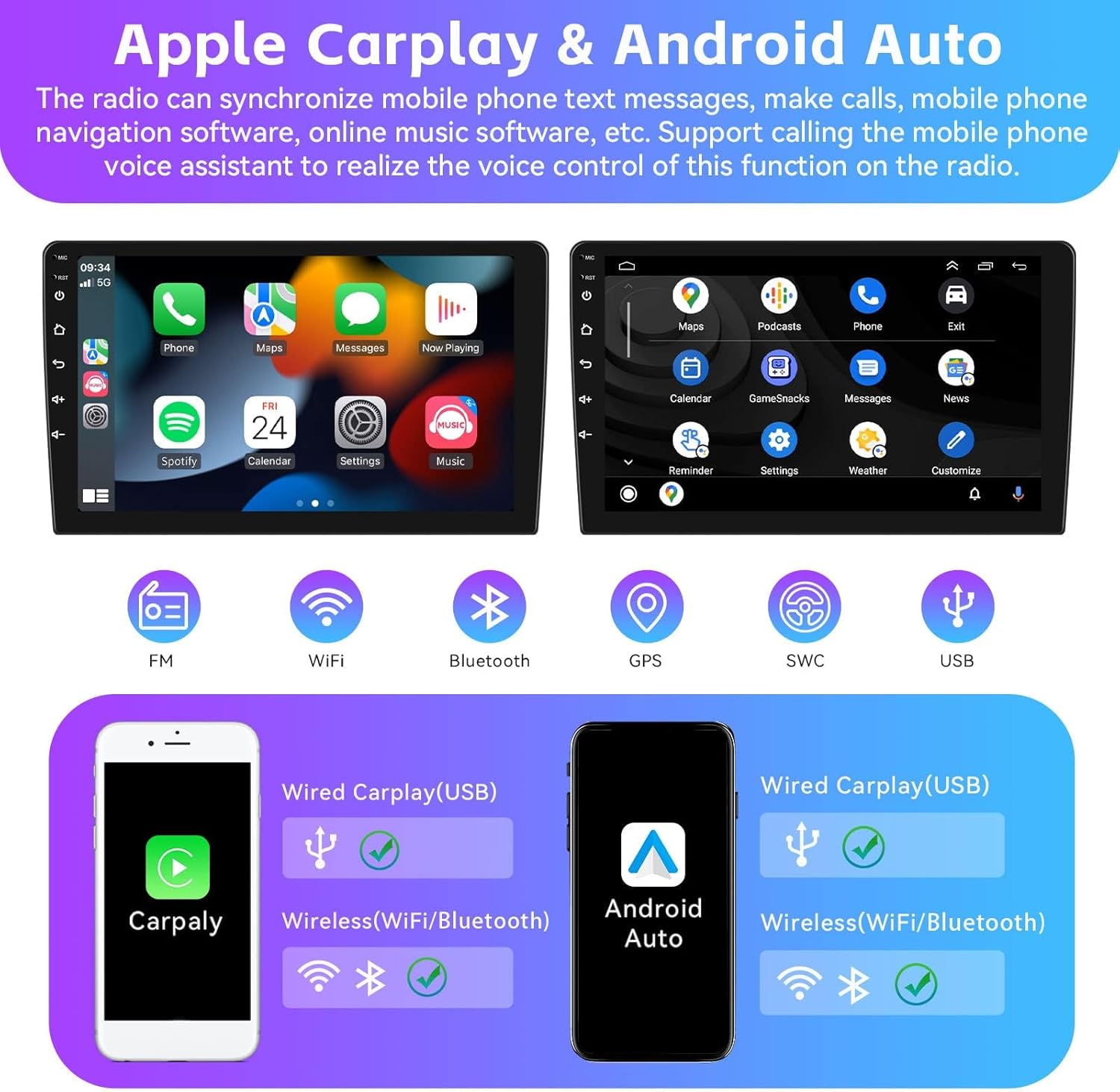
Image: Displays the user interfaces for Apple Carplay and Android Auto, showing various app icons and connectivity options (wired/wireless).
3.3 Mirror Link Function
Display content from your Android or iOS phone directly onto the car stereo screen. This allows for real-time projection of maps, videos, or pictures. Select the "phonelink" app on the stereo to activate this feature.

Image: The car stereo screen mirroring a smartphone display, showing a car driving along a scenic route.
3.4 Split Screen Mode
Operate two functions simultaneously on the screen. For example, view navigation on one side and control the radio tuner on the other. To activate, drag an application to the left or right side of the screen.

Image: The car stereo screen divided into two sections, displaying a map navigation on one side and a music player interface on the other.
3.5 Wi-Fi and GPS Navigation
Connect to Wi-Fi to download various applications from the Play Store, stream online music, or watch videos. The built-in GPS navigation allows for offline map downloads. Online maps function perfectly when connected to Wi-Fi.

Image: Demonstrates Wi-Fi connectivity with various app icons and GPS navigation displaying a map with route information.
3.6 Built-in Bluetooth & FM/RDS Radio
The Bluetooth function supports hands-free calls, phonebook synchronization, and mobile phone music playback, enhancing driving safety. The FM/RDS radio supports stations from 87.5-108 MHz, providing news, music, and traffic information.

Image: Shows the FM radio interface with frequency display and the Bluetooth interface for calls, music, and settings.
3.7 Steering Wheel Control (SWC)
Utilize your car's original steering wheel buttons to control the car audio system, offering convenient and safer operation while driving. The system supports learning functions for various steering wheel controls.

Image: Displays the Steering Wheel Learn settings interface and a view of the reversing display with parking guidelines.
3.8 Reversing Display (Backup Camera)
The included waterproof night vision camera provides a clear reversing image, automatically switching to the display when the vehicle is in reverse gear. For optimal performance, ensure the camera resolution is set correctly in the system settings.
- Setting Resolution: Go to Radio Settings > Factory Settings (Password: 8888) > Protocol Parameter Settings > Reversing Video Resolution Settings > Select AHD/25.
3.9 HiFi Sound Effect
Adjust various sound effects to customize your car audio experience. The system includes equalizer settings with presets like Custom, Classical, Jazz, and Pop, allowing you to achieve your preferred audio quality.

Image: A graphic representing the HiFi sound effect feature with an equalizer interface and various sound presets.
4. Maintenance
To ensure the longevity and optimal performance of your car stereo, follow these general maintenance guidelines:
- Keep the screen clean using a soft, lint-free cloth. Avoid abrasive cleaners.
- Ensure proper ventilation around the unit to prevent overheating.
- Avoid exposing the unit to extreme temperatures or direct sunlight for extended periods.
- Regularly check cable connections for security.
5. Troubleshooting
If you encounter issues with your car stereo, refer to the following common solutions:
- Power Cord Incompatibility: If the radio and frame match your car but the power cord socket is unsuitable (e.g., due to high car configuration requiring a CANBUS protocol box), you may need an upgraded power cord. Contact customer service with pictures of your original car center console and car socket for assistance.
- No Sound: Check speaker connections and volume settings. Ensure the mute function is not active.
- GPS Signal Issues: Ensure the GPS antenna is properly installed and has a clear view of the sky.
- Bluetooth Connection Problems: Ensure Bluetooth is enabled on both the stereo and your phone. Try unpairing and re-pairing the devices.
- Touchscreen Unresponsive: Try restarting the unit. If the issue persists, contact support.
6. Specifications

Image: A table detailing the technical specifications of the Android radio unit and the AHD camera.
6.1 Android Radio Specifications
| Feature | Detail |
|---|---|
| Memory | 2GB (RAM) + 64GB (ROM) |
| Screen Resolution | 1024*600 |
| Power Output | 4*45W |
| Work Temperature | -20°C ~ 75°C |
| Radio Band | FM/RDS (87.5-108 MHz) |
| Video Output | Support |
| Reversing Input | AHD/CVBS |
| Audio Format | APE/FLAC/WAV/MP3/WMA etc. |
| Video Format | MKV/RMVB/AVI/MP4/MDV etc. |
| Factory Setting Keyword | 8888 |
| Supported Languages | Chinese/English/French/Italian/Korean/Japanese/Arabic/Spanish/Portuguese/Russian/Turkish/Vietnamese/Hebrew/Polish/German |
| Picture Format | PNG/JPEG/JPG/GIF/WBMP/BMP etc. |
6.2 AHD Camera Specifications
| Feature | Detail |
|---|---|
| Image Sensor | 140A |
| TV System | NTSC / PAL Option |
| Power | DC 12V |
| Effective Pixels | 1280 x 720 Pixels |
| Video Output | 1.0Vpp, 75ohm |
| White Balance | Auto |
| Video Cable Length | About 6M |
| Power Supply Cable Length | About 1.5M |
| Low-light Level Night Vision | 15m visible distance for night |
| Electronic Shutter | 1/50 to 1/100,000 seconds, 1/60 to 1/100,000 seconds |
7. Warranty
The SIXTOP 4-Core 2+64G Android Car Stereo comes with a 1-Year Warranty from the date of purchase. This warranty covers manufacturing defects and malfunctions under normal use. Please retain your proof of purchase for warranty claims.
8. Support
For any questions, technical assistance, or troubleshooting not covered in this manual, please contact SIXTOP customer service. When contacting support, provide your product model and a detailed description of the issue.
- Online Support Email: SIXTOP123@163.com
- Response Time: Expect a quick response within 24 hours, 7 days a week.
- Additional Support: SIXTOP offers 1-year replacement for eligible issues and lifetime technical support.


Images: Visual representations of customer support, contact methods, and warranty/support benefits.


